
Angular路由——子路由
一、子路由语法:
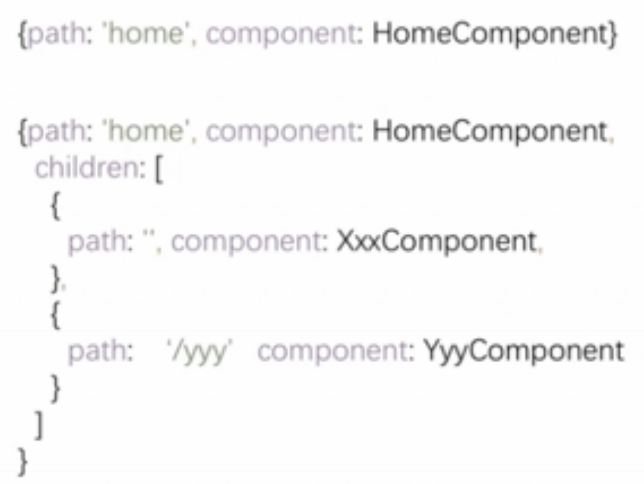
二、实例
在商品详情页面,除了显示商品id信息,还显示了商品描述,和销售员的信息。
通过子路由实现商品描述组件和销售员信息组件展示在商品详情组件内部。
1、新建2个组件修改其内容
ng g component productDesc

ng g component sellerInfo
重点是修改销售员信息组件,显示销售员ID。
import { Component, OnInit } from '@angular/core';

import { ActivatedRoute } from '@angular/router';

@Component({

  selector: 'app-seller-info',

  templateUrl: './seller-info.component.html',

  styleUrls: ['./seller-info.component.css']

})

export class SellerInfoComponent implements OnInit {

  private sellerId: number;

  constructor(private routeInfo: ActivatedRoute) { }

  ngOnInit() {

    this.sellerId = this.routeInfo.snapshot.params["id"];

  }

}
2、修改路由配置
给商品组件加上子路由
const routes: Routes = [

  { path: '', redirectTo : 'home',pathMatch:'full' }, //路径为空

  { path: 'home', component: HomeComponent },

  { path: 'product/:id', component: ProductComponent, children:[

    { path: '', component : ProductDescComponent },

    { path: 'seller/:id', component : SellerInfoComponent }

  ] },

  { path: '**', component: Code404Component }

];
3、修改product.component.ts的模版
注意:routerLink里要配置成./,不能再用/。
<p>

  这里是商品信息组件

</p>

<p>

  商品id是: {{productId}}

</p>

<a [routerLink]="['./']">商品描述</a>

<a [routerLink]="['./seller',99]">销售员信息</a>

<router-outlet></router-outlet>
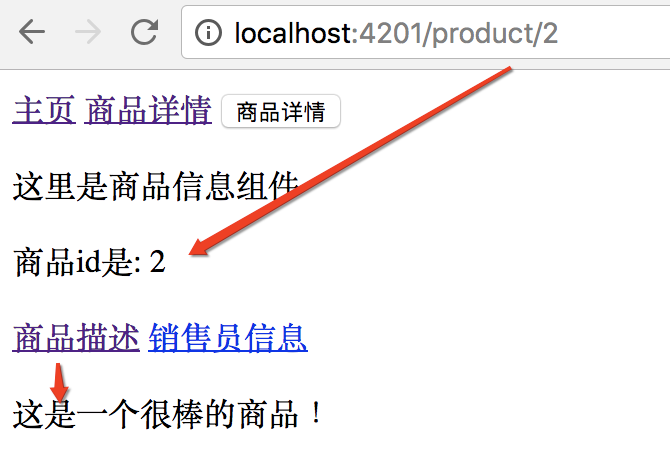
效果:
主路由是/product/2,子路由为空字符串:
主路由的商品详情组件显示出来了,子路由的空字符串对应的商品描述组件也显示出来了。
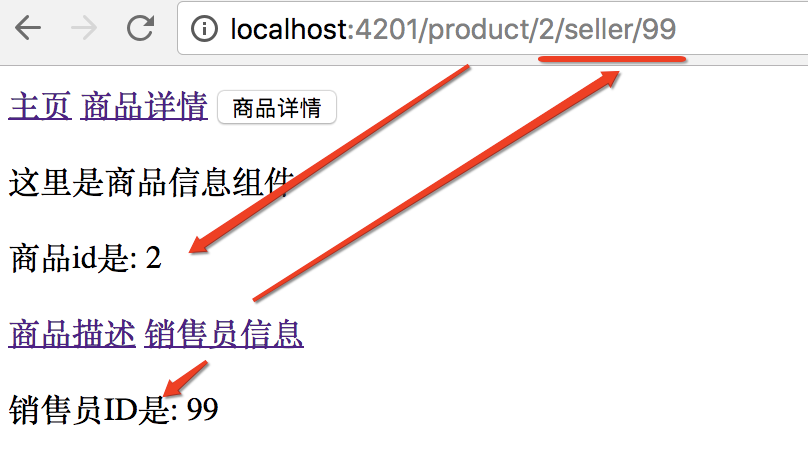
点销售员信息链接:
URL路径变成:http://localhost:4201/product/2/seller/99。
子路由seller/99,对应的sellerInfo组件也展示出来。
注意:
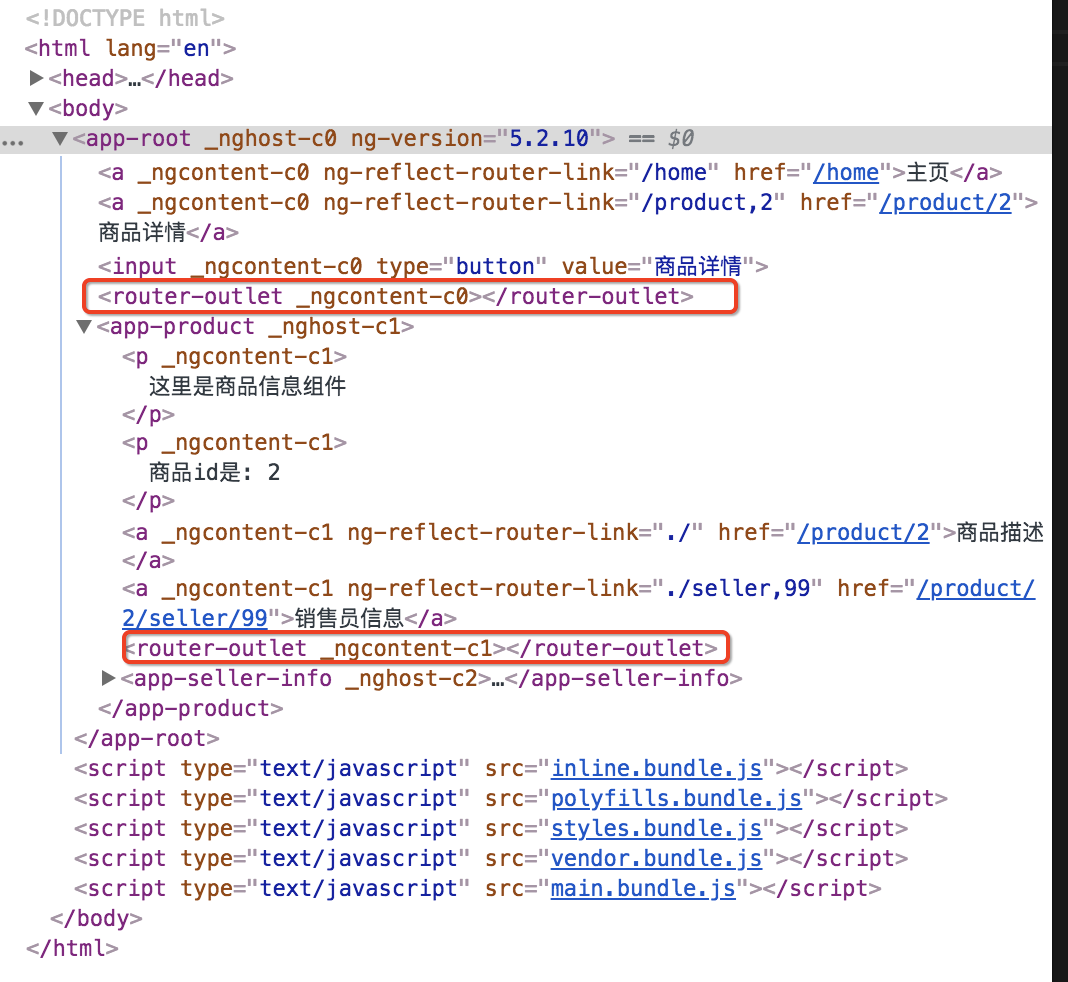
1、插座router-out形成父子关系,可以无限嵌套
2、所有的路由信息都是在模块层,在app.routing.module.ts中配置的。
路由信息都是在模块层,所有的组件本身,并不知道任何跟路由相关的信息。
插座之间的父子关系——子路由。
插座之间的兄弟关系——辅助路由。
本文作者starof,因知识本身在变化,作者也在不断学习成长,文章内容也不定时更新,为避免误导读者,方便追根溯源,请诸位转载注明出处:http://www.cnblogs.com/starof/p/9006207.html 有问题欢迎与我讨论,共同进步。
Angular路由——子路由的更多相关文章
- Angular 4 子路由
子子路由 现在要为产品组件增加两个子组件 1. 创建productDesc和sellerInfo两个组件 ng g component productDesc ng g component selle ...
- [Vue]vue-router嵌套路由(子路由)
总共添加两个子路由,分别命名Collection.vue(我的收藏)和Trace.vue(我的足迹) 1.重构router/index.js的路由配置,需要使用children数组来定义子路由,具体如 ...
- angular路由详解四(子路由)
子路由是相对路由 路由配置部分: 主要是children const routes: Routes = [ {path:'home', component: HomeComponent, childr ...
- angular配置路由/子页面+vue配置路由/子页面
1.在vue.js中组件可以复用,然后最近配置了几个子页面 在 这个文件中配置路由,子页面的配置跟其他一样,只不过path不同. routes: [ { path: '/', ...
- Angular学习笔记—路由(转载)
创建路由 1.首先安装 Angular Router.你可以通过运行以下任一操作来执行此操作: yarn add @angular/router # OR npm i --save @angular/ ...
- Angular : 绑定, 参数传递, 路由
如何把jquery导入angular npm install jquery --savenpm install @type/jquery --save-dev "node_modules/z ...
- angular.js的路由和模板在asp.net mvc 中的使用
angular.js的路由和模板在asp.net mvc 中的使用 我们知道angular.js是基于mvc 的一款优秀js框架,它也有一套自己的路由机制,和asp.net mvc 路由不太一样.as ...
- Angular routing生成路由和路由的跳转
Angular routing生成路由和路由的跳转 什么是路由 路由的目的是可以让根组件按照不同的需求动态加载不同的组件. 根据不同地址,加载不同组件,实现单页面应用. Angular 命令创建一个配 ...
- Angular 监听路由变化
var app = angular.module('Mywind',['ui.router']) //Angular 监听路由变化 function run($ionicPlatform, $loca ...
随机推荐
- fifo 实现问题
AR# 63960 FIFO Generator v12.0 - [Common 17-55] 'get_property' expects at least one object.[axis_fif ...
- HDU6278 Just h-index
主席树+二分 每次对给定区间从1-区间长度len二分mid,查询区间内第mid大的数是不是大于等于mid.. #include <bits/stdc++.h> #define INF 0x ...
- NOI2018游记
Day-1 下午报道,没什么好说的 Day0 先考笔试,开幕式咕到了下午 笔试没什么好说的,反正都是 \(100\) 好像有很多人被gedit坑了? 下午开幕式,很多省的口号都有意思,比如: &quo ...
- 使用Sublime Text 3进行Markdown编辑+实时预览
使用Sublime Text 3进行Markdown编辑+实时预览 安装软件包管理器 打开Sublime Text 3 同时按下 ctrl+` ,窗口底部出现一个小控制台 复制以下代码,粘贴到控制台的 ...
- 【dfs】P1433 吃奶酪
题目描述 房间里放着n块奶酪.一只小老鼠要把它们都吃掉,问至少要跑多少距离?老鼠一开始在(0,0)点处. 输入输出格式 输入格式: 第一行一个数n (n<=15) 接下来每行2个实数,表示第i块 ...
- pgsql 并行相关配置
- MongoDB用户及数据库管理命令
1.用户管理: 连接数据库: mongo 127.0.0.1:27017 切换到admin数据库: > use admin 创建管理员账户: db.createUser( { user: &qu ...
- Python统计词频的几种方式
语料 text = """My fellow citizens: I stand here today humbled by the task before us, gr ...
- 对于mysql数据库优化的见解
一.数据库占用的空间大小.表占用空间大小.索引占用空间大小 在用阿里云的数据库的时候经常出现磁盘空间爆满的情况.所以要经常查询数据库相关内容占用的磁盘大小,有很多mysql客户端如navicat 就可 ...
- saltstack主机管理项目:主机管理项目需求分析(一)
1.场景: 我现在又一台裸机要实现一下任务 2.配置管理: 1.装上nginx,mysql 2.nginx用我指定的配置文件 3.mysql用户 4.设置一个默认的数据库访问权限 5.启动mysql ...