
CentOS7 设置yum源
1、关闭防火墙
- 临时关闭防火墙
systemctl stop firewalld - 永久防火墙开机自关闭
systemctl disable firewalld - 临时打开防火墙
systemctl start firewalld - 防火墙开机启动
systemctl enable firewalld - 查看防火墙状态
systemctl status firewalld
2、关闭selinux 关闭原因 自行google vi /etc/selinux/config
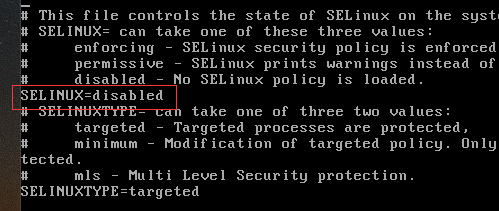
修改sellinux=disabled :wq保存退出
可能存在的问题:若修改了selinuxtype=disabled的值会导致linux启动失败。
解决方案:
1. 重启时在启动页面,选择你要启动的内核 按 E, 进入 grub 编辑页面。
2. 找到 linux16 那一行,在language 后面 也就是LANG=zh_CN.UTF-8,空格 加上 selinux=0 或者 enforcing=0 (备注:我是加入selinux=0 生效的。)
3. 然后 ctrl + x 启动,就看到熟悉的登录界面。
4 .修改selinux配置文件,正确关闭selinux
解决方案原文:http://www.mamicode.com/info-detail-1847013.html
3、设置域名解析
配置下centos的DNS一个国内,一个国外
vi /etc/resolv.conf
nameserver 114.114.114.114
nameserver 8.8.8.8
4、安装wget命令,已安装请忽略
命令:yum -y install wget
5、更新yum源配置
5.1、备份下原来的yum源
cd /etc/yum.repos.d/ ls
mv CentOS-Base.repo CentOS-Base.repo_bak
5.2 、设置源网易或阿里云
网易yum源:http://mirrors.163.com/.help/centos.html
wget -O /etc/yum.repos.d/CentOS-Base.repo http://mirrors.163.com/.help/CentOS7-Base-163.repo
yum clean all
yum makecache
阿里云yum源:http://mirrors.aliyun.com/repo/Centos-7.repo
wget -O /etc/yum.repos.d/CentOS-Base.repo http://mirrors.aliyun.com/repo/Centos-7.repo
yum clean all
yum makecache
查看已安装yum源:yum repolist all
图形方案:https://jingyan.baidu.com/article/215817f7aef2e01eda1423f4.html
yum命令常见问题:
yum install的时候提示:Loaded plugins: fastestmirror(加速插件)
解决方案:
1.修改插件的配置文件
# vi /etc/yum/pluginconf.d/fastestmirror.conf
enabled = 1//由1改为0,禁用该插件
2.修改yum的配置文件
# vi /etc/yum.conf
plugins=1//改为0,不使用插件
解决方案原文:https://www.cnblogs.com/starof/p/4773209.html
6、安装VIM命令,默认未安装
检测是否安装VIM rpm -aq|grep vim
若出现以下命令则未安装 vim-minimal.x86_64 2:7.4.160-4.el7
执行命令,yum -y install vim* 提示安装完毕!
7、检测IP地址 ipaddr show 或ifconfig
提示ifconfig command not found的解决方案:
1、确认sbin目录是否存在 cd /sbin ls
2、不存在执行命令:yum install net-tools
CentOS7 设置yum源的更多相关文章
- [转]centos7 修改yum源为阿里源
centos7 修改yum源为阿里源,某下网络下速度比较快 首先是到yum源设置文件夹里 cd /etc/yum.repos.d 接着备份旧的配置文件 sudo mv CentOS-Base.repo ...
- centos7 修改yum源为阿里源
centos7 修改yum源为阿里源,某下网络下速度比较快 首先是到yum源设置文件夹里 安装base reop源 cd /etc/yum.repos.d 接着备份旧的配置文件 sudo mv Cen ...
- 设置yum源:
1.企业 阿里开源镜像站: http://mirrors.aliyun.com/ 搜狐开源镜像站: http://mirrors.sohu.com/ 网易开源镜像站: http://mirr ...
- [问题解决]RedHat7更换CentOS7的yum源时踩过的坑
更换yum源的流程 查看当前yum程序 $ rpm -qa|grep yum 这里推荐将其结果截屏或拷贝出来,以免后面报错修复. 删除原有yum源 $ rpm -aq | grep yum|xargs ...
- Fedora19添加和设置YUM源
Fedora19添加和设置YUM源添加yum源前先安装fastestmirror/downloadonly插件和axelget插件: 1.安装fastestmirror/downloadonly插件 ...
- 修改Centos7的yum源
以下为修改Centos7的yum源: 1. 备份原镜像文件,便于后期恢复 [root@keepmydream ~]# mv /etc/yum.repos.d/CentOS-Base.repo /etc ...
- CentOS7搭建yum源仓库(阿里源)
文章目录 注意:环境要求 1.配置服务器端yum 1.1.安装yum源工具 1.2.配置nginx 1.2.1.配置nginx页面目录 1.3.替换yum源文件 1.4.建立yum源仓库 2.配置客户 ...
- 在centos7虚拟机上挂载镜像,并设置yum源(包括遇到的问题)
挂载镜像方法很简单: mkdir /etc/a mount /dev/cdrom /etc/a 查看挂载情况 : df -h 修改yum源文件 : 先把 CentOS-Base.repo 文件名改一 ...
- CentOS7更换yum源为阿里云镜像源
1. 备份原来的yum源 cp /etc/yum.repos.d/CentOS-Base.repo /etc/yum.repos.d/CentOS-Base.repo.bak 2.设置aliyun的y ...
随机推荐
- [Swift]LeetCode186. 翻转字符串中的单词 II $ Reverse Words in a String II
Given an input string, reverse the string word by word. A word is defined as a sequence of non-space ...
- [Swift]LeetCode459. 重复的子字符串 | Repeated Substring Pattern
Given a non-empty string check if it can be constructed by taking a substring of it and appending mu ...
- [Swift]LeetCode564. 寻找最近的回文数 | Find the Closest Palindrome
Given an integer n, find the closest integer (not including itself), which is a palindrome. The 'clo ...
- [Swift]LeetCode701. 二叉搜索树中的插入操作 | Insert into a Binary Search Tree
Given the root node of a binary search tree (BST) and a value to be inserted into the tree, insert t ...
- zookeeper使用详解(命令、客户端、源码)
1. zookeeper使用详解(命令.客户端.源码) 1.1. 前言 zookeeper我们常用来做分布式协调中间件,很多时候我们都接触不到它的原理和用法,我对他的了解也仅限于知道它可以做分布式 ...
- 低延时的P2P HLS直播技术实践
本文根据4月21日OSC源创会·武汉站的现场分享为蓝本,重新整理.以下是演讲内容: 近几年,随着直播.短视频等视频领域对带宽要求的提升以及CDN行业竞争的加剧,很多CDN公司开始往P2P-CDN方向发 ...
- 深入并发包 ConcurrentHashMap 源码解析
以前写过介绍HashMap的文章,文中提到过HashMap在put的时候,插入的元素超过了容量(由负载因子决定)的范围就会触发扩容操作,就是rehash,这个会重新将原数组的内容重新hash到新的扩容 ...
- VS背景设置
设置如上图的IDE背景图片 点击工具-〉扩展与更新,在联机中搜索IDE Text Background,下载IDE Text Background 然后搜索文件Maxzhang可以找到,然后打开文件, ...
- 自己构建一个Spring自定义标签以及原理讲解
平时不论是在Spring配置文件中引入其他中间件(比如dubbo),还是使用切面时,都会用到自定义标签.那么配置文件中的自定义标签是如何发挥作用的,或者说程序是如何通过你添加的自定义标签实现相应的功能 ...
- yum仓库的创建
这篇博客是yum仓库的配置过程,如果是yum客户端配置请参考 http://www.cnblogs.com/zhaojiedi1992/p/zhaojiedi_linux_002.html 1 环境介 ...