
CentOS7 设置yum源
1、关闭防火墙
- 临时关闭防火墙
systemctl stop firewalld - 永久防火墙开机自关闭
systemctl disable firewalld - 临时打开防火墙
systemctl start firewalld - 防火墙开机启动
systemctl enable firewalld - 查看防火墙状态
systemctl status firewalld
2、关闭selinux 关闭原因 自行google vi /etc/selinux/config
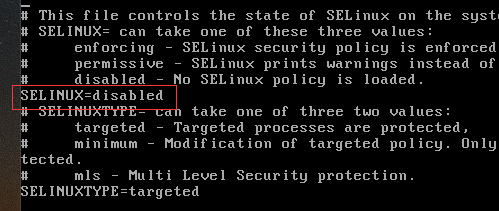
修改sellinux=disabled :wq保存退出
可能存在的问题:若修改了selinuxtype=disabled的值会导致linux启动失败。
解决方案:
1. 重启时在启动页面,选择你要启动的内核 按 E, 进入 grub 编辑页面。
2. 找到 linux16 那一行,在language 后面 也就是LANG=zh_CN.UTF-8,空格 加上 selinux=0 或者 enforcing=0 (备注:我是加入selinux=0 生效的。)
3. 然后 ctrl + x 启动,就看到熟悉的登录界面。
4 .修改selinux配置文件,正确关闭selinux
解决方案原文:http://www.mamicode.com/info-detail-1847013.html
3、设置域名解析
配置下centos的DNS一个国内,一个国外
vi /etc/resolv.conf
nameserver 114.114.114.114
nameserver 8.8.8.8
4、安装wget命令,已安装请忽略
命令:yum -y install wget
5、更新yum源配置
5.1、备份下原来的yum源
cd /etc/yum.repos.d/ ls
mv CentOS-Base.repo CentOS-Base.repo_bak
5.2 、设置源网易或阿里云
网易yum源:http://mirrors.163.com/.help/centos.html
wget -O /etc/yum.repos.d/CentOS-Base.repo http://mirrors.163.com/.help/CentOS7-Base-163.repo
yum clean all
yum makecache
阿里云yum源:http://mirrors.aliyun.com/repo/Centos-7.repo
wget -O /etc/yum.repos.d/CentOS-Base.repo http://mirrors.aliyun.com/repo/Centos-7.repo
yum clean all
yum makecache
查看已安装yum源:yum repolist all
图形方案:https://jingyan.baidu.com/article/215817f7aef2e01eda1423f4.html
yum命令常见问题:
yum install的时候提示:Loaded plugins: fastestmirror(加速插件)
解决方案:
1.修改插件的配置文件
# vi /etc/yum/pluginconf.d/fastestmirror.conf
enabled = 1//由1改为0,禁用该插件
2.修改yum的配置文件
# vi /etc/yum.conf
plugins=1//改为0,不使用插件
解决方案原文:https://www.cnblogs.com/starof/p/4773209.html
6、安装VIM命令,默认未安装
检测是否安装VIM rpm -aq|grep vim
若出现以下命令则未安装 vim-minimal.x86_64 2:7.4.160-4.el7
执行命令,yum -y install vim* 提示安装完毕!
7、检测IP地址 ipaddr show 或ifconfig
提示ifconfig command not found的解决方案:
1、确认sbin目录是否存在 cd /sbin ls
2、不存在执行命令:yum install net-tools
CentOS7 设置yum源的更多相关文章
- [转]centos7 修改yum源为阿里源
centos7 修改yum源为阿里源,某下网络下速度比较快 首先是到yum源设置文件夹里 cd /etc/yum.repos.d 接着备份旧的配置文件 sudo mv CentOS-Base.repo ...
- centos7 修改yum源为阿里源
centos7 修改yum源为阿里源,某下网络下速度比较快 首先是到yum源设置文件夹里 安装base reop源 cd /etc/yum.repos.d 接着备份旧的配置文件 sudo mv Cen ...
- 设置yum源:
1.企业 阿里开源镜像站: http://mirrors.aliyun.com/ 搜狐开源镜像站: http://mirrors.sohu.com/ 网易开源镜像站: http://mirr ...
- [问题解决]RedHat7更换CentOS7的yum源时踩过的坑
更换yum源的流程 查看当前yum程序 $ rpm -qa|grep yum 这里推荐将其结果截屏或拷贝出来,以免后面报错修复. 删除原有yum源 $ rpm -aq | grep yum|xargs ...
- Fedora19添加和设置YUM源
Fedora19添加和设置YUM源添加yum源前先安装fastestmirror/downloadonly插件和axelget插件: 1.安装fastestmirror/downloadonly插件 ...
- 修改Centos7的yum源
以下为修改Centos7的yum源: 1. 备份原镜像文件,便于后期恢复 [root@keepmydream ~]# mv /etc/yum.repos.d/CentOS-Base.repo /etc ...
- CentOS7搭建yum源仓库(阿里源)
文章目录 注意:环境要求 1.配置服务器端yum 1.1.安装yum源工具 1.2.配置nginx 1.2.1.配置nginx页面目录 1.3.替换yum源文件 1.4.建立yum源仓库 2.配置客户 ...
- 在centos7虚拟机上挂载镜像,并设置yum源(包括遇到的问题)
挂载镜像方法很简单: mkdir /etc/a mount /dev/cdrom /etc/a 查看挂载情况 : df -h 修改yum源文件 : 先把 CentOS-Base.repo 文件名改一 ...
- CentOS7更换yum源为阿里云镜像源
1. 备份原来的yum源 cp /etc/yum.repos.d/CentOS-Base.repo /etc/yum.repos.d/CentOS-Base.repo.bak 2.设置aliyun的y ...
随机推荐
- 洛谷P1036选数(素数+组合数)
题目链接:https://www.luogu.org/problemnew/show/P1036 主要考两个知识点:判断一个数是否为素数.从n个数中选出m个数的组合 判断一个数是否为素数: 素数一定是 ...
- 完整的http请求分析
首先我们要明白什么是http. http:超文本传输协议(HTTP,HyperText Transfer Protocol). 超文本传输协议是互联网上应用最为广泛的一种网络协议.所有的WWW文件都必 ...
- python之读取配置文件模块configparser(三)高级使用---非标准配置文件解析
非标准配置文件也是经常使用的,如何使用configparser来解析? 这要从configparser本身解析结构来说,configparser包含section和option,非标准配置文件只有op ...
- ThinkPHP 数据库操作(四) : 聚合查询、时间查询、高级查询
聚合查询 在应用中我们经常会用到一些统计数据,例如当前所有(或者满足某些条件)的用户数.所有用户的最大积分.用户的平均成绩等等,ThinkPHP为这些统计操作提供了一系列的内置方法,包括: 用法示例: ...
- 剖析项目多个logback配置(下)
来源:http://www.cnblogs.com/guozp/p/5973038.html 上篇大概描述了logback的加载顺序以及加载的源码,本篇将分析如果在你的Maven或者其他多模块的项目中 ...
- Python内置函数(17)——divmod
英文文档: divmod(a, b) Take two (non complex) numbers as arguments and return a pair of numbers consisti ...
- 只需要4步就可以将asp.net mvc变成SPA(单页面)应用,实现无刷新页面切换!
SENNA.js Senna.js是一个超快速的单页面应用程序引擎,轻松构建基于Web的现代应用程序,只有大约8KB的JavaScript而没有任何依赖性.还提供非常酷炫的动画效果.想要详细了解的朋友 ...
- 痞子衡嵌入式:ARM Cortex-M文件那些事(1)- 源文件(.c/.h/.s)
大家好,我是痞子衡,是正经搞技术的痞子.今天痞子衡给大家讲的是嵌入式开发里的source文件. 众所周知,嵌入式开发属于偏底层的开发,主要编程语言是C和汇编.所以本文要讲的source文件主要指的就是 ...
- 使用顶级 VSCode 扩展来加快开发 JavaScript
使用顶级 VSCode 扩展来加快开发 JavaScript 发表于 2018年08月24日 by 愚人码头 被浏览 3,942 次 分享到: 小编推荐:掘金是一个面向程序员的高质量技术社区,从 ...
- [Linux] memache打印所有的key
1.在使用memcache的时候 , 经常需要查看下里面存储的值 , 前提是要先知道key是啥,memcache没有redis的keys命令 2.下面两个命令的结合,可以查看到key stats it ...