
selenium2 run in Jenkins GUI testing not visible or browser not open but run in background浏览器后台运行不可见
http://wiki.hudson-ci.org/display/HUDSON/Tomcat
Tomcat from Windows
GUI Testing in Windows
Most Windows services -- including those run with the option "Allow service to interact with desktop" in Windows XP and Vista -- do not have access to many of the computer's resources, including the console display. This may cause Automated GUI Tests to fail if you are running Apache Tomcat as a Windows Service and are doing any GUI testing. This is true at least for AWT and Abbot frameworks. A typical error might look similar to this:
[junit] \# An unexpected error has been detected by HotSpot Virtual Machine:

[junit] \#

[junit] \# EXCEPTION_ACCESS_VIOLATION (0xc0000005) at pc=0x6d07baf4, pid=3260, tid=288

[junit] \#

[junit] \# Java VM: Java HotSpot(TM) Client VM (1.5.0_09-b03 mixed mode, sharing)

[junit] \# Problematic frame:

[junit] \# C [awt.dll+0xbaf4|awt.dll+0xbaf4]

[junit] \#
This limitation can be resolved by not running Tomcat as a Windows Service, but instead through a "Scheduled Task" as an Application that runs at logon. There are several options for doing this, an example would be to run "$TOMCAT_HOME\bin\tomcat5.exe". When setting up the scheduled task in Windows Vista consider choosing the check-box for "Run with highest privileges" from the general tab, as this removes the need to always provide administrator privileges and may resolve other issues as well.
*Note: This workaround/fix may or may not require an admin to be logged in during testing. Running your tests while logged in as a standard user this is fine, but some modifications may need to be made for your individual configuration.
Running NetBeans application tests on Jenkins CI is quite easy. You just need to call the ‘test’ target in your NetBeans application’s build script (e.g. ANT build.xml) and Jenkins will do the rest. I initially setup Jenkins as a windows service to run my tests. This works fine for unit tests since they do not require a display to execute.
But recently I faced some issues when I wanted to run some functional (GUI) tests of a NetBeans platform app using a Jenkins job running on Windows. Since the Jenkins process could not access the windows display all the GUI tests were failing. On a linux box this issue is addressed by using X display such Xvnc (available as a Jenkins plugin), but of course I cannot use X display on windows!
After googling around I came across a possible solution which was to enable the option “Allow service to interact with desktop” for my Jenkins service. But as promising as it seemed it did not work, my GUI tests continued to fail 
Then I decided to stop and disable the Jenkins windows service and just ran it from the windows command prompt using the refreshingly simple command “java -jar jenkins.war”. Voila!!! It worked all my GUI tests were running without any problem and I can even see the GUIs opening and closing automagically on my windows desktop.
This solution was confirmed when I later stumbled upon the wiki here, which shows how to run GUI tests on ‘Hudson’ (Jenkins’ original name before Oracle knocked its head on a rock!) using a Tomcat container running on Windows. Although I didn’t use a servlet container such as Tomcat the solution applies to my situation as well.
So there you are, if you want to run GUI tests on Jenkins CI running onWindows do not configure it as a windows service instead run it from the command prompt or set it up as a scheduled task to run on windows logon using the command “java -jar jenkins.war”.
http://stackoverflow.com/questions/9618774/jenkins-selenium-gui-tests-are-not-visible-on-windows
When I run my selenium test (mvn test) from jenkins (windows) I see only the console output. I don't see the real browsers getting opened . How can I configure jenkins so that I can see the browsers running the test?
这个问题今天终于解决了:
1,对于selenium testing的GUI或者是browser不能看到,visible。但是可以看到的是在后台这个浏览器已经启动了,它实际上是后台运行的。
这个原因就是windows设置的服务安全问题,在slave机器上运行测试时候,千万不要把其中的Jenkins-slave设置为windows的服务,而是转到前台运行,意思就是,在slave机器上的JNLP不能以服务启动,只能是如下的运行方式:
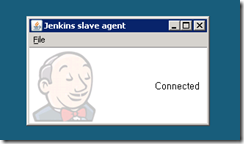
这里注意了,千万不要点击“File”设置为服务启动,如果设置了后,即使你勾选了这个服务中的“Log on” Tab中的check "interact with desktop" , the desktop that is being referred to is invisble .,
it works after running the agent using JNLP
Hi All, Just to update: this problem is solved. below are the details: Put Internet driver in path Run Browser Hub for remote exectution java -Dwebdriver.server.session.timeout=0 -jar selenium-server-standalone-2.25.0.jar -role hub java -Dwebdriver.server.session.timeout=0 -jar selenium-server-standalone-2.25.0.jar -role node -hublocalhost:4444/grid/register Refer following links: code.google.com/p/selenium/wiki/Grid2code.google.com/p/selenium/wiki/RemoteWebDriver code.google.com/p/selenium/wiki/WebDriverJs
参考二:https://gist.github.com/djangofan/5174433(已经写好了slave机器的配置信息)
hub设置脚本:
@ECHO off

SETLOCAL ENABLEDELAYEDEXPANSION

TITLE WebDriver Grid Hub on 4444

ECHO *********************************************

ECHO *

ECHO * WebDriver grid Hub instance.

ECHO *

ECHO *  http://localhost:4444/grid/console

ECHO *

ECHO *********************************************

ECHO.

SET JAR=selenium-server-standalone-2.31.0.jar

SET "WGET=C:\Program Files (x86)\GnuWin32\bin\wget.exe"

IF NOT DEFINED JAVA_HOME (

  ECHO You must define a JAVA_HOME environment variable before you run this script.

  GOTO :ERROR

)

SET "PATH=%JAVA_HOME%\bin;%PATH%"

IF NOT EXIST %JAR% (

  ECHO Selenium standalone server .jar is missing.

  IF EXIST "%WGET%" (

    ECHO Hit any key to download Selenium standalone .jar file.

  PAUSE >nul

    "%WGET%" --dot-style=binary http://selenium.googlecode.com/files/%JAR%

  ) ELSE (

    ECHO Wget.exe is missing. Install GNU Utils.

    GOTO :ERROR

  )

)

ECHO.

java.exe -jar %JAR% -role hub -hubConfig hubConfig.json -debug

IF NOT %ERRORLEVEL%==0 GOTO :ERROR

GOTO :END

:ERROR

ECHO There may have been an error.  Try running the script again.

pause

:END
.csharpcode, .csharpcode pre
{
font-size: small;
color: black;
font-family: consolas, "Courier New", courier, monospace;
background-color: #ffffff;
/*white-space: pre;*/
}
.csharpcode pre { margin: 0em; }
.csharpcode .rem { color: #008000; }
.csharpcode .kwrd { color: #0000ff; }
.csharpcode .str { color: #006080; }
.csharpcode .op { color: #0000c0; }
.csharpcode .preproc { color: #cc6633; }
.csharpcode .asp { background-color: #ffff00; }
.csharpcode .html { color: #800000; }
.csharpcode .attr { color: #ff0000; }
.csharpcode .alt
{
background-color: #f4f4f4;
width: 100%;
margin: 0em;
}
.csharpcode .lnum { color: #606060; }
grid node设置脚本:
@ECHO off

SETLOCAL ENABLEDELAYEDEXPANSION

SET TITLETEXT=WebDriver Grid Node

TITLE %TITLETEXT%

SET CHROMEDRIVERZIP=chromedriver_win_26.0.1383.0.zip

SET CHROMEDRIVER=chromedriver.exe

SET JAR=selenium-server-standalone-2.31.0.jar

SET IEDRIVERZIP=IEDriverServer_Win32_2.31.0.zip

SET IEDRIVER=IEDriverServer.exe

SET "WGET=C:\Program Files (x86)\GnuWin32\bin\wget.exe"

ECHO *********************************************

ECHO *

ECHO * WebDriver Grid Node

ECHO * It requires that a WebDriver JSON Hub is already running, usually on port 4444.

ECHO * You can run more than one of these if each has its own JSON config file.

ECHO *

ECHO *********************************************

ECHO.

IF NOT DEFINED JAVA_HOME (

ECHO You must define a JAVA_HOME environment variable before you run this script.

GOTO :ERROR

)

SET "PATH=.;%JAVA_HOME%\bin;%PATH%"

IF NOT EXIST %JAR% (

IF EXIST "%WGET%" (

"%WGET%" --dot-style=binary http://selenium.googlecode.com/files/%JAR%

) ELSE (

ECHO Wget.exe is missing. Install GNU utils. & GOTO :ERROR

)

)

IF NOT EXIST %IEDRIVER% (

IF EXIST "%WGET%" (

"%WGET%" --dot-style=binary http://selenium.googlecode.com/files/%IEDRIVERZIP%

jar.exe xvf %IEDRIVERZIP%

DEL /Q %IEDRIVERZIP%

) ELSE (

ECHO Wget.exe is missing. & GOTO :ERROR

)

)

IF NOT EXIST %CHROMEDRIVER% (

IF EXIST "%WGET%" (

"%WGET%" --dot-style=binary --no-check-certificate https://chromedriver.googlecode.com/files/%CHROMEDRIVERZIP%

jar.exe xvf %CHROMEDRIVERZIP%

DEL /Q %CHROMEDRIVERZIP%

) ELSE (

ECHO Wget.exe is missing. & GOTO :ERROR

)

)

ECHO.

ECHO ======================

ECHO Grid Hub status : & netstat -an | FIND "4444"

ECHO ======================

ECHO.

TITLE %TITLETEXT%

java.exe -jar %JAR% -role node -nodeConfig node1Config.json -Dwebdriver.chrome.driver=%CHROMEDRIVER%

GOTO :END

:ERROR

pause

:END
.csharpcode, .csharpcode pre
{
font-size: small;
color: black;
font-family: consolas, "Courier New", courier, monospace;
background-color: #ffffff;
/*white-space: pre;*/
}
.csharpcode pre { margin: 0em; }
.csharpcode .rem { color: #008000; }
.csharpcode .kwrd { color: #0000ff; }
.csharpcode .str { color: #006080; }
.csharpcode .op { color: #0000c0; }
.csharpcode .preproc { color: #cc6633; }
.csharpcode .asp { background-color: #ffff00; }
.csharpcode .html { color: #800000; }
.csharpcode .attr { color: #ff0000; }
.csharpcode .alt
{
background-color: #f4f4f4;
width: 100%;
margin: 0em;
}
.csharpcode .lnum { color: #606060; }
Stop Hub 节点的脚本:
https://groups.google.com/forum/#!topic/selenium-users/_8A3q_ekw0g
尝试这下面的另外两种方法:
http://localhost:4444/selenium-server/driver?cmd=getLogMessages (Error 500 java.lang.NullPointerException)
http://localhost:4444/lifecycle-manager?action=shutdown (Does nothing)
selenium2 run in Jenkins GUI testing not visible or browser not open but run in background浏览器后台运行不可见的更多相关文章
- 【Selenium2】【Jenkins】
1. 下载Tomcat ,Windows7 环境,http://tomcat.apache.org/ 我下载的是版本8 2. 下载Jenkins,Windows7 环境,http://jenkins ...
- 怎么让jenkins保持后台运行
今天在腾讯云直接使用命令启动jenkins,java -jar jenkins.war --httpPort=8080,这样启动关掉shell窗口或退回shell窗口,进程就会结束,需要重新 启动,非 ...
- 25+ Useful Selenium Web driver Code Snippets For GUI Testing Automation
本文总结了使用Selenium Web driver 做页面自动化测试的一些 tips, tricks, snippets. 1. Chrome Driver 如何安装 extensions 两种方式 ...
- The Linux Mint 18.1:Eclipse Run The C++ And Python ConfigorationWhen You achieve above step,you can run the c++ and python! (Next OTL ,PYOTL is Project That Write By Ruimin Shen(ability man) )
# Copyright (c) 2016, 付刘伟 (Liuwei Fu)# All rights reserved.# 转载请注明出处 1.Install The Eclipse,g++ Use T ...
- Tomcat中catalina run后台运行脚本
编写启动脚本start.sh,将其放在/srv/aubapp/bin/下 #!/bin/sh #设置web应用程序目录 export CATALINA_BASE="/srv/aubapp&q ...
- Vue 项目: npm run dev b报错 “'webpack-dev-server' 不是内部或外部命令,也不是可运行的程序 或批处理文件。”
前提: 电脑已经安装了nodeJS和npm, 项目是直接下载的zip包. 报错步骤为1:cd /d 目录: 2. npm ren dev -------> 报错如下: > webpac ...
- 既然 start() 方法会调用 run() 方法,为什么我们调用 start() 方法,而不直接调用 run() 方法?
当你调用 start() 方法时,它会新建一个线程然后执行 run() 方法中的代码.如果直接调用 run() 方法,并不会创建新线程,方法中的代码会在当前调用者的线程中执行
- 解决 npm run dev b报错 “'webpack-dev-server' 不是内部或外部命令,也不是可运行的程序 或批处理文件。”
摘自:https://www.cnblogs.com/laraLee/p/9174383.html 前提: 电脑已经安装了nodeJS和npm, 项目是直接下载的zip包. 在项目目录下运行“npm ...
- npm run start 后台运行
yum provides */nohup nohup npm start & 原程序的的标准输出被自动改向到当前目录下的nohup.out文件,起到了log的作用. 停止程序 ps -ef ...
随机推荐
- [Swift]LeetCode225. 用队列实现栈 | Implement Stack using Queues
Implement the following operations of a stack using queues. push(x) -- Push element x onto stack. po ...
- [Swift]LeetCode905. 按奇偶排序数组 | Sort Array By Parity
Given an array A of non-negative integers, return an array consisting of all the even elements of A, ...
- [Swift]LeetCode934. 最短的桥 | Shortest Bridge
In a given 2D binary array A, there are two islands. (An island is a 4-directionally connected grou ...
- CKEditor上传视频(java)
CKEditor上传视频 CKEditor批量上传图片flvplayer.swf播放器CKEditor整合包(v4.6.1) ------------------------------------ ...
- jupyter-notebook后home页面空白问题
jupyter-notebook后home页面空白问题 解决方案1 更换默认的浏览器,选择谷歌浏览器,很多360打不开的页面,更换谷歌后都能有效解决,并且确保是最新版本的google浏览器. 解决 ...
- redis 系列16 持久化 RDB
一.概述 Redis是内存数据库,一旦服务器进程退出,服务器中的数据库内存数据状态也会消失.为了解决这个问题,Redis提供了RDB 持久化功能,这个功能可以将redis在内存中的数据库状态保存到磁盘 ...
- (二)通过fork编写一个简单的并发服务器
概述 那么最简单的服务端并发处理客户端请求就是,父进程用监听套接字监听,当有连接过来时那么监听套接字就变成了已连接套接字(源和目的的IP和端口都包含了),这时候就可以和客户端通信,但此时其他客户端无法 ...
- Oracle 查询结果集行数分析
本人曾去某金融软件公司面试,交流中面试官问的一个问题是:"如果有 A.B 两张表,A 表中有 2 条数据,B 表中有 200 条数据,请问 SELECT * FROM A,B 能查出多少条数 ...
- MariaDB Galera Cluster 部署 + keepalived实现高可用
MariaDB Galera Cluster 部署 MariaDB作为Mysql的一个分支,在开源项目中已经广泛使用,例如大热的openstack,所以,为了保证服务的高可用性,同时提高系统的负载能力 ...
- windows资源管理器多标签打开 windows文件夹多标签浏览 浏览器tab页面一样浏览文件夹 clover win8 win10 报错 无响应问题怎么解决 clover卡死 clover怎么换皮肤
大家都知道,我们打开一堆文件夹的时候,是什么样子 “厚厚的一叠”图标堆叠在一起的,非常的不方便 那么,是不是可以像浏览器一样的tab页面展示呢? 答案是可以的 安装好就是这样子的 是不是方便漂亮了很多 ...