
Mac OSX 编译 LeanSDR
LeanSDR:Lightweight, portable software-defined radio
git clone http://github.com/pabr/leansdr.git

cd leansdr/src/apps
LeanSDR在使用过程中需要使用X11图形框架,首次在OSX编译LeanSDR会有报错:
g++ -O3 -I.. -Wall -Wno-sign-compare -Wno-array-bounds -Wno-unused-variable -DGUI leandvb.cc -lX11 -o leandvb  ||  \

    g++ -O3 -I.. -Wall -Wno-sign-compare -Wno-array-bounds -Wno-unused-variable       leandvb.cc       -o leandvb

In file included from leandvb.cc::

../leansdr/gui.h::: fatal error: 'X11/X.h' file not found

#include <X11/X.h>

         ^

 error generated.

g++ -O3 -I.. -Wall -Wno-sign-compare -Wno-array-bounds -Wno-unused-variable -DGUI leansdrscan.cc -lX11 -o leansdrscan  ||  \

    g++ -O3 -I.. -Wall -Wno-sign-compare -Wno-array-bounds -Wno-unused-variable       leansdrscan.cc       -o leansdrscan

leansdrscan.cc::: warning: comparison of unsigned expression <  is always false [-Wtautological-compare]

        if ( nr <  ) fatal("read");

             ~~ ^ ~

 warning generated.

ld: library not found for -lX11

clang: error: linker command failed with exit code  (use -v to see invocation)

leansdrscan.cc::: warning: comparison of unsigned expression <  is always false [-Wtautological-compare]

        if ( nr <  ) fatal("read");

             ~~ ^ ~

 warning generated.

g++ -O3 -I.. -Wall -Wno-sign-compare -Wno-array-bounds -Wno-unused-variable -DGUI leansdrcat.cc -lX11 -o leansdrcat  ||  \

    g++ -O3 -I.. -Wall -Wno-sign-compare -Wno-array-bounds -Wno-unused-variable       leansdrcat.cc       -o leansdrcat

ld: library not found for -lX11

clang: error: linker command failed with exit code  (use -v to see invocation)

g++ -O3 -I.. -Wall -Wno-sign-compare -Wno-array-bounds -Wno-unused-variable -DGUI leantsgen.cc -lX11 -o leantsgen  ||  \

    g++ -O3 -I.. -Wall -Wno-sign-compare -Wno-array-bounds -Wno-unused-variable       leantsgen.cc       -o leantsgen

ld: library not found for -lX11

clang: error: linker command failed with exit code  (use -v to see invocation)

g++ -O3 -I.. -Wall -Wno-sign-compare -Wno-array-bounds -Wno-unused-variable -DGUI leanchansim.cc -lX11 -o leanchansim  ||  \

    g++ -O3 -I.. -Wall -Wno-sign-compare -Wno-array-bounds -Wno-unused-variable       leanchansim.cc       -o leanchansim

ld: library not found for -lX11

clang: error: linker command failed with exit code  (use -v to see invocation)

g++ -O3 -I.. -Wall -Wno-sign-compare -Wno-array-bounds -Wno-unused-variable -DGUI leandvbtx.cc -lX11 -o leandvbtx  ||  \

    g++ -O3 -I.. -Wall -Wno-sign-compare -Wno-array-bounds -Wno-unused-variable       leandvbtx.cc       -o leandvbtx

ld: library not found for -lX11

clang: error: linker command failed with exit code  (use -v to see invocation)
查找X11目录
sudo find / -name "X.h"

/Applications/Xcode.app/Contents/Developer/Platforms/MacOSX.platform/Developer/SDKs/MacOSX.sdk/System/Library/Frameworks/Tk.framework/Versions/8.4/Headers/X11/X.h

/Applications/Xcode.app/Contents/Developer/Platforms/MacOSX.platform/Developer/SDKs/MacOSX.sdk/System/Library/Frameworks/Tk.framework/Versions/8.5/Headers/X11/X.h

find: /dev/fd/cn0xroot: No such file or directory

find: /dev/fd/cn0xroot: No such file or directory

/Library/Developer/CommandLineTools/SDKs/MacOSX.sdk/System/Library/Frameworks/Tk.framework/Versions/8.5/Headers/X11/X.h

/opt/local/include/X11/X.h

/opt/local/share/doc/boost/libs/coroutine/example/cpp03/asymmetric/X.h

/opt/metasploit-framework/embedded/include/X11/X.h

/opt/X11/include/X11/X.h

/System/Library/Frameworks/Tk.framework/Versions/8.4/Headers/X11/X.h

/System/Library/Frameworks/Tk.framework/Versions/8.5/Headers/X11/X.h
解决方案:修改Makefile
APPS = leandvb leansdrscan

APPS += leansdrcat leantsgen leanchansim leandvbtx

all: $(APPS)

clean:

rm -f $(APPS)

DEPS = ../leansdr/*.h

CXXFLAGS = -O3 -I.. -I/opt/X11/include -Wall -Wno-sign-compare -Wno-array-bounds -Wno-unused-variable

%: %.cc $(DEPS)

g++ $(CXXFLAGS) -DGUI $< -lX11 -L/opt/X11/lib -o $@ || \

g++ $(CXXFLAGS) $< -o $@

EMBED_FLAGS= -I.. -Wall -Wno-sign-compare -Wno-array-bounds -Wno-unused-variable \

-Ofast -mfpu=neon -funsafe-math-optimizations -fsingle-precision-constant

leandvb.embedded: leandvb.cc $(DEPS)

g++ $(CXXFLAGS) $(EMBED_FLAGS) $< -static -o $@ || \

g++ $(CXXFLAGS) $(EMBED_FLAGS) $< -o $@
make
Usage
leandvb --help

Usage: leandvb [options]  < IQ  > TS

Demodulate DVB-S I/Q on stdin, output MPEG packets on stdout

Input options:

  --u8           Input format is -bit unsigned (rtl_sdr, default)

  --f32          Input format is -bit float (gqrx)

  -f HZ          Input sample rate (default: 2.4e6)

  --loop         Repeat (stdin must be a file)

  --inbuf N      Additional input buffering (samples)

Preprocessing options:

  --anf N        Number of birdies to remove (default: )

  --derotate HZ  For use with --fd-pp, otherwise use --tune

  --resample     Resample baseband (CPU-intensive)

  --resample-rej K  Aliasing rejection (default: )

  --decim N      Decimate baseband (causes aliasing)

  --cnr          Measure CNR (requires samplerate>*symbolrate)

  --fd-pp NUM    Dump preprocessed IQ data to file descriptor

DVB-S options:

  --sr HZ        Symbol rate (default: 2e6)

  --tune HZ      Bias frequency for demodulation

  --drift        Track frequency drift beyond safe limits

  --standard S   DVB-S (default), DVB-S2 (not implemented)

  --const C      QPSK (default), BPSK .. 32APSK (DVB-S2 only)

  --cr N/D       Code rate / (default) .. / .. /

  --fastlock     Synchronize more aggressively (CPU-intensive)

  --sampler      nearest, linear, rrc

  --rrc-steps N  RRC interpolation factor

  --rrc-rej K    RRC filter rejection (defaut:)

  --roll-off A   RRC roll-off (default: 0.35)

  --viterbi      Use Viterbi (CPU-intensive)

  --hard-metric  Use Hamming distances with Viterbi

Compatibility options:

  --hdlc         Expect HDLC frames instead of MPEG packets

  --packetized   Output -bit length prefix (default: as stream)

General options:

  --buf-factor   Buffer size factor (default:)

  --hq           Maximize sensitivity

                 (Enables all CPU-intensive features)

  --hs           Maximize throughput (QPSK CR1/ only)

                 (Disables all preprocessing)

UI options:

  -h             Display this help message and exit

  -v             Output debugging info at startup and exit

  -d             Output debugging info during operation

  --fd-info NUM  Output demodulator status to file descriptor

  --fd-const NUM Output constellation and symbols to file descr

  --gui          Show constellation and spectrum (X11)

  --duration S   Width of timeline plot (default: )

  --linger       Keep GUI running after EOF

Testing options:

  --awgn STDDEV  Add white gaussian noise (slow)
eanchansim --help

Usage: leanchansim [options]  < IQ.in  > IQ.out

Simulate an imperfect communication channel.

Input options:

  --iu8              Interpret stdin as complex unsigned char

  --if32             Interpret stdin as complex float

  -f Hz              Specify sample rate

  --loop             Repeat (stdin must be a file)

Gain options:

  --scale FACTOR     Multiply by constant

Drift options:

  --lo HZ            Specify nominal LO frequency

  --ppm PPM          Specify LO accuracy

  --drift-period S   Drift +-ppm every S seconds

  --drift-rate R     Drift with maximum rate R (Hz/s)

  --drift2-amp HZ    Add secondary drift (range in Hz)

  --drift2-freq HZ   Add secondary drift (rate in Hz)

Noise options:

  --awgn STDDEV      Add white gaussian noise (dB)

Output options:

  --ou8              Output as complex unsigned char

  --of32             Output as complex float
leandvbtx --help

Usage: leandvbtx [options]  < TS  > IQ

Modulate MPEG packets into a DVB-S baseband signal

Output float complex samples

Options:  -f INTERP[/DECIM]        Samples per symbols (default: )

  --roll-off R             RRC roll-off (defalt: 0.35)

  --power P                Output power (dB)

  --agc                    Better regulation of output power

  -v                       Verbose output
leansdrcat --help

Usage: leansdrcat [options]

Forward from stdin to stdout at constant rate.

Options:

  --block      Pause when stdout is busy (default: '#' on stderr)

  --nonblock   Silently ignore when stdout is busy

  --cbr R      Set rate in bits per second

  --cbr8 R     Set rate in bytes per second

  --cbr16 R    Set rate in -bit words per second

  --cbr32 R    Set rate in -bit words per second

  --cbr64 R    Set rate in -bit words per second

  -h           Display this help message and exit
leansdrscan --help

Usage: leansdrscan [options]  [program settings]

Run , cycling through combinations of settings.

Example: 'leansdrscan -v cat -n,-e' will feed stdin through 'cat -n' and 'cat -e' alternatively.

Options:

  -h              Print this message

  -v              Verbose

  --timeout N     Next settings if no output within N seconds

  --rewind        Rewind input (stdin must be a file)

  --probesize N   Forward only N bytes (with --rewind)
leantsgen --help

Usage: leantsgen [-c PACKETCOUNT]

Output numbered MPEG TS packets on stdout.
Example
rtl_sdr -g  -f 315e6 -s  /tmp/test.ts

leandvb --gui -v -d -f 1000e3 --sr 500e3 --cr / --derotate - --anf  < /tmp/test.ts > mpeg.ts
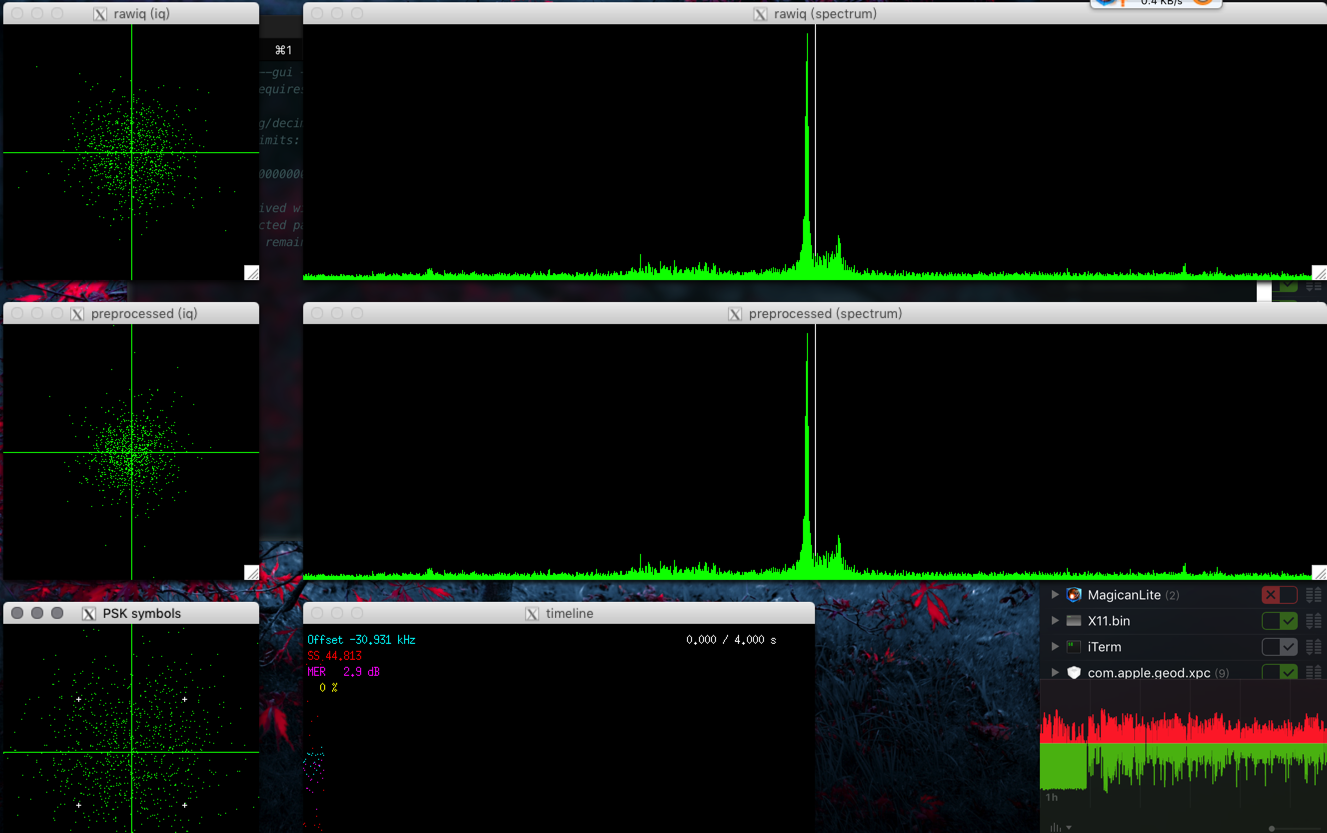
https://www.rtl-sdr.com/transmitting-dvb-s-with-a-plutosdr-and-receiving-it-with-an-rtl-sdr/
http://www.pabr.org/radio/leandvb/leandvb.en.html
Mac OSX 编译 LeanSDR的更多相关文章
- Windows、Linux、Mac OSX编译jni动态库
在不同平台下默认调用不同名字的动态库,在Windows平台调用name.dll,在Linux平台调用libname.so,在OSX下调用libname.jnilib.不同平台下的编译的方法也有些区别. ...
- Mac OSX编译安装php5.6
安装好OSX 10.13以后默认自带的php7.1.7,跟现有环境不兼容,所以准备编译安装php5.6,自带的php7不建议卸载,重新安装一份php5.6 1.安装php的一些依赖,推荐使用brew安 ...
- Mac OSX编译安装php7.1.8
laravel中用到ldap认证包,要求php7.0以上版本,而且安装Mews\Captcha包的时候 验证码无法显示 报错如下: Call to undefined function Interve ...
- mac osx 上面部署Django项目 apache+mysql+mod_wsgi
1.安装Xcode command line tools 首先,编译mysql和Homebrew需要用到Xcode command line tools,所以首先安装command line tool ...
- 2016-1-1最新版本的linphone-android在mac上编译通过,同时建立了IDEA工程
虽然参考了这个文章<MAC OS编译Android版Linphone SDK和APP>,https://www.lidaren.com/archives/1592 ,但是在实际的编译过程中 ...
- Mac Pro 编译安装 PHP 5.6.21 及 问题汇总
[系统环境] 操作系统:OS X 10.11.5 Xcode:7.3.1 [注意] 编译之前,需要安装 xcode.Homebrew 套件! Mac Pro 安装 Homebrew 软件包管理工具 1 ...
- 在Mac OSX 10.10 上安装opencv
http://blog.csdn.net/wdkirchhoff/article/details/41910553 在Mac OSX上如果想使用OpenCV,可以通过自己手动编译源码的方式,但比较繁琐 ...
- [图文详解] Sublime Text在Windows/Ubuntu/Mac OSX中配置使用CTags
很开发者都在找Sublime Text中函数转跳的功能,这个是软件自身没有的功能,要靠CTags这个插件配合CTags的可执行程序的实现的.按照我的理解是CTags扫描索引你的项目文件,然后subli ...
- 如何在Mac OSX上安装xgboost
听说xgboost效果很不错,于是准备学习下,但是发现大多数资料都是在讲如何在windows或linux下安装xgboost,而且照着官方文档也没有正确的安装好多线程的xgboost.最后还是从the ...
随机推荐
- SpringBoot整合Mybatis注解版---update出现org.apache.ibatis.binding.BindingException: Parameter 'XXX' not found. Available parameters are [arg1, arg0, param1, param2]
SpringBoot整合Mybatis注解版---update时出现的问题 问题描述: 1.sql建表语句 DROP TABLE IF EXISTS `department`; CREATE TABL ...
- XV Open Cup named after E.V. Pankratiev. GP of Central Europe (AMPPZ-2014)--J.Cave
给你一棵树,现在有m个专家,每个专家计划从$a_i$走到$b_i$, 经过的距离不超过$d_i$,现在让你找一个点,使得所有专家的路途都能经过这个点 令$S_i$表示满足第i个专家的所有点,先检查1可 ...
- redis 集群引出hash一致性算法
写的很棒的文章 https://blog.csdn.net/bntX2jSQfEHy7/article/details/79549368 这篇分析的更叼 https://www.jianshu.com ...
- C语言博客作业02——循环结构
1.本章学习总结 1.1思维导图 1.2本章学习体会及代码量学习体会 1.2.1学习体会 本周学习了循环结构,在之前学习分支结构的时候就涉及到了循环结构中的for循环,这周的又新学了while和do- ...
- Spring Http Invoke 请求过程图
Spring Http Invoke 请求过程图:
- springcloud-spring cloud config统一配置中心
统一配置中心 为什么需要统一配置中心? 统一配置中心顾名思义,就是将配置统一管理,配置统一管理的好处是在日后大规模集群部署服务应用时相同的服务配置一致,日后再修改配置只需要统一修改全部同步,不需要一个 ...
- Python3+unittest使用教程
一.直接使用TestCase 注意所有测试方法都需要以test开头.代码如下: import unittest class Test1(unittest.TestCase): @classmethod ...
- css的em是根据什么来写的
em是要依靠父元素的值来计算的 1.字体计算公式依旧 1 ÷ 父元素的font-size × 需要转换的像素值 = em值 转自:https://zhidao.baidu.com/question/7 ...
- java无锁化编程一:目录
假设我们用netty做服务,当接受到网络传输的码流,我们通过某种手段将这种传输数据解析成了熟悉的pojo,那这些pojo该如何进一步处理? 比如游戏中的抢购.场景业务等,对处理那种高并发的业务场景,如 ...
- China MVP Community Connection 2017
在微软北京和小朋友们参加编程一小时活动