
Python + Tornado 搭建自动回复微信公众号
1 通过 pip 安装 wechat-python-sdk , Requests 以及 Tornado
pip install tornado

pip install wechat-sdk

pip install requests
2 订阅号申请
要搭建订阅号,首先需要在微信公众平台官网进行注册,注册网址: 微信公众平台。
目前个人用户可以免费申请微信订阅号,虽然很多权限申请不到,但是基本的消息回复是没有问题的。
- 服务器接入
具体的接入步骤可以参考官网上的接入指南。
本订阅号的配置为:
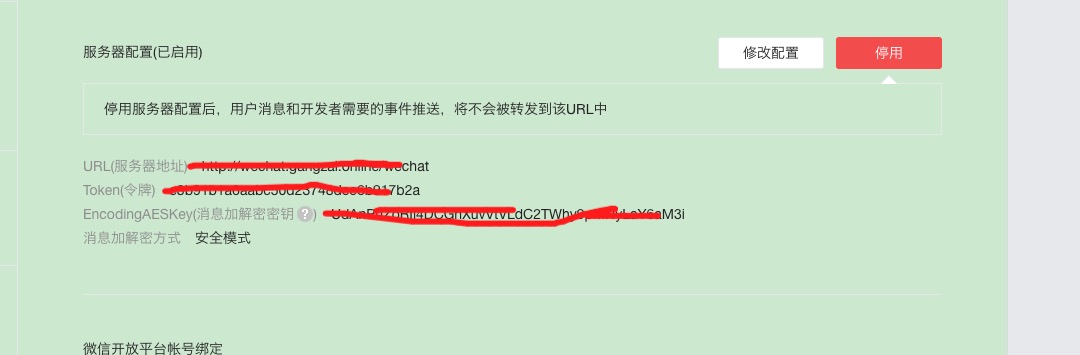
进行修改配置,提交时,需要验证服务器地址的有效性
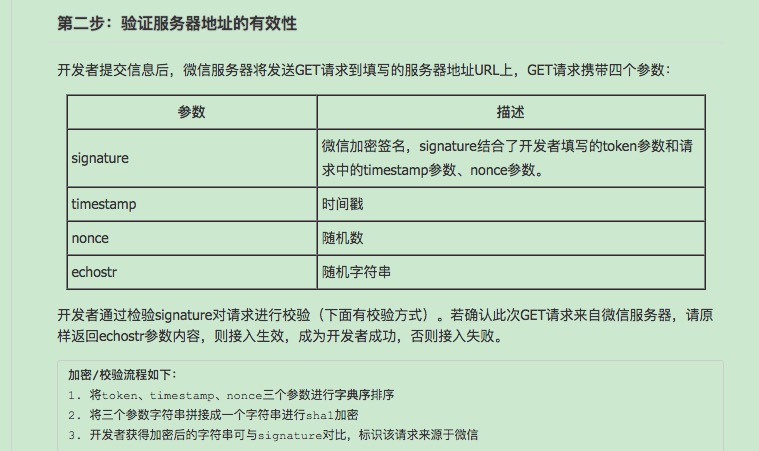
wechat.py
import tornado.escape

import tornado.web

from wechat_sdk import WechatConf

conf = WechatConf(

    token='your_token', # 你的公众号Token

    appid='your_appid', # 你的公众号的AppID

    appsecret='your_appsecret', # 你的公众号的AppSecret

    encrypt_mode='safe',  # 可选项:normal/compatible/safe,分别对应于 明文/兼容/安全 模式

    encoding_aes_key='your_encoding_aes_key'  # 如果传入此值则必须保证同时传入 token, appid

)

from wechat_sdk import WechatBasic

wechat = WechatBasic(conf=conf)

class WX(tornado.web.RequestHandler):

    def get(self):

        signature = self.get_argument('signature', 'default')

        timestamp = self.get_argument('timestamp', 'default')

        nonce = self.get_argument('nonce', 'default')

        echostr = self.get_argument('echostr', 'default')

        if signature != 'default' and timestamp != 'default' and nonce != 'default' and echostr != 'default' \

                and wechat.check_signature(signature, timestamp, nonce):

            self.write(echostr)

        else:

            self.write('Not Open')
wechat_main.py
#!/usr/bin/env python

#coding:utf-8

import tornado.web

import tornado.httpserver

from tornado.options import define, options

import os

import wechat

settings = {

            'static_path': os.path.join(os.path.dirname(__file__), 'static'),

            'template_path': os.path.join(os.path.dirname(__file__), 'view'),

            'cookie_secret': 'xxxxxxxxxxx',

            'login_url': '/',

            'session_secret': "xxxxxxxxxxxxxxxxxxxxxxx",

            'session_timeout': 3600,

            'port': 8888,

            'wx_token': 'your_token',

            }

web_handlers = [

        (r'/wechat', wechat.WX),

        ]

#define("port", default=settings['port'], help="run on the given port", type=int)

from tornado.options import define, options

define ("port", default=8888, help="run on the given port", type=int)

if __name__ == '__main__':

    app = tornado.web.Application(web_handlers, **settings)

    tornado.options.parse_command_line()

    http_server = tornado.httpserver.HTTPServer(app)

    http_server.listen(options.port)

    tornado.ioloop.IOLoop.instance().start()
cookie_secret session_secret 可以随便填写;
配置好程序源代码后运行,确认运行无误后再在公众号设置页面点击 提交 ,如果程序运行没问题,会显示接入成功。
3 接入图灵机器人
要接入图灵机器人,首先需要在官网申请API Key。
class TulingAutoReply:

    def __init__(self, tuling_key, tuling_url):

        self.key = tuling_key

        self.url = tuling_url

    def reply(self, unicode_str):

        body = {'key': self.key, 'info': unicode_str.encode('utf-8')}

        r = requests.post(self.url, data=body)

        r.encoding = 'utf-8'

        resp = r.text

        if resp is None or len(resp) == 0:

            return None

        try:

            js = json.loads(resp)

            if js['code'] == 100000:

                return js['text'].replace('<br>', '\n')

            elif js['code'] == 200000:

                return js['url']

            else:

                return None

        except Exception:

            traceback.print_exc()

            return None
4 编写公众号自动回复代码
auto_reply = TulingAutoReply(key, url) # key和url填入自己申请到的图灵key以及图灵请求url

class WX(tornado.web.RequestHandler):

    def wx_proc_msg(self, body):

        try:

            wechat.parse_data(body)

        except ParseError:

            print('Invalid Body Text')

            return

        if isinstance(wechat.message, TextMessage): # 消息为文本消息

            content = wechat.message.content

            reply = auto_reply.reply(content)

            if reply is not None:

                return wechat.response_text(content=reply)

            else:

                return wechat.response_text(content=u"不知道你说的什么")

        return wechat.response_text(content=u'知道了')

    def post(self):

        signature = self.get_argument('signature', 'default')

        timestamp = self.get_argument('timestamp', 'default')

        nonce = self.get_argument('nonce', 'default')

        if signature != 'default' and timestamp != 'default' and nonce != 'default' \

                and wechat.check_signature(signature, timestamp, nonce):

            body = self.request.body.decode('utf-8')

            try:

                result = self.wx_proc_msg(body)

                if result is not None:

                    self.write(result)

            except IOError as e:

                return
最终 wechat.py 代码如下:
import tornado.escape

import tornado.web

#from goose import Goose, ParseError

import json

import requests

import traceback

from wechat_sdk import WechatConf

conf = WechatConf(

    token='your_token', # 你的公众号Token

    appid='your_appid', # 你的公众号的AppID

    appsecret='your_appsecret', # 你的公众号的AppSecret

    encrypt_mode='safe',  # 可选项:normal/compatible/safe,分别对应于 明文/兼容/安全 模式

    encoding_aes_key='your_encoding_aes_key'  # 如果传入此值则必须保证同时传入 token, appid

)

from wechat_sdk import WechatBasic

wechat = WechatBasic(conf=conf)

class TulingAutoReply:

    def __init__(self, tuling_key, tuling_url):

        self.key = tuling_key

        self.url = tuling_url

    def reply(self, unicode_str):

        body = {'key': self.key, 'info': unicode_str.encode('utf-8')}

        r = requests.post(self.url, data=body)

        r.encoding = 'utf-8'

        resp = r.text

        if resp is None or len(resp) == 0:

            return None

        try:

            js = json.loads(resp)

            if js['code'] == 100000:

                return js['text'].replace('<br>', '\n')

            elif js['code'] == 200000:

                return js['url']

            else:

                return None

        except Exception:

            traceback.print_exc()

            return None

auto_reply = TulingAutoReply(key, url) # key和url填入自己申请到的图灵key以及图灵请求url

class WX(tornado.web.RequestHandler):

    def wx_proc_msg(self, body):

        try:

            wechat.parse_data(body)

        except ParseError:

            print('Invalid Body Text')

            return

        if isinstance(wechat.message, TextMessage): # 消息为文本消息

            content = wechat.message.content

            reply = auto_reply.reply(content)

            if reply is not None:

                return wechat.response_text(content=reply)

            else:

                return wechat.response_text(content=u"不知道你说的什么")

        return wechat.response_text(content=u'知道了')

    def post(self):

        signature = self.get_argument('signature', 'default')

        timestamp = self.get_argument('timestamp', 'default')

        nonce = self.get_argument('nonce', 'default')

        if signature != 'default' and timestamp != 'default' and nonce != 'default' \

                and wechat.check_signature(signature, timestamp, nonce):

            body = self.request.body.decode('utf-8')

            try:

                result = self.wx_proc_msg(body)

                if result is not None:

                    self.write(result)

            except IOError as e:

                return
Python + Tornado 搭建自动回复微信公众号的更多相关文章
- python利用wxpy监控微信公众号
此次利用wxpy可以进行微信公众号的消息推送监测(代码超级简单),这样能进行实时获取链接.但是不光会抓到公众号的消息,好友的消息也会抓到(以后会完善的,毕竟现在能用了,而且做项目的微信号肯定是没有好友 ...
- 教你如何入手用python实现简单爬虫微信公众号并下载视频
主要功能 如何简单爬虫微信公众号 获取信息:标题.摘要.封面.文章地址 自动批量下载公众号内的视频 一.获取公众号信息:标题.摘要.封面.文章URL 操作步骤: 1.先自己申请一个公众号 2.登录自己 ...
- 从Python爬虫到SAE云和微信公众号:二、新浪SAE上搭建微信服务
目的:用PHP在SAE上搭建一个微信公众号的服务器. 1.申请一个SAE云账号 SAE申请地址:http://sae.sina.com.cn/ 可以使用微博账号登陆,SAE是新浪的云服务,时间也比较 ...
- 在新浪SAE上搭建微信公众号的python应用
微信公众平台的开发者文档https://www.w3cschool.cn/weixinkaifawendang/ python,flask,SAE(新浪云),搭建开发微信公众账号http://www. ...
- Azure 项目构建 - 用 Azure 认知服务在微信公众号上搭建智能会务系统
通过完整流程详细介绍了如何在Azure平台上快速搭建基于微信公众号的智慧云会务管理系统. 此系列的全部课程 https://school.azure.cn/curriculums/11 立即访问htt ...
- Python+Tornado开发微信公众号
本文已同步到专业技术网站 www.sufaith.com, 该网站专注于前后端开发技术与经验分享, 包含Web开发.Nodejs.Python.Linux.IT资讯等板块. 本教程针对的是已掌握Pyt ...
- 小机器人自动回复(python,可扩展开发微信公众号的小机器人)
api来之图灵机器人.我们都知道微信公众号可以有自动回复,我们先用python脚本编写一个简单的自动回复的脚本,利用图灵机器人的api. http://www.tuling123.com/help/h ...
- 使用python django快速搭建微信公众号后台
前言 使用python语言,django web框架,以及wechatpy,快速完成微信公众号后台服务的简易搭建,做记录于此. wechatpy是一个python的微信公众平台sdk,封装了被动消息和 ...
- 个人微信公众号搭建Python实现 -接收和发送消息-基本说明与实现(14.2.1)
@ 目录 1.原理 2.接收普通消息 3.接收代码普通消息代码实现 1.原理 2.接收普通消息 其他消息类似参考官方文档 3.接收代码普通消息代码实现 from flask import Flask, ...
随机推荐
- Perl IO:操作系统层次的IO
sysopen() open()和sysopen()都打开文件句柄,open()是比较高层次的打开文件句柄,sysopen()相对要底层一点.但它们打开的文件句柄并没有区别,只不过sysopen()有 ...
- vim编辑器详解(week1_day3)--技术流ken
vi编辑器 作用:编辑文本文件中的内容的工具 命令历史 末行模式中,以:和/开头的命令都有历史纪录,可以首先键入:或/然后按上下箭头来选择某个历史命令. 启动vim 在命令行窗口中输入以下命令即可 v ...
- MySql 注意点
每条操作语句的结束都要加:(遇到:就会执行操作) DELIMITER 其实本身相当 :当存储过程中包含:的时候,就需要用 DELIMITER 来区分 我们会经常看到 DELIMITER $$ 或者DE ...
- [PHP]MySQL的wait_timeout与pdo对象
1.查看和设置mysql的wait_timeout的值 SHOW GLOBAL VARIABLES LIKE '%timeout%'; 设置wait_timeout的值 SET GLOBAL wait ...
- Android开发过程中的坑及解决方法收录(四)
1.某个控件要放在Linearlayout布局的底部(底部导航条) <LinearLayout xmlns:android="http://schemas.android.com/ap ...
- 视频拉流 Linux安装FFmpeg
1 下载最新源码包并解压 $ wget http://ffmpeg.org/releases/ffmpeg-3.1.3.tar.bz2 $ tar jxvf ffmpeg-.tar.bz2 2安装ya ...
- JavaScript-数字和字符串比较大小
JavaScript经常会比较字符串的大小,有的时候容易混淆,因此简单的梳理一下JavaScript字符串的比较: //1.数字比较 console.log('数字比较:' + (12 < 3) ...
- splay详解(一)
前言 Spaly是基于二叉查找树实现的, 什么是二叉查找树呢?就是一棵树呗:joy: ,但是这棵树满足性质—一个节点的左孩子一定比它小,右孩子一定比它大 比如说 这就是一棵最基本二叉查找树 对于每次插 ...
- IDEA工具教程
刚从myeclipse工具转成IntelliJ IDEA工具,在“传智播客*黑马程序员”学习了相关操作和配置,因此整理在该文章中. 文章大纲 教程文档下载地址 链接:https://pan.bai ...
- angular应用容器化部署
angular 应用容器化部署 Intro 我自己有做一个个人主页,虽然效果不怎么样(不懂设计的典型程序猿...),但是记录了我对于前端框架及工具的一些实践, 从开始只有一个 angularjs 制作 ...