
Karma (Test runner)
Karma
https://baike.baidu.com/item/%E7%BE%AF%E7%A3%A8/7618552?fromtitle=Karma&fromid=878453
1,意译作“业”。业;行动;命运。一个人生命中的自然与必然事件,由前世的作为所决定。含有善恶、苦乐果报之意味,亦即与因果关系相结合的一种持续作用力。,2,在佛教中,既是“作持”性质的戒条(属于各部“广律”的犍度篇部分),更是僧团中的议事规则。举凡授戒、说戒、忏悔,乃至各种僧团公共事条的处理所应遵行的一定程序,统称为“羯磨”,故此词意译为“办事”。
https://astrisk.github.io/javascript/2017/04/20/js-karma/
Karma 是Google 开源的一个基于Node.js 的 JavaScript 测试执行过程管理工具(Test Runner)。 Karma 可以在不同的桌面或移动设备浏览器上,或在持续集成的服务器上测试 JavaScript 代码。Karma 支持 Chrome、ChromeCanary、 Safari、Firefox、 IE、Opera、 PhantomJS,知道如何捕获浏览器正使用的默认路径,这些路径可能在启动器配置文件被忽视(overridden)。Karma 就是一个可以和多重测试框架协作的测试执行过程管理工具,它有针对Jasmine、 Mocha 和AngularJS 的适配器,它也可以与 Jenkins 或 Travis 整合,用于执行持续集成测试。
安装:
http://blog.fens.me/nodejs-karma-jasmine/
npm install -g karma// configkarma init
// runkarma start
详细见:
http://www.cnblogs.com/wushangjue/p/4539189.html
配置:
karma.config.js
module.exports = function (config) {

    config.set({

        basePath: '',

        frameworks: ['jasmine'],

        files: ['*.js'],

        exclude: ['karma.conf.js'],

        reporters: ['progress'],

        port: 9876,

        colors: true,

        logLevel: config.LOG_INFO,

        autoWatch: true,

        browsers: ['Chrome'],

        captureTimeout: 60000,

        singleRun: false

    });

};
覆盖率报告:
http://blog.fens.me/nodejs-karma-jasmine/
npm install karma-coverage
reporters: ['progress','coverage'],

preprocessors : {'src.js': 'coverage'},

coverageReporter: {

    type : 'html',

    dir : 'coverage/'

}
Jasmine 断言API
https://jasmine.github.io/2.0/custom_matcher.html
Expectations
Expectations are built with the function
expectwhich takes a value, called the actual. It is chained with a Matcher function, which takes the expected value.describe("The 'toBe' matcher compares with ===", function() {Matchers
Each matcher implements a boolean comparison between the actual value and the expected value. It is responsible for reporting to Jasmine if the expectation is true or false. Jasmine will then pass or fail the spec.
  it("and has a positive case", function() {

    expect(true).toBe(true);

});Any matcher can evaluate to a negative assertion by chaining the call to
expectwith anotbefore calling the matcher.it("and can have a negative case", function() {
expect(false).not.toBe(true);
});
});Included Matchers
Jasmine has a rich set of matchers included. Each is used here - all expectations and specs pass. There is also the ability to write custom matchers for when a project's domain calls for specific assertions that are not included below.
将ES6转换为 UMD
UMD:
http://web.jobbole.com/82238/
既然CommonJs和AMD风格一样流行,似乎缺少一个统一的规范。所以人们产生了这样的需求,希望有支持两种风格的“通用”模式,于是通用模块规范(UMD)诞生了。
不得不承认,这个模式略难看,但是它兼容了AMD和CommonJS,同时还支持老式的“全局”变量规范:
(function (root, factory) {

    if (typeof define === 'function' && define.amd) {

        // AMD

        define(['jquery'], factory);

    } else if (typeof exports === 'object') {

        // Node, CommonJS之类的

        module.exports = factory(require('jquery'));

    } else {

        // 浏览器全局变量(root 即 window)

        root.returnExports = factory(root.jQuery);

    }

}(this, function ($) {

    //    方法

    function myFunc(){};

    //    暴露公共方法

    return myFunc;

}));
http://www.cnblogs.com/snandy/archive/2012/03/19/2406596.html
AMD以浏览器为第一(browser-first)的原则发展,选择异步加载模块。它的模块支持对象(objects)、函数(functions)、构造器(constructors)、字符串(strings)、JSON等各种类型的模块。因此在浏览器中它非常灵活。
CommonJS module以服务器端为第一(server-first)的原则发展,选择同步加载模块。它的模块是无需包装的(unwrapped modules)且贴近于ES.next/Harmony的模块格式。但它仅支持对象类型(objects)模块。
这迫使一些人又想出另一个更通用格式 UMD(Universal Module Definition)。希望提供一个前后端跨平台的解决方案。
UMD的实现很简单,先判断是否支持Node.js模块格式(exports是否存在),存在则使用Node.js模块格式。
再判断是否支持AMD(define是否存在),存在则使用AMD方式加载模块。前两个都不存在,则将模块公开到全局(window或global)。
https://github.com/umdjs/umd
This repository formalizes the design and implementation of the Universal Module Definition (UMD) API for JavaScript modules. These are modules which are capable of working everywhere, be it in the client, on the server or elsewhere.
The UMD pattern typically attempts to offer compatibility with the most popular script loaders of the day (e.g RequireJS amongst others). In many cases it uses AMD as a base, with special-casing added to handle CommonJS compatibility.
将ES6模块转换为UMD代码
https://babel.bootcss.com/docs/plugins/transform-es2015-modules-umd/
输入
export default 42;
输出
(function (global, factory) {

  if (typeof define === "function" && define.amd) {

    define(["exports"], factory);

  } else if (typeof exports !== "undefined") {

    factory(exports);

  } else {

    var mod = {

      exports: {}

    };

    factory(mod.exports);

    global.actual = mod.exports;

  }

})(this, function (exports) {

  "use strict";

  Object.defineProperty(exports, "__esModule", {

    value: true

  });

  exports.default = 42;

});
安装
npm install --save-dev babel-plugin-transform-es2015-modules-umd
用法
通过 .babelrc(推荐)
.babelrc
{

  "plugins": ["transform-es2015-modules-umd"]

}
当模块在浏览器中运行时,你可以覆盖特定的库的名称。例如
es-promise库将自己暴露为global.Promise而不是global.es6Promise。这可以通过如下代码实现:{
"plugins": [
["transform-es2015-modules-umd", {
"globals": {
"es6-promise": "Promise"
}
}]
]
}
自己动手
https://github.com/fanqingsong/code-snippet/tree/master/javascript/karma_demo
karma.config.js
// Karma configuration

// Generated on Thu Aug 16 2018 01:07:59 GMT+0800 (中国标准时间)

module.exports = function(config) {

  config.set({

    // base path that will be used to resolve all patterns (eg. files, exclude)

    basePath: '',

    // frameworks to use

    // available frameworks: https://npmjs.org/browse/keyword/karma-adapter

    frameworks: ['jasmine', 'browserify'],

    /**

     * 需要加载到浏览器的文件列表

     */

    // list of files / patterns to load in the browser

    files: [

      'test/*[s|S]pec.js',

    ],

    // list of files / patterns to exclude

    exclude: [

        'karma.conf.js'

    ],

    // preprocess matching files before serving them to the browser

    // available preprocessors: https://npmjs.org/browse/keyword/karma-preprocessor

    preprocessors: {

        'test/*[s|S]pec.js' : [ 'browserify' ]

    },

    //karma-browserify 配置,配置为使用 babelify

    browserify: {

          debug: true,

          transform: [['babelify', {presets: ['es2015'], plugins: ['transform-class-properties']}]]

    },

    // test results reporter to use

    // possible values: 'dots', 'progress'

    // available reporters: https://npmjs.org/browse/keyword/karma-reporter

    reporters: ['progress','kjhtml'],

    // web server port

    port: 9876,

    // enable / disable colors in the output (reporters and logs)

    colors: true,

    // level of logging

    // possible values: config.LOG_DISABLE || config.LOG_ERROR || config.LOG_WARN || config.LOG_INFO || config.LOG_DEBUG

    logLevel: config.LOG_INFO,

    // enable / disable watching file and executing tests whenever any file changes

    autoWatch: true,

    // start these browsers

    // available browser launchers: https://npmjs.org/browse/keyword/karma-launcher

    browsers: ['Chrome'],

    // Continuous Integration mode

    // if true, Karma captures browsers, runs the tests and exits

    singleRun: false,

    // Concurrency level

    // how many browser should be started simultaneous

    concurrency: Infinity,

  })

}
Player.js
class Player {

  constructor() {

  }

  play(song) {

    this.currentlyPlayingSong = song;

    this.isPlaying = true;

  }

  pause() {

    this.isPlaying = false;

  }

  resume() {

    if (this.isPlaying) {

      throw new Error("song is already playing");

    }

    this.isPlaying = true;

  }

  makeFavorite() {

    this.currentlyPlayingSong.persistFavoriteStatus(true);

  }

};

export default Player;
Song.js
class Song {

  constructor() {

  }

  persistFavoriteStatus(value) {

    // something complicated

    throw new Error("not yet implemented");

  }

}

export default Song;
testPlayerSpec.js
import Player from "../js/Player";

import Song from '../js/Song';

console.log("====================================")

describe("Player", function() {

  var player;

  var song;

  beforeEach(function() {

    player = new Player();

    song = new Song();

    jasmine.addMatchers({

      toBePlaying: function () {

        return {

          compare: function (actual, expected) {

            var player = actual;

            return {

              pass: player.currentlyPlayingSong === expected && player.isPlaying

            }

          }

        };

      }

    });

  });

  console.log("====================================!!! out")

  it("should be able to play a Song", function() {

    console.log("====================================!!!")

    player.play(song);

    expect(player.currentlyPlayingSong).toEqual(song);

    //demonstrates use of custom matcher

    expect(player).toBePlaying(song);

  });

  describe("when song has been paused", function() {

    beforeEach(function() {

      player.play(song);

      player.pause();

    });

    it("should indicate that the song is currently paused", function() {

      expect(player.isPlaying).toBeFalsy();

      // demonstrates use of 'not' with a custom matcher

      expect(player).not.toBePlaying(song);

    });

    it("should be possible to resume", function() {

      player.resume();

      expect(player.isPlaying).toBeTruthy();

      expect(player.currentlyPlayingSong).toEqual(song);

    });

  });

  // demonstrates use of spies to intercept and test method calls

  it("tells the current song if the user has made it a favorite", function() {

    spyOn(song, 'persistFavoriteStatus');

    player.play(song);

    player.makeFavorite();

    expect(song.persistFavoriteStatus).toHaveBeenCalledWith(true);

  });

  // //demonstrates use of expected exceptions

  // describe("#resume", function() {

  //   it("should throw an exception if song is already playing", function() {

  //     player.play(song);

  //     expect(function() {

  //       player.resume();

  //     }).toThrowError("song is already playing");

  //   });

  // });

});
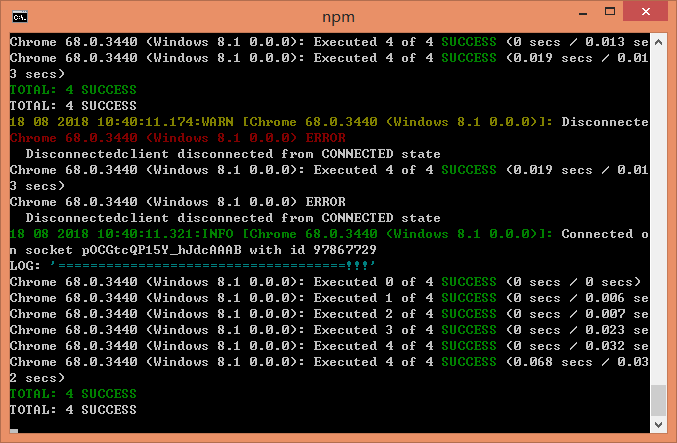
参考:
http://blog.leanote.com/post/y.ruibin09@gmail.com/%E5%89%8D%E7%AB%AF-es6
https://wenjs.me/p/es6-testing-workflow-with-karma
Karma (Test runner)的更多相关文章
- karma作为jQuery单元测试Runner
karma作为angular测试runner出现,如果你使用过karma一定感受到这很不错的javascript测试runner.简单干净的配置文件karma.config.js,以及karma in ...
- karma的基础应用之与fis结合
一.介绍 1. karma是单元测试运行框架,可以集成jasmine断言库,也支持babel. 2.fis是百度前端团队开源推出的前端工程化管理工具. 二.karma的基础应用 1.karma的基础a ...
- Karma:1. 集成 Karma 和 Jasmine 进行单元测试
关于 Karma 会是一个系列,讨论在各种环境下,使用 Karma 进行单元测试. 本文讨论 karma 集成 Jasmine 进行单元测试. 初始化 NPM 实现初始化 NPM 包管理,创建 pac ...
- Vue的自动化测试
前言 为什么我们需要测试? 让产品可以快速迭代,同时还能保持高质量 -- 阮一峰 持续集成是什么? 对于一些相对稳定的系统级别页面,自动化测试在提高测试的效率的方面起到非常重要的作用.前端的自动化测试 ...
- WebStorm 7.0 支持更多的Web技术
JetBrains刚刚发布了WebStorm 7.0 GA,支持EJS.Mustache.Handlebars.Web组件.Stylus.Karma.Istanbul.Compass,并增强了很多功能 ...
- Rails 5 Test Prescriptions 第10章 Unit_Testing JavaScript(新工具,learn曲线太陡峭,pass)
对Js的单元测试是一个大的题目.作者认为Ruby的相关测试工具比Js的测试工具更灵活 大多数Js代码最终是关于响应用户的行为和改变DOM中的元素 没有什么javascript的知识点.前两节用了几个新 ...
- 利用Angularjs测试引擎Karma进行自动化单元测试
Karma是Google用于angularjs框架单元测试的js引擎(javascript test runner ), angular1 和angular2项目源码的单元测试都是基于karma和ja ...
- Karma+Jasmine实现自动化单元测试
1.Karma介绍 Karma是Testacular的新名字,在2012年google开源了Testacular,2013年Testacular改名为Karma.Karma是一个让人感到非常神秘的名字 ...
- Karma +Jasmine+ require JS进行单元测试并生成测试报告、代码覆盖率报告
1. 关于Karma Karma是一个基于Node.js的JavaScript测试执行过程管理工具(Test Runner). 该工具可用于测试所有主流Web浏览器,也可集成到CI(Continuou ...
随机推荐
- Linux文件目录
简介: Linux 内核最初由芬兰的 Linus Torvalds 开发,后来他组建了团队,Linux 内核由这个团队维护. GNU 组织开发了很多核心软件和基础库,例如 GCC 编译器.C语言标准库 ...
- Node、TS、Koa学习笔记
这样定义可以轻松拿到gender属性 这样定义,函数内显示没有gender 这种方法能得到gender但是函数内部没有gender 这种方式能到gender 但是在函数里施symbel属性,外部不能访 ...
- 【题解】P2324 [SCOI2005]骑士精神
·有关IDA* 是带有估值函数的迭代加深搜索,表现出出色的效率. 估值函数可以简单的定义为「已经到位的骑士的个数」. 然后就是普通的迭代加深了. 算法酷炫不一定赢,搜索好才是成功. ——Loli Co ...
- 20 python 初学(logging模块)
学习网站:https://www.cnblogs.com/yuanchenqi/articles/5732581.html logging 模块: # _author: lily # _date: 2 ...
- Python小数据池和字典操作
小数据池 #id 查看内存地址 #多个代码块可以使用小数据池 #一个代码块中有一个问题,就是重复使用 #数字 -5~256 #字符串 字符串 乘法总数长度不能超过20, 0,1除外 #不能有特殊字符 ...
- git 命令积累
git status # 查看仓库的状态 git add . # 监控工作区的状态树,使用它会把工作时的所有变化提交到暂存区,包括文件内容修改(modified)以及新文件(new),但不包括被删除的 ...
- .Net Core应用框架Util介绍(二)
Util的开源地址 https://github.com/dotnetcore/util Util的开源协议 Util以MIT协议开源,这是目前最宽松的开源协议,你不仅可以用于商业项目,还能把Util ...
- Linux下redis的安装及配置
1.去官网下载redis(redis.io) 2.将其解压到根目录下 3.进入解压的目录,然后编译源程序, 如果不是root账户登录的,命令前面需要加sudo make make install PR ...
- 二十九、layui分页插件的使用
<div id="page1"></div> <script> //开启分页 var page = 1; function findstoreL ...
- 【学习总结】GirlsInAI ML-diary day-13-Try/Except 异常处理
[学习总结]GirlsInAI ML-diary 总 原博github链接-day13 认识异常处理 要点小结: try和except是同个等级,注意对齐和缩进 可以把try和except直接理解成另 ...