
Android开发中,使用 EditText 输入内容,如何进行一键清空内容处理
本文仅为个人的处理方式,希望能对您有所帮助,欢迎各位留言指正,抱拳了
1、text.xml示例:
<?xml version="1.0" encoding="utf-8"?>

<RelativeLayout

    xmlns:android="http://schemas.android.com/apk/res/android" android:layout_width="match_parent"

    android:layout_height="match_parent"

    android:background="#ccc">

    <EditText

        android:id="@+id/input"

        android:layout_width="@dimen/dimen_270"

        android:layout_height="wrap_content"

        android:maxLines="1"

        android:hint="请输入内容"

        android:textSize="@dimen/dimen_16"

        android:textColor="@color/color_fff"

        android:layout_marginTop="@dimen/dimen_10" />

    <ImageView

        android:id="@+id/del"

        android:layout_width="@dimen/dimen_14"

        android:layout_height="@dimen/dimen_14"

        android:visibility="gone"

        android:layout_marginTop="@dimen/dimen_28"

        android:src="@mipmap/bonus_envelope_cancel_icon_normal"

        android:layout_toRightOf="@id/input"/>

</RelativeLayout>
2.textActivity.java示例:
public class textActivity extends Activity implements View.OnClickListener {

    private EditText input;

    private ImageView inputDel;  //实例化一键清除输入内容

    @Override

    protected void onCreate(@Nullable Bundle savedInstanceState)  {

        super.onCreate(savedInstanceState);

        setContentView(R.layout.text);

        initView();

        initListener();

    }

    //对变量进行初始化

    private void initView(){

        inputDel = findViewById(R.id.del);

        input = findViewById(R.id.input);

    }

    //设置监听器

    private void initListener(){

        input.addTextChangedListener(textWatcher);

        inputDel.setOnClickListener(this);

    }

    private TextWatcher textWatcher = new TextWatcher() {

        @Override

        public void beforeTextChanged(CharSequence s, int start, int count, int after) {

        }

        @Override

        public void onTextChanged(CharSequence s, int start, int before, int count) {

        }

        @Override

        public void afterTextChanged(Editable s) {

            if (input.getEditableText().length() >= 1){

                inputDel.setVisibility(View.VISIBLE);

            } else{

                inputDel.setVisibility(View.GONE);

            }

        }

    };

    //点击事件(清空)

    @Override

    public void onClick(View v) {

        switch (v.getId()){

            case R.id.del:

                input.setText("");

                break;

        }

    }

}
3、在AndroidManifest.xml中进行注册:
<activity android:name=".textActivity">

    <intent-filter>

         <action android:name="android.intent.action.MAIN" />

         <category android:name="android.intent.category.LAUNCHER" />

    </intent-filter>

</activity>
4、效果图如下:
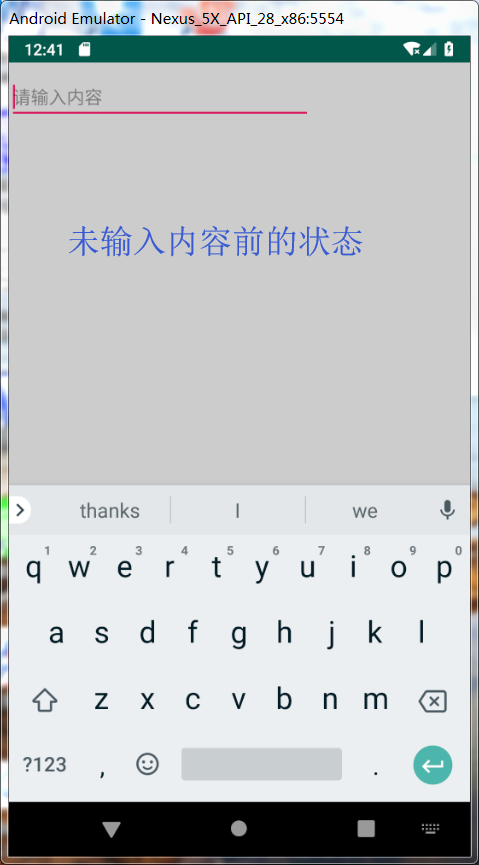
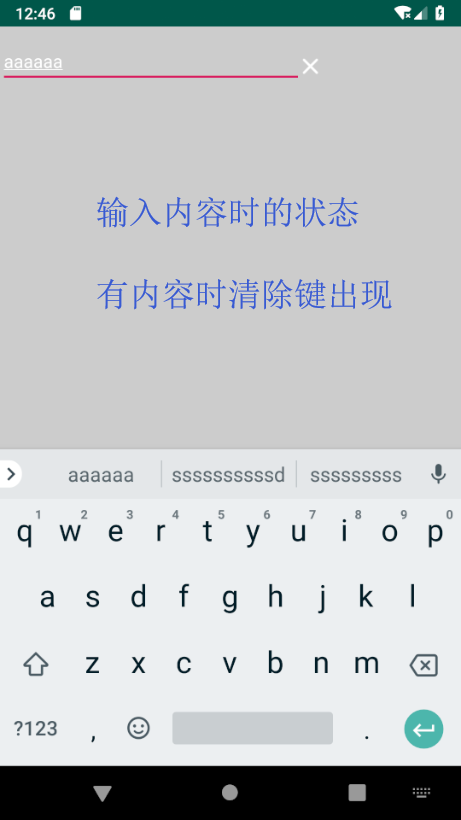
动图展示: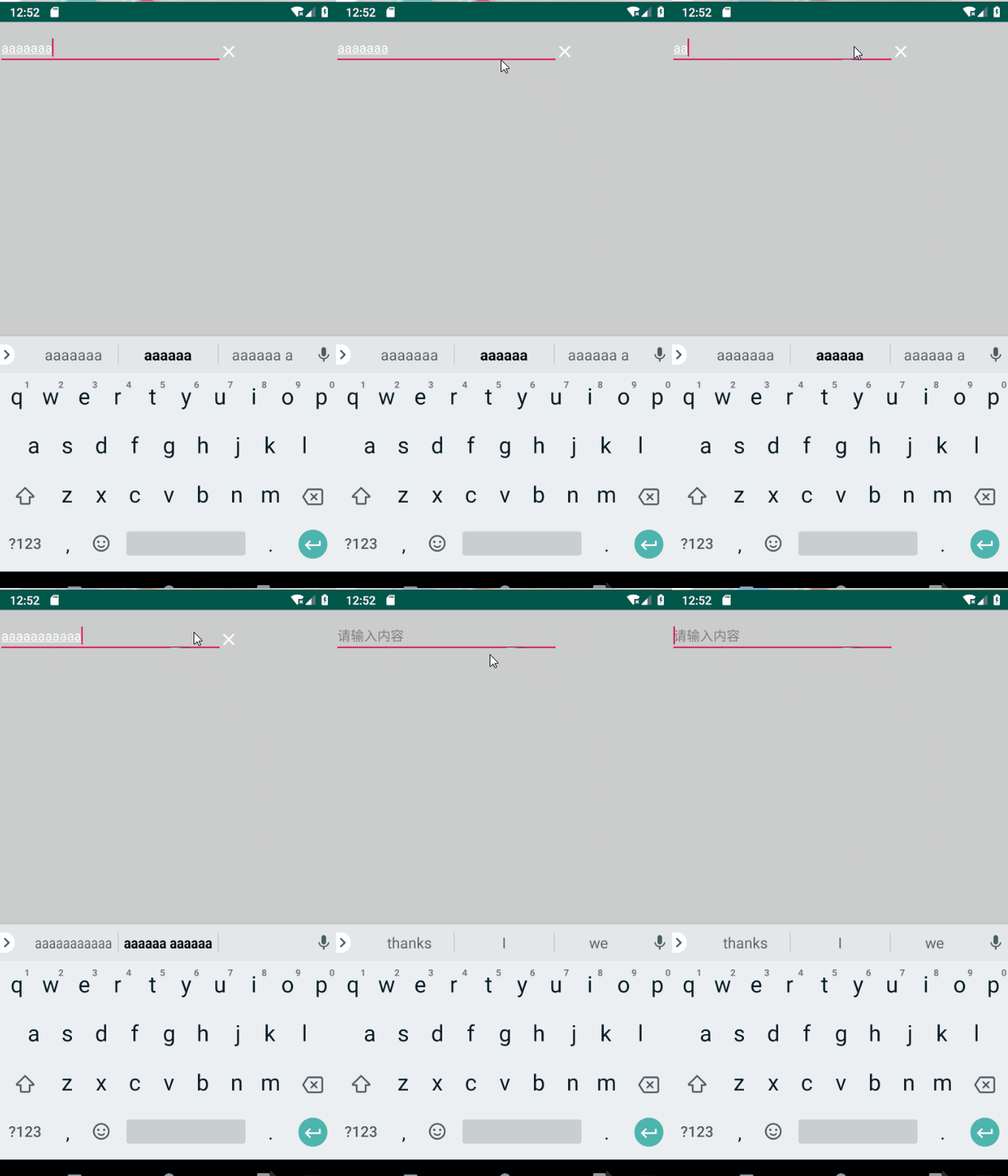
Android开发中,使用 EditText 输入内容,如何进行一键清空内容处理的更多相关文章
- Android开发中的输入合法性检验
Why ? 合法性检查对于程序的健壮性具有重要作用.在Android开发中,良好的合法性检查设计机制可以使程序更加清晰,产生bug更少,交互更加友好. What ? 合法性检查的目的在于确定边界.对于 ...
- 【转载】Eclipse:Android开发中如何查看System.out.println的输出内容
Android开发中在代码中通过System.out.println的输出内容不知道去哪了,在console视图中看不到.而通过Log.i之类的要在Logcat视图中看到,夹杂了太多的其它App及底层 ...
- Android开发中,那些让您觉得相见恨晚的方法、类或接口
Android开发中,那些让你觉得相见恨晚的方法.类或接口本篇文章内容提取自知乎Android开发中,有哪些让你觉得相见恨晚的方法.类或接口?,其实有一部是JAVA的,但是在android开发中也算常 ...
- android开发中的5种存储数据方式
数据存储在开发中是使用最频繁的,根据不同的情况选择不同的存储数据方式对于提高开发效率很有帮助.下面笔者在主要介绍Android平台中实现数据存储的5种方式. 1.使用SharedPreferences ...
- 讨论Android开发中的MVC设计思想
最近闲着没事,总是想想做点什么.在时间空余之时给大家说说MVC设计思想在Android开发中的运用吧! MVC设计思想在Android开发中一直都是一套比较好的设计思想.很多APP的设计都是使用这套方 ...
- Intent 对象在 Android 开发中的应用
转自(http://www.ibm.com/developerworks/cn/opensource/os-cn-android-intent/) Android 是一个开放性移动开发平台,运行在该平 ...
- android开发中常犯的几个错误整理
新手程序猿,在开发中难免会犯各种各样的错误,以下是整理的一些android开发中常见的错误,一起来看看吧. 1.避免将多个类放在一个文件夹里面,除非是一次性使用的内部类. 就是一个文件,最好给分它同名 ...
- Android开发中查看未root真机的app数据库
在Android开发中,如果用到数据库来储存数据,那么难免就要查看数据库中的内容,可是对于未root的真机来说,查看数据库就不是那么容易了,如果仅仅为了查看数据库再把手机root了,有点得不偿失,所以 ...
- android开发中fragment获取context
在用到fragment时无法使用.this来指定当前context内容,android开发中fragment获取context,可以使用getActivity().getApplicationCont ...
- java中的反射机制在Android开发中的用处
JAVA反射机制是在运行状态中,对于任意一个类,都能够知道这个类的所有属性和方法:对于任意一个对象,都能够调用它的任意一个方法和属性:这种动态获取的信息以及动态调用对象的方法的功能称为java语言的反 ...
随机推荐
- 用PMML实现机器学习模型的跨平台上线
在机器学习用于产品的时候,我们经常会遇到跨平台的问题.比如我们用Python基于一系列的机器学习库训练了一个模型,但是有时候其他的产品和项目想把这个模型集成进去,但是这些产品很多只支持某些特定的生产环 ...
- Tapestry3.0开发概论
一.TAPESTRY技术的综述. tapestry是平行于struts/Spring MVC/webwork /jsf等开发工具的语言.tapestry是基于组件的开发工具.它具有组件的可重用性.因为 ...
- springboot情操陶冶-web配置(一)
承接前文springboot情操陶冶-@SpringBootApplication注解解析,在前文讲解的基础上依次看下web方面的相关配置 环境包依赖 在pom.xml文件中引入web依赖,炒鸡简单, ...
- arcgis 10 版本连接SDE数据库报错:No ArcSDE server license found 最有效的解决方法
这个问题可以这样解决:就在在Oracle中登入SDE数据库 进入到SDE数据库中后,找到表SERVER_CONFIG,其中有一行数据记录的就是我们需要进行修改的数据 你需要做的就是找到一个可用的,前面 ...
- Android Material Design控件使用(三)——CardView 卡片布局和SnackBar使用
cardview 预览图 常用属性 属性名 说明 cardBackgroundColor 设置背景颜色 cardCornerRadius 设置圆角大小 cardElevation 设置z轴的阴影 ca ...
- Linux文件系统的基本结构
Linux文件系统结构 通过下面两张图片来认识一下Linux文件系统的结构. 当前工作目录 实践: 文件名称 这些规则不仅适用于文件,也适用于文件夹. 实践: ls命令 ls命令表示列出当前工作目录的 ...
- java开发环境配置——IDEA SVN的使用
一.安装svn客户端,在idea中配置svn 装小乌龟,TortoiseSVN ,就下图一个要注意的地方,这里默认 command line client tools是不安装的,选上.如果已经安装过了 ...
- Go开发之路 -- 流程控制
1. if else if 条件 { } else { // else必须写在这里 } // 写一个程序, 从终端读取输入, 并转成整数. 如果转成整数出错, // 则输出'can not conve ...
- es6 常用方法
来自 https://www.cnblogs.com/lhl66/p/9555903.html 侵删 来自 https://www.cnblogs.com/lhl66/p/8862106.html 侵 ...
- 广州.NET微软技术俱乐部微信群有用信息集锦(10) - 大量json数据压缩方案
这是广州.NET微软技术俱乐部微信群有用信息集锦系列的其中一篇文章. 刚才微信群里有人问:“对于大量json数据返回的时候,有用过什么压缩方案吗?” 大家都给与了回答和帮助.包括: 开启gzi ...