
C#实现以太仿DApp合约编译、部署
在网上找了一些关于C#开发以太仿的资料,大概了解了以太仿常用名词,后续可能需要根据资料查看开源的源码进一步熟悉一下。
一、准备合约
这里准备了一个EzToken.sol合约,目前还不会solidity,所以随便在网上找了一个,由于使用的是solidity的版本是0.5.6的版本,所以需要在string memory _tokenName,中加memory,否则会报错。
pragma solidity >=0.4. <0.6.;

contract EzToken {

    uint256 public totalSupply;

    mapping (address => uint256) public balances;

    mapping (address => mapping (address => uint256)) public allowed;

    string public  name;

    uint8 public decimals;

    string public symbol;

    event Transfer(address indexed _from, address indexed _to, uint256 _value);

    event Approval(address indexed _owner, address indexed _spender, uint256 _value);

    constructor(

        uint256 _initialAmount,

        string memory  _tokenName,

        uint8 _decimalUnits,

        string memory  _tokenSymbol

    ) public {

        balances[msg.sender] = _initialAmount;

        totalSupply = _initialAmount;

        name = _tokenName;

        decimals = _decimalUnits;

        symbol = _tokenSymbol;

    }

    function transfer(address _to, uint256 _value) public returns (bool success) {

        require(balances[msg.sender] >= _value);

        balances[msg.sender] -= _value;

        balances[_to] += _value;

        emit Transfer(msg.sender, _to, _value);

        return true;

    }

    function transferFrom(address _from, address _to, uint256 _value) public returns (bool success) {

        uint256 allowance = allowed[_from][msg.sender];

        require(balances[_from] >= _value && allowance >= _value);

        balances[_to] += _value;

        balances[_from] -= _value;

        allowed[_from][msg.sender] -= _value;

        emit Transfer(_from, _to, _value);

        return true;

    }

    function balanceOf(address _owner) public view returns (uint256 balance) {

        return balances[_owner];

    }

    function approve(address _spender, uint256 _value) public returns (bool success) {

        allowed[msg.sender][_spender] = _value;

        emit Approval(msg.sender, _spender, _value);

        return true;

    }

    function allowance(address _owner, address _spender) public view returns (uint256 remaining) {

        return allowed[_owner][_spender];

    }

}
二、编译合约
编译合约我这边下载了window版本的solidity编译器https://github.com/ethereum/solidity/releases,这里我下载的是window的0.5.6版本。

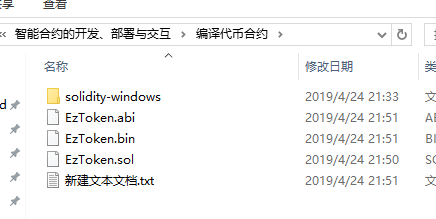
然后在solidity-windows目录下cmd命令输入下面命令,之后会编译出一个abi文件、一个bin文件,关于solidity后续还需要进一步学习。
solc ../EzToken.sol --bin --abi --optimize --overwrite -o ../
三、部署
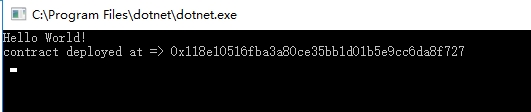
部署合约也是一个交易,只是与普通的交易相比,部署交易 需要把合约的字节码和编码后构造函数参数放在请求报文参数中的data字段里, 然后通过eth_sendTransaction或eth_sendRawTransaction调用提交给节点。这里发行了CYW的代币。
using Nethereum.Hex.HexConvertors.Extensions;

using Nethereum.Hex.HexTypes;

using Nethereum.RPC.Eth.DTOs;

using Nethereum.Web3;

using System;

using System.IO;

using System.Numerics;

using System.Threading;

using System.Threading.Tasks;

using Nethereum.ABI.FunctionEncoding;

using Nethereum.ABI.Model;

namespace DeployContractTheory

{

    class Program

    {

        static void Main(string[] args)

        {

            Console.WriteLine("Hello World!");

            Run().Wait();

            Console.ReadLine();

        }

        public static async Task Run()

        {

            string abi = File.ReadAllText("EzToken.abi");

            string bin = File.ReadAllText("EzToken.bin");

            ParametersEncoder encoder = new ParametersEncoder();

            Parameter[] parameters = new Parameter[]

            {

                new Parameter("uint256"),

                new Parameter("string"),

                new Parameter("uint8"),

                new Parameter("string")

            };

            BigInteger initialAmount = new BigInteger();

            string tokenName = "CYW";

            BigInteger decimalUnits = new BigInteger();

            string tokenSymbol = "CuiYW";

            byte[] encodedParams = encoder.EncodeParameters(parameters, initialAmount, tokenName, decimalUnits, tokenSymbol);

            string data = "0x" + bin + encodedParams.ToHex(false);

            Web3 web3 = new Web3("http://localhost:7545");

            string[] accounts = await web3.Eth.Accounts.SendRequestAsync();

            TransactionInput txinput = new TransactionInput

            {

                From = accounts[],

                Data = data,

                Gas = new HexBigInteger(),

                GasPrice = new HexBigInteger()

            };

            string txhash = await web3.TransactionManager.SendTransactionAsync(txinput);

            TransactionReceipt receipt = null;

            while (true)

            {

                receipt = await web3.Eth.Transactions.GetTransactionReceipt.SendRequestAsync(txhash);

                if (receipt != null) break;

                Thread.Sleep();

            }

            Console.WriteLine("contract deployed at => " + receipt.ContractAddress);

        }

    }

}

C#实现以太仿DApp合约编译、部署的更多相关文章
- 以太仿DApp开发环境搭建
在网上找了些以太仿的资料,是node.js写的,之前也了解过node.js,正好也可以用上.本篇主要学习以太仿DApp开发环境搭建. 一.安装 DApp 开发环境 1.1安装 Node.js 首先下载 ...
- 使用Remix编译和部署以太坊智能合约
Remix 是一個开源的 Solidity 智能合约开发环境,提供基本的编译.部署至本地或测试网络.执行合约等功能.Solidity 是 以太坊Ethereum 官方设计和支持的开发语言,专门用于 ...
- 智能合约开发——以太坊 DApp 实现 购买通证token
合约的buy()方法用于提供购买股票的接口.注意关键字payable,有了它买股票的人才可以付钱给你. 接收钱没有比这个再简单的了! function buy() payable public ret ...
- 深入以太坊智能合约 ABI
开发 DApp 时要调用在区块链上的以太坊智能合约,就需要智能合约的 ABI.本文希望更多了解 ABI,如为什么需要 ABI?如何解读 Ethereum 的智能合约 ABI?以及如何取得合约的 ABI ...
- rpc接口调用以太坊智能合约
rpc接口调用以太坊智能合约 传送门: 柏链项目学院 在以太坊摸爬滚打有些日子了,也遇到了各种各样的问题.这几天主要研究了一下如何通过rpc接口编译.部署和调用合约.也遇到了一些困难和问题,下面将 ...
- 以太坊智能合约开发框架Truffle
前言 部署智能合约有多种方式,命令行的浏览器的渠道都有,但往往跟我们程序员的风格不太相符,因为我们习惯了在IDE里写了代码然后打包运行看效果. 虽然现在IDE中已经存在了Solidity插件,可以编写 ...
- 以太坊智能合约虚拟机(EVM)原理与实现
以太坊 EVM原理与实现 以太坊底层通过EVM模块支持合约的执行与调用,调用时根据合约地址获取到代码,生成环境后载入到EVM中运行.通常智能合约的开发流程是用solidlity编写逻辑代码,再通过编译 ...
- Go语言打造以太坊智能合约测试框架(level3)
传送门: 柏链项目学院 第三课 智能合约自动化测试 之前课程回顾 我们之前介绍了go语言调用exec处理命令行,介绍了toml配置文件的处理,以及awk处理文本文件获得ABI信息.我们的代码算是完成了 ...
- Go语言打造以太坊智能合约测试框架(level1)
传送门: 柏链项目学院 Go语言打造以太坊智能合约测试框架 前言 这是什么? 这是一个基于go语言编写的,自动化测试以太坊智能合约的开发框架,使用此框架,可以自动化的部署合约,自动测试合约内的功能函数 ...
随机推荐
- List使用linq的OrderBy方法排序,并按照两个字段排序的写法
SfaMember.GetList(searchInfo, 0, 1000, out Allcount).Where(item => item.bOpen == true).OrderBy(it ...
- [GIT] 更新.repo目录
cd .repo/manifests/ git co -f git pull
- C++中几种输入输出cin、cin.getline()、getline()、sscanf()、sprintf()、gets()等
1.cin和cout cout是输出流对象的名字,cin是输入流对象的名字 ,“<<”是流插入运算符(也可称流插入操作符〉,作用是将需要输出的内容插入到输出流中,默认的输出设备是显示器. ...
- echarts、higncharts折线图或柱状图显示数据为0的点
echarts.higncharts折线图或柱状图只需要后端传到前端一段json数据,接送数据的x轴与y周有对应数据,折线图或柱状图就会渲染出这数据. 比如,x轴表示美每天日期,y轴表示数量.他们的数 ...
- [LeetCode] Buddy Strings 伙计字符串
Given two strings A and B of lowercase letters, return true if and only if we can swap two letters i ...
- linux学习:curl与netcat用法整理
CURL 语法: curl [option] [url] 常用参数:-A/--user-agent <string> 设置用户代理发送给服务器-b/--cookie <name=st ...
- Hadoop集群搭建过程中ssh免密码登录(二)
一.为什么设置ssh免密码登录 在集群中,Hadoop控制脚本依赖SSH来执行针对整个集群的操作.例如,某个脚本能够终止并重启集群中的所有守护进程.所以,需要安装SSH,但是,SSH远程登陆的时候,需 ...
- 33 ArcToolBox学习系列之数据管理工具箱——投影与变换(Projections and Transformations)未完待续……
工具箱位置 打开ArcToolBox,找到工具集Projections and Transformations,位置如下:ArcToolbox--Data Management Tools--Proj ...
- css实现超出两行隐藏
overflow:hidden; text-overflow:ellipsis; display:-webkit-box; -webkit-box-orient:vertical; -webkit-l ...
- Trie树(字典树)的介绍及Java实现
简介 Trie树,又称为前缀树或字典树,是一种有序树,用于保存关联数组,其中的键通常是字符串.与二叉查找树不同,键不是直接保存在节点中,而是由节点在树中的位置决定.一个节点的所有子孙都有相同的前缀,也 ...