
Docker:私有仓库registry [十一]
一、运行docker私有仓库
安装registry
docker run -d -p 5000:5000 --restart=always --name registry -v /opt/myregistry:/var/lib/registry registry
当容器启动完成,私有仓库就可以使用了
二、上传到私有仓库的步骤:
1、给要上传的镜像打tag
[root@luoahong ~]# docker images

REPOSITORY          TAG                 IMAGE ID            CREATED             SIZE

httpd               latest              ef1dc54703e2        2 weeks ago         132

[root@luoahong ~]# docker image tag httpd:latest 192.168.228.134:5000/httpd:latest
2、上传
[root@luoahong ~]# docker images

REPOSITORY          TAG                 IMAGE ID            CREATED             SIZE

httpd               latest              ef1dc54703e2        2 weeks ago         132MB

[root@luoahong ~]# docker push 192.168.228.134:5000/httpd:latest

The push refers to repository [192.168.228.134:5000/httpd]

Get https://192.168.228.134:5000/v2/: http: server gave HTTP response to HTTPS client
3、报错解决方法
[root@luoahong ~]# vim /etc/docker/daemon.json

{

  "registry-mirrors": ["https://registry.docker-cn.com"],

  "insecure-registries": ["192.168.228.134:5000"]

}

[root@luoahong ~]# systemctl restart docker

[root@luoahong ~]# docker push 192.168.228.134:5000/httpd:latest

The push refers to repository [192.168.228.134:5000/httpd]

64446057e402: Pushed

13a694db88ed: Pushed

3fc0ec65884c: Pushed

30d0b099e805: Pushed

7b4e562e58dc: Pushed

latest: digest: sha256:246fed9aa9be7aaba1e04d9146be7a3776c9a40b5cfb3242d3427f79edee37db size: 1367

[root@luoahong ~]# docker images

REPOSITORY                   TAG                 IMAGE ID            CREATED             SIZE

httpd                        latest              ef1dc54703e2        2 weeks ago         132MB

192.168.228.134:5000/httpd   latest              ef1dc54703e2        2 weeks ago         132MB
三、上传原理推导
1、客户端
[root@luoahong ~]# docker pull fedora:latest

latest: Pulling from library/fedora

d0483bd5a554: Pull complete

Digest: sha256:4a861283a7f0a8ce3d19b42f4c0a10d7012a4d12f785149d82a0800cdb4498b0

Status: Downloaded newer image for fedora:latest

[root@luoahong ~]# docker image tag  fedora:latest 192.168.228.134:5000/fedora:latest

[root@luoahong ~]# docker push 192.168.228.134:5000/fedora:latest

The push refers to repository [192.168.228.134:5000/fedora]

a13f3c019d29: Pushed

latest: digest: sha256:f6d888e4caccb101aa540013d46089803f84f2b41b7ce70ef6b42e1ff4b33254 size: 529
2、私有仓库
没有推送fedora之前
[root@luoahong1 ~]# cd /opt/myregistry/docker/registry/v2/repositories/

[root@luoahong1 repositories]# ls

centos  httpd

[root@luoahong1 repositories]# pwd

/opt/myregistry/docker/registry/v2/repositories

[root@luoahong1 repositories]# tree httpd/_manifests/

httpd/_manifests/

├── revisions

│   └── sha256

│       └── 246fed9aa9be7aaba1e04d9146be7a3776c9a40b5cfb3242d3427f79edee37db

│           └── link

└── tags

    └── latest

        ├── current

        │   └── link

        └── index

            └── sha256

                └── 246fed9aa9be7aaba1e04d9146be7a3776c9a40b5cfb3242d3427f79edee37db

                    └── link
推送fedora之后
[root@luoahong1 repositories]# ls

centos  fedora  httpd

[root@luoahong1 repositories]# pwd

/opt/myregistry/docker/registry/v2/repositories
四、带base认证的私有仓库
0、没有带base认证前
[root@luoahong ~]# docker images

REPOSITORY                    TAG                 IMAGE ID            CREATED             SIZE

192.168.228.134:5000/httpd    latest              ef1dc54703e2        2 weeks ago         132MB

httpd                         latest              ef1dc54703e2        2 weeks ago         132MB

centos                        latest              1e1148e4cc2c        6 weeks ago         202MB

192.168.228.134:5000/fedora   latest              8c568f104326        2 months ago        267MB

fedora                        latest              8c568f104326        2 months ago        267MB

centos                        6.8                 e54faac158ff        3 months ago        195MB

centos                        6.9                 e88c611d16a0        3 months ago        195MB

192.168.228.134:5000/centos   6.9                 e88c611d16a0        3 months ago        195MB

[root@luoahong ~]# docker rmi centos:6.9 192.168.228.134:5000/centos:6.9

Untagged: centos:6.9

Untagged: centos@sha256:48623f1cc1ff287ef4843888bcee22285066adf2d5da6daf000070bee83cd93a

Untagged: 192.168.228.134:5000/centos:6.9

Untagged: 192.168.228.134:5000/centos@sha256:29b4ae1d59c681e6e8bb6f8eff1ec9f1c18cd24ae23b7d612e3a38c27a44f92f

Deleted: sha256:e88c611d16a001c1494b11a55bc25c0e9d63e67444d754d01f0ffa7de92a15c7

[root@luoahong ~]# docker pull 192.168.228.134:5000/centos:6.9

Error response from daemon: Get http://192.168.228.134:5000/v2/centos/manifests/6.9: no basic auth credentials
1、base认证密码文件准备
yum install httpd-tools -y

mkdir /opt/registry-var/auth/ -p

htpasswd -Bbn luoahong 123456 >> /opt/registry-var/auth/htpasswd
2、启动docker私有仓库
docker run -d -p 5000:5000 -v /opt/registry-var/auth/:/auth/ -v /opt/myregistry:/var/lib/registry -e "REGISTRY_AUTH=htpasswd" -e "REGISTRY_AUTH_HTPASSWD_REALM=Registry Realm" -e REGISTRY_AUTH_HTPASSWD_PATH=/auth/htpasswd registry
3、测试下载
[root@luoahong ~]# docker pull 192.168.228.134:5000/centos:6.9

Error response from daemon: Get http://192.168.228.134:5000/v2/centos/manifests/6.9: no basic auth credentials

[root@luoahong ~]#

[root@luoahong ~]# docker login 192.168.228.134:5000

Username: luoahong

Password:

WARNING! Your password will be stored unencrypted in /root/.docker/config.json.

Configure a credential helper to remove this warning. See

https://docs.docker.com/engine/reference/commandline/login/#credentials-store

Login Succeeded

[root@luoahong ~]# cat /root/.docker/config.json

{

	"auths": {

		"192.168.228.134:5000": {

			"auth": "bHVvYWhvbmc6MTIzNDU2"

		}

	},

	"HttpHeaders": {

		"User-Agent": "Docker-Client/18.09.1 (linux)"

	}

}[root@luoahong ~]#docker pull 192.168.228.134:5000/centos:6.9

6.9: Pulling from centos

993c50d47469: Pull complete

Digest: sha256:29b4ae1d59c681e6e8bb6f8eff1ec9f1c18cd24ae23b7d612e3a38c27a44f92f

Status: Downloaded newer image for 192.168.228.134:5000/centos:6.9

[root@luoahong ~]# docker images

REPOSITORY                    TAG                 IMAGE ID            CREATED             SIZE

192.168.228.134:5000/httpd    latest              ef1dc54703e2        2 weeks ago         132MB

httpd                         latest              ef1dc54703e2        2 weeks ago         132MB

centos                        latest              1e1148e4cc2c        6 weeks ago         202MB

192.168.228.134:5000/fedora   latest              8c568f104326        2 months ago        267MB

fedora                        latest              8c568f104326        2 months ago        267MB

centos                        6.8                 e54faac158ff        3 months ago        195MB

192.168.228.134:5000/centos   6.9                 e88c611d16a0        3 months ago        195MB
4、私有仓库的缺点
私有仓库查看版本很麻烦
[root@luoahong1 repositories]# ls httpd/_manifests/tags/

latest

[root@luoahong1 repositories]# pwd

/opt/myregistry/docker/registry/v2/repositories
四、私有仓库缺点解决方案
1、查看镜像列表
使用浏览器访问:
http://192.168.228.134:5000/v2/_catalog
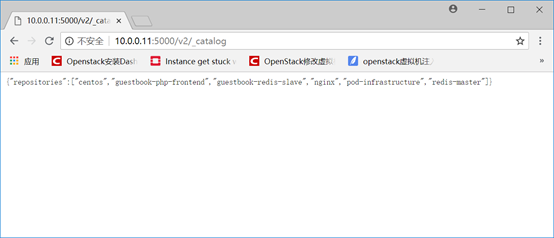
2、查看镜像列表
下面我已nginx为例
http://192.168.228.134:5000/v2/nginx/tags/list
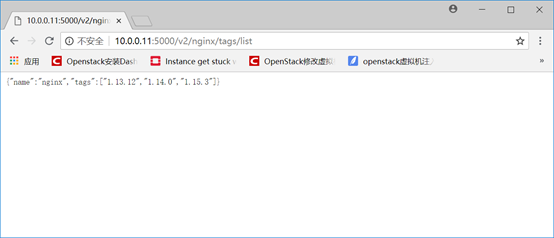
3、删除镜像
1)进入docker registry的容器中
docker exec -it registry /bin/sh
2) 删除repo
rm -fr /var/lib/registry/docker/registry/v2/repositories/nginx
3) 清除掉:blob
registry garbage-collect /etc/docker/registry/config.yml
https://www.qstack.com.cn/archives/350.html
Docker:私有仓库registry [十一]的更多相关文章
- 转载:教你分分钟搞定Docker私有仓库Registry
一.什么是Docker私有仓库Registry 官方的Docker hub是一个用于管理公共镜像的好地方,我们可以在上面找到我们想要的镜像,也可以把我们自己的镜像推送上去.但是,有时候我们的服务器无法 ...
- 教你分分钟搞定Docker私有仓库Registry
一.什么是Docker私有仓库Registry 官方的Docker hub是一个用于管理公共镜像的好地方,我们可以在上面找到我们想要的镜像,也可以把我们自己的镜像推送上去.但是,有时候我们的服务器无法 ...
- (转)教你分分钟搞定Docker私有仓库Registry
转:https://www.cnblogs.com/Javame/p/7389093.html 一.什么是Docker私有仓库Registry 官方的Docker hub是一个用于管理公共镜像的好地方 ...
- Docker私有仓库registry的搭建及使用
前言 由于Docker Hub公共仓库很多时候使用这并不是很方便,大分部因为网络的问题可能拉取的时候会很慢或者拉取不到,所以搭建一个本地的私有仓库. 准备 由于此篇文章是在Kubernetes集群安装 ...
- Docker私有仓库Registry的搭建验证
1. 关于Registry 官方的Docker hub是一个用于管理公共镜像的好地方,我们可以在上面找到我们想要的镜像,也可以把我们自己的镜像推送上去.但是,有时候,我们的使用场景需要我们拥有一个私有 ...
- Docker私有仓库Registry 搭建
1. 关于Registry 官方的Docker hub是一个用于管理公共镜像的好地方,我们可以在上面找到我们想要的镜像,也可以把我们自己的镜像推送上去.但是,有时候,我们的使用场景需要我们拥有一个私有 ...
- Centos 7上Docker私有仓库Registry实战
1. 关于Registry 官方的Docker hub是一个用于管理公共镜像的好地方,我们可以在上面找到我们想要的镜像,也可以把我们自己的镜像推送上去.但是,有时候,我们的使用场景需要我们拥有一个私有 ...
- Docker私有仓库Registry实战
参考: https://www.cnblogs.com/soar1688/p/6828329.html 1. 关于Registry 官方的Docker hub是一个用于管理公共镜像的好地方,我们可以在 ...
- docker私有仓库registry的使用
1.registry的安装 关于docker registry的安装,可以说简单的不能再简单了,docker run一个容器就好了,也就是一条命令的事 docker run -d -p : --res ...
随机推荐
- iOS开发之OC与swift开发混编教程,代理的相互调用,block的实现。OC调用Swift中的代理, OC调用Swift中的Block 闭包
本文章将从两个方向分别介绍 OC 与 swift 混编 1. 第一个方向从 swift工程 中引入 oc类 1. 1 如何在swift的类中使用oc类 1.2 如何在swift中实现oc的代理 ...
- 【eclipse】mybatis配置文件创建与mapper接口文件创建
什么是mybatis: MyBatis 是一款优秀的持久层框架,它支持定制化 SQL.存储过程以及高级映射. mybatis配置文件: <?xml version="1.0" ...
- python3 文件操作
步骤:打开文件->操作文件->关闭文件 打开文件 文件句柄 = open('文件路径', '模式') 指定文件编码 文件句柄= open('文件路径','模式',encoding='utf ...
- Bootstrap -- 导航栏样式、分页样式、标签样式、徽章样式
Bootstrap -- 导航栏样式.分页样式.标签样式.徽章样式 1. 使用图标的导航栏 使用导航栏样式: <!DOCTYPE html> <html> <head&g ...
- LeetCode算法题-Second Minimum Node In a Binary Tree(Java实现)
这是悦乐书的第285次更新,第302篇原创 01 看题和准备 今天介绍的是LeetCode算法题中Easy级别的第153题(顺位题号是671).给定非空的特殊二叉树,其由具有非负值的节点组成,其中该树 ...
- Docker的使用初探(一):常用指令说明
目录 Docker的使用初探(一):常用指令说明 为什么要用Docker Docker的安装与简单使用 国内镜像加速 常用指令 Docker的使用初探(一):常用指令说明 前几个星期实践的了,再不记录 ...
- raise
raise 后边一般是更报错处理的,比如nameerror.先上代码 try: a='a0'+8 except: print('l') raise else: print('women') print ...
- C#基础知识之反射
http://blog.csdn.net/educast/article/details/2894892 两个现实中的例子:1.B超:大家体检的时候大概都做过B超吧,B超可以透过肚皮探测到你内脏的生理 ...
- LVS负载均衡集群
回顾-Nginx反向代理型负载 负载均衡(load balance)集群,提供了一种廉价.有效.透明的方法,来扩展网络设备和服务器的负载.带宽.增加吞吐量.加强网络数据处理能力.提高网络的灵活性和可用 ...
- 用CMD打开chrome并导航到百度(golang)
首选在cmd中输入(注意:根据你的电脑路径修改,可能是Progra~1): C:\Progra~\Google\Chrome\Application\chrome.exe www.baidu.com ...