
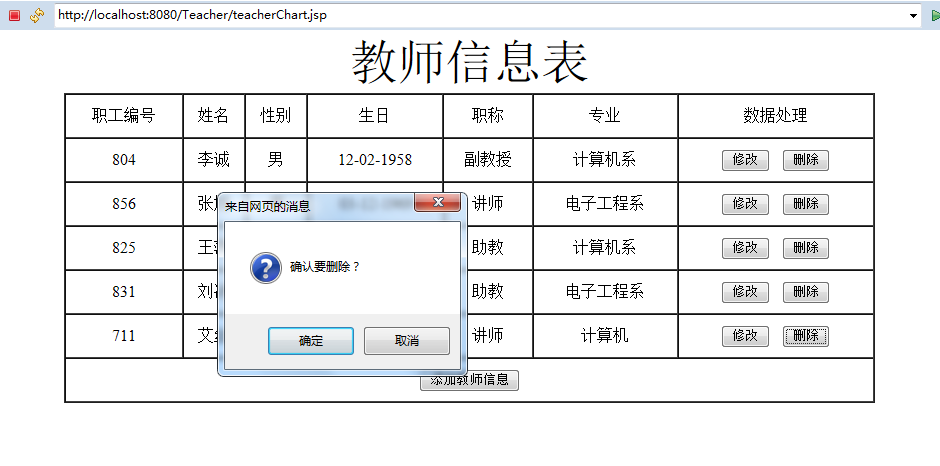
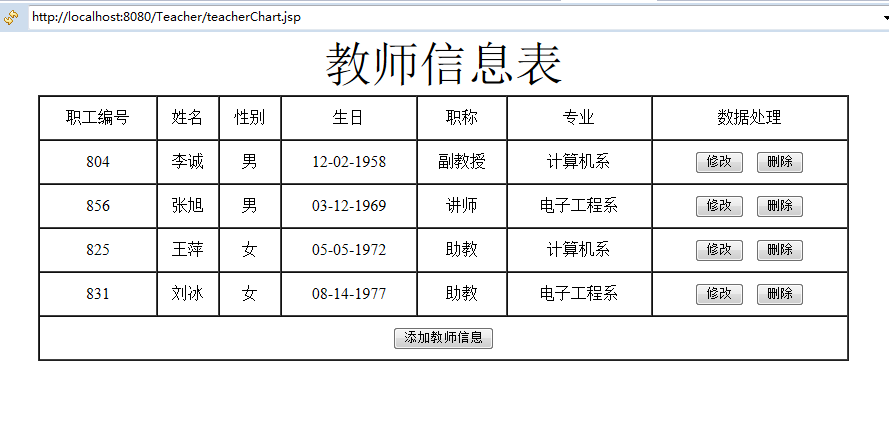
对teacher表进行增加,删除,修改
<%@page import="java.text.SimpleDateFormat"%>
<%@ page language="java" contentType="text/html; charset=UTF-8"
pageEncoding="UTF-8"%>
<%@ page import="java.sql.*"%>
<!DOCTYPE html PUBLIC "-//W3C//DTD HTML 4.01 Transitional//EN" "http://www.w3.org/TR/html4/loose.dtd">
<html>
<head>
<meta http-equiv="Content-Type" content="text/html; charset=UTF-8">
<title>教师信息</title>
</head>
<body>
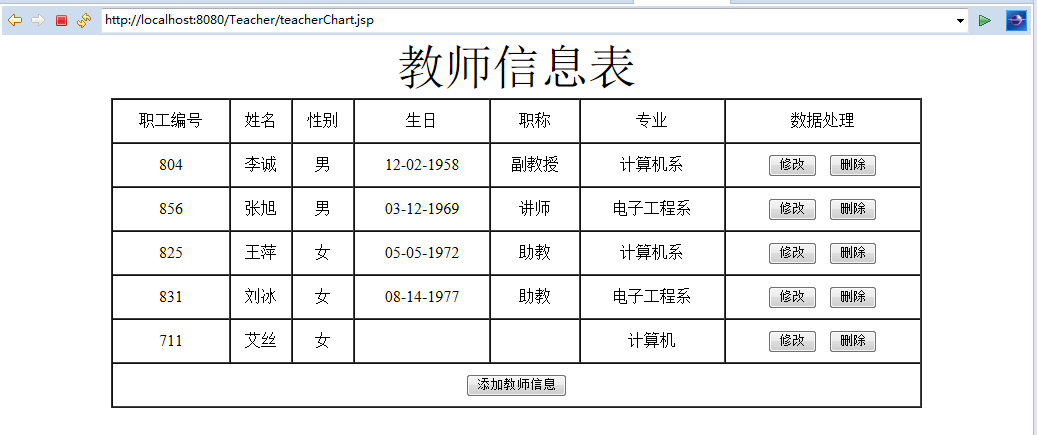
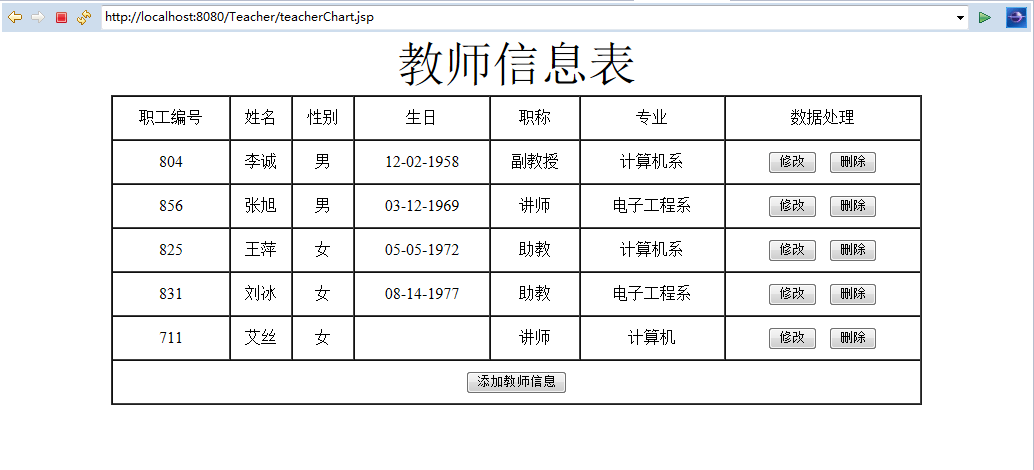
<div align="center"><font size="20px">教师信息表</font></div>
<table border="1" cellspacing="0" width="80%" align="center" style="text-align: center">
<tr>
<td height="40">职工编号</td>
<td >姓名</td>
<td >性别</td>
<td >生日</td>
<td >职称</td>
<td >专业</td>
<td>数据处理</td>
</tr>
<%
try
{ Class.forName("oracle.jdbc.driver.OracleDriver");
Connection conn = DriverManager.getConnection("jdbc:oracle:thin:@localhost:1521:orcl", "test", "5211314");
Statement st=conn.createStatement();
ResultSet rs=st.executeQuery("select * from TEACHER"); if(rs!=null)
{
SimpleDateFormat sdf= new SimpleDateFormat("MM-dd-yyyy"); while(rs.next())
{
String tno = rs.getString(1);
String tname = rs.getString(2);
String tsex = rs.getString(3); String tbirthday=null;
if(rs.getDate(4)!=null)
{
tbirthday=sdf.format(rs.getDate(4));
}
String prof = rs.getString(5);
String depart = rs.getString(6);
%>
<tr>
<td height="40"><%=tno %></td>
<td><%=tname%></td>
<td><%=tsex%></td>
<td><%=tbirthday==null?"":tbirthday %></td>
<td><%=prof==null?"":prof %></td>
<td><%=depart%></td>
<td><a href='updateT.jsp?tno=<%=tno%>'><input type="button" value="修改"></a>
<a href='DeleteT?tno=<%=tno%>' onClick="delcfm()"><input type="button" value="删除"></a></td>
</tr> <%
}
rs.close();
} st.close();
conn.close(); }
catch(Exception e)
{
e.printStackTrace();
}
%>
<tr><td colspan="7" height="40"><a href="teacherInsert.jsp"><input type="button" value="添加教师信息"></a></td></tr>
</table>
<script language="javascript">
function delcfm() {
if (!confirm("确认要删除?")) {
window.event.returnValue = false;
}
}
</script>
</body>

</html>
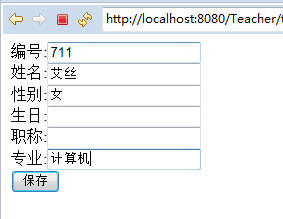
<%@ page language="java" contentType="text/html; charset=UTF-8"

    pageEncoding="UTF-8"%>

<!DOCTYPE html PUBLIC "-//W3C//DTD HTML 4.01 Transitional//EN" "http://www.w3.org/TR/html4/loose.dtd">

<html>

<head>

<meta http-equiv="Content-Type" content="text/html; charset=UTF-8">

<title>添加信息</title>

</head>

<body>

<form action="SaveT" method="post">

编号:<input type="text" name="tno"><br>

姓名:<input type="text" name="tname"><br>

性别:<input type="text" name="tsex"><br>

生日:<input type="text" name="tbirthday"><br>

职称:<input type="text" name="prof"><br>

专业:<input type="text" name="depart"><br>

<input type="submit" value="保存">

</form>

</body>

</html>
<%@page import="java.text.SimpleDateFormat"%>

<%@ page language="java" contentType="text/html; charset=UTF-8"

    pageEncoding="UTF-8"%>

<%@ page import="java.sql.*" %>

<!DOCTYPE html PUBLIC "-//W3C//DTD HTML 4.01 Transitional//EN" "http://www.w3.org/TR/html4/loose.dtd">

<html>

<head>

<meta http-equiv="Content-Type" content="text/html; charset=UTF-8">

<title>修改</title>

</head>

<body>

<%

try{

String tno=request.getParameter("tno");

String tname=null;

String tsex=null;

String tbirthday=null;

String prof=null;

String depart=null;

SimpleDateFormat sdf=new SimpleDateFormat("yyyy-MM-dd");

if(tno!=null && tno.trim().length()>0)

{

    try {

            Class.forName("oracle.jdbc.driver.OracleDriver");

            Connection conn = DriverManager.getConnection("jdbc:oracle:thin:@localhost:1521:orcl", "test", "5211314");

            PreparedStatement p=conn.prepareStatement(

                    "select * from TEACHER where tno=?");

            p.setString(1, tno);

            ResultSet rs=p.executeQuery();

            if(rs!=null&&rs.next())

            {

                tname=rs.getString("tname");

                tsex=rs.getString("tsex");

                prof=rs.getString("prof");

                depart=rs.getString("depart");

%>

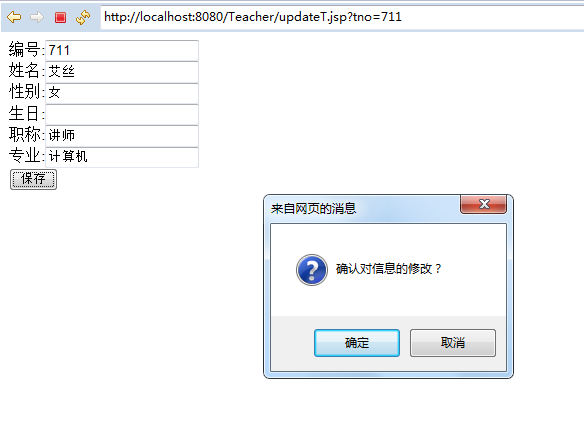
<form action="SaveT" method="post">

编号:<input type="text" name="tno" readonly="readonly" value="<%=tno %>"><br>

姓名:<input type="text" name="tname" value="<%=tname %>"><br>

性别:<input type="text" name="tsex" value="<%=tsex%>"><br>

生日:<input type="text" name="tbirthday" value="<%=rs.getDate("tbirthday")==null?"":sdf.format(rs.getDate("tbirthday")) %>"><br>

职称:<input type="text" name="prof" value="<%=prof==null?"":prof%>"><br>

专业:<input type="text" name="depart" value="<%=depart %>"><br>

<input type="hidden" name="isupdate" value="1">

<a onClick="delcfm()"><input type="submit" value="保存"></a>

</form>

<%

                rs.close();

            }

            else

            {

                out.print("未查询到数据");

            }

            p.close();

            conn.close();

            } catch (Exception e) {

                // TODO 自动生成的 catch 块

                e.printStackTrace();

            }

}

else

{

     out.print("请正确访问");

}

}catch(Exception e)

{

    }

%>
<script language="javascript">
function delcfm() {
if (!confirm("确认对信息的修改?")) {
window.event.returnValue = false;
}
}
</script>
</body>

</html>
package teacher;

import java.sql.*;

import java.text.SimpleDateFormat;

import java.io.IOException;

import javax.servlet.ServletException;

import javax.servlet.http.HttpServlet;

import javax.servlet.http.HttpServletRequest;

import javax.servlet.http.HttpServletResponse;

import oracle.net.aso.e;

public class SaveT extends HttpServlet {

    private static final long serialVersionUID = 1L;

    public SaveT() {

        super();

    }

    protected void doGet(HttpServletRequest request, HttpServletResponse response) throws ServletException, IOException {

        String tno=request.getParameter("tno");

        String tname=request.getParameter("tname");

        String tsex=request.getParameter("tsex");

        String tbirthday=request.getParameter("tbirthday");

        String prof=request.getParameter("prof");

        String depart=request.getParameter("depart");

        String isupdate=request.getParameter("isupdate");

        if(tno!=null&& tno.trim().length()!=0)

        {

            try

            {

            Class.forName("oracle.jdbc.driver.OracleDriver");

            Connection conn = DriverManager.getConnection("jdbc:oracle:thin:@localhost:1521:orcl", "test", "5211314");

            if(tbirthday.length()!=0)

            {

            PreparedStatement pst=conn.prepareStatement(

                    "insert into TEACHER (tname,tsex,tbirthday,prof,depart,tno)"+

                         "values(?,?,?,?,?,?)");

            if(isupdate!=null&& isupdate.equals("1"))

            {

                pst = conn.prepareStatement(

                        "update TEACHER set tname=?,tsex=?,tbirthday=?,prof=?,depart=? where tno=?");

            }

                SimpleDateFormat adf = new SimpleDateFormat("yyyy-MM-dd");

                java.util.Date bir= adf.parse(tbirthday);

                Date sqlBir = new Date(bir.getTime());

                pst.setString(6, tno);

                pst.setString(1, tname);

                pst.setString(2, tsex);

                pst.setDate(3, sqlBir);

                pst.setString(4, prof);

                pst.setString(5, depart);

                pst.executeUpdate();

                pst.close();

            }

            else

            {

                PreparedStatement pst=conn.prepareStatement(

                        "insert into TEACHER (tname,tsex,prof,depart,tno)"+

                             "values(?,?,?,?,?)");

                if(isupdate!=null&& isupdate.equals("1"))

                {

                    pst = conn.prepareStatement(

                            "update TEACHER set tname=?,tsex=?,prof=?,depart=? where tno=?");

                }

                pst.setString(5, tno);

                pst.setString(1, tname);

                pst.setString(2, tsex);

                pst.setString(3, prof);

                pst.setString(4, depart);

                pst.executeUpdate();

                pst.close();

            }

            conn.close();

            response.getWriter().write("保存成功");

            response.setHeader("refresh", "3;URL=teacherChart.jsp");

            } catch (Exception e) {

                e.printStackTrace();

                response.getWriter().write("保存失败");

                response.setHeader("refresh", "3;URL=teacherChart.jsp");

            }

        }

        else

        {

            response.getWriter().write("请正确提交数据");

            response.setHeader("refresh", "3;URL=teacherChart.jsp");

        }

    }

    protected void doPost(HttpServletRequest request, HttpServletResponse response) throws ServletException, IOException {

        // TODO Auto-generated method stub

        doGet(request, response);

    }

}
package teacher;

import java.sql.*;

import java.io.IOException;

import javax.servlet.ServletException;

import javax.servlet.http.HttpServlet;

import javax.servlet.http.HttpServletRequest;

import javax.servlet.http.HttpServletResponse;

public class DeleteT extends HttpServlet {

    private static final long serialVersionUID = 1L;

    public DeleteT() {

        super();

        // TODO Auto-generated constructor stub

    }

    protected void doGet(HttpServletRequest request, HttpServletResponse response) throws ServletException, IOException {

        String tno=request.getParameter("tno");

        if(tno!=null&& tno.trim().length()!=0)

        {

            try

            {

            Class.forName("oracle.jdbc.driver.OracleDriver");

            Connection conn = DriverManager.getConnection("jdbc:oracle:thin:@localhost:1521:orcl", "test", "5211314");

            PreparedStatement pst=conn.prepareStatement(

                    "delete TEACHER where "+"tno=?");

            pst.setString(1, tno);

            pst.executeUpdate();

            pst.close();

            conn.close();

            response.getWriter().write("删除成功");

            response.setHeader("refresh", "3;URL=teacherChart.jsp");

            } catch (Exception e) {

                // TODO 自动生成的 catch 块

                e.printStackTrace();

                response.getWriter().write("删除失败");

                response.setHeader("refresh", "3;URL=teacherChart.jsp");

            }

        }

        else

        {

            response.getWriter().write("请正确提交数据");

            response.setHeader("refresh", "3;URL=teacherChart.jsp");

        }

    }

    protected void doPost(HttpServletRequest request, HttpServletResponse response) throws ServletException, IOException {

        // TODO Auto-generated method stub

        doGet(request, response);

    }

}

对teacher表进行增加,删除,修改的更多相关文章
- AutoCad 二次开发 .net 之层表的增加 删除 修改图层颜色 遍历 设置当前层
AutoCad 二次开发 .net 之层表的增加 删除 修改图层颜色 遍历 设置当前层 AutoCad 二次开发 .net 之层表的增加 删除 修改图层颜色 遍历 设置当前层我理解的图层的作用大概是把 ...
- 在Javascript操作JSON对象,增加 删除 修改
在Javascript操作JSON对象,增加删除修改全有的,详情见代码 <script type="text/javascript"> var jsonObj2 = { ...
- Nodejs之MEAN栈开发(九)---- 用户评论的增加/删除/修改
由于工作中做实时通信的项目,需要用到Nodejs做通讯转接功能,刚开始接触,很多都不懂,于是我和同事就准备去学习nodejs,结合nodejs之MEAN栈实战书籍<Getting.MEAN.wi ...
- [JavaWeb基础] 004.用JSP + SERVLET 进行简单的增加删除修改
上一次的文章,我们讲解了如何用JAVA访问MySql数据库,对数据进行增加删除修改查询.那么这次我们把具体的页面的数据库操作结合在一起,进行一次简单的学生信息操作案例. 首先我们创建一个专门用于学生管 ...
- MySQL使用SQL操作数据表的增加、修改和删除
表的修改和删除 修改 -- 修改表名称 -- ALTER TABLE 旧表名 RENAME AS 新表名 ALTER TABLE test RENAME AS test1 -- 增加表字段 -- AL ...
- Sql增加,删除,修改列
1. 查看约束条件 - MySQL: SELECT * FROM information_schema.`TABLE_CONSTRAINTS` where table_name = 'book'; - ...
- 建表/修改表名/增加删除字段(MySql)
修改表名:alter table 旧表名 rename 新表名; 删除字段:alter table 表名 drop 字段名; 增加字段:alter table 表名 add 字段名 字段类型 [def ...
- 在oracle表中增加、修改、删除字段,表的重命名,字段顺序调整
增加字段语法:alter table tablename add (column datatype [default value][null/not null],….); 说明:alter table ...
- MySQL中的表中增加删除字段
1.增加一个字段alter table user表 add COLUMN new1字段 VARCHAR(20) NOT NULL DEFAULT 0; //增加一个字段,VARCHERA 20 , ...
随机推荐
- iOS JavaScriptCore与H5交互时出现异常提示
在利用JavaScriptCore与H5交互时出现异常提示: This application is modifying the autolayout engine from a background ...
- Sublime WiFi真机同步和WiFi真机预览使用说明
概述WiFi真机同步: 通过在Sublime中建立调试服务,接收真机设备主动连接调试的方式,配合apploader及自定义loader,为开发者提供在局域网内通过WiFi实现应用快速真机同步和实时预览 ...
- 通过pustil模块取pid及对应的pidname
通过pustil模块取pid及对应的pidname import psutil import json def getpid(): reslut = psutil.pids() return resl ...
- Windows Server 2008 R2 组策略基本设置
域控组策略基本设置 标注: 组策略计算配置:系统需要重启才生效 组策略用户配置:系统注销即可生效 一. 域用户登录桌面后自动 ...
- sql服务器启动不了问题
问题:the the service mysql56 failed the most recent status change request with the messagethe service ...
- git/github学习笔记
郑重提示,本文来自这里,如果喜欢,请关注原作者. 1. git 版本控制系统 相比CVS\SVN优势: - 支持离线开发,离线Repository- 强大的分支功能,适合多个独立开发者协作- 速度块 ...
- OpenERP 使用与开发笔记(一)
一直关注OpenERP,但一直未真正使用.最近一些数据想规范管理,免得使和EXCEL与WORD等到处找,所以想到OpenERP的自定义功能比较好,就再次找来相关资料重新拾掇起来.在这过程中,发现了许多 ...
- GetKeyboardType获取键盘类型(通过键盘可初步判断用户使用的是台式电脑还是笔记本电脑)
函数功能:该函数获取系统当前键盘的信息. int WINAPI GetKeyboardType( __in int nTypeFlag ); 参数说明:nTypeFlag:指定要获取的键盘信息的类型, ...
- 利用Python实现从百度下载图片到本地磁盘
import urllib.request import os import re url=r'http://image.baidu.com/search/index?tn=baiduimage&am ...
- 纯css的防止图片撑破页面的代码(图片自动缩放)
<!DOCTYPE html PUBLIC "-//W3C//DTD XHTML 1.0 Transitional//EN" "http://www.w3.org/ ...