
DWR实现扫一扫登录功能
前言
《DWR实现后台推送消息到Web页面》一文中已对DWR作了简介,并列出了集成步骤。本文中再一次使用到DWR,用以实现扫一扫登录功能。
业务场景
web端首页点击“登陆”按钮,弹出二维码,用户进入企业号应用后点击“扫一扫”按钮,扫描二维码后web端自动跳转到已登录界面。
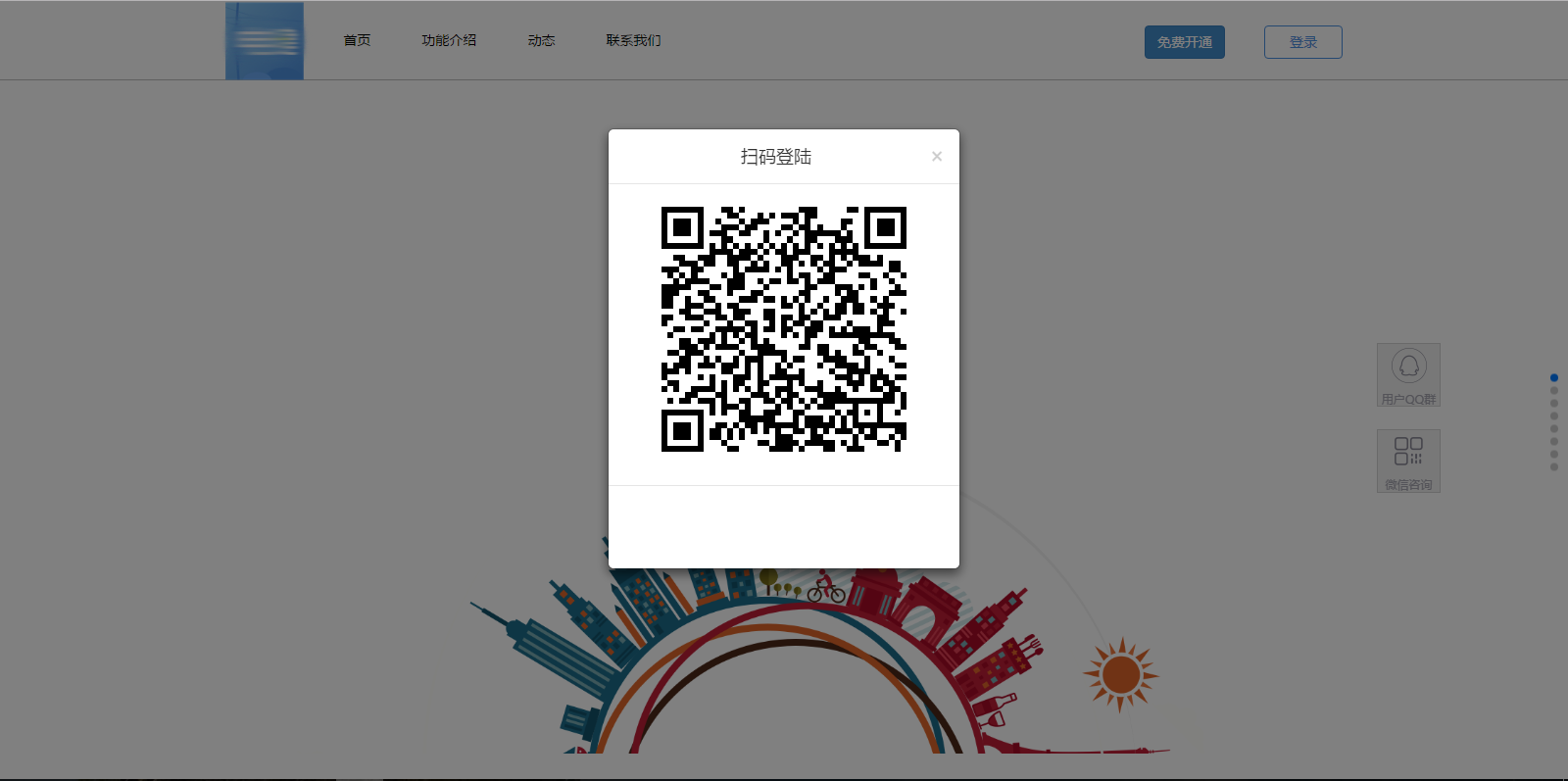

主要技术
- DWR —— 后台调用前端JS实现comet技术
- 微信JSSDK —— 实现扫一扫功能
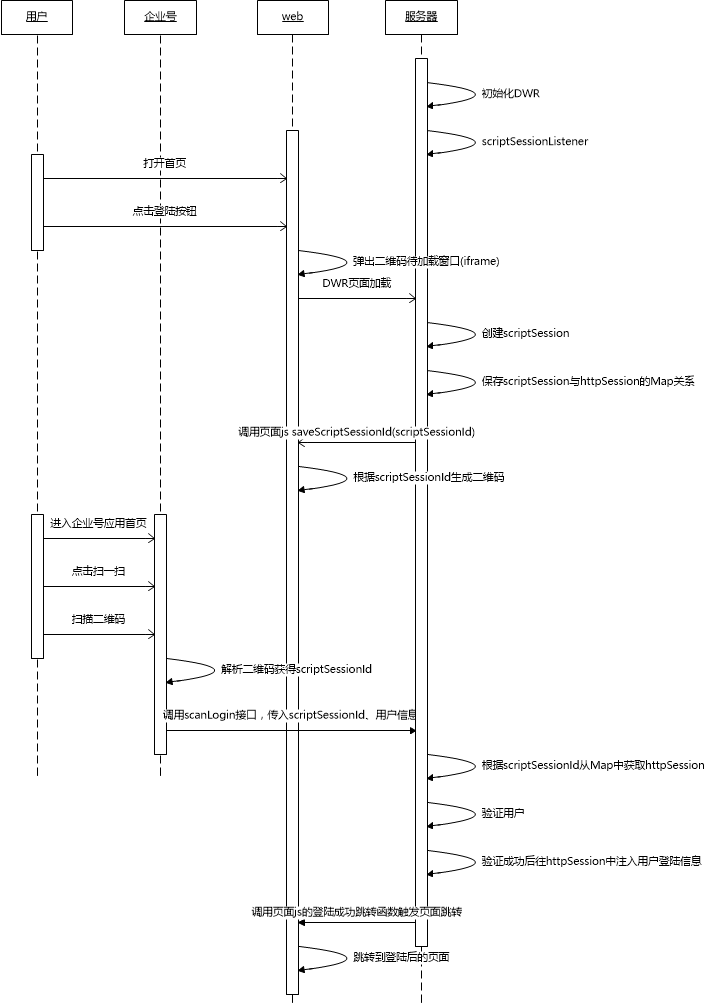
主要流程
备注
- 为了达到点击登陆按钮弹出二维码窗口时即刷新二维码,所以选择用iframe装载二维码;
- 为了控制指定浏览器跳转页面,所以后台必须要记录浏览器与服务器之间的httpSession实例;
- DWR自身不保存scriptSession和httpSession的关系,所以需要自己保存其对应关系;
实现步骤
1、导入jar包(若用maven则添加依赖关系)
地址: http://directwebremoting.org/dwr/downloads/index.html
2、编写ScriptSessionListener
public class DWRScriptSessionListener implements ScriptSessionListener {

    //维护一个Map key为ScriptSession的Id, value为HttpSession对象

    public static final Map<String, Map> httpMap = new HashMap<String, Map>();

    /**

     * ScriptSession创建事件

     */

    public void sessionCreated(ScriptSessionEvent event) {

      WebContext webContext = WebContextFactory.get();

      HttpSession httpSession = webContext.getSession();

      ScriptSession scriptSession = event.getSession();

      Map httpMapObj = new HashMap<>();

      httpMapObj.put("HttpSession", httpSession);

      httpMapObj.put("HttpServletRequest", webContext.getHttpServletRequest());

      httpMapObj.put("HttpServletResponse", webContext.getHttpServletResponse());

      httpMap.put(scriptSession.getId(), httpMapObj);

      System.out.println("httpSession: " + httpSession.getId() + " scriptSession: "

            + scriptSession.getId() + "is created!");

      //创建连接后触发前端保存ScriptSessionId

      DwrUtil t = new DwrUtil();

      List args = new ArrayList();

      args.add(scriptSession.getId());

      t.invokeJavascriptFunctionBySessionId(scriptSession.getId(), "saveScriptSessionId", args);

   }

    /**

     * ScriptSession销毁事件

     */

    public void sessionDestroyed(ScriptSessionEvent event) {

      ScriptSession scriptSession = event.getSession();

      Map httpMapObj = httpMap.remove(scriptSession.getId()); // 移除scriptSession

      HttpSession httpSession = (HttpSession)httpMapObj.get("HttpSession");

      // httpMap.remove(scriptSession.getId()); //移除scriptSession

      System. out.println( "httpSession: " + httpSession.getId() + " scriptSession: " + scriptSession.getId() + "is destroyed!");

    }

}
3、编写ScriptSessionManager
public class DWRScriptSessionManager extends DefaultScriptSessionManager {

   public DWRScriptSessionManager() {

      // 绑定一个ScriptSession增加销毁事件的监听器

      this.addScriptSessionListener(new DWRScriptSessionListener());

      System.out.println("bind DWRScriptSessionListener");

   }

}
4、在web.xml中增加ScriptSessionManager 的配置
<!-- DWR -->

<servlet>

    <servlet-name>dwr-invoker</servlet-name>

    <servlet-class>

        org.directwebremoting.servlet.DwrServlet

    </servlet-class>

    <init-param>

        <param-name>pollAndCometEnabled</param-name>

        <param-value>true</param-value>

    </init-param>

    <init-param>

         <param-name >org.directwebremoting.extend.ScriptSessionManager </param-name>

         <param-value >com.gzkit.service.dwr.DWRScriptSessionManager </param-value>

   </init-param>

</servlet>

<servlet-mapping>

    <servlet-name>dwr-invoker</servlet-name>

    <url-pattern>/dwr/*</url-pattern>

</servlet-mapping>
5、业务代码
/**

 * 扫一扫登录

 * @author:LiuZhuoJun

 * @Description: 如果登录成功则触发前端页面跳转,如果不成功则返回错误信息

 * @param account 用户账号

 * @param scriptSessionId

 * @return

 * @date:2016年11月4日

 */

@RequestMapping(value = "scanLogin")

@ResponseBody

public JkReturnJson scanLogin(String account, String scriptSessionId) {

   JkReturnJson jkReturnJson = new JkReturnJson();

   if(Utils.isBlank(account) || Utils.isBlank(scriptSessionId)){

      jkReturnJson.setStatusCode(ConstantsErrCode.JK_PARAM_ERR);

      jkReturnJson.setStatusMsg(ConstantsErrCode.JK_PARAM_ERR_MSG);

      jkReturnJson.setUserMsg("account、scriptSessionId字段为必需");

      return jkReturnJson;

   }

   /* 从httpMap中获取对应的httpSession */

   Map httpMapObj = DWRScriptSessionListener.httpMap.get(scriptSessionId);

   if(httpMapObj == null){

      jkReturnJson.setStatusCode(ConstantsErrCode.BUSSINESS_ERR);

      jkReturnJson.setStatusMsg("httpSession不存在");

      jkReturnJson.setUserMsg("二维码已失效,请刷新页面");

      return jkReturnJson;

   }

   HttpSession httpSession = (HttpSession)httpMapObj.get("HttpSession");

   HttpServletRequest httpServletRequest = (HttpServletRequest)httpMapObj.get("HttpServletRequest");

   /* 根据传入的account获取对应用户对象 */

   /* 此处代码省略 */

   /* 将用户对象设入httpSession中 */

   httpSession.setAttribute(ResourceUtil.LOCAL_CLINET_USER, user);

   /* 登录成功触发前端跳转页面 */

   DwrUtil t =  new DwrUtil();

   List args = new ArrayList();

   t.invokeJavascriptFunctionBySessionId(scriptSessionId,"loginSuccess",args);

   jkReturnJson.setUserMsg("登录成功");

   return jkReturnJson;

}
6、web首页
6.1 首页二维码iframe结构
<!-- 二维码模态框 -->
<div class="modal fade" id="qrcodeModal" tabindex="-1" role="dialog" aria-labelledby="myModalLabel" aria-hidden="true">
<div class="modal-dialog" style="top: 100px; width:360px" >
<div class="modal-content" style="width: 360px; height:450px">
<div class="modal-header">
<button type="button" class="close" data-dismiss="modal"><span aria-hidden="true">×</span><span class="sr-only">Close</span></button>
<h4 class="modal-title text-center " id="myModalLabel">扫码登陆</h4>
</div>
<div class="modal-body">
<iframe id="qrcodeframe" width="100%" height="270px" frameborder="0"></iframe>
<!-- <div class="center-block" style="width:250px;height:250px"></div> -->
<!-- <img src="webpage/homePage/image/erweima.jpg" class="center-block" alt="Responsive image">-->
</div>
<div class="modal-footer">
<p class="text-center">请关注电建宝应用并使用"扫一扫"登陆电建宝管理后台</p>
</div>
</div>
</div>
</div>
6.2 二维码页面
注意要引入/dwr/engine.js和/dwr/util.js才能实现页面与后台的DWR连接。(js是动态生成的,无需导入js文件)
<body>

<div id="qrcode" style="margin: auto auto; width: 250px;"></div>

<script type='text/javascript' src='/dwr/engine.js'></script>

<script type='text/javascript' src='/dwr/util.js'></script>

<script type="text/javascript" src="/plug-in/mobile/third/qrcode/jquery.qrcode.min.js"></script>

<script type="text/javascript" src="/webpage/homePage/js/qrcode.js"></script>

</body>
6.3 二维码页面js
$(function(){

    initDwr();

    //设置每隔5分钟刷新二维码

    setInterval("reloadPage()",5*60*1000);

});

//初始化dwr

function initDwr(){

    dwr.engine.setActiveReverseAjax(true);

}

//保存scriptSessionId

function saveScriptSessionId(scriptSessionId){

   $("#qrcode").html("");

   $("#qrcode").qrcode({width: 250,height: 250,text: scriptSessionId});

}

//登录成功操作

function loginSuccess(){

   window.parent.location.href = "/loginController.do?login";

}

//刷新页面

function reloadPage(){

   location.reload();

}
7、企业号调用微信SDK实现扫一扫功能
代码略
相关链接:
DWR官网
http://directwebremoting.org/dwr/
DWR入门讲解(前端)
http://directwebremoting.org/dwr/introduction/getting-started.html
DWR入门讲解(后台)
http://directwebremoting.org/dwr/documentation/server/javaapi.html
DWR下载地址
http://directwebremoting.org/dwr/downloads/index.html
DWR JavaDoc
http://directwebremoting.org/dwr/javadoc/
微信JSSDK
http://qydev.weixin.qq.com/wiki/index.php?title=%E5%BE%AE%E4%BF%A1JS-SDK%E6%8E%A5%E5%8F%A3
附录一 DwrUtil.java
public class DwrUtil {

   /**

    * 调用页面javascript函数

    * @param functionName

    * @param args

    */

   public void invokeJavascriptFunction (String _funcName, List _args){

      final String funcName = _funcName;

      final List args = _args;

      Browser.withAllSessions(new Runnable(){

            private ScriptBuffer script = new ScriptBuffer();

            public void run(){

               //拼接javascript

               script = script.appendScript(funcName+"(");

               for(int i=0; i<args.size(); i++){

                  if(i != 0){

                     script = script.appendScript(",");

                  }

                  script = script.appendData(args.get(i));

               }

               script.appendScript(")");

               //System.out.println(script.toString());

                Collection<ScriptSession> sessions = Browser.getTargetSessions();

                for (ScriptSession scriptSession : sessions){

                    scriptSession.addScript(script);

                }

            }

        });

   }

   public void invokeJavascriptFunctionBySessionId (String sessionId, String _funcName, List _args){

      final String funcName = _funcName;

      final List args = _args;

      Browser.withSession(sessionId, new Runnable(){

            private ScriptBuffer script = new ScriptBuffer();

            public void run(){

               //拼接javascript

               script = script.appendScript(funcName+"(");

               for(int i=0; i<args.size(); i++){

                  if(i != 0){

                     script = script.appendScript(",");

                  }

                  script = script.appendData(args.get(i));

               }

               script.appendScript(")");

               //System.out.println(script.toString());

               Collection<ScriptSession> sessions = Browser.getTargetSessions();

                for (ScriptSession scriptSession : sessions){

                    scriptSession.addScript(script);

                }

            }

        });

   }

}
附录二 服务器使用nginx导致DWR的js无法加载的解决办法
nginx默认是开启代理缓冲的,而DWR的js是动态生成的,无法缓冲。要解决dwr js加载问题需在nginx配置中增加以下语句
proxy_buffering off;
DWR实现扫一扫登录功能的更多相关文章
- 实现基于dotnetcore的扫一扫登录功能
第一次写博客,前几天看到.netcore的认证,就心血来潮想实现一下基于netcore的一个扫一扫的功能,实现思路构思大概是web端通过cookie认证进行授权,手机端通过jwt授权,web端登录界面 ...
- 微信开放平台PC端扫码登录功能个人总结
最近公司给我安排一个微信登录的功能,需求是这样的: 1.登录授权 点击二维码图标后,登录界面切换为如下样式(二维码),微信扫描二维码并授权,即可成功登录: 若当前账号未绑定微信账号,扫描后提示“ ...
- .Net微信网页开发之使用微信JS-SDK调用微信扫一扫功能
前言: 之前有个项目需要调用微信扫描二维码的功能,通过调用微信扫码二维码功能,然后去获取到系统中生成的二维码信息.正好微信JS-SDK提供了调用微信扫一扫的功能接口,下面让我们来看看是如何实现的吧. ...
- C#开发微信门户及应用(15)-微信菜单增加扫一扫、发图片、发地理位置功能
前面介绍了很多篇关于使用C#开发微信门户及应用的文章,基本上把当时微信能做的接口都封装差不多了,微信框架也积累了不少模块和用户,最近发现微信公众平台增加了不少内容,特别是在自定义菜单里面增加了扫一扫. ...
- 微信JSSDK使用步骤(用于在微信浏览器中自定义分享,分享到朋友圈,拍照,扫一扫等功能)
一.使用JSSDK需要一个公众号(需要认证!): (1).把自己项目的服务器地址输入. (2).把MP_verify_m7Qp93BAuIGDWRVO.txt 文件下载下来,放到该服务器域名指向的根 ...
- 调用微信的扫一扫功能详解说明---(java 排坑版)
最近碰到了这么一个需求,说是在前端页面调用手机本地的相机,扫描二维码这么一个需求,对于我一个后端来说, 这实在是难,难于上青天,但是决不能说一个不字.我说可以使用微信的扫码工具吗,这样可以方便一点,. ...
- vue 实现 扫二维码 功能
前段时间一直在研究,如何通过 vue 调用 相机 实现 扫一扫的功能,但是查看文档发现,需要获取 getUserMedia 的属性值,但存在兼容性问题. 退而求其次,通过 h5plus 来实现. 1. ...
- 调用微信扫一扫功能,踩坑'invalid signature'
在vue项目中,调用微信扫一扫功能,在安卓系统下完全正常,ios系统下却报错'invalid signature'的错误,这可能令许多小伙伴困惑,经过查询大量博客相关资料,才找到了解决的方法. 原因: ...
- 记录vue用 html5+做移动APP 用barcode做扫一扫功能时安卓 的bug(黑屏、错位等等)和解决方法
最近做项目时,要用到扫一扫二维码的功能,在html5+里面有提供barcode功能,于是照过来用了, 写的代码如下 : 扫码页面: <style lang="less" sc ...
随机推荐
- C++ 基础知识复习(一)
数据类型,常量与变量部分:(发现有些点竟然这么多年第一次发现) C++基本数据类型有哪些: 答:整型,浮点型,void型. 注:其他各种数据类型均是这三种类型的扩充,另外void类型在实际程序中经常用 ...
- Power BI for Office 365(六)Power Map简介
如果说Power BI中最给力的功能是什么,我觉得是Power Map.Power Map第一次是出现在SQL Server 2014的新特性里被提及,前身就是GeoFlow.在Power Map下可 ...
- flume+kafka+hbase+ELK
一.架构方案如下图: 二.各个组件的安装方案如下: 1).zookeeper+kafka http://www.cnblogs.com/super-d2/p/4534323.html 2)hbase ...
- partial class的使用范围
Partial Class,部分类 或者分布类.顾名思义,就是将一个类分成多个部分.比如说:一个类中有3个方法,在VS 2005将该类中3个方法分别存放在3个不同的.cs文件中. 这样做的好处: 1. ...
- [参考]wget下载整站
wget -m -e robots=off -U "Mozilla/5.0 (Windows; U; Windows NT 5.1; zh-CN; rv:1.9.1.6) Gecko/200 ...
- C# 五、谈扩展方法的理解
http://www.cnblogs.com/zhaopei/p/5678842.html
- python 线程之 threading(四)
python 线程之 threading(三) http://www.cnblogs.com/someoneHan/p/6213100.html中对Event做了简单的介绍. 但是如果线程打算一遍一遍 ...
- windows查看端口占用情况
1,查看指定端口被哪个进程占用. >netstat -ano|findstr 8008 TCP 127.0.0.1:8083 0.0.0.0:0 ...
- js实现找质因数
实现最一个整数的质因数的拆分,例如:90可以才分为2*3*3*5,具体代码如下: <script> var num = prompt('请输入一个整数:','90'); var regex ...
- C#连接Oracle数据库(直接引用dll使用)
转载至:http://www.cnblogs.com/gguozhenqian/p/4262813.html 项目中有个功能需要从一台Oracle数据库获取数据,本以为是很简单的事情,直接将原来的Sq ...