
mybatis 与 日志
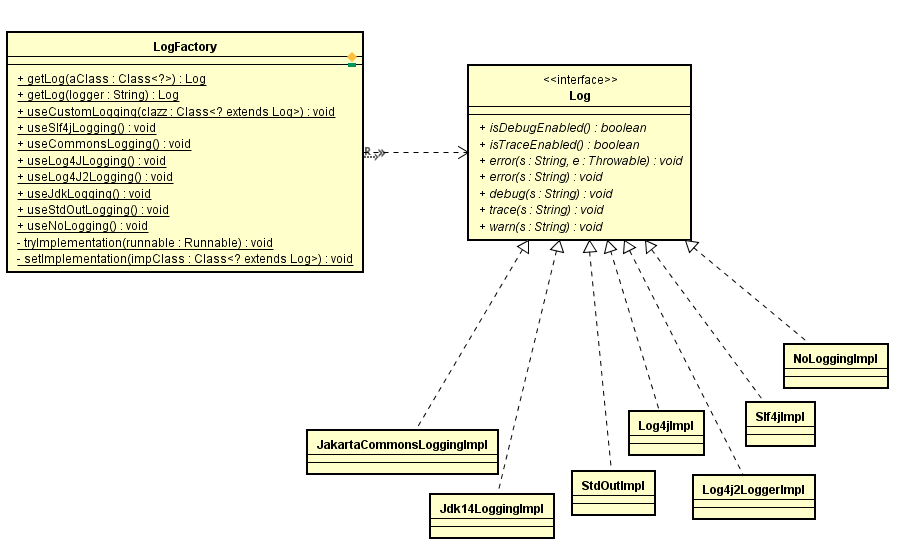
如上图所示,mybatis默认支持7种日志记录的方式,也可以自己实现Log接口,然后将实现类通过LogFactory注入到日志工厂中。
LogFactory是日志模块的入口,外层通过getLog获取Log对象,然后调用Log接口方法进行日志的记录,代码示例:
private static final Log log = LogFactory.getLog(BaseExecutor.class);

...

@Override

  public void close(boolean forceRollback) {

    try {

      try {

        rollback(forceRollback);

      } finally {

        if (transaction != null) {

          transaction.close();

        }

      }

    } catch (SQLException e) {

      // Ignore.  There's nothing that can be done at this point.

      log.warn("Unexpected exception on closing transaction.  Cause: " + e);

    } finally {

      transaction = null;

      deferredLoads = null;

      localCache = null;

      localOutputParameterCache = null;

      closed = true;

    }

  }
LogFactory的初始化过程:
  static {

    tryImplementation(new Runnable() {

      @Override

      public void run() {

        useSlf4jLogging();

      }

    });

    tryImplementation(new Runnable() {

      @Override

      public void run() {

        useCommonsLogging();

      }

    });

    tryImplementation(new Runnable() {

      @Override

      public void run() {

        useLog4J2Logging();

      }

    });

    tryImplementation(new Runnable() {

      @Override

      public void run() {

        useLog4JLogging();

      }

    });

    tryImplementation(new Runnable() {

      @Override

      public void run() {

        useJdkLogging();

      }

    });

    tryImplementation(new Runnable() {

      @Override

      public void run() {

        useNoLogging();

      }

    });

  }
  private static void tryImplementation(Runnable runnable) {

    if (logConstructor == null) {

      try {

        runnable.run();

      } catch (Throwable t) {

        // ignore

      }

    }

  }
 private static void setImplementation(Class<? extends Log> implClass) {

    try {

      Constructor<? extends Log> candidate = implClass.getConstructor(String.class);

      Log log = candidate.newInstance(LogFactory.class.getName());

      if (log.isDebugEnabled()) {

        log.debug("Logging initialized using '" + implClass + "' adapter.");

      }

      logConstructor = candidate;

    } catch (Throwable t) {

      throw new LogException("Error setting Log implementation.  Cause: " + t, t);

    }

  }
按照顺序依次去尝试着实例化各个实例(tryImplementation方法),slf4j -> common-logging -> log4j2 -> log4j -> jdk -> nologging,当某个Log实例化成功后,就会停止下面的初始化。
实例化是setImplementation方法做的,当所有日志都没有做配置或者缺少包的话就会失败,所以默认的日志是NoLoggingImpl。
我们可以在mybatis配置文件中指定具体的配置类或者自定义配置类。
我们可以在代码中调用LogFactory的方法来手动指定配置类,但是由于mybatis在初始化配置的时候将组建的各个配置都初始化好存放到configuration对象中,包括log。所以当mybatis初始化完成之后再去调用LogFactory的方法更改log对于configuration是没有影响的,所以,我们应该在SqlSessionFactoryBuilder开始之前对LogFactory操作,下面是使用代码配置成控制台log:
public class TestLog {

    public static void main(String[] args) throws IOException {

        Reader reader = Resources.getResourceAsReader("mybatis-config.xml");

        LogFactory.useStdOutLogging();

        SqlSessionFactory factory = new SqlSessionFactoryBuilder().build(reader);

        SqlSession session = factory.openSession();

        List<Gscope> result = session.selectList("getGscopes");

        session.close();

        System.out.println(result);

    }

}
logging包还有个重要的组件,负责对JDBC对象拦截和日志记录:
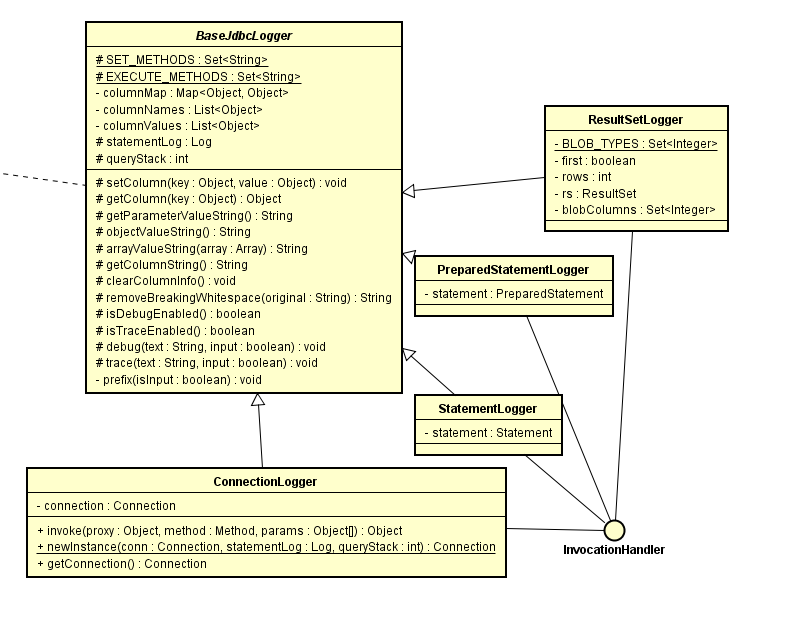
其中,基类BaseJdbcLogger实现了一些工具类,并封装了column,它的4个子类ConnectionLogger,StatementLogger,PreparedStatementLogger和ResultLogger实现了InvacationHandler接口,作为JDBC对象Connection,Statement,ResultSet的代理,其中,StatementLogger和PreparedStatementLogger在ConnectionLogger中拦截statement方法并返回代理对象,ResultLogger在StatementLogger和PreparedStatementLogger中拦截execute并返回代理对象,
而ConnectionLogger是在Executor中创建的代理:
BaseExecutor.java
  protected Connection getConnection(Log statementLog) throws SQLException {

    Connection connection = transaction.getConnection();

    if (statementLog.isDebugEnabled()) {

      return ConnectionLogger.newInstance(connection, statementLog, queryStack);

    } else {

      return connection;

    }

  }
上例中的控制台打印的log如下
Logging initialized using 'class org.apache.ibatis.logging.stdout.StdOutImpl' adapter.

PooledDataSource forcefully closed/removed all connections.

PooledDataSource forcefully closed/removed all connections.

PooledDataSource forcefully closed/removed all connections.

PooledDataSource forcefully closed/removed all connections.

Opening JDBC Connection

Tue Jan 03 23:54:04 CST 2017 WARN: Establishing SSL connection without server's identity verification is not recommended. According to MySQL 5.5.45+, 5.6.26+ and 5.7.6+ requirements SSL connection must be established by default if explicit option isn't set. For compliance with existing applications not using SSL the verifyServerCertificate property is set to 'false'. You need either to explicitly disable SSL by setting useSSL=false, or set useSSL=true and provide truststore for server certificate verification.

Created connection 1635546341.

Setting autocommit to false on JDBC Connection [com.mysql.jdbc.JDBC4Connection@617c74e5]

==>  Preparing: select * from gscope;

==> Parameters:

<==    Columns: sid, id, code, name, pinyin, first_pinyin, level, parent_id, alias, orderby, lng, lat, show_in_web

<==        Row: 1, 22, TJ , 天津, tianji, tj, 1, 0, 天津, 1, 0, 0, 1

...省略...

<==      Total: 133

Resetting autocommit to true on JDBC Connection [com.mysql.jdbc.JDBC4Connection@617c74e5]

Closing JDBC Connection [com.mysql.jdbc.JDBC4Connection@617c74e5]

Returned connection 1635546341 to pool.
mybatis 与 日志的更多相关文章
- Mybatis 的日志管理
Mybatis通过日志工厂提供日志信息,Mybatis内置的日志模版是log4j,commons.log,jdk log也可以通过slf4j简单日志模版结合log4j使用日志信息输出.具体选择哪个日志 ...
- MyBatis 显示日志
<!-- 全局配置 --> <settings> <setting name="cacheEnabled" value="false&quo ...
- SpringBoot打印MyBatis sql日志输出
SpringBoot打印MyBatis sql日志输出 默认情况下mybatis是不开启SQL日志输出,需要手动配置 方法一:(在mybatis整合在springboot框架的情况下) 只需要在配置文 ...
- Mybatis学习日志
在Mybatis深入学习的一周中,总感觉跟着师傅的视屏讲解什么都能懂,但实际自己操作的时候才发现自己一脸懵逼,不知道从何入手.但还好自己做了点笔记.在此记录一下自己浅度学习Mybatis遇到几个小问题 ...
- logback打印mybatis sql日志
近期在项目中调试sql,发现现有的配置 使用logback 无法打印出sql语句,原配置如下(修改为debug也不好使): <!--jdbc --><logger name=&quo ...
- Mybatis学习--日志
学习笔记,选自Mybatis官方中文文档:http://www.mybatis.org/mybatis-3/zh/logging.html Logging Mybatis内置的日志工厂提供日志功能,具 ...
- Mybatis之日志工厂
思考:我们在测试SQL的时候,要是能够在控制台输出 SQL 的话,是不是就能够有更快的排错效率? 如果一个 数据库相关的操作出现了问题,我们可以根据输出的SQL语句快速排查问题. 对于以往的开发过程, ...
- IDEA集成Mybatis打印日志插件
MyBatis Log Plugin :把 mybatis 输出的sql日志还原成完整的sql语句. 如下图所示,点击Tools>MyBatis Log Plugin 然后运行程序后,就会看到对 ...
- Mybatis学习-日志与分页
日志 为什么需要日志 如果一个数据库操作出现了异常,需要排错,那么日志就是最好的助手 Mybatis通过使用内置的日志工厂提供日志功能,有一下几种实现方式: SLF4J Apache Commons ...
随机推荐
- linux下查看进程状态
1.查看进程的启动时间和执行时间 使用 ps 命令 :#ps -A -opid,stime,etime,args $ ps -A -opid,stime,etime,args PID STIME EL ...
- .NET将图片Base64字符串还原为图片(jpg格式)并保存到本地
1. 了解Base64字符串的形式是:data:image/jpeg;base64,字符串 2 .Base64字符串转换为图片的代码实现: string[] str = base64Str.Split ...
- NSIS 让程序以管理权限运行
用NSIS向导,制作安装包,会生成NSI扩展的脚本文件,按F9,即可以生成安装文件. 如果要以管理员权限运行,直接在nsi脚本中,添加RequestExecutionLevel admin Name ...
- REVERSE-DAILY(5)-rev2
比较有意思的一道题目 提示是一个迷宫 链接: http://pan.baidu.com/s/1pLhINBt 密码:91bs 先运行程序,要求是输入字符串,错误会输出"Sorry you ...
- Could not find result map com.lrlz.weixin.dao.SysUserDAO.SysUser
<select id="selectByTimeCount" resultType="java.lang.Integer" parameterType=& ...
- 【Mocha.js 101】Mocha 入门指南
序 说到质量控制,不得不提起测试驱动开发(TDD)和行为驱动开发(BDD).随着敏捷软件开发的推行,软件质量控制的重担也逐渐从测试工程师转向了研发工程师.测试驱动也随之悄然而生,成为了敏捷开发中重要的 ...
- (转)如何处理iOS中照片的方向
如何处理iOS中照片的方向 31 May 2015 • 7 min. read • Comments 使用过iPhone或者iPad的朋友在拍照时不知是否遇到过这样的问题,将设备中的照片导出到Wind ...
- B - Dividing
Time Limit:1000MS Memory Limit:10000KB 64bit IO Format:%I64d & %I64u Submit Status Descr ...
- robotframework接口测试初探3
接口自动化环境搭建好了 requests接口测试模块也会用了 那么怎样整合到RF的框架呢? 写一个小例子
- MVCC PostgreSQL实现事务和多版本并发控制的精华
原创文章,同步发自作者个人博客,http://www.jasongj.com/sql/mvcc/ PostgreSQL针对ACID的实现机制 事务的实现原理可以解读为RDBMS采取何种技术确保事务的A ...