
JavaScript获取浏览器高度和宽度值
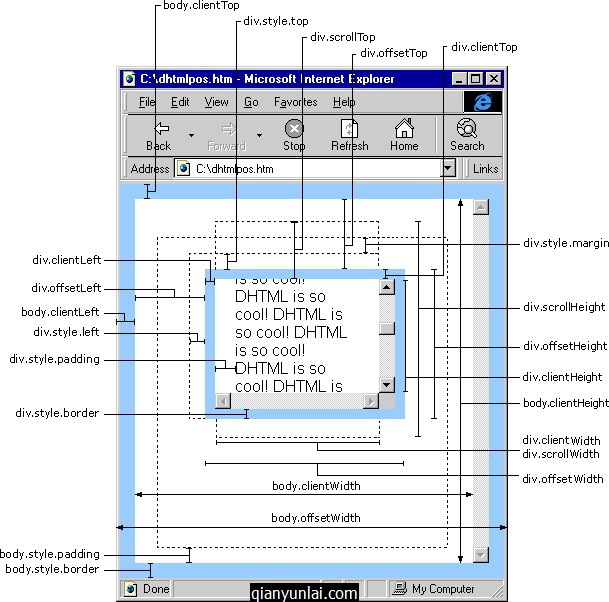
IE中:
document.body.clientWidth ==> *DY对象宽度
document.body.clientHeight ==> *DY对象高度
document.documentElement.clientWidth ==> 可见区域宽度
document.documentElement.clientHeight ==> 可见区域高度
FireFox中:
document.body.clientWidth ==> *DY对象宽度
document.body.clientHeight ==> *DY对象高度
document.documentElement.clientWidth ==> 可见区域宽度
document.documentElement.clientHeight ==> 可见区域高度
Opera中:
document.body.clientWidth ==> 可见区域宽度
document.body.clientHeight ==> 可见区域高度
document.documentElement.clientWidth ==> 页面对象宽度(即*DY对象宽度加上Margin宽)
document.documentElement.clientHeight ==> 页面对象高度(即*DY对象高度加上Margin高)
没有定义W3C的标准,则
IE为:
document.documentElement.clientWidth ==> 0
document.documentElement.clientHeight ==> 0
FireFox为:
document.documentElement.clientWidth ==> 页面对象宽度(即*DY对象宽度加上Margin宽)
document.documentElement.clientHeight ==> 页面对象高度(即*DY对象高度加上Margin高)
Opera为:
document.documentElement.clientWidth ==> 页面对象宽度(即*DY对象宽度加上Margin宽)
document.documentElement.clientHeight ==> 页面对象高度(即*DY对象高度加上Margin高)
网页可见区域宽: document.body.clientWidth
网页可见区域高: document.body.clientHeight
网页可见区域宽: document.body.offsetWidth (包括边线的宽)
网页可见区域高: document.body.offsetHeight (包括边线的高)
网页正文全文宽: document.body.scrollWidth
网页正文全文高: document.body.scrollHeight
网页被卷去的高: document.body.scrollTop
网页被卷去的左: document.body.scrollLeft
网页正文部分上: window.screenTop
网页正文部分左: window.screenLeft
屏幕分辨率的高: window.screen.height
屏幕分辨率的宽: window.screen.width
屏幕可用工作区高度: window.screen.availHeight
屏幕可用工作区宽度: window.screen.availWidth
HTML精确定位:scrollLeft、scrollWidth、clientWidth、offsetWidth
scrollWidth ==> 获取对象的滚动宽度
scrollHeight ==> 获取对象的滚动高度
scrollLeft ==> 设置或获取位于对象左边界和窗口中目前可见内容的最左端之间的距离(被卷去的左)
scrollTop ==> 设置或获取位于对象最顶端和窗口中可见内容的最顶端之间的距离(被卷去的高)
offsetLeft ==> 获取对象相对于版面或由 offsetParent 属性指定的父坐标的计算左侧位置
offsetTop ==> 获取对象相对于版面或由 offsetTop 属性指定的父坐标的计算顶端位置
offsetHeight ==> 获取对象相对于版面或由父坐标 offsetParent 属性指定的父坐标的高度
event.clientX ==> 相对文档的水平座标
event.clientY ==> 相对文档的垂直座标
event.offsetX ==> 相对容器的水平坐标
event.offsetY ==> 相对容器的垂直坐标
document.documentElement.scrollTop ==> 垂直方向滚动的值
event.clientX+document.documentElement.scrollTop ==> 相对文档的水平座标+垂直方向滚动的量
Jquery
alert($(window).height()); //浏览器当前窗口可视区域高度
alert($(document).height()); //浏览器当前窗口文档的高度
alert($(document.body).height()); //浏览器当前窗口文档body的高度
alert($(document.body).outerHeight(true)); //浏览器当前窗口文档body的总高度 包括border padding margin
alert($(window).width()); //浏览器当前窗口可视区域宽度
alert($(document).width()); //浏览器当前窗口文档对象宽度
alert($(document.body).width()); //浏览器当前窗口文档body的宽度
alert($(document.body).outerWidth(true)); //浏览器当前窗口文档body的总宽度 包括border padding margin
实现代码:
<!DOCTYPE html PUBLIC "-//W3C//DTD XHTML 1.0 Transitional//EN" "http://www.w3.org/TR/xhtml1/DTD/xhtml1-transitional.dtd">

<html xmlns="http://www.w3.org/1999/xhtml">

<head>

<meta http-equiv="content-type" content="text/html; charset=utf-8">

<title>请调整浏览器窗口</title>

</head>

<body>

<h2 align="center">请调整浏览器窗口大小</h2><hr/>

<p>1920*1200 </p>

<p>ie:55+24=79  1081  40</p>

<p>火狐:23+71+26=120 1040 40</p>

<p>谷歌:61 1099 40</p>

<form action="#" method="get" name="form1" id="form1">

<!--显示浏览器窗口的实际尺寸-->

浏览器窗口 的 实际高度: <input type="text" name="availHeight" size="4"/><br />

浏览器窗口 的 实际宽度: <input type="text" name="availWidth" size="4"/><br />

</form>

<script type="text/javascript">

var winWidth = 0;

var winHeight = 0;

//函数:获取尺寸

function findDimensions() {

    //获取窗口宽度

    if (window.innerWidth) {

        winWidth = window.innerWidth;

    } else if ((document.body) && (document.body.clientWidth)) {

        winWidth = document.body.clientWidth;

    }

    //获取窗口高度

    if (window.innerHeight) {

        winHeight = window.innerHeight;

    } else if ((document.body) && (document.body.clientHeight)) {

        winHeight = document.body.clientHeight;

    }

    //通过深入Document内部对body进行检测,获取窗口大小

    if (document.documentElement && document.documentElement.clientHeight && document.documentElement.clientWidth) {

        winHeight = document.documentElement.clientHeight;

        winWidth = document.documentElement.clientWidth;

    }

    //结果输出至两个文本框

    document.form1.availHeight.value = winHeight;

    document.form1.availWidth.value = winWidth;

}

findDimensions();

//调用函数,获取数值

window.onresize = findDimensions;

</script>

</body>

</html>
HTML 测试代码:
<!DOCTYPE html PUBLIC "-//W3C//DTD XHTML 1.0 Transitional//EN" "http://www.w3.org/TR/xhtml1/DTD/xhtml1-transitional.dtd">

<html xmlns="http://www.w3.org/1999/xhtml">

<head>

<meta http-equiv="Content-Type" content="text/html; charset=utf-8" />

<title>测试1</title>

<style type="text/css">

/* reset */

body, label,p{margin:0; padding:0;}

body{font:12px/1.0 Arial, "宋体"; color:#333;}

p{

    white-space: normal;

    word-break: break-all;

    word-wrap: break-word;

}

</style>

<script type="text/javascript">

function show(){

    var s = "";

    s += "网页可见区域宽度clientWidth:"+document.body.clientWidth;

    s += "\n网页可见区域高度clientHeight:"+document.body.clientHeight;

    s += "\n网页可见区域宽(body),包括border等(包括边线)offsetWidth:"+document.body.offsetWidth;

    s += "\n网页可见区域高(body),包括border等(包括边线)offsetHeight:"+document.body.offsetHeight;

    s += "\n网页正文全文宽,包括有滚动条时的未见区域scrollWidth:"+document.body.scrollWidth;

    s += "\n网页正文全文高,包括有滚动条时的未见区域scrollHeight:"+document.body.scrollHeight;

    s += "\n网页被卷去的Top(滚动条)scrollTop:"+document.body.scrollTop;

    s += "\n网页被卷去的Left(滚动条)scrollLeft:"+document.body.scrollLeft;

    s += "\n浏览器距离Top(screenTop):"+window.screenTop;

    s += "\n浏览器距离Left(screenLeft):"+window.screenLeft;

    s += "\n屏幕可用工作区域宽度screen.availWidth:"+window.screen.availWidth;

    s += "\n屏幕可用工作区域高度screen.availHeight:"+window.screen.availHeight;

    s += "\n屏幕分辨率宽度screen.width:"+window.screen.width;

    s += "\n屏幕分辨率高度screen.height:"+window.screen.height;

    alert(s);

}

</script>

</head>

<body style="margin:5px;padding:10px;border:15px solid #f00;">

<label>margin:5px; padding:10px; border:15px solid #f00;</label>

<p>w:-(5+15+15+5+17=57)  h:15*2+20*2+10*2+10*2+12*2=134</p>

<div style="width:2000px;height:1500px;margin:10px;padding:15px;border:20px solid #ddd;">

<p>width:2000px; height:1500px; margin:10px; padding:15px; border:20px solid #ddd;</p>

<a onclick="show()" href="#">点击</a>

</div>

</body>

</html>
JavaScript获取浏览器高度和宽度值的更多相关文章
- JavaScript获取浏览器高度和宽度值(documentElement,clientHeight,offsetHeight,scrollHeight,scrollTop,offsetParent,offsetY,innerHeight)
IE中: document.body.clientWidth ==> BODY对象宽度 document.body.clientHeight ==> BODY对象高度 document.d ...
- js获取浏览器高度和宽度值,尽量的考虑了多浏览器。
js获取浏览器高度和宽度值,尽量的考虑了多浏览器. IE中: document.body.clientWidth ==> BODY对象宽度 document.body.clientHeight ...
- 【转】js 获取浏览器高度和宽度值(多浏览器
原文地址:http://www.jb51.net/article/19844.htm js获取浏览器高度和宽度值,尽量的考虑了多浏览器. IE中: document.body.clientWidth ...
- js 获取浏览器高度和宽度值(多浏览器)(转)
IE中: document.body.clientWidth ==> BODY对象宽度 document.body.clientHeight ==> BODY对象高度 document.d ...
- js 获取浏览器高度和宽度值(多浏览器)
IE中: document.body.clientWidth ==> BODY对象宽度 document.body.clientHeight ==> BODY对象高度 document.d ...
- 关于JS中获取浏览器高度和宽度值的多种方法(多浏览器)
三种浏览器获取值方法 IE中: document.body.clientWidth ==> BODY对象宽度 document.body.clientHeight ==> BODY对象高度 ...
- [转]js 获取浏览器高度和宽度值(多浏览器)(js获取宽度高度大全)
IE中: document.body.clientWidth ==> BODY对象宽度 document.body.clientHeight ==> BODY对象高度 document.d ...
- javascript获取浏览器高度与宽度信息
网页可见区域宽:document.body.clientWidth网页可见区域高:document.body.clientHeight网页可见区域宽:document.body.offsetWidth ...
- 转:JS获取浏览器高度和宽度
发现一篇好文章,汇总到自己的网站上. IE中: document.body.clientWidth ==> BODY对象宽度 document.body.clientHeight ==> ...
随机推荐
- PackageManager使用
参考:http://www.linuxidc.com/Linux/2012-02/53072.htm Android系统为我们提供了很多服务管理类,包括ActivityManager.PowerMan ...
- javascript学习7
JavaScript Math(算数)对象 Math(算数)对象的作用是:执行常见的算数任务. 实例 round() 如何使用 round(). random() 如何使用 random() 来返回 ...
- Mina工作原理分析
Mina是Apache社区维护的一个开源的高性能IO框架,在业界内久经考验,广为使用.Mina与后来兴起的高性能IO新贵Netty一样,都是韩国人Trustin Lee的大作,二者的设计理念是极为相似 ...
- jQuery.ajax()的相关参数及使用
jQuery.ajax(),有很多项参数,小弟菜鸟级别,有时候想不起来,现在记录下来便于以后查看,也欢迎大神指正. 常用的几类,可以称为模板样式写法: $.ajax({ url: "url& ...
- C#指定时间和当前时间的相差的月份、天数
DateTime 类型有时间的 年月日时分秒等属性,但是获取两个DateTime的 相差月份,就需要自己写了: public static int GetSubMonth(DateTime speci ...
- 地图定位IOS8.0之前的定位
在ios8.0之前定位的步骤如下: 1.首先将我们的项目版本切换到7.0
- 【转载】[C#]枚举操作(从枚举中获取Description,根据Description获取枚举,将枚举转换为ArrayList)工具类
关键代码: using System; using System.Collections; using System.Collections.Generic; using System.Compone ...
- Mailbox unavailable. The server response was: 5.1.1 User unknown
昨晚至今早,在新的项目中,实现一个小功能,就是当有访问者浏览网页在留言簿留言时,系统把留言内容发送至某一个邮箱或是抄送指定的邮箱中. 使用以前能正常发送邮件的代码,但在新项目中,测试时,就是出现标题的 ...
- winform自定义日期控件,要求可以手动输入日期DatePicker
要求:文本框中能手动输入数字,向上箭头根据鼠标位置给年月日递增,向下箭头递减 一:页面加载时: private void FlatDatePicker_Load(object sender, Even ...
- 介绍开源的.net通信框架NetworkComms框架 源码分析(十)DOSProtection
原文网址: http://www.cnblogs.com/csdev Networkcomms 是一款C# 语言编写的TCP/UDP通信框架 作者是英国人 以前是收费的 目前作者已经开源 许可是 ...