
【转载】解决Windows 10 局域网内共享的问题
问题: 小米盒子,iPhone (OS 10.2) 无法访问 Win 1o共享
解决方案:
原文链接 http://www.dedoimedo.com/computers/windows-10-network-share-access.html
原文:
-----
Updated: February 18, 2015
Your problem might be as follows. You have recently upgraded your Windows 10 Preview to the new Build 9926, and all of a sudden, network shares, like other Windows machines you may have in your environment, are no longer accessible. Best of all, they worked fine right up until the upgrade.
I have outlined this issue in my review, and now, I'm sharing the promised tutorial that solves the problem. Get it? Sharing. I'm sharing a solution to a sharing problem. That's so damn witty. Now, follow me.
Symptom
This is what you see when you try to go to any \\something network share:
\\something is not accessible. You might not have permission to use this network resource. Contact the administrator of this server to find out if you have access permissions. The account is not authorized to log in from this station.
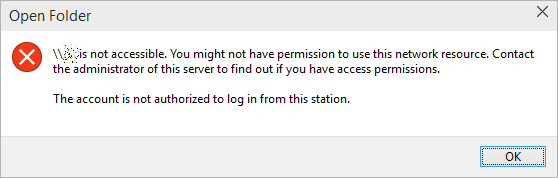
Obviously, this is a bogus message. You are the administrator, and everything worked until one reboot ago. So it must be a change in the Windows 10 internals, and indeed it is. The new build simply does not allow anonymous (guest) access to shares by default, as a silly security measure. You can resolve this by creating a new registry key in the right hive, reboot, and then move on with your precious life, all the while thanking me by buying my books and such. There's a subliminal marketing message for you.
Solution
Fire up the registry editor (regedit). Navigate to:
HKLM\SYSTEM\CurrentControlSet\Services\LanmanWorkstation\Parameters
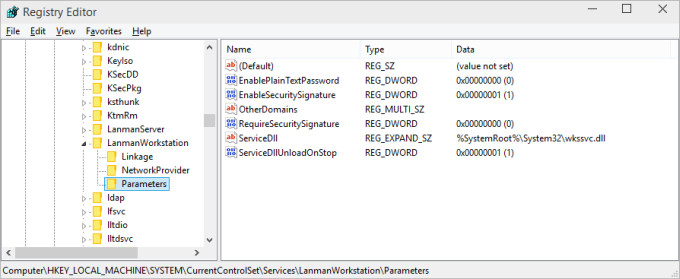
Here, you will need to create a new parameter (32-bit DWORD). Right-click:

Then, name it AllowInsecureGuestAuth and assign it a value of 1.
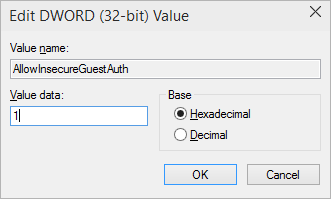
The hive should look thusly:

And you're done. Reboot, and enjoy your network access.
Conclusion
I do not know why Windows folks suddenly decided to change the way network sharing works. It should not happen. First, I had file sharing and network access for everyone allowed on some of my Windows 7/8 machines, therefore Windows 10 should not meddle and interfere, especially since everything worked smoothly before the upgrade. Second, there are no meaningful messages in the Event Log, which is the natural way of problem solving.
Hopefully, this little guide will save you a lot of frustration and anger, and it might also teach you a few new tips and tricks for handling Windows. And since this comes from a Linux guy, it's even more mind-boggling. There you go fellas. I am going to follow up with articles and guides on Windows 10 privacy configuration and tweaks, Classic Shell setup, and other cool things. Sacrificing my own nerves so you don't have to.
Cheers.
---
但是我的另一台Win 10仍然无法访问共享的那台Win 10, 错误如下:
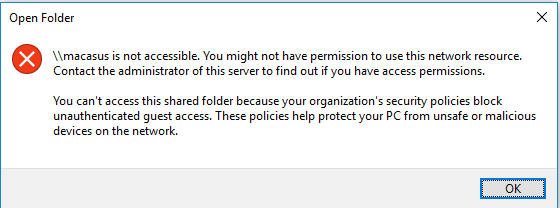
判断为另一台win 10本身的问题 ,这台是在公司域下的,可能做个某些安全设置,本人现在只要手机和小米盒子能访问共享就好,故不继续深究,如有哪位有解决方案,请留言。
【转载】解决Windows 10 局域网内共享的问题的更多相关文章
- 如何解决Windows 10系统下设备的声音问题
如何解决Windows 10系统下设备的声音问题? 请阅读下面的说明来解决Windows 10设备上的声音问题. 1. 检查设备管理器 打开开始菜单,键入设备管理器, 从出现的结果中选择并打开它. 在 ...
- 解决Windows 10下Wireshark运行问题
解决Windows 10下Wireshark运行问题在Windows 10下,安装Wireshark时候,提示WinPcap不被系统系统支持.这是由于最新版的WinPcap 4.1.3只支持到Wind ...
- Windows ->> 解决Windows 10下面无法多用户同时远程桌面
解决Windows 10下面无法多用户同时远程桌面 https://pc4u.org/how-to-allow-multiple-rdp-sessions-windows-10-without-mod ...
- Windows 10 访问网络共享 总是提示用户名或密码不正确的解决方法
今天同事在Windows10上共享了一些文件,其他使用Windows 7的同事都可以正常使用,唯独我是使用Windows 10操作系统的,和别人输入一样的用户名和密码,却总是告诉我:用户名或密码不正确 ...
- 解决Windows 10 1803 April 2018 Updatete不能网络共享的问题
Windows 10升级到1803后便不能网络共享了,现在我用的是Widnows 10 1809 Oct 2018 Update依然存在这个问题. 为了能够共享文件和文件夹需要去windows ser ...
- Windows 局域网内共享
前言 在局域网内,其它成员无需密码就可以访问某台计算机共享的某个磁盘或某个文件夹. 本文记录几个关键点, 共享端:需要共享的计算机 用户端:从共享计算机读取文件的计算机 共享端 开启guest用户 1 ...
- 解决windows 10无法打开.hlp帮助文件的问题
最近学习UML,使用的Rational Rose 7.0,使用帮助时,才发现windows 10无法打开.hlp的帮助文件.虽然win10默认定向到微软支持页面,但发现通过下载补丁来查看hlp文件,实 ...
- 解决windows 10关机自动重启的问题
自从windows 10推出来没多久,就给台式机安装了.可是,有点悲剧的是:每次关机,都会自动重启(restart). 之后也在网上找了一些解决方式,但还是没用.前天通过搜索”Windows 10 c ...
- 解决windows 10 9926 中vmware安装的虚拟机无法桥接上网的问题
从windows 10 出来之后就安装了使用,但一直有一个问题直到9926也没有解决,那就是vmware下的虚拟机无法桥接上网,但NAT方式正常.发现有一种办法可以实现桥接方式上网.但这种方式下本机与 ...
随机推荐
- JsonWriter使用
Example: 拼一个如下的json格式String { [ { "id": 912345678901, &quo ...
- NOIP2016普及组
普及组.代码有空发. 第一题就是买铅笔.暴力模拟绝对可取. 第二题就是回文日期.从t1的年份到t2的年份枚举每一年.头尾要特判. 第三题就是海港.骗了40分. 第四题就是魔法阵.不太好优化. 完.
- python python 入门学习之网页数据爬虫搜狐汽车数据库
自己从事的是汽车行业,所以首先要做的第一个程序是抓取搜狐汽车的销量数据库(http://db.auto.sohu.com/cxdata/): 数据库提供了07年至今的汽车月销量,每个车型对应一个xml ...
- C#时间戳转成php的time()
DateTime timeStamp = new DateTime(1970,1,1); //得到1970年的时间戳 long a = (DateTime.UtcNow.Ticks - timeSt ...
- MySQL创建一个具有root权限的用户
grant all privileges on *.* to 'user'@'host' identified by 'password' WITH GRANT OPTION MAX_QUERIES_ ...
- PMI列子1
遍历得到PMI中,是注释类型的,你可以参考一下.int num_text, thetype, thesubtype;tag_t draft_aid_tag = NULL_TAG;UF_UI_open ...
- SDN三种模型解析
数十年前,计算机科学家兼网络作家Andrew S. Tanenbaum讽刺标准过多难以选择,当然现在也是如此,比如软件定义网络模型的数量也很多.但是在考虑部署软件定义网络(SDN)或者试点之前,首先需 ...
- android源码环境下用mmm/mm编译模块,输出编译log到文件的方法
android源码环境下用mmm/mm编译模块,输出编译log到文件的方法 1,在android目录下直接用mmm命令编译, log信息保存在android目录下 mmm packages/apps/ ...
- Process 执行shell 脚本
概述: Process类是一个抽象类(所有的方法均是抽象的),封装了一个进程(即一个执行程序). Process 类提供了执行从进程输入.执行输出到进程.等待进程完成.检查进程的退出状态以及销毁(杀掉 ...
- c#利用WebClient和WebRequest获取网页源代码的比较
前几天举例分析了用asp+xmlhttp获取网页源代码的方法,但c#中一般是可以利用WebClient类和WebRequest类获取网页源代码.下面分别说明这两种方法的实现. WebClient类获取 ...