
一起买beta版UI测试
一起买beta版UI测试
测试目的
保证代码质量,对各个单元进行测试,可以有效地保证代码的可靠性,让模块在与别的模块整合时出现更少的错误。
UI测试
- 登录模块测试
登录模拟过程。
- 发帖模块测试
发帖模拟过程
测试过程
- 登录模块测试
package com.example.s.buytogether;

import android.support.test.rule.ActivityTestRule;

import android.support.test.runner.AndroidJUnit4;

import android.test.suitebuilder.annotation.LargeTest;

import com.example.s.buytogether.login.Login;

import org.junit.Rule;

import org.junit.Test;

import org.junit.runner.RunWith;

import static android.support.test.espresso.Espresso.onView;

import static android.support.test.espresso.action.ViewActions.click;

import static android.support.test.espresso.action.ViewActions.typeText;

import static android.support.test.espresso.matcher.ViewMatchers.withId;

import static android.support.test.espresso.matcher.ViewMatchers.withText;

@RunWith(AndroidJUnit4.class)

@LargeTest

public class LoginTest {

    private static final String STRING_TO_BE_TYPED = "b";

    @Rule

    public ActivityTestRule<Login> mActivityRule = new ActivityTestRule<>(

            Login.class);

    @Test

    public void login() {

        onView(withId(R.id.edtTxt_userName)).perform(typeText("b"));

        onView(withId(R.id.edtTxt_userPassword)).perform(typeText("b"));

        onView(withId(R.id.btn_login)).perform(click());

    }

}
测试结果:
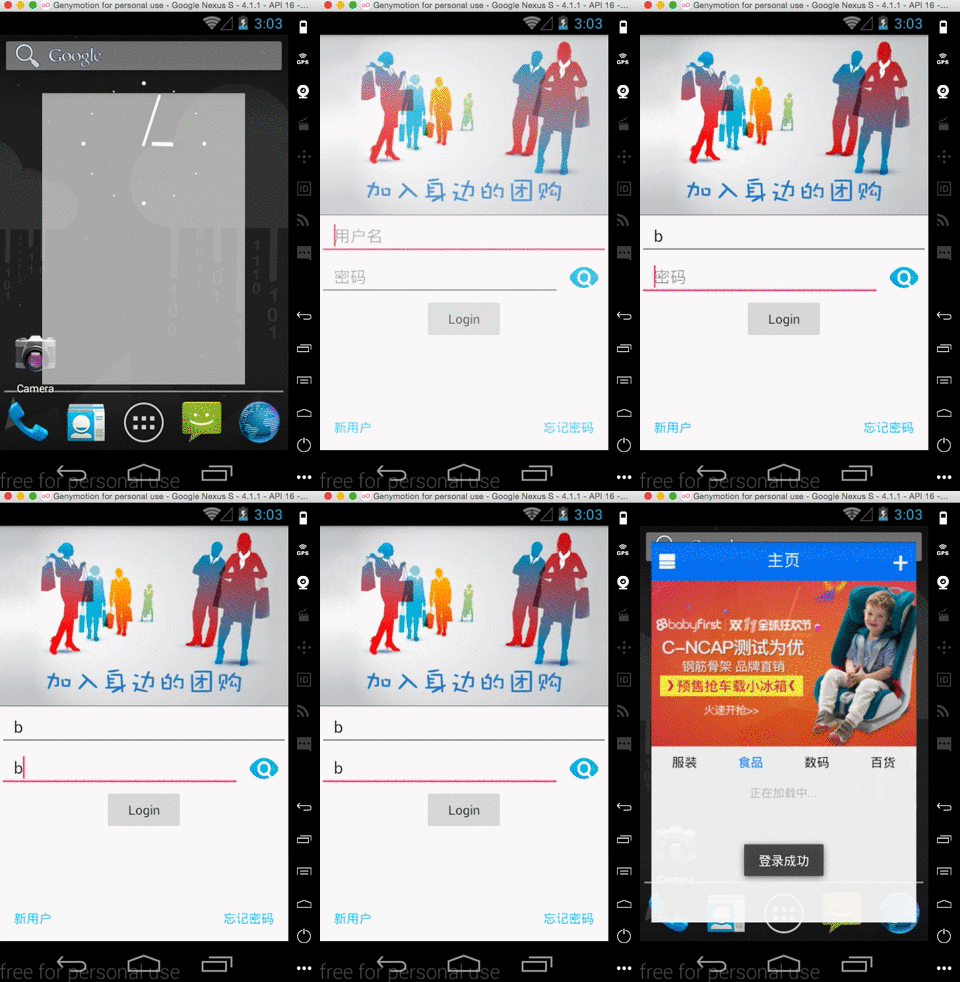
- 发帖模块测试
package com.example.s.buytogether;

import android.support.test.rule.ActivityTestRule;

import android.support.test.runner.AndroidJUnit4;

import android.test.suitebuilder.annotation.LargeTest;

import com.example.s.buytogether.newPosts.NewPosts;

import org.junit.Rule;

import org.junit.Test;

import org.junit.runner.RunWith;

import static android.support.test.espresso.Espresso.onView;

import static android.support.test.espresso.action.ViewActions.click;

import static android.support.test.espresso.action.ViewActions.closeSoftKeyboard;

import static android.support.test.espresso.action.ViewActions.scrollTo;

import static android.support.test.espresso.action.ViewActions.typeText;

import static android.support.test.espresso.matcher.ViewMatchers.withId;

import static android.support.test.espresso.matcher.ViewMatchers.withText;

@RunWith(AndroidJUnit4.class)

@LargeTest

public class NewPostsTest {

    @Rule

    public ActivityTestRule<NewPosts> mActivityRule = new ActivityTestRule<>(

            NewPosts.class);

    @Test

    public void login() {

        onView(withId(R.id.edtTxt_description)).perform(scrollTo(), typeText("yaobuyaolaiwana~~~"), closeSoftKeyboard());

        onView(withId(R.id.edtTxt_location)).perform(scrollTo(), typeText("30#417"), closeSoftKeyboard());

        onView(withId(R.id.edtTxt_phone)).perform(scrollTo(), typeText("110"), closeSoftKeyboard());

        onView(withId(R.id.edtTxt_indateTimeDay)).perform(scrollTo(), typeText("30"), closeSoftKeyboard());

        onView(withId(R.id.edtTxt_indateTimeHour)).perform(scrollTo(), typeText("2"), closeSoftKeyboard());

//        onView(withId(R.id.edtTxt_moreDescription)).perform(scrollTo(), typeText("hahahahhaha"), closeSoftKeyboard());

        onView(withId(R.id.edtTxt_price)).perform(scrollTo(), typeText("30"), closeSoftKeyboard());

        onView(withId(R.id.edtTxt_unit)).perform(scrollTo(), typeText("po"), closeSoftKeyboard());

        onView(withId(R.id.edtTxt_menCount)).perform(scrollTo(), typeText("2"), closeSoftKeyboard());

//        onView(withId(R.id.img_addPosts)).perform(click());

    }

}
测试结果:

结果统计
共计两个测试,两个均无问题
质量评估
所测试模块,均可正常通过
测试总结
由于时间原因,只做了两个部分的UI测试,其他部分依然还是存在一系列的bug正在解决中。但是也感觉espresso这个UI自动化测试的厉害之处,避免了人工手动的复杂输入,操作起来很炫酷。
一起买beta版UI测试的更多相关文章
- 一起买beta版本文档报告汇总
一起买beta版本文档报告汇总 031402401鲍亮 031402402曹鑫杰 031402403常松 031402412林淋 031402418汪培侨 031402426许秋鑫 一.Beta版本冲 ...
- 一起买beta版PHP单元测试
一起买beta版PHP单元测试 测试目的 保证代码质量,对各个单元进行测试,可以有效地保证代码的可靠性,让模块在与别的模块整合时出现更少的错误. 单元描述 完成帖子接口 将"正在进行&q ...
- 一起买beta版模块单元测试
一起买beta版模块接口单元测试 测试目的 保证代码质量,对各个模块进行单元测试,不仅可以有效地保证代码的可靠性,让模块在与别的模块整合时出现更少的错误. 而且不用每次启动程序而等待浪费时间. 单元描 ...
- unity4.6 Beta版 UI控件之Button
近期需求,须要用到4.6版本号uGui了,所以抽时间来学习学习,就UI控件在Unity工具里创建预设这块来说相比較于NGUI,我认为是没有什么太大的差别的. 比方:Canvas--Camera . T ...
- 一起买Beta版本系列文档
一起买beta版本文档报告汇总 031402401鲍亮 031402402曹鑫杰 031402403常松 031402412林淋 031402418汪培侨 031402426许秋鑫 一.Beta版本冲 ...
- Beta版测试报告
Beta版测试报告 测试中发现的Bug: Version 2.0 Bug List 1. 在动态监测界面,若随便点击“开始”.“关闭”.“结束”.红叉,会出现不定式崩溃现象. 2. 处理空数据时可能会 ...
- [App Store Connect帮助]六、测试 Beta 版本(1)TestFlight Beta 版测试概述(iOS、Apple TVOS、watchOS)
TestFlight Beta 版测试让您可以分发您 App 的 Beta 版构建版本给测试员并收集反馈.您可以在您的 App Store Connect 帐户中一次为至多 100 个 App 启用 ...
- [App Store Connect帮助]六、测试 Beta 版本(4.3) 管理 Beta 版构建版本:为 Beta 版构建版本提供出口合规证明
如果您没有完成出口合规证明,则该 Beta 版构建版本的状态为“缺少合规证明”.您可以在 TestFlight 部分中回答必需的出口合规证明问题. 必要职能:“帐户持有人”职能.“管理”职能或“App ...
- XE8 & IOS开发之免费证书真机调试:开发证书、AppID、开发授权profile的申请,附Debug真机调试演示(XCode7 Beta版或以上版本适用,有图有真相)
网上能找到的关于Delphi XE系列的移动开发的相关文章甚少,本文尽量以详细的图文内容.傻瓜式的表达来告诉你想要的答案. 原创作品,请尊重作者劳动成果,转载请注明出处!!! 注意,苹果发布Xcode ...
随机推荐
- java泛型编译时被擦除引起多态的破坏,用 桥方法解决此类问题。(java 桥方法)
在JVM虚拟机中泛型编译的时候,会出现类型擦除.但是,在多态场景中,编译时,擦除方式会出现多态被破坏的可能. 举个栗子: A.java public class A<T> { void g ...
- 35、重新复习html与css(1)
1.html与css的结合方式 <!DOCTYPE html PUBLIC "-//W3C//DTD HTML 4.01 Transitional//EN" "ht ...
- Nodejs学习(四)- express目录的分析
好久不来了,最近挺忙,就写一写下目录的情况吧. 我就说主要的目录,也就是我们经常用到的 public 用于存放一些js,css. routes 路由目录,如果你学过MVC应该不默生. views ...
- Two Pointers Day
(1)Reverse String 解题思路简单明了,但是要注意时间复杂度问题!!! 代码如下:(声明一个与字符串等长的char数组,然后倒序区字符串中的字符,放入数组即可.) public clas ...
- 使用Linux碎解三_CentOS7搭建Lamp环境安装zabbix遇到的问题
问题一: 执行不了 yum命令 解决方案:配置系统的DNS(详细参见碎解二) 问题二: make 命令的时候,出现错误 提示 和没有gcc大体相关 解决方案:yum install gcc (在网 ...
- 仿QQ的底部选项
效果图: item_add.xml <?xml version="1.0" encoding="utf-8"?> <LinearLayout ...
- css3、html5学习笔记
2016/12/14 ----认真看完绝对对你有帮助 HTML5针对移动端,移动端的浏览器主要是chrome,是webkit内核; app(applicatin):应用; native app:原生的 ...
- 阐述程序员如何实现IT职业定位
[动力IT职业生涯规划课]阐述程序员如何实现IT职业定位 2016年9月16日下午17:00,南通动力IT教育创始人阙海忠先生,亲自向动力IT学员传授其十八年IT从业经验. 一个程序员的完美人生定位 ...
- Debug模式,不能进入打断点的类,反而进入代理类里
有史以来,第一次,遇到这个问题, 设置好断点,Debug模式开启项目,,没有进入原来打好的断点类,反而,进入的是和断点类相同名字(但是图标不同)的一个类里, 不能真正的调试,调试变得很麻烦, 解决方案 ...
- 分布式管理系统-git安装及配置
安装完成后,在开始菜单里找到“Git”->“Git Bash”,蹦出一个类似命令行窗口的东西,就说明Git安装成功! 安装完成后,还需要最后一步设置,在命令行输入: $ git config - ...