
《DSP using MATLAB》示例Example 8.28

%% ------------------------------------------------------------------------

%%            Output Info about this m-file

fprintf('\n***********************************************************\n');

fprintf('        <DSP using MATLAB> Exameple 8.28 \n\n');

time_stamp = datestr(now, 31);

[wkd1, wkd2] = weekday(today, 'long');

fprintf('      Now is %20s, and it is %8s  \n\n', time_stamp, wkd2);

%% ------------------------------------------------------------------------

% Digital Filter Specifications:   Chebyshev-1 hignpass

wp = 0.6*pi;                     % digital passband freq in rad

ws = 0.4586*pi;                  % digital stopband freq in rad

Rp = 1;                          % passband ripple in dB

As = 15;                         % stopband attenuation in dB

% Calculation of Chebyshev-1 filter parameters:

[N, wn] = cheb1ord(wp/pi, ws/pi, Rp, As);

% Digital Chebyshev-1 Highpass Filter Design:

[bhp, ahp] = cheby1(N, Rp, wn, 'high');

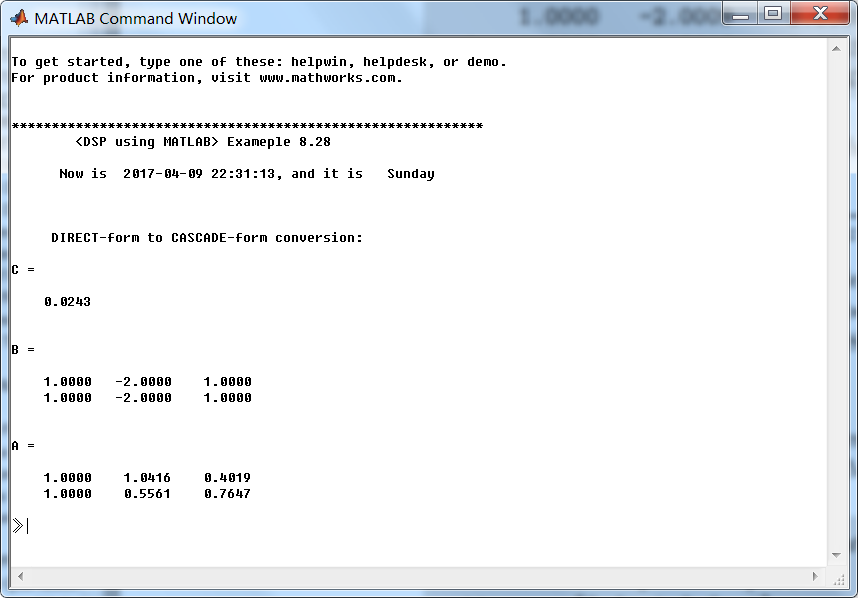
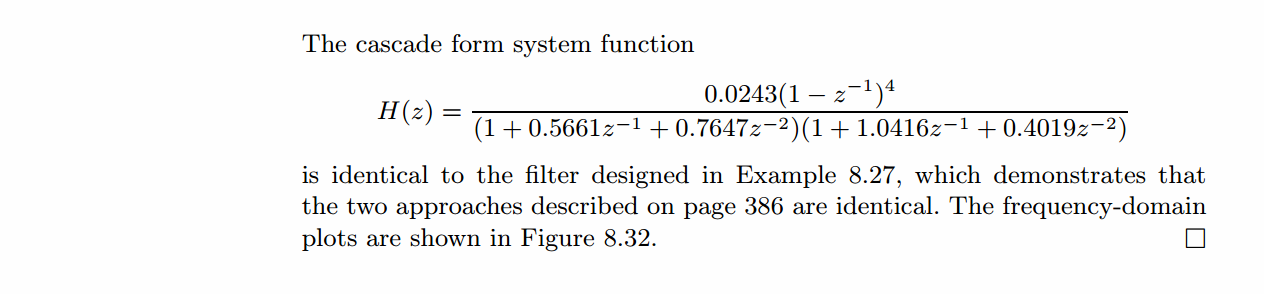
[C, B, A] = dir2cas(bhp, ahp)

% Calculation of Frequency Response:

%[dblp, maglp, phalp, grdlp, wwlp] = freqz_m(blp, alp);

[dbhp, maghp, phahp, grdhp, wwhp] = freqz_m(bhp, ahp);

%% -----------------------------------------------------------------

%%                             Plot

%% -----------------------------------------------------------------

figure('NumberTitle', 'off', 'Name', 'Exameple 8.28')

set(gcf,'Color','white');

M = 1;                          % Omega max

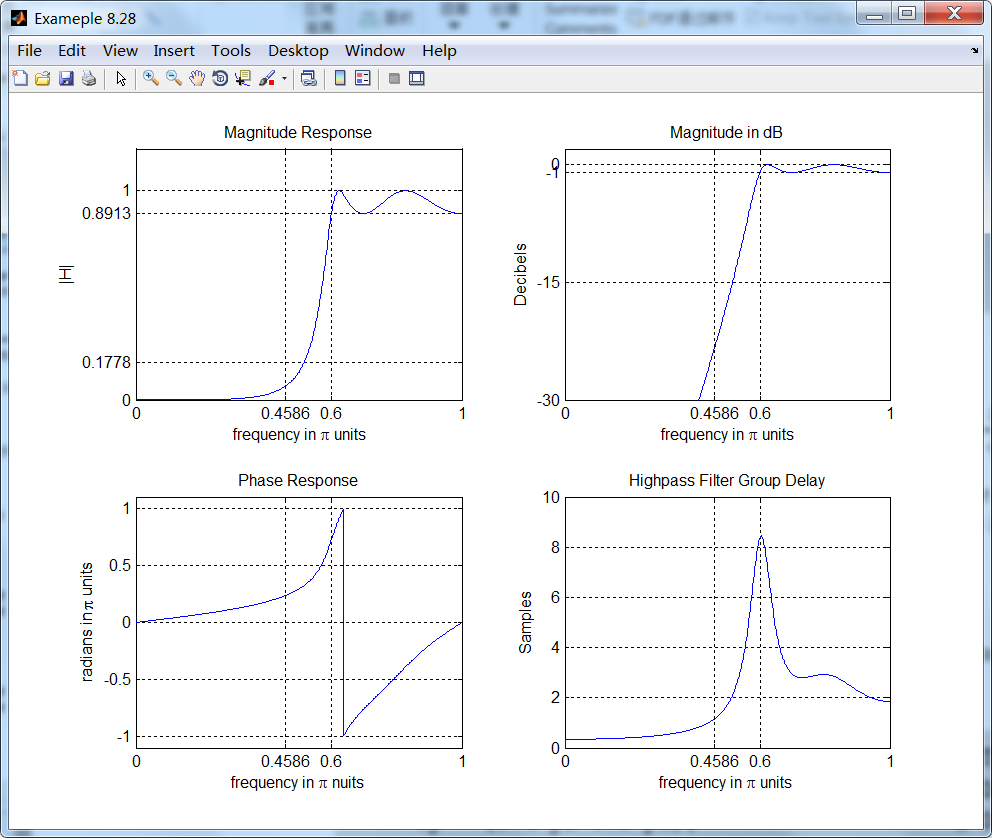
subplot(2,2,1); plot(wwhp/pi, maghp); axis([0, M, 0, 1.2]); grid on;

xlabel(' frequency in \pi units'); ylabel('|H|'); title('Magnitude Response');

set(gca, 'XTickMode', 'manual', 'XTick', [0, 0.4586, 0.6, M]);

set(gca, 'YTickMode', 'manual', 'YTick', [0, 0.1778, 0.8913, 1]);

subplot(2,2,2); plot(wwhp/pi, dbhp); axis([0, M, -30, 2]); grid on;

xlabel(' frequency in \pi units'); ylabel('Decibels'); title('Magnitude in dB');

set(gca, 'XTickMode', 'manual', 'XTick', [0, 0.4586, 0.6, M]);

set(gca, 'YTickMode', 'manual', 'YTick', [-30, -15, -1, 0]);

subplot(2,2,3); plot(wwhp/pi, phahp/pi); axis([0, M, -1.1, 1.1]); grid on;

xlabel('frequency in \pi nuits'); ylabel('radians in \pi units'); title('Phase Response');

set(gca, 'XTickMode', 'manual', 'XTick', [0, 0.4586, 0.6, M]);

set(gca, 'YTickMode', 'manual', 'YTick', [-1:0.5:1]);

subplot(2,2,4); plot(wwhp/pi, grdhp); axis([0, M, 0, 10]); grid on;

xlabel('frequency in \pi units'); ylabel('Samples'); title('Highpass Filter Group Delay');

set(gca, 'XTickMode', 'manual', 'XTick', [0, 0.4586, 0.6, M]);

set(gca, 'YTickMode', 'manual', 'YTick', [0:2:10]);
运行结果:
《DSP using MATLAB》示例Example 8.28的更多相关文章
- 《DSP using MATLAB》Problem 5.28
昨晚手机在看X信的时候突然黑屏,开机重启都没反应,今天维修师傅说使用时间太长了,还是买个新的吧,心疼银子啊! 这里只放前两个小题的图. 代码: 1. %% ++++++++++++++++++++++ ...
- 《DSP using MATLAB》Problem 8.28
代码: %% ------------------------------------------------------------------------ %% Output Info about ...
- 《DSP using MATLAB》Problem 7.28
又是一年五一节,朋友圈都是晒名山大川的,晒脑袋的,我这没钱的待在家里上网转转吧 频率采样法设计带通滤波器,过渡带中有一个样点 代码: %% ++++++++++++++++++++++++++++++ ...
- DSP using MATLAB 示例Example3.21
代码: % Discrete-time Signal x1(n) % Ts = 0.0002; n = -25:1:25; nTs = n*Ts; Fs = 1/Ts; x = exp(-1000*a ...
- DSP using MATLAB 示例 Example3.19
代码: % Analog Signal Dt = 0.00005; t = -0.005:Dt:0.005; xa = exp(-1000*abs(t)); % Discrete-time Signa ...
- DSP using MATLAB示例Example3.18
代码: % Analog Signal Dt = 0.00005; t = -0.005:Dt:0.005; xa = exp(-1000*abs(t)); % Continuous-time Fou ...
- DSP using MATLAB 示例Example3.23
代码: % Discrete-time Signal x1(n) : Ts = 0.0002 Ts = 0.0002; n = -25:1:25; nTs = n*Ts; x1 = exp(-1000 ...
- DSP using MATLAB 示例Example3.22
代码: % Discrete-time Signal x2(n) Ts = 0.001; n = -5:1:5; nTs = n*Ts; Fs = 1/Ts; x = exp(-1000*abs(nT ...
- DSP using MATLAB 示例Example3.17
- DSP using MATLAB示例Example3.16
代码: b = [0.0181, 0.0543, 0.0543, 0.0181]; % filter coefficient array b a = [1.0000, -1.7600, 1.1829, ...
随机推荐
- RestTemplate请求https忽略证书认证
RestTemplate是Spring提供的用于访问Rest服务的客户端,提供了多种便捷访问远程Http服务的方法,能够大大提高客户端的编写效率.RestTemplate 默认使用J2SE提供的方式( ...
- gulp+es6构建页面
遇到的问题: 1.es6如何使用,定义一个demo.js //demo.js export default class demo { // 构造函数 constructor(){ //在构造函数中调用 ...
- RabbitMQ 与 AMQP路由
概述 RabbitMQ(MQ 为 MessageQueue) 是一个消息队列,主要是用来实现应用程序的异步和解耦,同时起到消息缓冲.消息分发作用 消息队列 消息(Message)是指应用间传送的数据, ...
- Spring ApplicationListener 理解
在开发时有时候需要在整个应用开始运行时执行一些特定代码,比如初始化环境,准备测试数据.加载一些数据到内存等等. 在spring中可以通过ApplicationListener来实现相关的功能,加载完成 ...
- Java读写文化总结
Java读文件 package 天才白痴梦; import java.io.BufferedReader; import java.io.File; import java.io.FileInputS ...
- CodeForces 297D Color the Carpet (脑补题)
题意 一个h*w的矩阵上面涂k种颜色,并且每行相邻格子.每列相邻格子都有=或者!=的约束.要求构造一种涂色方案使得至少有3/4的条件满足. 思路 脑补神题--自己肯定想不出来T_T-- 官方题解: 2 ...
- 【Raspberry Pi】USB无线网卡自动连接
Raspberry Pi 使用USB无线网卡的时候不会因为路由重启而掉线. #!/bin/bash while true ; do if ifconfig wlan0 | grep -q " ...
- 小练习:Two Sum
1.example Given nums = [, , , ], target = , Because nums[] + nums[] = + = , , ]. 2.solve class Solut ...
- js 返回上一页和刷新以及页面跳转
1. Javascript 返回上一页history.go(-1), 返回两个页面: history.go(-2); 2. history.back(). 3. window.history.forw ...
- Django中间件(勾子函数)使用
中间件 Django中的中间件是一个轻量级.底层的插件系统,可以介入Django的请求和响应处理过程,修改Django的输入或输出.中间件的设计为开发者提供了一种无侵入式的开发方式,增强了Django ...