
SpringMVC封装表单数据
1、domain类
 package com.xiaostudy.domain;

 public class User {

     private int id;

     private String username;

     private String password;

     public int getId() {

         return id;

     }

     public void setId(int id) {

         this.id = id;

     }

     public String getUsername() {

         return username;

     }

     public void setUsername(String username) {

         this.username = username;

     }

     public String getPassword() {

         return password;

     }

     public void setPassword(String password) {

         this.password = password;

     }

     @Override

     public String toString() {

         return "User [id=" + id + ", username=" + username + ", password=" + password + "]";

     }

 }
2、填写表单数据的jsp
 <%@ page language="java" contentType="text/html; charset=UTF-8"

     pageEncoding="UTF-8"%>

 <!DOCTYPE html PUBLIC "-//W3C//DTD HTML 4.01 Transitional//EN" "http://www.w3.org/TR/html4/loose.dtd">

 <html>

 <head>

     <meta http-equiv="Content-Type" content="text/html; charset=UTF-8">

     <title>springMVC</title>

 </head>

 <body>

 <form action="${pageContext.request.contextPath }/command.do" method="post">

     ID:<input type="text" name="id" id="id"/>

     姓名:<input type="text" name="username" id="username"/>

     密码:<input type="password" name="password" id="password"/>

     <input type="submit" value="提交"/>

 </form>

 </body>

 </html>
3、springmvc.xml
 <?xml version="1.0" encoding="UTF-8"?>

 <beans xmlns="http://www.springframework.org/schema/beans"

     xmlns:mvc="http://www.springframework.org/schema/mvc"

     xmlns:aop="http://www.springframework.org/schema/aop"

     xmlns:tx="http://www.springframework.org/schema/tx"

     xmlns:context="http://www.springframework.org/schema/context"

     xmlns:xsi="http://www.w3.org/2001/XMLSchema-instance"

     xsi:schemaLocation="http://www.springframework.org/schema/beans

                         http://www.springframework.org/schema/beans/spring-beans-3.2.xsd

                         http://www.springframework.org/schema/mvc

                         http://www.springframework.org/schema/mvc/spring-mvc-3.2.xsd

                         http://www.springframework.org/schema/context

                         http://www.springframework.org/schema/context/spring-context-3.2.xsd

                         http://www.springframework.org/schema/aop

                         http://www.springframework.org/schema/aop/spring-aop-3.2.xsd

                         http://www.springframework.org/schema/tx

                         http://www.springframework.org/schema/tx/spring-tx-3.2.xsd">

         <!-- ======================================================================================================= -->

         <!-- 配置处理器映射器,springmvc默认的处理器映射器

         BeanNameUrlHandlerMapping:根据bean(自定义Controler)的name属性的url去寻找hanler(Action:Controller) -->

         <bean class="org.springframework.web.servlet.handler.BeanNameUrlHandlerMapping"/>

         <bean name="/toadd.do" class="com.xiaostudy.ToAddController"/>

         <bean name="/command.do" class="com.xiaostudy.CommandController"/>

         <!-- 配置sprigmvc视图解析器:解析逻辑试图

              后台返回逻辑试图:index

             视图解析器解析出真正物理视图:前缀+逻辑试图+后缀====/WEB-INF/index.jsp -->

         <bean class="org.springframework.web.servlet.view.InternalResourceViewResolver">

             <property name="prefix" value="/WEB-INF/"/>

             <property name="suffix" value=".jsp"/>

         </bean>

 </beans>
4、负责跳转到add.jsp的类
 package com.xiaostudy;

 import javax.servlet.http.HttpServletRequest;

 import javax.servlet.http.HttpServletResponse;

 import org.springframework.web.servlet.ModelAndView;

 import org.springframework.web.servlet.mvc.Controller;

 public class ToAddController implements Controller{

     public ModelAndView handleRequest(HttpServletRequest request,

             HttpServletResponse response) throws Exception {

         ModelAndView mv = new ModelAndView();

         //调转到add添加页面视图

         mv.setViewName("add");

         return mv;

     }

 }
5、处理表单数据类
 package com.xiaostudy;

 import javax.servlet.http.HttpServletRequest;

 import javax.servlet.http.HttpServletResponse;

 import org.springframework.validation.BindException;

 import org.springframework.web.servlet.ModelAndView;

 import org.springframework.web.servlet.mvc.AbstractCommandController;

 import com.xiaostudy.domain.User;

 public class CommandController extends AbstractCommandController {

     public CommandController() {

         this.setCommandClass(User.class);

     }

     @Override

     protected ModelAndView handle(HttpServletRequest request, HttpServletResponse response, Object command, BindException arg3)

             throws Exception {

         User user = (User)command;

         ModelAndView mv = new ModelAndView();

         mv.addObject("user", user);

         mv.setViewName("index");

         return mv;

     }

 }
6、返回到jsp中
 <%@ page language="java" contentType="text/html; charset=UTF-8" pageEncoding="UTF-8"%>

 <!DOCTYPE html PUBLIC "-//W3C//DTD HTML 4.01 Transitional//EN"

             "http://www.w3.org/TR/html4/loose.dtd">

 <html>

 <head>

     <meta http-equiv="Content-Type" content="text/html; charset=UTF-8">

     <title>springMVC_demo</title>

 </head>

 <body>

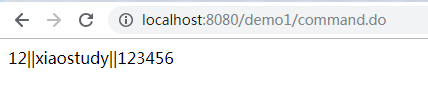
     ${user.id }||${user.username }||${user.password }

 </body>

 </html>
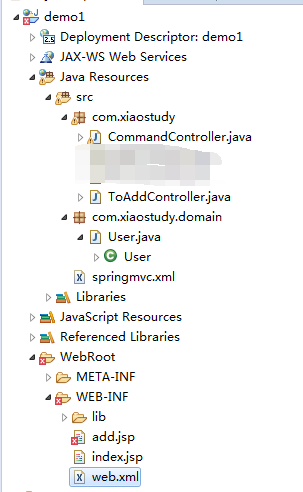
项目文件路径
分析执行过程
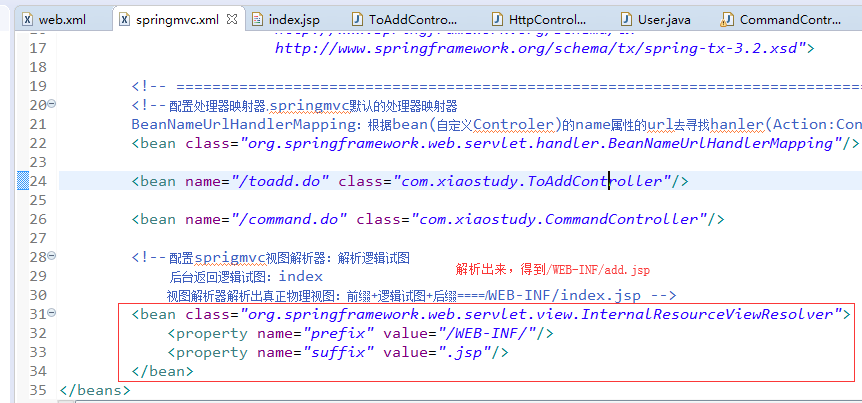
1、浏览器通过地址访问,经过web.xml拦截,交给springmvc.xml

2、springmvc.xml通过匹配,找到相应的类

3、类返回一个逻辑视图

4、springmvc.xml解析逻辑视图,得到物理视图路径


5、填写表单数据并提交数据


6、web.xml拦截,交给springmvc.xml去处理,springmvc.xml通过匹配,找到相应的类

7、类处理表单数据,并返回一个逻辑视图
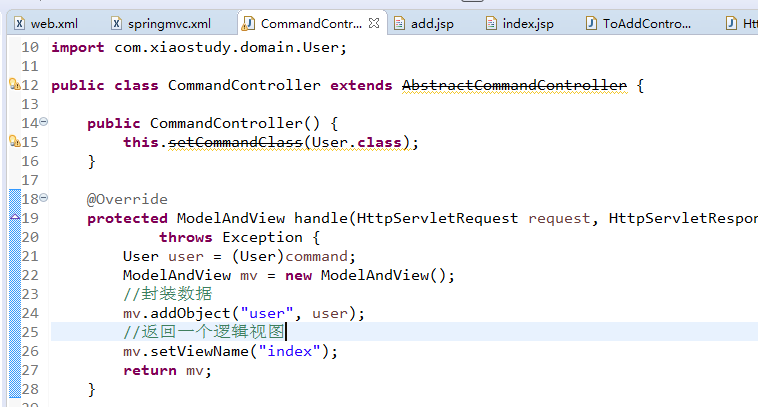
8、springmvc.xml解析逻辑视图,得到物理视图路径
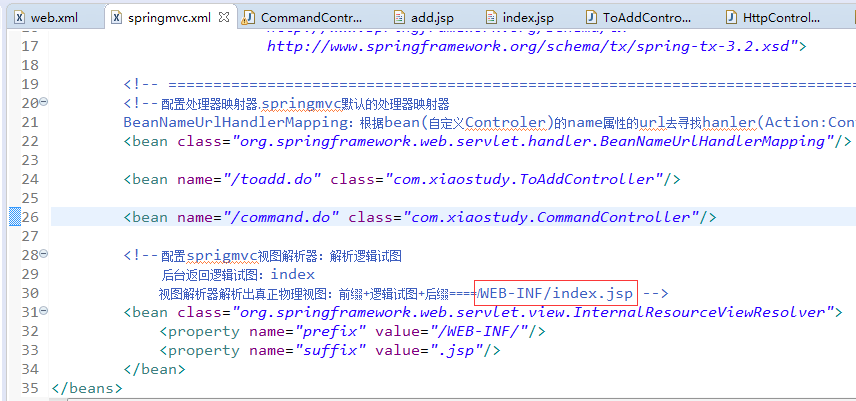

9、把数据返回给用户
SpringMVC封装表单数据的更多相关文章
- 框架学习之Struts2(二)---基本配置和封装表单数据
一.结果页面配置 1.局部结果页面配置 <!-- 局部结果页面配置--> <package name = "demo" extends = "strut ...
- 利用BeanUtils工具类封装表单数据
一.BeanUtils工具类的使用 1.首先导入BeanUtils工具类的jar包 commons-beanutils-1.8.0.jar commons-logging-1.1.1.jar 2.se ...
- httpclient模拟post请求json封装表单数据
好长时间不更博了,主要肚子里没什么好墨水,哈哈.废话不说上代码. public static String httpPostWithJSON(String url) throws Exception ...
- request对象多种方法封装表单数据
public void doGet(HttpServletRequest request, HttpServletResponse response) throws ServletException, ...
- SpringMVC接受表单数据
@ 目录 pojo addProduct.jsp ProductController showProduct.jsp 测试结果 pojo 新建实体类Product package pojo; publ ...
- JavaWeb - 模仿SpringMVC抽取 BaseServlet + 封装表单参数
模仿SpringMVC抽取一个BaseServlet,接收所有请求,然后自动封装表单参数和分发到对应的servlet执行,下面用一个页面表单提交,转发显示的项目做示例. 1)首先准备一个Entity, ...
- Servlet的5种方式实现表单提交(注册小功能),后台获取表单数据
用servlet实现一个注册的小功能 ,后台获取数据. 注册页面: 注册页面代码 : <!DOCTYPE html> <html> <head> <meta ...
- 【ASP.NET Web API教程】5.2 发送HTML表单数据:URL编码的表单数据
原文:[ASP.NET Web API教程]5.2 发送HTML表单数据:URL编码的表单数据 注:本文是[ASP.NET Web API系列教程]的一部分,如果您是第一次看本系列教程,请先看前面的内 ...
- springMVC(7)---表单标签
springMVC(7)---表单标签 form标签作用 简单来讲form表单有两大作用 1:第一就是往后端提交数据或者前端回显 ...
随机推荐
- 永久解决delphi 2010不能2次启动问题
由于在Windows安装了最近的更新(KB2982791, KB2970228)后,Delphi的IDE需要创建的一个文件%TEMP%\EditorLineEnds.ttr会被系统锁定,导致除非重新启 ...
- 设计模式中类的关系UML
在java以及其他的面向对象设计模式中,类与类之间主要有6种关系,他们分别是:依赖.关联.聚合.组合.继承.实现.他们的耦合度依次增强. 1. 依赖(Dependence) 依赖关系的定义为:对于两 ...
- Asp.Net MVC以JSON传值扩展方法
Asp.Net在客户端和服务器端,以JSON形式相互传值,可写扩展方法,用到的类型如下: DataContractJsonSerializer类: 该类在System.Runtime.Serializ ...
- python学习笔记(十一)redis的介绍及安装
一.redis简介 1.redis是一个开源的.使用C语言编写的.支持网络交互的.可基于内存也可持久化的Key-Value数据库. 2.redis的官网地址,非常好记,是redis.io. ...
- kettle中的karaf设置
Spoon.sh设置-Dpentaho.karaf.root.copy.dest.folder=$PENTAHO_KARAF_ROOT -Dpentaho.karaf.root.transient=f ...
- 关于手机适配中的rem的学习随笔
githup 下载地址 :https://github.com/comjustforfun/remformobile adaptivejs利用rem解决移动端页面开发的自适应问题 页面模板初始化的时候 ...
- (转)VS中的路径宏 vc++中OutDir、ProjectDir、SolutionDir各种路径说明
$(RemoteMachine) 设置为“调试”属性页上“远程计算机”属性的值.有关更多信息,请参见更改用于 C/C++ 调试配置的项目设置. $(References) 以分号分隔的引用列表被添 ...
- memcache服务端与客户端的安装部署
1)安装memcached前需要先安装libevent [root@aliyun tools]# tar -zxf libevent-1.4.13-stable.tar.gz [root@aliyun ...
- A simple windows programm in c
A simple windows programm in c The following programm is a minimal windows program. It opens ...
- 10 Linux Commands Every Developer Should Know
转载:http://azer.bike/journal/10-linux-commands-every-developer-should-know/ As a software engineer, l ...