
Make a printer-port EEPROM programmer and dongle
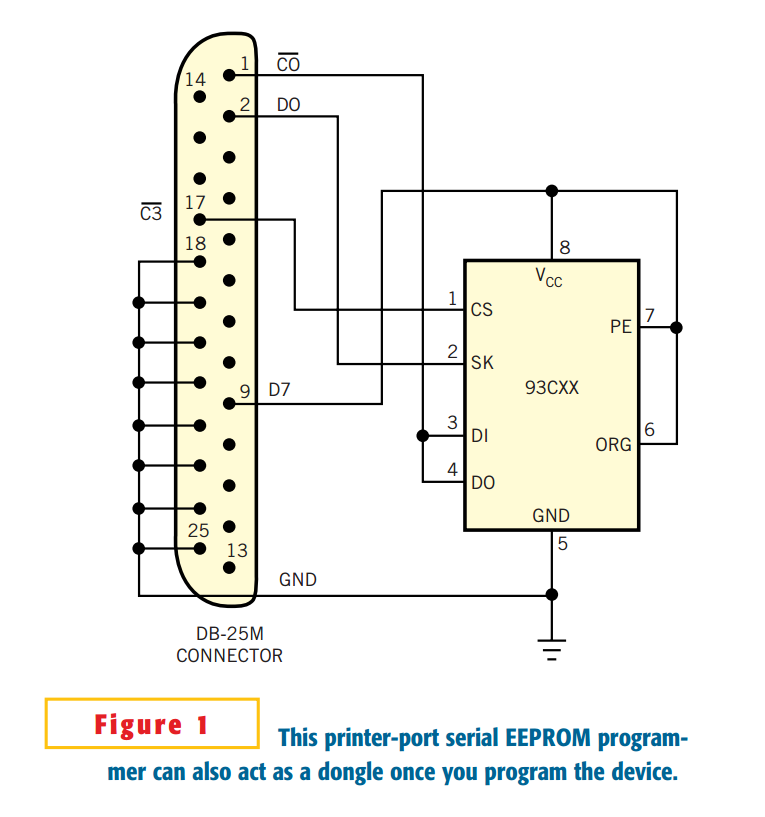
You can easily use a PC's printer port for serial-EEPROM programming. You can use a device-programmer circuit used to program the MicroWire serial EE-PROM 93CXX (Figure 1). The circuit is so simple that any further simplification seems impossible. This programmer circuit contains no microcontroller, as most device programmers do. It needs neither a separate power supply, or "wall-wart," nor a cable. When in use, it directly plugs into the PC's printer port. However, you still can use a cable if convenient—for PC printer ports behind the PC, for example. The circuit also requires neither a resistor nor a decoupling capacitor.
These advantages come from the PC's printer-port resources and the architectural simplicity of the MicroWire serial EEPROM. The printer port comprises the 8-bit data, status, and control registers. Each register has its unique address. On the classic IBM PC, the data port serves solely for output, but the control port can serve as either input or output. The eight-pin, tiny, serial EEPROM consumes less than 1-mA current in the active state, and the printer port's data pin can supply a few milliamps, so this design uses D7 (Pin 9) as a power-supply pin. No decoupling capacitor is necessary in practice.
The MicroWire chip uses the CS (chip-select), SK (clock-signal), DI (data-input), and DO (data-output) pins to control its read/write operations. This design uses the chip-select signal from the reverse level of the control bit  (Pin 17). It also ties together pins DI and DO and connects them to the Control bit
  (Pin 1), which can serve as input or output, thereby saving one pin. These selections caused no problems in practice. Because control Pin 1's logic is the reverse of the logic level on bit C0, the software must take care of the inversion. The MicroWire interface normally requires a pullup resistor on the DO pin, but such a resistor is already inside the PC, so it's unnecessary.
Once you settle on the hardware design, the main task is to write software. This task is not difficult. For many embedded-system-software engineers, it's routine and interesting. A freeware executable program, Pseep2.exe, is available for this purpose. A sample demo program, secret.bin, allows you to practice the programming. Click hereto download the software for this Design Idea. It handles only one MicroWire device—the popular 93C46's read/write operation as an example. Another important feature of this circuit is that, once you program the 93CXX device, the system becomes a primitive dongle. You can then use it as a hardware-protection device for your valuable software. Only you know whatever was programmed in the device.
When the protected software runs, it first checks whether the device is present at the printer port and whether the code matches what you programmed. If a match doesn't exist, the software refuses to continue and exits. The dongle is primitive, but it does illustrate the basic principle of dongle-protection technology. You can build the circuit using wire-wrapping or point-to-point soldering techniques on a solderless breadboard, in which case you'll need a cable, or with your own pc board. It's a one-evening project.
Make a printer-port EEPROM programmer and dongle的更多相关文章
- SEEprog Serial EEPROM programmer
Features SEEprog is universal programmer of all types of serial EEPROMs in 8-pin package. SEEprog en ...
- ELNEC Programmer
BeeHive204 Very fast universal 4x 48-pindrive concurrent multiprogramming system with ISP capability ...
- BeeProg2C Extremely fast universal USB interfaced programmer
http://www.elnec.com/products/universal-programmers/beeprog2c/ FPGA based totally reconfigurable 48 ...
- 设备管理 USB ID
发现个USB ID站点,对于做设备管理识别的小伙伴特别实用 http://www.linux-usb.org/usb.ids 附录: # # List of USB ID's # # Maintain ...
- usb.ids
# # List of USB ID's # # Maintained by Vojtech Pavlik <vojtech@suse.cz> # If you have any new ...
- 书籍推荐《以C语言解析电脑》
这本书要想买到,在大陆看起来比较难,理出个目录,看个大概: 另外在这个地方可以预览前20页:http://openebook.hyread.com.tw/ebookservice/hyviewer/o ...
- JDicom使用指南
适用条件本指南用于使用JDicom进行环境模拟.产品调试. 一.安装JDicom运行JDicom安装程序之前,需安装JRE 1.3及以上版本.否则,弹出如下图所示报错 安装JRE 1.4:双击运行可执 ...
- 和S5933比较起来,开发PLX9054比较不幸,可能是第一次开发PCI的缘故吧。因为,很多PCI的例子都是对S5933,就连微软出版的《Programming the Microsoft Windows Driver Model》都提供了一个完整的S5933的例子。 在这篇有关DDK的开发论文里。
和S5933比较起来,开发PLX9054比较不幸,可能是第一次开发PCI的缘故吧.因为,很多PCI的例子都是对S5933,就连微软出版的<Programming the Microsoft Wi ...
- SecureCRT辅助解决方案
SecureCRT辅助解决方案 1. 下载SecureCRT 7.3版本并激活: 2. SecureCRT linux配色方案: 3. SecureCRT设置log保存方案: 1. secureCRT ...
随机推荐
- python 之ConfigParser模块学习
1.1 读取配置文件 -read(filename) 直接读取ini文件内容 -sections() 得到所有的section,并以列表的形式返回 -options(section) 得到该secti ...
- ueditor 编辑器上传到服务器后图片上传不能正常使用
网站集成ueditor编辑器后在本地能正常使用,上传到服务器上后,图片上传功能提示:后端配置项没有正常加载,上传插件不能正常使用.且单个图片上传图标是灰色的不能点击. 相信遇到这个问题的同学是很多的吧 ...
- mvc部署
权限中加入windows 2008中加入SERVICE,windows2003中加入NETWORK SERVICE
- Hadoop案例(四)倒排索引(多job串联)与全局计数器
一. 倒排索引(多job串联) 1. 需求分析 有大量的文本(文档.网页),需要建立搜索索引 xyg pingping xyg ss xyg ss a.txt xyg pingping xyg pin ...
- 【PAT】1012. 数字分类 (20)
1012. 数字分类 (20) 给定一系列正整数,请按要求对数字进行分类,并输出以下5个数字: A1 = 能被5整除的数字中所有偶数的和: A2 = 将被5除后余1的数字按给出顺序进行交错求和,即计算 ...
- DotNetOpenAuth实践之WebApi资源服务器
系列目录: DotNetOpenAuth实践系列(源码在这里) 上篇我们讲到WCF服务作为资源服务器接口提供数据服务,那么这篇我们介绍WebApi作为资源服务器,下面开始: 一.环境搭建 1.新建We ...
- Python全栈开发之7、模块和几种常见模块以及format知识补充
一.模块的分类 Python流行的一个原因就是因为它的第三方模块数量巨大,我们编写代码不必从零开始重新造轮子,许多要用的功能都已经写好封装成库了,我们只要直接调用即可,模块分为内建模块.自定义的模块. ...
- 在linux下安装sbt
1.到官方网站下载deb包,下载地址:https://dl.bintray.com/sbt/debian/sbt-1.0.3.deb 2.点击下载的deb包进行安装 3.安装完成后,在terminal ...
- poj1915 Knight Moves(BFS)
题目链接 http://poj.org/problem?id=1915 题意 输入正方形棋盘的边长.起点和终点的位置,给定棋子的走法,输出最少经过多少步可以从起点走到终点. 思路 经典bfs题目. 代 ...
- matlab下mex 调用opencv库
1. 首先写好待编译的.cpp文件,使用混合编程,以人脸检测为例 #include "mex.h" // Required for the use of MEX files // ...