
[cocos2d-js]cc.RenderTexture几种用法(数字图片、刮刮乐效果)
【转】http://blog.csdn.net/realcrazysun1/article/details/42393629
本文基于cocos2d-js 3.0版本引擎开发
RenderTexture用法1:数字图片
通过这张图片实现任意数字

//数字图片精灵
var PictureNumber = cc.Sprite.extend({

    m_Number:null,

    m_NumberTexture:null,

    ctor:function(){

        this._super();

    },

    buildNumber:function(paramNumber, paramTexture)

    {

        this.setNumber(paramNumber);

        this.setNumberTexture(cc.textureCache.addImage(paramTexture));

        return this.build();

    },

    build:function(){

        var iNumCount = (this.m_Number+"").length;   //取得字符个数

        var stSize = this.m_NumberTexture.getContentSize(); //取得纹理大小,要求纹理中每个数字都是等宽等高,并依照0123456789排列

        var iNumWidth = parseInt( stSize.width / 10);    //纹理中每个数字的宽度

        var iNumHeight =  parseInt( stSize.height);    //纹理中每个数字的高度

        var pRT = new cc.RenderTexture(iNumWidth * iNumCount, iNumHeight); //创建渲染纹理对象,并数字确定宽度

        pRT.begin();

        for (var i = 0; i < iNumCount; i++)

        {

            var pSprite   = new cc.Sprite(); //创建精灵对象,用于绘制数字

            pSprite.setAnchorPoint(0, 0);

            pSprite.setTexture(this.m_NumberTexture);

            var iNumber = (this.m_Number+"")[i];

            //设置要显示数字的纹理区域,这个区域是指参数中paramTexture中区域

            var stRect = new cc.rect(iNumber * iNumWidth, 0, iNumWidth, iNumHeight);

            pSprite.setTextureRect(stRect, false, cc.size(stRect.width, stRect.height));

            pSprite.setPosition(i * iNumWidth, 0);                  //计算显示的偏移位置

            pSprite.visit(); //渲染到pRT中

        }

        pRT.end();

        //取得生成的纹理

        this.setTexture(pRT.getSprite().getTexture());

        //设置显示的内容

        var stRect = new cc.rect(0, 0, iNumWidth * iNumCount, iNumHeight);

        this.setTextureRect(stRect, false, cc.size(stRect.width, stRect.height));

        //默认的情况下,通过CCRenderTexture得到的纹理是倒立的,这里需要做一下翻转

        this.setFlippedY(true);

    },

    setNumber:function(paramNumber){

        this.m_Number = paramNumber;

    },

    getNumber:function(){

        return this.m_Number;

    },

    setNumberTexture:function(paramTexture)

    {

        this.m_NumberTexture = paramTexture;

    }

});
使用方法:
var pNum = new PictureNumber();

        pNum.buildNumber(1234567, "res/number.png");

        pNum.setPosition(200, 200);

        pNum.setAnchorPoint(0, 0);

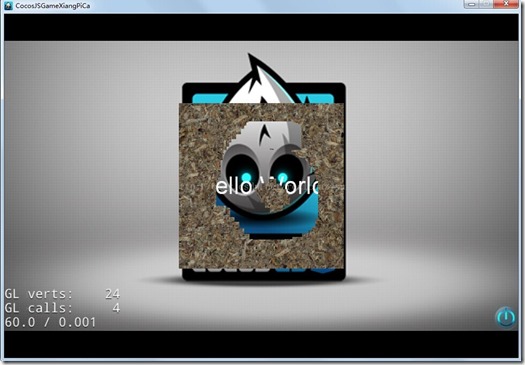
RenderTexture用法2:刮刮乐效果
主要代码如下:
var HelloWorldLayer = cc.Layer.extend({

    sprite:null,

    pEraser:null,

    pRTex:null,

    ctor:function () {

        //////////////////////////////

        // 1. super init first

        this._super();

        var size = cc.winSize;

        // add a "close" icon to exit the progress. it's an autorelease object

        var closeItem = new cc.MenuItemImage(

            res.CloseNormal_png,

            res.CloseSelected_png,

            function () {

                cc.log("Menu is clicked!");

            }, this);

        closeItem.attr({

            x: size.width - 20,

            y: 20,

            anchorX: 0.5,

            anchorY: 0.5

        });

        var menu = new cc.Menu(closeItem);

        menu.x = 0;

        menu.y = 0;

        this.addChild(menu, 1);

        /////////////////////////////

        // 3. add your codes below...

        // add a label shows "Hello World"

        // create and initialize a label

        var helloLabel = new cc.LabelTTF("Hello World", "Arial", 38);

        // position the label on the center of the screen

        helloLabel.x = size.width / 2;

        helloLabel.y = size.height / 2;

        // add the label as a child to this layer

        this.addChild(helloLabel, 5);

        // hello world 背景图片

        this.sprite = new cc.Sprite(res.HelloWorld_png);

        this.sprite.attr({

            x: size.width / 2,

            y: size.height / 2,

        });

        this.addChild(this.sprite, 0);

        //橡皮擦

        this.pEraser = new cc.DrawNode();

        this.pEraser.drawDot(cc.p(0, 0), 20, cc.color(255, 255, 255, 0));

        this.pEraser.retain();

        //通过pRTex实现橡皮擦

        this.pRTex = new cc.RenderTexture(size.width,size.height);

        this.pRTex.setPosition(size.width/2, size.height/2);

        this.addChild(this.pRTex, 10);

        //加载等待被擦除的图片

        var pBg = new cc.Sprite(res.dirt_png);

        pBg.setPosition(size.width/2, size.height/2);

        this.pRTex.begin();

        pBg.visit();

        this.pRTex.end();

        cc.eventManager.addListener({

            event: cc.EventListener.TOUCH_ONE_BY_ONE,

            onTouchBegan:function(touches, event){

                cc.log("start");

                var target = event.getCurrentTarget();

                return true;

            },

            onTouchMoved:function (touch, event) {

                var target = event.getCurrentTarget();

                target.pEraser.setPosition(touch.getLocation());

                target.eraseByBlend();

            }

        }, this);

        return true;

    },

    eraseByBlend :function()

    {

        this.pEraser.setBlendFunc(cc.GL_ONE_MINUS_SRC_ALPHA, cc.ZERO);

        this.pRTex.begin();

        this.pEraser.visit();

        this.pRTex.end();

    }

});
运行效果如下:

[cocos2d-js]cc.RenderTexture几种用法(数字图片、刮刮乐效果)的更多相关文章
- Js闭包常见三种用法
Js闭包特性源于内部函数可以将外部函数的活动对象保存在自己的作用域链上,所以使内部函数的可以将外部函数的活动对象占为己有,可以在外部函数销毁时依然存有外部函数内的活动对象内容,这样做的好处是可 ...
- JS函数的几种用法
1.正常使用:
- js的this几种用法
1.普通的函数调用 此时指的是全局对象 function aaa(){ this.x=1;}aaa();alert(x) 2.对象内的方法this调用 此时指的是上一级对象 var aaa={ zz: ...
- js 函数arguments一种用法
无意改同事的代码发现的 function toggle(){ var _arguments=arguments; var count=0; $("#more").click(fun ...
- jQuery演示8种不同的图片遮罩层动画效果
效果预览 下载地址 jQuery插件大全 实例代码 <div class="container"> <h1>jQuery图标和文章动画效果</h1&g ...
- js正则表达式中的问号几种用法小结
这篇文章主要介绍了js正则表达式中的问号几种用法,比如+?,*?,{2,3}?可以停止匹配的贪婪模式,感兴趣的朋友可以参考下 在表示重复的字符后面加问号,比如+?,*?,{2,3}?可以停止匹配的贪婪 ...
- js中哈希表的几种用法总结
本篇文章只要是对js中哈希表的几种用法进行了总结介绍,需要的朋友可以过来参考下,希望对大家有所帮助 1. <html> <head> <script type=" ...
- JS里设定延时:js中SetInterval与setTimeout用法
js中SetInterval与setTimeout用法 JS里设定延时: 使用SetInterval和设定延时函数setTimeout 很类似.setTimeout 运用在延迟一段时间,再进行某项操 ...
- js中apply,call的用法
最近一直在用 js 写游戏服务器,我也接触 js 时间不长,大学的时候用 js 做过一个 H3C 的 web的项目,然后在腾讯实习的时候用 js 写过一些奇怪的程序,自己也用 js 写过几个的网站.但 ...
随机推荐
- UITableView 接口的调用顺序
ios7启用estimatedHeightForRowAtIndexPath之后的api调用顺序called -[XHYTableViewController tableView:heightForR ...
- bootstrap-6
表格:bootstrap为表格提供了1种基础样式和4种附加样式以及一个支持响应式的表格.主要包括: .table:基础表格 .table-striped:斑马线表格 .table-bordered:带 ...
- checkbox提交多组数据到action
突然想通过checkbox来提交多组数据到action,一时间想不起来怎么写,到网上流岚大婶们的笔迹之后,有了新发现! 方法一: 在action用一个String类型的变量来接受checkbox传过来 ...
- 修改pc机的mac地址 以及 mac地址的组成
在"开始"菜单的"运行"中输入regedit,打开注册表编辑器,展开注册表到:HKEY_LOCAL_ MACHINE/System/CurrentControl ...
- Python中reactor,factory,protocol
最为简单的情况下,除了了解清reactor的简单使用,你还要了解Protocol和Factory.它们最终都会由reactor的侦听建立和run来统一调度起来. 建立服务器的第一个要解决的问题就是服务 ...
- QTableWidget实用技巧(转)
http://blog.csdn.NET/mingxia_sui/article/details/7681863 在使用Qt不多的日子里,已经两次用到了QTableWidget这个控件,也慢慢的习惯和 ...
- 从头开始linux-centos
测试环境,下面二者之一CentOS-6.5-x86_64-minimal.isoCentOS-7-x86_64-Minimal-1511.iso 第一步系统检测与优化,即初始化工作,常规型的 rpm ...
- Linux下安装php加速器xcache
一.环境说明 php安装目录:/usr/local/php php.ini配置文件路径:/usr/local/php/etc/php.ini Nginx安装目录:/usr/local/nginx Ng ...
- zookeeper 笔记
http://www.biaodianfu.com/zookeeper.html ======= ---- zookeeper这种数据结构有如下这些特点: 1,每个子目录如NameService都被作 ...
- ZooKeeper程序员指南(转)
译自http://zookeeper.apache.org/doc/trunk/zookeeperProgrammers.html 1 简介 本文是为想要创建使用ZooKeeper协调服务优势的分布式 ...