
ClearCanvas DICOM 开发系列 一
概述
C#开源的DICOM server.支持影像处理、影像归档、影像管理、影像传输和影像浏览功能。开源代码可学习地方很多。
官方网站:http://www.clearcanvas.ca
building ImageViewer 的代码,
1、打开ImageViewer.sln 在 /Trunk/ImageViewer 用VS2008编译它.
2、运行ClearCanvas.Desktop.Executable Bin\debug 或Bin\Release下的项目.
- 编译通过ImageServer.sln 在 /Trunk/ImageServer
- 修改 connectionStrings在ImageServer_Shreds_dist.config 的user 和 password 在你安装了ImageServer数据库后.
- 编辑/Trunk/ImageServer/Executable/Logging.config 的ConnectionString 的 user 和 password .
- 编译通过这个项目
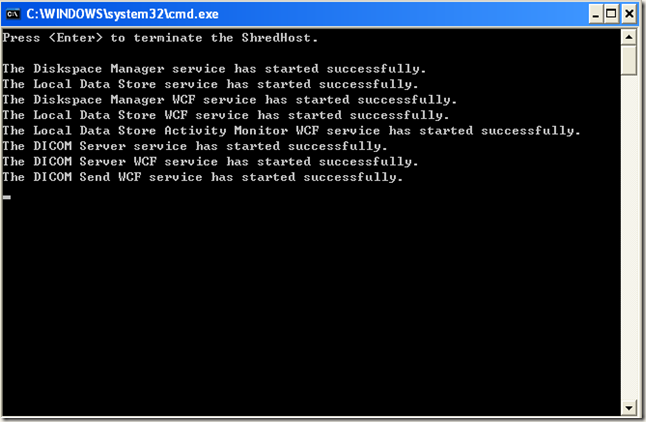
- 开启 ClearCanvas.ImageServer.ShredHostService ,运行里面的wcf server,可以在Bin\Log 看到开启后的日志.
结果如下
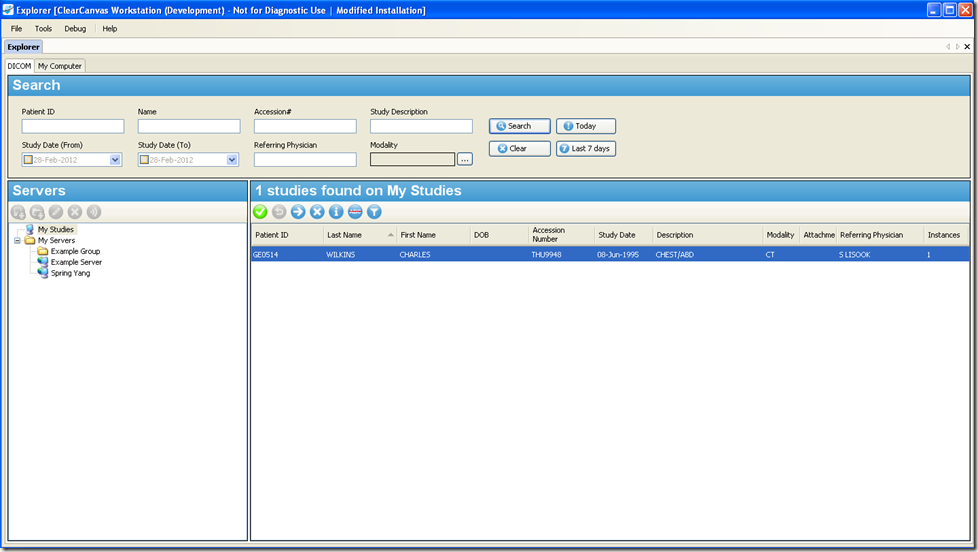
运行 ClearCanvas.Desktop.Executable 的结果如下
测试往Server加入.dcm文件的代码如下
|
1
2
3
4
5
6
7
8
9
10
11
12
13
14
15
16
17
18
19
20
21
22
23
24
25
26
27
28
29
30
31
32
33
34
35
36
37
38
39
40
41
42
43
44
45
46
47
48
49
50
51
52
53
54
55
56
57
58
59
60
61
62
63
64
65
66
67
68
69
70
71
72
73
74
75
76
77
78
79
80
81
82
83
84
|
[TestFixture] public class ScuTests : AbstractTest { [TestFixtureSetUp] public void Init() { _serverType = TestTypes.Receive; } [TestFixtureTearDown] public void Cleanup() { } TestTypes _serverType; public IDicomServerHandler ServerHandlerCreator(DicomServer server, ServerAssociationParameters assoc) { return new ServerHandler(this, _serverType); } private StorageScu SetupScu() { StorageScu scu = new StorageScu("TestAe", "AssocTestServer", "localhost", 104); IList<DicomAttributeCollection> list = SetupMRSeries(4, 2, DicomUid.GenerateUid().UID); foreach (DicomAttributeCollection collection in list) { DicomFile file = new DicomFile("test", new DicomAttributeCollection(), collection); file.TransferSyntax = TransferSyntax.ExplicitVrLittleEndian; file.MediaStorageSopClassUid = SopClass.MrImageStorage.Uid; file.MediaStorageSopInstanceUid = collection[DicomTags.SopInstanceUid].ToString(); scu.AddStorageInstance(new StorageInstance(file)); } return scu; } [Test] public void ScuAbortTest() { int port = 2112; /* Setup the Server */ ServerAssociationParameters serverParameters = new ServerAssociationParameters("AssocTestServer", new IPEndPoint(IPAddress.Any, port)); byte pcid = serverParameters.AddPresentationContext(SopClass.MrImageStorage); serverParameters.AddTransferSyntax(pcid, TransferSyntax.ExplicitVrLittleEndian); serverParameters.AddTransferSyntax(pcid, TransferSyntax.ExplicitVrBigEndian); serverParameters.AddTransferSyntax(pcid, TransferSyntax.ImplicitVrLittleEndian); _serverType = TestTypes.Receive; DicomServer.StartListening(serverParameters, ServerHandlerCreator); StorageScu scu = SetupScu(); IList<DicomAttributeCollection> list = SetupMRSeries(4, 2, DicomUid.GenerateUid().UID); foreach (DicomAttributeCollection collection in list) { DicomFile file = new DicomFile("test",new DicomAttributeCollection(),collection ); file.TransferSyntax = TransferSyntax.ExplicitVrLittleEndian; file.MediaStorageSopClassUid = SopClass.MrImageStorage.Uid; file.MediaStorageSopInstanceUid = collection[DicomTags.SopInstanceUid].ToString(); scu.AddStorageInstance(new StorageInstance(file)); } scu.ImageStoreCompleted += delegate(object o, StorageInstance instance) { // Test abort scu.Abort(); }; scu.Send(); scu.Join(); Assert.AreEqual(scu.Status, ScuOperationStatus.NetworkError); // StopListening DicomServer.StopListening(serverParameters); } } |
如果直接是filePath的话也可以这样
|
1
2
3
4
5
6
7
8
9
10
11
12
13
14
15
16
17
18
19
20
21
22
23
24
25
26
27
28
29
30
|
public class ImageStoreDAL{ private ConnectModel _connectModel; public ImageStoreDAL(ConnectModel connectModel) { _connectModel = connectModel; } public ConnectModel ConnectModelInstance { get { return _connectModel; } set { _connectModel = value; } } private StorageScu SetupScu(string filePath) { StorageScu scu = new StorageScu(_connectModel.ClientAETitle, _connectModel.RemoteAE, _connectModel.RemoteHost, _connectModel.RemotePort); DicomFile file = new DicomFile(filePath); scu.AddStorageInstance(new StorageInstance(file)); return scu; } public ScuOperationStatus ImageStoreByFilePath(string filePath) { StorageScu scu = SetupScu(filePath); scu.Send(); return scu.Status; }} |
ClearCanvas DICOM 开发系列 一的更多相关文章
- iOS开发系列--Swift语言
概述 Swift是苹果2014年推出的全新的编程语言,它继承了C语言.ObjC的特性,且克服了C语言的兼容性问题.Swift发展过程中不仅保留了ObjC很多语法特性,它也借鉴了多种现代化语言的特点,在 ...
- 【微信小程序开发•系列文章六】生命周期和路由
这篇文章理论的知识比较多一些,都是个人观点,描述有失妥当的地方希望读者指出. [微信小程序开发•系列文章一]入门 [微信小程序开发•系列文章二]视图层 [微信小程序开发•系列文章三]数据层 [微信小程 ...
- iOS开发系列文章(持续更新……)
iOS开发系列的文章,内容循序渐进,包含C语言.ObjC.iOS开发以及日后要写的游戏开发和Swift编程几部分内容.文章会持续更新,希望大家多多关注,如果文章对你有帮助请点赞支持,多谢! 为了方便大 ...
- iOS开发系列--App扩展开发
概述 从iOS 8 开始Apple引入了扩展(Extension)用于增强系统应用服务和应用之间的交互.它的出现让自定义键盘.系统分享集成等这些依靠系统服务的开发变成了可能.WWDC 2016上众多更 ...
- iOS开发系列--Swift进阶
概述 上一篇文章<iOS开发系列--Swift语言>中对Swift的语法特点以及它和C.ObjC等其他语言的用法区别进行了介绍.当然,这只是Swift的入门基础,但是仅仅了解这些对于使用S ...
- iOS开发系列--通知与消息机制
概述 在多数移动应用中任何时候都只能有一个应用程序处于活跃状态,如果其他应用此刻发生了一些用户感兴趣的那么通过通知机制就可以告诉用户此时发生的事情.iOS中通知机制又叫消息机制,其包括两类:一类是本地 ...
- iOS开发系列--数据存取
概览 在iOS开发中数据存储的方式可以归纳为两类:一类是存储为文件,另一类是存储到数据库.例如前面IOS开发系列-Objective-C之Foundation框架的文章中提到归档.plist文件存储, ...
- iOS开发系列--网络开发
概览 大部分应用程序都或多或少会牵扯到网络开发,例如说新浪微博.微信等,这些应用本身可能采用iOS开发,但是所有的数据支撑都是基于后台网络服务器的.如今,网络编程越来越普遍,孤立的应用通常是没有生命力 ...
- Win10 UWP开发系列:使用VS2015 Update2+ionic开发第一个Cordova App
安装VS2015 Update2的过程是非常曲折的.还好经过不懈的努力,终于折腾成功了. 如果开发Cordova项目的话,推荐大家用一下ionic这个框架,效果还不错.对于Cordova.PhoneG ...
随机推荐
- Java @Override报错
问题 如果在使用Eclipse开发Java项目时,在使用 @Override 出现以下错误:The method *** of type *** must override a superclass ...
- codeforces 709B Checkpoints
题目链接:http://codeforces.com/problemset/problem/709/B 题目大意: 第一行给出两个数 n,x.第二行 输入 n 个数. 要求:从x位置遍历 n-1 个位 ...
- C# unmanaged function pointers for iOS
C# unmanaged function pointers for iOS Just a reminder to myself when I need this thing next time fo ...
- $.ajax()引发的对Deferred的总结 (转)
传统的ajax写法: $.ajax({ url:"1.json", type:"get", success:function(data){}, error:fu ...
- ecshop 后台【左侧新增菜单】
模板文件admin/template/menu.htm admin/includes/inc_menu.php 菜单排序(链接) langagues/zh_cn/admin/common.php 语 ...
- jquermobile 安装
代码 <script src="../Public/js/jquery-1.11.1.min.js"></script> <script src=&q ...
- IOS: 账号,证书 好文整理
公钥.私钥.数字证书的概念 http://blog.csdn.net/turui/article/details/2048582 iOS Provisioning Profile(Certificat ...
- JAVA个人知识总结
1.一个.java文件中只能有一个public类,且必须跟文件名相同,其他类不能以public开头. 2.继承: 子类继承父类的属性和方法. 3.继承和组合: 继承是对“是一种”(is-a)关系建模, ...
- Linux下的压缩解压缩命令详解
linux zip命令zip -r myfile.zip ./*将当前目录下的所有文件和文件夹全部压缩成myfile.zip文件,-r表示递归压缩子目录下所有文件. 2.unzipunzip -o - ...
- trace enabled
<system.web> <trace enabled="true" localOnly="true" pageOutput="tr ...