
OpenCV 之 边缘检测
1 图像边缘
上一篇 OpenCV 之 图像平滑 中,提到的图像平滑,从信号处理的角度来看,实际上是一种“低通滤波器”。
本篇中,数字图像的边缘,通常都是像素值变化剧烈的区域 (“高频”),故可将边缘检测视为一种 “高通滤波器”。
现实中,对应于像素值变化剧烈的情况如下:
1) 深度的不连续 (物体处在不同的物平面上)
2) 表面方向的不连续 (例如,正方体的不同的两个面)
3) 物体材料不同 (光的反射系数也不同)
4) 场景中光照不同 (例如,有树荫的路面)
OpenCV 中,边缘检测常用的是索贝尔算子 (Sobel) 和拉普拉斯算子 (Laplace),分别是对图像求一阶导和二阶导。
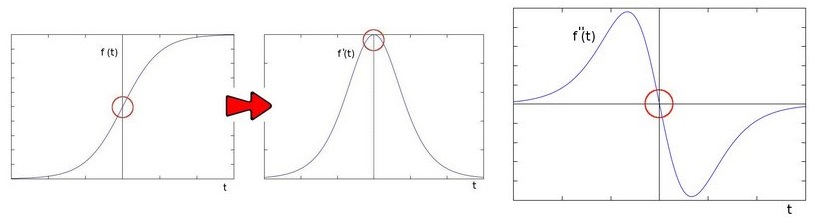
2 索贝尔算子 (Sobel)
2.1 计算过程
假定输入图像矩阵为 I,卷积核大小为 3x3,则水平一阶导数 Gx 和垂直一阶导数 Gy 分别为:
$\quad G_x = \begin{bmatrix} -1 & 0 & 1 \\ -2 & 0 & 2 \\ -1 & 0 & 1 \\ \end{bmatrix} * I \qquad G_y = \begin{bmatrix} -1 & -2 & -1 \\ 0 & 0 & 0 \\ 1 & 2 & 1 \\ \end{bmatrix} * I $
输出的图像矩阵 G 为:
$\quad G = \sqrt{G_{x}^2 + G_{y}^2 } \qquad \text{或简化为} \qquad G = |G_x| + |G_y| $
OpenCV 中,Sobel 函数如下:
void cv::Sobel   (

    InputArray  src,    // 输入图像

    OutputArray  dst,   // 输出图像

    int      ddepth,    // 输出图像深度,-1 表示等于 src.depth()

    int      dx,        // 水平方向的阶数

    int      dy,        // 垂直方向的阶数

    int     ksize = ,    // 卷积核的大小,常取 1, 3, 5, 7 等奇数

    double  scale = ,    // 缩放因子,应用于计算结果

    double  delta = ,    // 增量数值,应用于计算结果
    int borderType = BORDER_DEFAULT // 边界处理模式
)
dx 和 dy 表示阶数,一般取 0 或 1,但不超过 2;scale = 1,表示计算结果不缩放;delat = 0,表示计算结果无增量。
2.2 Scharr 卷积核
当卷积核大小为 3x3 时,使用 sobel 卷积核来计算并不是很精确,此时常用 Scharr 卷积核来代替,如下:
$\quad K_x = \begin{bmatrix} -3 & 0 & 3 \\ -10 & 0 & 10 \\ -3 & 0 & 3 \\ \end{bmatrix}\qquad K_y = \begin{bmatrix} -3 & -10 & -3 \\ 0 & 0 & 0 \\ 3 & 10 & 3 \\ \end{bmatrix} $
而 Sharr 函数,本质上就是令 ksize = 3 且使用 Scharr 卷积核的 Sobel 函数。
void cv::Scharr (

    InputArray  src,

    OutputArray  dst,

    int      ddepth,

    int      dx,

    int      dy,

    double  scale = ,

    double  delta = ,

    int     borderType = BORDER_DEFAULT

)
对于 Scharr 函数,要求 dx 和 dy 都 >= 0 且 dx + dy == 1,假如 dx 和 dy 都设为 1,则会抛出异常。
因此,对于 Sobel 和 Scharr 函数,通常各自求其 x 和 y 方向的导数,然后通过加权来进行边缘检测。
// Gradient X

Scharr( src_gray, grad_x, ddepth, , , scale, delta, BORDER_DEFAULT );

convertScaleAbs( grad_x, abs_grad_x );

// Gradient Y

Scharr( src_gray, grad_y, ddepth, , , scale, delta, BORDER_DEFAULT );
convertScaleAbs( grad_y, abs_grad_y );

// Total Gradient (approximate)

addWeighted( abs_grad_x, 0.5, abs_grad_y, 0.5, , grad );
3 拉普拉斯算子 (Laplace)
索贝尔算子 (Sobel) 和拉普拉斯算子 (Laplace) 都是用来对图像进行边缘检测的,不同之处在于,前者是求一阶导,后者是求二阶导。
$\quad Laplace(f) = \frac{\partial^2f}{\partial x^2} + \frac{\partial^2f}{\partial y^2} = f(x+1, y) + f(x-1, y) + f(x, y+1) + f(x, y-1) - 4f(x, y)$
OpenCV 中对应的函数为 Laplacian
void cv::Laplacian (

    InputArray     src,

    OutputArray    dst,

    int       ddepth,

    int       ksize = ,

    double    scale = ,

    double    delta = ,

    int       borderType = BORDER_DEFAULT

)
4 Canny 算子
4.1 算法步骤
Canny 边缘检测算子,其算法步骤大体如下:
1) 用高斯滤波器对输入图像做平滑处理 (大小为 5x5 的高斯核)
$\quad K = \frac{1}{159} \begin{bmatrix} 2 & 4 & 5 & 4 & 2 \\ 4 & 9 & 12 & 9 & 4 \\ 5 & 12 & 15 & 12 & 5 \\ 4 & 9 & 12 & 9 & 4 \\ 2 & 4 & 5 & 4 & 2 \end{bmatrix}$
2) 计算图像的梯度强度和角度方向 ( x 和 y 方向上的卷积核)
$\quad K_x = \begin{bmatrix} -1 & 0 & 1 \\ -2 & 0 & 2 \\ -1 & 0 & 1 \\ \end{bmatrix} \qquad K_y = \begin{bmatrix} -1 & -2 & -1 \\ 0 & 0 & 0 \\ 1 & 2 & 1 \\ \end{bmatrix} $
$\quad G = \sqrt{G_{x}^2 + G_{y}^2 } \qquad \theta = \arctan(\dfrac{ G_y }{ G_x }) $
角度方向近似为四个可能值,即 0, 45, 90, 135
3) 对图像的梯度强度进行非极大抑制
可看做边缘细化:只有候选边缘点被保留,其余的点被移除
4) 利用双阈值检测和连接边缘
若候选边缘点大于上阈值,则被保留;小于下阈值,则被舍弃;处于二者之间,须视其所连接的像素点,大于上阈值则被保留,反之舍弃
4.2 Canny 函数
OpenCV 中的 Canny 函数如下所示:
void cv::Canny (

    InputArray    image,    // 输入图像 (8位)

    OutputArray   edges,    // 输出图像 (单通道,8位)

    double      threshold1,  // 下阈值

    double      threshold2,  // 上阈值

    int         apertureSize = ,

    bool        L2gradient = false

)
一般 上阈值 / 下阈值 = 2 ~ 3
L2gradient 默认 flase,表示图像梯度强度的计算采用近似形式;若为 true,则表示采用更精确的形式。
5 代码示例
5.1 OpenCV 示例
Sobel 或 Scharr 示例中,使用 addWeighted 函数,来加权合成 x 和 y 方向上各自的一阶导数
#include "opencv2/imgproc/imgproc.hpp"

#include "opencv2/imgcodecs.hpp"

#include "opencv2/highgui/highgui.hpp"

#include <stdlib.h>

#include <stdio.h>

using namespace cv;

int main( int, char** argv )

{

  Mat src, src_gray;

  Mat grad;

  const char* window_name = "Sobel Demo - Simple Edge Detector";

  int scale = ;

  int delta = ;

  int ddepth = CV_16S;

  /// Load an image

  src = imread( argv[] );

  if( src.empty() )

    { return -; }

  GaussianBlur( src, src, Size(,), , , BORDER_DEFAULT );

  /// Convert it to gray

  cvtColor( src, src_gray, COLOR_RGB2GRAY );

  /// Create window

  namedWindow( window_name, WINDOW_AUTOSIZE );

  /// Generate grad_x and grad_y

  Mat grad_x, grad_y;

  Mat abs_grad_x, abs_grad_y;

  /// Gradient X

  //Scharr( src_gray, grad_x, ddepth, 1, 0, scale, delta, BORDER_DEFAULT );

  Sobel( src_gray, grad_x, ddepth, , , , scale, delta, BORDER_DEFAULT );

  convertScaleAbs( grad_x, abs_grad_x );

  /// Gradient Y

  //Scharr( src_gray, grad_y, ddepth, 0, 1, scale, delta, BORDER_DEFAULT );

  Sobel( src_gray, grad_y, ddepth, , , , scale, delta, BORDER_DEFAULT );

  convertScaleAbs( grad_y, abs_grad_y );

  /// Total Gradient (approximate)

  addWeighted( abs_grad_x, 0.5, abs_grad_y, 0.5, , grad );

  imshow( window_name, grad );

  waitKey();

  return ;

}
Laplacion 示例中,利用了高斯滤波函数来降低噪声
#include "opencv2/imgproc/imgproc.hpp"

#include "opencv2/imgcodecs.hpp"

#include "opencv2/highgui/highgui.hpp"

using namespace cv;

int main( int, char** argv )

{

  Mat src, src_gray, dst;

  int kernel_size = ;

  int scale = ;

  int delta = ;

  int ddepth = CV_16S;

  const char* window_name = "Laplace Demo";

  // 读图

  src = imread("camera1.bmp");

  if( src.empty())

      return -;

  // 高斯滤波

  GaussianBlur( src, src, Size(,), , , BORDER_DEFAULT );

  // 灰度图

  cvtColor( src, src_gray, COLOR_RGB2GRAY );

  // 窗体

  namedWindow( window_name, WINDOW_AUTOSIZE );

  // Laplace 函数

  Mat abs_dst;

  Laplacian( src_gray, dst, ddepth, kernel_size, scale, delta, BORDER_DEFAULT );

  convertScaleAbs( dst, abs_dst );

  // 显示

  imshow( window_name, abs_dst );

  waitKey();

}
在 Canny 函数之前,也需要 blur 函数,来进行降噪处理
#include "opencv2/imgproc/imgproc.hpp"

#include "opencv2/imgcodecs.hpp"

#include "opencv2/highgui/highgui.hpp"

#include <stdlib.h>

#include <stdio.h>

using namespace cv;

/// Global variables

Mat src, src_gray;

Mat dst, detected_edges;

int edgeThresh = ;

int lowThreshold;

int const max_lowThreshold = ;

int ratio = ;

int kernel_size = ;

const char* window_name = "Edge Map";

/**

 * @function CannyThreshold

 * @brief Trackbar callback - Canny thresholds input with a ratio 1:3

 */

static void CannyThreshold(int, void*)

{

    /// Reduce noise with a kernel 3x3

    blur( src_gray, detected_edges, Size(,) );

    /// Canny detector

    Canny( detected_edges, detected_edges, lowThreshold, lowThreshold*ratio, kernel_size );

    /// Using Canny's output as a mask, we display our result

    dst = Scalar::all();

    src.copyTo( dst, detected_edges);

    imshow( window_name, dst );

}

int main( int, char** argv )

{

  /// Load an image

  src = imread( argv[] );

  if( src.empty() )

    { return -; }

  /// Create a matrix of the same type and size as src (for dst)

  dst.create( src.size(), src.type() );

  /// Convert the image to grayscale

  cvtColor( src, src_gray, COLOR_BGR2GRAY );

  /// Create a window

  namedWindow( window_name, WINDOW_AUTOSIZE );

  /// Create a Trackbar for user to enter threshold

  createTrackbar( "Min Threshold:", window_name, &lowThreshold, max_lowThreshold, CannyThreshold );

  /// Show the image

  CannyThreshold(, );

  /// Wait until user exit program by pressing a key

  waitKey();

  return ;

}
5.2 简单对比
在进行 Sobel,Laplacian 和 Canny 边缘检测之前,统一调用 GaussianBlur 来降低图像噪声
#include "opencv2/imgproc/imgproc.hpp"

#include "opencv2/highgui/highgui.hpp"

using namespace std;

using namespace cv;

int main()

{

    Mat src, src_gray, dst;

    src = imread("E:/Edge/bird.jpg");

    if(src.empty())

        return -;

    namedWindow("Original", CV_WINDOW_AUTOSIZE);

    namedWindow("Sobel", CV_WINDOW_AUTOSIZE);

    namedWindow("Laplace", CV_WINDOW_AUTOSIZE);

    namedWindow("Canny", CV_WINDOW_AUTOSIZE);

    imshow("Original", src);

    Mat grad_x, grad_y, abs_grad_x, abs_grad_y;

    GaussianBlur(src, src, Size(,),);

    cvtColor(src,src_gray,COLOR_BGR2GRAY);

    Sobel(src_gray, grad_x,CV_16S,,);        // use CV_16S to avoid overflow

    convertScaleAbs( grad_x, abs_grad_x );

    Sobel(src_gray, grad_y,CV_16S,,);        // use CV_16S to avoid overflow

    convertScaleAbs( grad_y, abs_grad_y );

    addWeighted( abs_grad_x, 0.5, abs_grad_y, 0.5, , dst );

    imshow("Sobel", dst);

    imwrite("Sobel.jpg",dst);

    Laplacian(src_gray,dst,-,);

    imshow("Laplace", dst);

    imwrite("Laplace.jpg",dst);

    Canny(src_gray,dst,,);

    imshow("Canny",dst);

    imwrite("Canny.jpg",dst);

    waitKey();
}
三种边缘检测的效果图如下:

参考资料
<Learning OpenCV_2nd>
<OpenCV Tutorials> imgproc module
OpenCV 之 边缘检测的更多相关文章
- 【OpenCV】边缘检测:Sobel、拉普拉斯算子
推荐博文,博客.写得很好,给个赞. Reference Link : http://blog.csdn.net/xiaowei_cqu/article/details/7829481 一阶导数法:梯度 ...
- OpenCV: Canny边缘检测算法原理及其VC实现详解(转载)
原文地址:http://blog.csdn.net/likezhaobin/article/details/6892176 原文地址:http://blog.csdn.net/likezhaobin/ ...
- Opencv 图片边缘检测和最小外接矩形
#include "core/core.hpp" #include "highgui/highgui.hpp" #include "imgproc/i ...
- opencv::Canny边缘检测
Canny算法介绍 五步 in cv::Canny 高斯模糊 - GaussianBlur 灰度转换 - cvtColor 计算梯度 – Sobel/Scharr 非最大信号抑制 高低阈值输出二值图像 ...
- OpenCV Canny 边缘检测
#include "opencv2/imgproc/imgproc.hpp" #include "opencv2/highgui/highgui.hpp" #i ...
- [OpenCV入门教程之十二】OpenCV边缘检测:Canny算子,Sobel算子,Laplace算子,Scharr滤波器合辑
http://blog.csdn.net/poem_qianmo/article/details/25560901 本系列文章由@浅墨_毛星云 出品,转载请注明出处. 文章链接:http://blog ...
- OpenCV 之 图像分割 (一)
1 基于阈值 1.1 基本原理 灰度阈值化,是最简单也是速度最快的一种图像分割方法,广泛应用在硬件图像处理领域 (例如,基于 FPGA 的实时图像处理). 假设输入图像为 f,输出图像为 g,则经 ...
- 【算法随记】Canny边缘检测算法实现和优化分析。
以前的博文大部分都写的非常详细,有很多分析过程,不过写起来确实很累人,一般一篇好的文章要整理个三四天,但是,时间越来越紧张,后续的一些算法可能就以随记的方式,把实现过程的一些比较容易出错和有价值的细节 ...
- 学习 opencv---(11)OpenC 边缘检测:Canny算子,Sobel算子,Laplace算子,Scharr滤波器
本篇文章中,我们将一起学习OpenCV中边缘检测的各种算子和滤波器——Canny算子,Sobel算子,Laplace算子以及Scharr滤波器.文章中包含了五个浅墨为大家准备的详细注释的博文配套源代码 ...
随机推荐
- go git 安装配置与使用 (windows 7 64bit)
go语言安装使用第三方库方式一般采用 go get github.com/.../... 命令.例如: go get github.com/astaxie/beego 1.错误情况一: packag ...
- 小白详细讲解快速幂--杭电oj2035-A^B
Problem Description 求A^B的最后三位数表示的整数.说明:A^B的含义是“A的B次方” Input 输入数据包含多个测试实例,每个实例占一行,由两个正整数A和B组成(1<= ...
- BP人工神经网络原理(转载)
- iOS开发-canOpenURL: failed for URL: "xx" - error:"This app is not allowed to query for scheme xx"
转载自:http://www.jianshu.com/p/e38a609f786e
- ContentProvider实现流程
个人记录 public class DataBaseContentProvider extends ContentProvider { private SQLiteOpenHelper mSQLite ...
- Android 数据库 LiteOrm 的使用
1.什么是 LiteOrm LiteOrm是一个小巧.强大.比系统自带数据库操作性能快1倍的 android ORM 框架类库,开发者一行代码实现数据库的增删改查操作,以及实体关系的持久化和自动映射. ...
- Android 中MyApplication
package liu.basedemo; import android.app.Activity; import android.app.Application; import java.lang. ...
- IOS 杂笔-1(为什么不继承类簇?)
答:首先,类簇是可以继承的,并不是不可以.例如,我们可以选择继承NSSting,但是此时你用你自己设定的类去调用NSSting的一些方法时,会存在无法实现的问题,这是为什么呢. 1.类簇里有很多私有的 ...
- iOS 上传新版本到AppStore时报错ITMS-90034
今天打包新版本上传到AppStore时报错 ERROR ITMS-90034:"Missing or invalid signature.The bundle'com.xxx.xxx' at ...
- vmware克隆虚拟机eth0网卡无法启动
概述: 通过vmware克隆安装好的虚拟机之后,出现了网卡未启动的问题. vmware安装虚拟机请看:<vmware快速安装linux虚拟机>. 定位过程: 1.通过ifocnfig命令只 ...