
Web Api 2 接口API文档美化
使用用第三方提供的swgger ui 帮助提高 web api 接口列表的阅读性,并且可以在页面中测试服务接口。
运行程序如下:
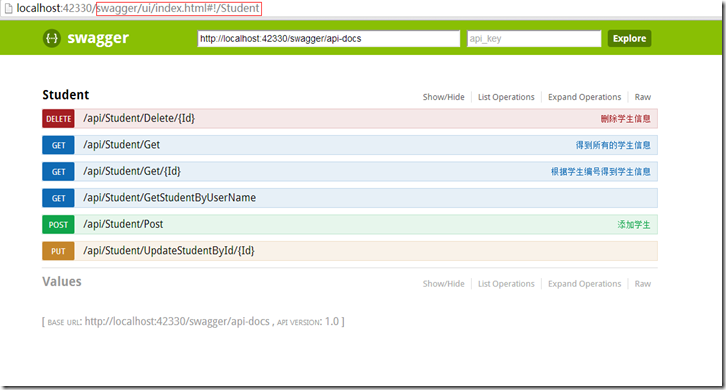
注意:在IE中必须输入红色部分。
并且可以对方法进行测试。
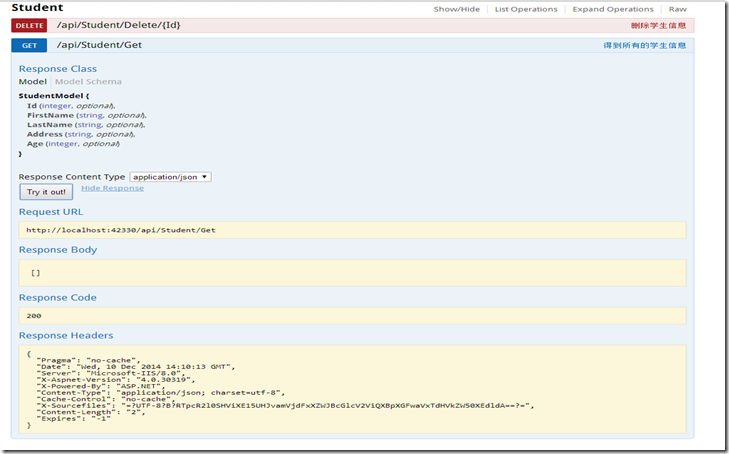
在开发web api 是可以写清楚注释,并且在文档中可以全部的显示出来。
在工程中处了安装Swashbuckle 以外,还会用到Owin,system.web.http.owin库
在WebApi项目工程中安装:Install-Package Swashbuckle ,安装成功能后,会在项目中的App_Start文件
夹中生成一个文件名为“SwaggerConfig”的文件。并修改如下:
1: using System.Web.Http;
2: using WebApi;
3: using WebActivatorEx;
4: using Swashbuckle.Application;
5:
6: [assembly: PreApplicationStartMethod(typeof(SwaggerConfig), "Register")]
7:
8: namespace WebApi
9: {
10: public class SwaggerConfig
11: {
12: public static void Register()
13: {
14: Swashbuckle.Bootstrapper.Init(GlobalConfiguration.Configuration);
15:
16: // NOTE: If you want to customize the generated swagger or UI, use SwaggerSpecConfig and/or SwaggerUiConfig here ...
17: SwaggerSpecConfig.Customize(c =>
18: {
19: c.IncludeXmlComments(GetXmlCommentsPath());
20: });
21: }
22:
23: private static string GetXmlCommentsPath()
24: {
25: return System.String.Format(@"{0}\bin\WebApi.XML", System.AppDomain.CurrentDomain.BaseDirectory);
26: }
27: }
28: }
在工程中添加一个StartUp的文件,代码如下:
1:
2: using Microsoft.Owin;
3: using Owin;
4: using System;
5: using System.Collections.Generic;
6: using System.Linq;
7: using System.Web;
8: using System.Web.Http;
9:
10: [assembly: OwinStartup(typeof(WebApi.Startup))]
11: namespace WebApi
12: {
13: public class Startup
14: {
15: public void Configuration(IAppBuilder app)
16: {
17: HttpConfiguration config = new HttpConfiguration();
18: WebApiConfig.Register(config);
19: Swashbuckle.Bootstrapper.Init(config);
20: app.UseWebApi(config);
21: }
22: }
23: }
新建一个studentController:
1: namespace WebApi.Controllers
2: {
3: /// <summary>
4: /// 用户接口
5: /// </summary>
6: public class StudentController : ApiController
7: {
8: /// <summary>
9: /// 得到所有的学生信息
10: /// </summary>
11: /// <returns></returns>
12: public IEnumerable<StudentModel> Get()
13: {
14: return new List<StudentModel>();
15: }
16:
17: /// <summary>
18: /// 根据学生编号得到学生信息
19: /// </summary>
20: /// <param name="Id">学生编号</param>
21: /// <returns></returns>
22: public StudentModel Get(int Id)
23: {
24: return new StudentModel { };
25: }
26:
27: /// <summary>
28: /// 添加学生
29: /// </summary>
30: /// <param name="studentModel">学生实体</param>
31: /// <remarks>添加一个新的学生</remarks>
32: /// <response code="400">Bad request </response>
33: /// <response code="500">Internal Server Error</response>
34: public void Post(StudentModel studentModel)
35: {
36: }
37:
38:
39: /// <summary>
40: /// 修改学生信息
41: /// </summary>
42: /// <param name="Id">学生编号</param>
43: /// <param name="studentModel">学生实体</param>
44:
45: [ResponseType(typeof(StudentModel))]
46: [ActionName("UpdateStudentById")]
47: public void Put(int Id, [Form]string studentModel)
48: {
49:
50: }
51:
52: /// <summary>
53: /// 删除学生信息
54: /// </summary>
55: /// <param name="Id">学生编号</param>
56: public void Delete(int Id)
57: {
58: }
59:
60: /// <summary>
61: /// 根据学生姓名得到学生信息
62: /// </summary>
63: /// <param name="name">学生姓名</param>
64: /// <remarks>dfsafdsa</remarks>
65: /// <returns></returns>
66: //[Route(Name = "GetStudentByUserName")]
67: //[ResponseType(typeof(StudentModel))]
68: [HttpGet]
69: [ActionName("GetStudentByUserName")]
70: public IEnumerable<StudentModel> GetStudentByName(string name)
71: {
72: return new List<StudentModel>();
73: }
74: }
75: }
.csharpcode, .csharpcode pre
{
font-size: small;
color: black;
font-family: consolas, "Courier New", courier, monospace;
background-color: #ffffff;
/*white-space: pre;*/
}
.csharpcode pre { margin: 0em; }
.csharpcode .rem { color: #008000; }
.csharpcode .kwrd { color: #0000ff; }
.csharpcode .str { color: #006080; }
.csharpcode .op { color: #0000c0; }
.csharpcode .preproc { color: #cc6633; }
.csharpcode .asp { background-color: #ffff00; }
.csharpcode .html { color: #800000; }
.csharpcode .attr { color: #ff0000; }
.csharpcode .alt
{
background-color: #f4f4f4;
width: 100%;
margin: 0em;
}
.csharpcode .lnum { color: #606060; }
.csharpcode, .csharpcode pre
{
font-size: small;
color: black;
font-family: consolas, "Courier New", courier, monospace;
background-color: #ffffff;
/*white-space: pre;*/
}
.csharpcode pre { margin: 0em; }
.csharpcode .rem { color: #008000; }
.csharpcode .kwrd { color: #0000ff; }
.csharpcode .str { color: #006080; }
.csharpcode .op { color: #0000c0; }
.csharpcode .preproc { color: #cc6633; }
.csharpcode .asp { background-color: #ffff00; }
.csharpcode .html { color: #800000; }
.csharpcode .attr { color: #ff0000; }
.csharpcode .alt
{
background-color: #f4f4f4;
width: 100%;
margin: 0em;
}
.csharpcode .lnum { color: #606060; }
.csharpcode, .csharpcode pre
{
font-size: small;
color: black;
font-family: consolas, "Courier New", courier, monospace;
background-color: #ffffff;
/*white-space: pre;*/
}
.csharpcode pre { margin: 0em; }
.csharpcode .rem { color: #008000; }
.csharpcode .kwrd { color: #0000ff; }
.csharpcode .str { color: #006080; }
.csharpcode .op { color: #0000c0; }
.csharpcode .preproc { color: #cc6633; }
.csharpcode .asp { background-color: #ffff00; }
.csharpcode .html { color: #800000; }
.csharpcode .attr { color: #ff0000; }
.csharpcode .alt
{
background-color: #f4f4f4;
width: 100%;
margin: 0em;
}
.csharpcode .lnum { color: #606060; }
设置工程属性,在属性的构建中设置输出文档:
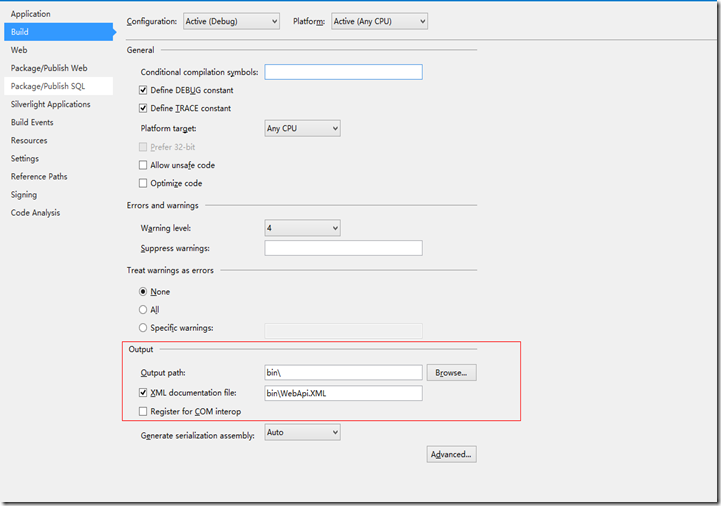
这里的“bin\WebApi.XML”文件名称和SwaggerConfig文件中的配置保持一样。
Web Api 2 接口API文档美化的更多相关文章
- Web Api 自动生成帮助文档
Web Api 自动生成帮助文档 新建Web Api项目之后,会在首页有API的导航菜单,点击即可看到API帮助文档,不过很遗憾,Description 是没有内容的. 怎么办呢? 第一步: 如果 ...
- Spring 5 中函数式web开发中的swagger文档
Spring 5 中一个非常重要的更新就是增加了响应式web开发WebFlux,并且推荐使用函数式风格(RouterFunction和 HandlerFunction)来开发WebFlux.对于之前主 ...
- 后端编写Swagger接口管理文档
Swagger接口管理文档 访问接口文档的网页:http://localhost:8080/swagger-ui/index.html 导入依赖 <dependency> <grou ...
- 支付宝接口使用文档说明 支付宝异步通知(notify_url)与return_url.
支付宝接口使用文档说明 支付宝异步通知(notify_url)与return_url. 现支付宝的通知有两类. A服务器通知,对应的参数为notify_url,支付宝通知使用POST方式 B页面跳转通 ...
- Java实现web在线预览office文档与pdf文档实例
https://yq.aliyun.com/ziliao/1768?spm=5176.8246799.blogcont.24.1PxYoX 摘要: 本文讲的是Java实现web在线预览office文档 ...
- (转)WEB页面导出为Word文档后分页&横向打印的方法
<html> <HEAD> <title>WEB页面导出为Word文档后分页&横向打印的方法 </title> < ...
- Web 前端 UI 组件库文档自动化方案 All In One
Web 前端 UI 组件库文档自动化方案 All In One 需求 自动化 动态 好用 markdown element-ui 中示例和说明按照一定规则写在md文件中,调用md-loader将md文 ...
- ASP.NET Web Api 2 接口API文档美化之Swagger
使用第三方提供的swgger ui 可有效提高 web api 接口列表的阅读性,并且可以在页面中测试服务接口. 但本人在查阅大量资料并进行编码测试后,发现大部分的swagger实例并不能有效运行.例 ...
- Web API 自动生成帮助文档并使用Web API Test Client 测试
之前在项目中有用到webapi对外提供接口,发现在项目中有根据webapi的方法和注释自动生成帮助文档,还可以测试webapi方法,功能很是强大,现拿出来与大家分享一下. 先看一下生成的webapi文 ...
随机推荐
- SQL Server中的RAND函数的介绍和区间随机数值函数的实现
工作中会遇到SQL Server模拟数据生成以及数值列值(如整型.日期和时间数据类型)随机填充等等任务,这些任务中都要使用到随机数.鉴于此,本文将对SQL Server中随机数的使用简单做个总 ...
- iOS MJRefresh下拉刷新(上拉加载)使用详解
下拉刷新控件目前比较火的有好几种,本人用过MJRefresh 和 SVPullToRefresh,相对而言,前者比后者可定制化.拓展新都更高一点. 因此本文着重讲一下MJRefresh的简单用法. 导 ...
- 浅谈C++设计模式之抽象工厂(Abstract Factory)
抽象工厂(Abstract Factory)模式是为了提供一系列相关或相互依赖对象的接口.对象创建型模式的一种. 客户Client 抽象工厂接口AbstractFactory 抽象工厂的实现类Conc ...
- TeX Live安装配置等默认目录
TeX Live默认目录情况: TEXDIR (the main TeX directory): !! default location: /usr/local/texlive/2015 ...
- js生成[n,m]的随机数
一.预备知识 Math.ceil(); //向上取整. Math.floor(); //向下取整. Math.round(); //四舍五入. Math.random(); //0.0 ~ 1 ...
- MMORPG大型游戏设计与开发(规范)
一件事如果没有规范.章法,那么做这件事起来往往会遇到许多难题,特别是在多人协作的时候,没有到规范通常让每个人多多少少都面临着头疼的困难.举个例子,多个人要做一桌美味的饺子,有买材料.做面皮.弄肉(菜) ...
- continue break return的区别
1.continue 语句的作用 终止本次循环的执行,即跳过当前一次循环中continue语句后尚未执行的语句,然后进行下一次循环条件的判断. 2.break 语句的作用 (1)当 ...
- NYOJ-取石子(六)
取石子(六) 时间限制:1000 ms | 内存限制:65535 KB 难度:3 描述 最近TopCoder的PIAOYI和HRDV很无聊,于是就想了一个游戏,游戏是这样的:有n堆石子,两个人轮流 ...
- AC日记——输出亲朋字符串 openjudge 1.7 05
05:输出亲朋字符串 总时间限制: 1000ms 内存限制: 65536kB 描述 编写程序,求给定字符串s的亲朋字符串s1. 亲朋字符串s1定义如下:给定字符串s的第一个字符的ASCII值加第二 ...
- ubuntu14上安装ros教程
安装ROS 官方的安装教程地址 http://wiki.ros.org/cn/jade/Installation/Ubuntu 建议安装indigo版的 下面的教程是安装jade版的 配置Ubuntu ...