
前端学PHP之文件操作(认真读读)
前面的话
在程序运行时,程序本身和数据一般都存在内存中,当程序运行结束后,存放在内存中的数据被释放。如果需要长期保存程序运行所需的原始数据,或程序运行产生的结果,就需要把数据存储在文件或数据库。一般地,小型数据存储在文件中,海量数据存储在数据库中。本文主要介绍php中目录和文件的基本操作
文件类型
文件一般指存储在外部介质上具有名字(文件名)的一组相关数据集合。用文件可长期保存数据,并实现数据共享
PHP是以UNIX的文件系统为模型的。因此在Windows系统中我们只能获得”file”、”dir”或者“unknown”三种文件类型。而在UNIX系统中,我们可以获得block、char、dir、fifo、file、link和unknown七种类型
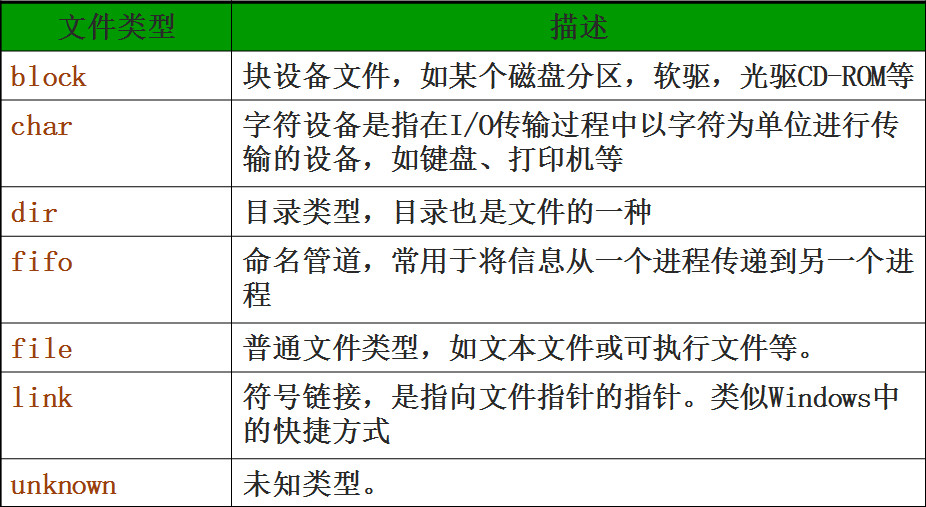
可以使用函数filetype()获取文件的具体类型,可能的值有fifo,char,dir,block,link,file 和 unknown
string filetype ( string filename )
如果出错则返回 FALSE。如果调用失败或者文件类型未知的话 filetype() 还会产生一个 E_NOTICE 消息
在服务器中新建一个目录test,并在目录中新建一个文件a.txt

<?php

echo filetype('test/a.txt');  // file

echo filetype('test/');        // dir

echo filetype('test/b.txt');  // Warning: filetype(): Lstat failed for test/b.txt

?>
在这7种文件类型中,window系统常用的是'file'和'dir'这两种,它们配套的类型检测函数分别是is_dir( )和is_file( )
is_dir( )
判断给定文件名是否是一个目录。如果文件名存在并且是一个目录则返回 true,否则返回 false
bool is_dir(_name)
is_file( )
判断给定文件名是否为一个正常的文件,如果文件存在且为正常的文件则返回 true
bool is_file(_name)
<?php

var_dump (is_file('test/a.txt'));  //boolean true

var_dump (is_dir('test/'));        //boolean true

?>
文件属性
一般地,在文件或目录右键菜单中,选择属性,即可查看文件的属性
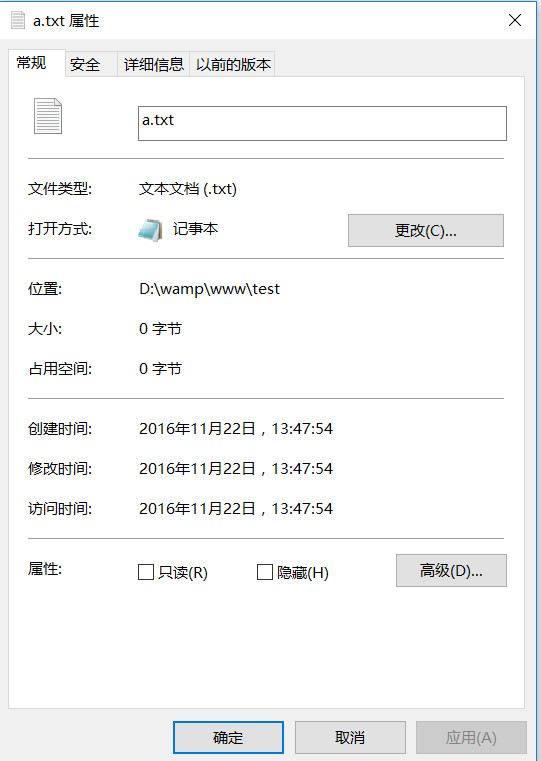
下表中列出了php中关于文件属性的常用函数


<?php

var_dump (file_exists('test/a.txt'));  //boolean true

var_dump (filesize('test/a.txt'));  // int 0

var_dump (is_readable('test/a.txt'));  //boolean true

var_dump (is_writeable('test/a.txt'));  //boolean true

var_dump (is_executable('test/a.txt'));  //boolean false

var_dump (date("Y-m-d H:i:s",(filectime('test/a.txt'))));//string '2016-11-22 06:47:54' (length=19)

var_dump (date("Y-m-d H:i:s",(filemtime('test/a.txt'))));//string '2016-11-22 06:47:54' (length=19)

var_dump (date("Y-m-d H:i:s",(fileatime('test/a.txt'))));//string '2016-11-22 06:47:54' (length=19)

?>
目录路径
windows下的目录路径使用是正斜杠(\),而unix下的目录路径使用是反斜杠(/)
$unixPath="/var/www/html/index.php";

    //在UNIX系统中的绝对路径,必须使用"/"分隔

$winPath="C:\\Appserv\\www\\index.php";

    //在Windows系统的绝对路径,默认使用"\"分隔

$winPath2="C:/Appserv/www/index.php";

    //在Windows系统中也可使用“/”分隔
因为在Windows系统中也可使用(/)分隔。所以,在PHP中,不论是什么操作系统,全部都使用反斜杠(/)代表路径分隔符号
在PHP中,还提供了一个常量DIRECTORY_SEPARATOR,以此来代表目录分隔符,但写起来较麻烦
<?php

echo "c:".DIRECTORY_SEPARATOR."a".DIRECTORY_SEPARATOR."b".DIRECTORY_SEPARATOR."c"; //c:\a\b\c

?>
在windows下多个路径的分隔符使用分号(;)分隔,而unix下使用冒号(:)分隔
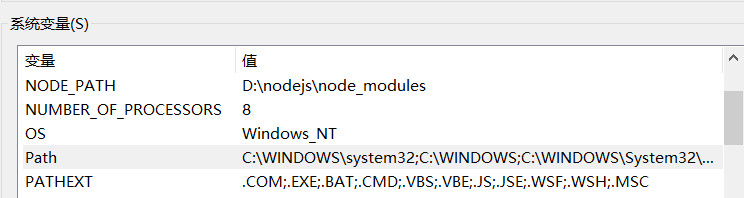
在PHP中,提供了一个常量PATH_SEPARATOR,用来在跨平台的情况下,表示多个路径之间的分隔符
<?php

echo "aaa/ccc/ddd".PATH_SEPARATOR."/www/yyyy";//aaa/ccc/ddd;/www/yyyy

?>
换行
在window下,换行是\r\n,而在unix下,换行是\n。通常在写程序中,换行就以unix为准,写作\n
同样地,PHP提供了一个常量PHP_EOL,用来在跨平台的情况下,表示换行
.和..
在PHP中,.表示当前目录,..表示上一级目录
<?php

var_dump (file_exists('test/a.txt'));//boolean true

var_dump (file_exists('./test/a.txt'));//boolean true

var_dump (file_exists('../www/test/a.txt'));//boolean true

?>
根路径
有两种根路径需要进行区分,一种是客户端根路径,一种是服务器根路径
以我自己在d盘安装的wamp为例,客户端根路径指'd:\wamp\www\',而服务器根路径为为'd:\'
<?php

echo '<img src="/a.jpg">';//客户端根路径,相当于d:\wamp\www\a.jpg

mkdir('/hello');//服务器根路径,相当于d:\hello

?>
路径解析函数
【basename()】
basename()函数用于返回路径中的文件名部分
<?php

echo "1) ".basename("/etc/sudoers.d", ".d");//1) sudoers

echo "2) ".basename("/etc/passwd").PHP_EOL;//2) passwd

echo "3) ".basename("/etc/").PHP_EOL;//3) etc

echo "4) ".basename(".").PHP_EOL;//4) .

echo "5) ".basename("/");//5)

?>
【dirname()】
dirname()函数用于返回路径中的目录部分
<?php

echo "1) " . dirname("/etc/passwd") . PHP_EOL; // 1) /etc

echo "2) " . dirname("/etc/") . PHP_EOL; // 2) \

echo "3) " . dirname("."); // 3) .

?>
【pathinfo()】
pathinfo()函数用于返回文件路径的信息
<?php

$path_parts = pathinfo('/www/htdocs/inc/lib.inc.php');

echo $path_parts['dirname'], "\n";// '/www/htdocs/inc' 目录名

echo $path_parts['basename'], "\n";// 'lib.inc.php' 文件名

echo $path_parts['extension'], "\n";// 'php' 文件后缀

echo $path_parts['filename'], "\n"; // 'lib.inc' 文件名不带后缀

?>
【realpath()】
realpath()函数用于返回规范化的绝对路径名
在Windows上,realpath()会将unix风格的路径改成Windows风格的
<?php

echo realpath('/wamp');// 'D:\wamp'

?>
目录遍历
glob()
glob()函数用于寻找与模式匹配的文件路径
array glob ( string $pattern [, int $flags = 0 ] )
在www目录下新建a.txt和b.txt文件
<?php

foreach (glob("*.txt") as $filename) {

    //a.txt size 1050 b.txt size 73

    echo "$filename size " . filesize($filename) . "\n";

}

?>
opendir()
opendir()函数用于打开目录句柄。如果成功则返回目录句柄的resource,失败则返回 FALSE
resource opendir ( string $path [, resource $context ] )
<?php

var_dump(opendir('test'))//resource(3, stream)

?>
closedir()
closedir()函数用于关闭目录句柄
void closedir ([ resource $dir_handle ] )
参数dir_handle表示目录句柄的 resource,之前由 opendir()所打开的。如果目录句柄没有指定,那么会假定为是opendir()所打开的最后一个句柄
<?php

$dir = opendir('test');

closedir($dir);

?>
readdir()
readdir()函数用于从目录句柄中读取条目,返回目录中下一个文件的文件名。文件名以在文件系统中的排序返回,失败时返回 FALSE
string readdir ([ resource $dir_handle ] )
在www目录下新建目录test,并在目录test下新建a.txt和b.txt文件
<?php

$dir = opendir('test');

echo readdir($dir)."<br>";//.

echo readdir($dir)."<br>";//..

echo readdir($dir)."<br>";//a.txt

echo readdir($dir)."<br>";//b.txt

echo readdir($dir)."<br>";//

closedir($dir);

?>
在遍历目录时,每个目录的前两个返回值都是.和..,.代表当前目录,..代表上一级目录
所以,一般地,列出当前目录的所有文件并去掉 . 和 ..,常采用下面的代码
<?php

if ($handle = opendir('test')) {

    while (false !== ($file = readdir($handle))) {

        if ($file != "." && $file != "..") {

            echo "$file\n";

        }

    }

    closedir($handle);

}

?>
接下来,在test目录下,新建一个目录in,并在in目录中新建文件c.txt。然后,目录和文件区分显示
[注意]通过is_dir()函数判断目录时,需要加入路径
<?php

if ($handle = opendir('test')) {

    while (false !== ($file = readdir($handle))) {

        if ($file != "." && $file != "..") {

            $file = "test/".$file;

            if(is_dir($file)){

                echo "目录:".$file."<br>";

            }else{

                echo "文件:".$file."<br>";

            }

        }

    }

    closedir($handle);

}

/*

文件:test/a.txt

文件:test/b.txt

目录:test/in

 */

?>
rewinddir()
rewinddir()函数用于倒回目录句柄,将参数dir_handle指定的目录流重置到目录的开头
void rewinddir ( resource $dir_handle )
如果不使用rewinddir()函数,则文件只能遍历一次
<?php

if ($handle = opendir('test')) {

    while (false !== ($file = readdir($handle))) {

        if ($file != "." && $file != "..") {

            $file = "test/".$file;

            if(is_dir($file)){

                echo "目录:".$file."<br>";

            }else{

                echo "文件:".$file."<br>";

            }

        }

    }

    while (false !== ($file = readdir($handle))) {

        if ($file != "." && $file != "..") {

            $file = "test/".$file;

            if(is_dir($file)){

                echo "目录:".$file."<br>";

            }else{

                echo "文件:".$file."<br>";

            }

        }

    }

    closedir($handle);

}

/*

文件:test/a.txt

文件:test/b.txt

目录:test/in

 */

?>
使用rewinddir()函数,可以把目录句柄返回到第一个文件,从而实现重新遍历
<?php

if ($handle = opendir('test')) {

    while (false !== ($file = readdir($handle))) {

        if ($file != "." && $file != "..") {

            $file = "test/".$file;

            if(is_dir($file)){

                echo "目录:".$file."<br>";

            }else{

                echo "文件:".$file."<br>";

            }

        }

    }

    rewinddir($handle);

    while (false !== ($file = readdir($handle))) {

        if ($file != "." && $file != "..") {

            $file = "test/".$file;

            if(is_dir($file)){

                echo "目录:".$file."<br>";

            }else{

                echo "文件:".$file."<br>";

            }

        }

    }

    closedir($handle);

}

/*

文件:test/a.txt

文件:test/b.txt

目录:test/in

文件:test/a.txt

文件:test/b.txt

目录:test/in

 */

?>
目录统计
disk_total_space()
disk_total_space()函数返回一个目录的磁盘总大小
float disk_total_space ( string $directory )
<?php

$ds = disk_total_space("C:");

echo $ds."<br>";//126652637184

$ds = disk_total_space("D:");

echo $ds;//1000202240000

?>
disk_free_space()
disk_free_space()函数返回目录中的可用空间
float disk_free_space ( string $directory )
<?php

$ds = disk_free_space("C:");

echo $ds."<br>";//86087041024

$ds = disk_free_space("D:");

echo $ds;//481647472640

?>
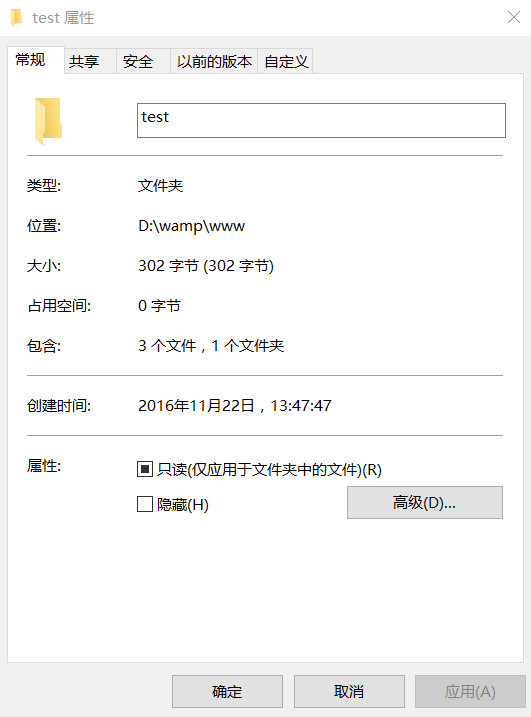
下面来统计在www文件夹下新建的test目录的个数
<?php

    $dirn = 0; //目录数

    $filen = 0; //文件数

    //统计一个目录下的文件和目录的个数

    function getdirnum($file) {

        global $dirn;

        global $filen;

        $dir = opendir($file);

        while (false !== ($filename = readdir($dir))) {

            if($filename!="." && $filename !="..") {

                $filename = $file."/".$filename; //更新路径

                if(is_dir($filename)) {

                    $dirn++;

                    getdirnum($filename);  //递归,就可以查看所有子目录

                } else {

                    $filen++;

                }

            }

        }

        closedir($dir);

    }

    getdirnum("test");

    echo "目录数为:{$dirn}<br>";//目录数为:1

    echo "文件数为:{$filen}<br>";//文件数为:3

?>
下面来统计在www文件夹下新建的test目录的大小
<?php

    //统计目录大小

    function dirsize($file) {

        $size = 0;

        $dir = opendir($file);

        while(false !== ($filename = readdir($dir))) {

            if($filename!="." && $filename !="..") {

                $filename = $file."/".$filename;

                if(is_dir($filename)) {

                    $size += dirsize($filename);//使用递归

                } else {

                    $size += filesize($filename);

                }

            }

        }

        closedir($dir);

        return $size;

    }

echo "test目录大小为:".dirsize("test")."<br>";//test目录大小为:302

?>
目录增删
mkdir()
mkdir()函数用于新建目录
bool mkdir ( string $pathname [, int $mode = 0777 [, bool $recursive = false [, resource $context ]]] )
rmdir()
rmdir()函数用于删除目录
bool rmdir ( string $dirname [, resource $context ] )
[注意]该目录必须是空的,而且要有相应的权限。失败时会产生一个 E_WARNING 级别的错误
unlink()
unlink()函数用于删除文件
bool unlink ( string $filename [, resource $context ] )
下面来清空test目录
<?php

    function deldir($dirname) {

        //如果是文件,直接删除即可

        if(is_file($dirname)) {

            unlink($dirname);

        }

        $dir = opendir($dirname);

        while(FALSE !== ($filename = readdir($dir))) {

            if($filename !="." && $filename!="..") {

                $filename = $dirname."/".$filename;

                if(is_dir($filename)) {

                    deldir($filename);//递归

                }else {

                    unlink($filename);//删除文件

                }

            }

        }

        closedir($dir);

        if($dirname != 'test'){

            rmdir($dirname);//删除目录

        }

    }

    deldir("test");

?>
目录复制
copy()
copy()函数用于拷贝文件
bool copy ( string $source , string $dest [, resource $context ] )
[注意]copy()函数不能用于复制目录
<?php

$file = 'a.txt';

$newfile = 'a.bak';

copy($file, $newfile);

?>
rename()
rename()函数用于重命名一个文件或目录
bool rename ( string $oldname , string $newname [, resource $context ] )
[注意]rename()函数具有移动文件或目录的功能
下面把www目录下的test目录剪贴,命名为t,并移动到d盘目录下
<?php

rename("test", "d:/t");

?>
使用rename()只能实现剪切的操作,使用copy()只能复制文件。如果要复制目录,则需要使用循环和遍历
<?php

    /**

     * $dirsrc  原目录

     * $dirto  目标目录

     */

    function copydir($dirsrc, $dirto) {

        //如果目录不存在,则新建一个目录

        if(!file_exists($dirto)) {

            mkdir($dirto);

        }

        $dir = opendir($dirsrc);

        while(FALSE !== ($filename = readdir($dir))) {

            if($filename != "." && $filename !="..") {

                $srcfile = $dirsrc."/".$filename;  //原文件

                $tofile = $dirto."/".$filename;    //目标文件

                if(is_dir($srcfile)) {

                    copydir($srcfile, $tofile);  //递归处理所有子目录

                }else{

                    copy($srcfile, $tofile);//复制文件

                }

            }

        }

    }

    copydir("test", "d:/t");

?>
文件操作
touch()
touch()函数用来设定文件的访问和修改时间。如果文件不存在,则会被创建。成功时返回 TRUE, 或者在失败时返回 FALSE
bool touch ( string $filename [, int $time = time() [, int $atime ]] )
参数filename表示要设定的文件名,time表示要设定的时间。如果没有提供参数 time 则会使用当前系统的时间;atime表示如果给出了这个参数,则给定文件的访问时间会被设为atime,否则会设置为time。如果没有给出这两个参数,则使用当前系统时间
<?php

    touch('abc.txt')

?>
copy()
copy()函数用于拷贝文件
bool copy ( string $source , string $dest [, resource $context ] )
[注意]copy()函数不能用于复制目录
<?php

$file = 'a.txt';

$newfile = 'a.bak';

copy($file, $newfile);

?>
rename()
rename()函数用于重命名一个文件或目录
bool rename ( string $oldname , string $newname [, resource $context ] )
[注意]rename()函数具有移动文件或目录的功能
<?php

rename("abc.txt", "d:/cba.txt");

?>
unlink()
unlink()函数用于删除文件
bool unlink ( string $filename [, resource $context ] )
<?php

unlink("d:/cba.txt");

?>
文件内容
fopen()
fopen()函数用于打开文件或者URL,fopen()将 filename 指定的名字资源绑定到一个流上
fopen() 中 mode 的可能值列表
mode      说明

'r'       只读方式打开,将文件指针指向文件头。

'r+'      读写方式打开,将文件指针指向文件头。

'w'       写入方式打开,将文件指针指向文件头并将文件大小截为零。如果文件不存在则尝试创建之。

'w+'      读写方式打开,将文件指针指向文件头并将文件大小截为零。如果文件不存在则尝试创建之。

'a'       写入方式打开,将文件指针指向文件末尾。如果文件不存在则尝试创建之。

'a+'      读写方式打开,将文件指针指向文件末尾。如果文件不存在则尝试创建之。
<?php

    //使用绝对路径打开file.txt文件,选择只读模式,并返回资源$handle

    $handle = fopen("/home/rasmus/file.txt", "r");

    //访问文档根目录下的文件,也以只读模式打开

    $handle = fopen(“{$_SERVER['DOCUMENT_ROOT']}/data/info.txt", "r");

    //在 Windows 平台上,转义文件路径中的每个反斜线,或者用斜线,

      以二进制和只写模式组合

    $handle = fopen("c:\\data\\file.gif", "wb");

    //使用相对路径打开file.txt文件,选择只读模式,并返回资源$handle

    $handle = fopen("../data/info.txt", "r");

    //打开远程文件, 使用HTTP协议只能以只读的模式打开

    $handle = fopen("http://www.example.com/", "r");

    //使用FTP协议打开远程文件,如果FTP服务器可写,则可以以写的模式打开

    $handle = fopen("ftp://user:password@example.com/somefile.txt", "w");

?>
fclose()
fclose()函数用于关闭一个已打开的文件指针
bool fclose ( resource $handle )
<?php

$handle = fopen('test/a.txt', 'r');

fclose($handle);

?>
fwrite()
fwrite()函数用于写入文件(可安全用于二进制文件),返回写入的字符数,出现错误时则返回 FALSE
int fwrite ( resource $handle , string $string [, int $length ] )
当打开方式为只读模式时,无法向文件写入字符
<?php

$fp = fopen('test/a.txt', 'r');

echo fwrite($fp, '1');//0

echo "<br>";

echo fwrite($fp, '23');//0

echo "<br>";

fclose($fp);

?>
当打开方式为写模式时,可以向文件写入字符
<?php

$fp = fopen('test/a.txt', 'w');

echo fwrite($fp, '1');//1

echo "<br>";

echo fwrite($fp, '23');//2

echo "<br>";

fclose($fp);

/*

文件内容为123

 */

?>
当打开方式为追加模式时,将向文件的尾部追加新的字符
<?php

$fp = fopen('test/a.txt', 'a');

echo fwrite($fp, '1');//1

echo "<br>";

echo fwrite($fp, '23');//2

echo "<br>";

fclose($fp);

/*

刷新两次时,文件内容为123123

 */

?>
fgetc()
fgetc()函数用于从文件指针中读取字符
[注意]使用fgetc()函数时,需要在fopen()函数中使用读模式
string fgetc ( resource $handle )
<?php

$fp = fopen('test/a.txt', 'r');

echo fgetc($fp);//1

echo fgetc($fp);//2

echo fgetc($fp);//3

fclose($fp);

?>
feof()
feof()函数用于测试文件指针是否到了文件结束的位置
bool feof ( resource $handle )
<?php

$fp = fopen('test/a.txt', 'r');

while(!feof($fp)){

    echo fgetc($fp);//123123

}

fclose($fp);

?>
fgets()
fgets()函数用于从文件指针中读取一行
string fgets ( resource $handle [, int $length ] )
将test目录下的a.txt文件内容修改为
aa

bbb
<?php

$fp = fopen('test/a.txt', 'r');

echo fgets($fp);//'aa'

echo fgets($fp);//'bbb'

echo fgets($fp);//''

fclose($fp);

?>
fread()
fread()函数用于读取文件(可安全用于二进制文件)。fread()从文件指针handle读取最多length个字节。该函数在读取了length个字节或到达了文件末尾(EOF)时将停止读取文件
string fread ( resource $handle , int $length )
<?php

$fp = fopen('test/a.txt', 'r');

echo fread($fp,3);//'aa '

fclose($fp);

$fp = fopen('test/a.txt', 'r');

echo fread($fp,filesize('test/a.txt'));//'aa bbb'

fclose($fp);

?>
fseek()
fseek()函数用于在文件指针中定位,成功则返回 0;否则返回 -1
int fseek ( resource $handle , int $offset [, int $whence = SEEK_SET ] )
将test目录下的a.txt文件内容修改为'12345'
<?php

$fp = fopen('test/a.txt', 'r');

echo fgetc($fp);//'1'

fseek($fp,4);

echo fgetc($fp);//'5'

fclose($fp);

?>
<?php

$fp = fopen('test/a.txt', 'r');

echo fread($fp,2)."<br>";//12

fseek($fp,4);

echo fread($fp,2)."<br>";//5

fseek($fp,-3,SEEK_END);

echo fread($fp,2)."<br>";//34

fclose($fp);

?>
ftell()
ftell()函数用于返回文件指针读/写的位置
int ftell ( resource $handle )
<?php

$fp = fopen('test/a.txt', 'r');

echo ftell($fp);//0

fgetc($fp);

echo ftell($fp);//1

fseek($fp,4);

echo ftell($fp);//4

fclose($fp);

?>
rewind()
rewind()函数用于倒回文件指针的位置,将handle的文件位置指针设为文件流的开头
bool rewind ( resource $handle )
<?php

$fp = fopen('test/a.txt', 'r');

fseek($fp,2);

echo ftell($fp);//2

rewind($fp);

echo ftell($fp);//0

?>
file_get_contents()
file_get_contents()函数用于将整个文件读入一个字符串
string file_get_contents ( string $filename [, bool $use_include_path = false [, resource $context [, int $offset = -1 [, int $maxlen ]]]] )
<?php

$homepage = file_get_contents('test/a.txt');

echo $homepage;//'12345'

?>
页面变为百度首页
<?php

$homepage = file_get_contents('http://www.baidu.com/');

echo $homepage;

?>
file_put_contents()
file_put_contents()函数用于将一个字符串写入文件
int file_put_contents ( string $filename , mixed $data [, int $flags = 0 [, resource $context ]] )
使用该函数和依次调用 fopen(),fwrite() 以及 fclose() 功能一样
[注意]默认为写模式,若设置第三个参数为FILE_APPEND,则变为追加模式
<?php

file_put_contents('test/a.txt','abc');

?>
readfile()
readfile()函数用于读取文件并写入到输出缓冲
int readfile ( string $filename [, bool $use_include_path = false [, resource $context ]] )
<?php

readfile('http://www.baidu.com/');//页面中显示百度首页

?>

<?php

readfile('test/a.txt');//页面中显示abc

?>
file()
file()函数用于把整个文件读入一个数组中,每一行作为一个数组的元素
array file ( string $filename [, int $flags = 0 [, resource $context ]] )
将a.txt的文件内容改为每一行一个数字,分别是1、2、3、4、5、6、7、8、9
<?php

$arr = file('test/a.txt',0);

echo $arr[0]."<br>";//1

echo count($arr);//9

?>
ftruncate()
ftruncate()函数用于将文件截断到给定的长度
bool ftruncate ( resource $handle , int $size )
[注意]使用ftruncate()函数时,需要使用追加模式。经测试,使用读模式时无效,使用写模式时,文件内容被清空
<?php

$fp = fopen("test/a.txt","a");

ftruncate($fp,100);

?>
前端学PHP之文件操作(认真读读)的更多相关文章
- 前端学PHP之文件操作
× 目录 [1]文件类型 [2]文件属性 [3]目录路径[4]目录遍历[5]目录统计[6]目录增删[7]目录复制[8]文件操作[9]文件内容 前面的话 在程序运行时,程序本身和数据一般都存在内存中,当 ...
- 前端学PHP之PHP操作memcache
× 目录 [1]安装 [2]连接 [3]增删改查[4]分布式[5]状态[6]安全[7]应用 前面的话 和访问mysql服务器类似,PHP也是作为客户端API访问memcached服务器的,所以同样需要 ...
- Java---字节输入,文件操作,病毒制造,请谨慎运行!
今天刚刚学了Java文件操作,跟着老师的思路,迫不及待的制造了这个小病毒. 用到的是一些小知识,很简单. 创建文件和文件夹,向文件中写入字节. 我已渐渐的爱上了编程!!! 下面附上完整代码: impo ...
- 第11讲-Java泛型和文件操作
1.知识点 1.1.课程回顾 1.2.本章重点 1.2.1.泛型 1.2.2.文件操作 2.具体内容 2.1.Java泛型 2.1.1.为什么需要泛型 我们发现在List中,底层是Object[ ]数 ...
- 简学Python第二章__巧学数据结构文件操作
#cnblogs_post_body h2 { background: linear-gradient(to bottom, #18c0ff 0%,#0c7eff 100%); color: #fff ...
- 小白学 Python(18):基础文件操作
人生苦短,我选Python 前文传送门 小白学 Python(1):开篇 小白学 Python(2):基础数据类型(上) 小白学 Python(3):基础数据类型(下) 小白学 Python(4):变 ...
- 零基础学Python--------第10章 文件及目录操作
第10章 文件及目录操作 10.1 基本文件操作 在Python中,内置了文件(File)对象.在使用文件对象时,首先需要通过内置的open() 方法创建一个文件对象,然后通过对象提供的方法进行一些基 ...
- 【学习笔记】--- 老男孩学Python,day9, 文件操作
有 + 就是有光标,注意光标位置 不同模式打开文件的完全列表: http://www.runoob.com/python/python-files-io.html 模式 描述 r 以只读方式打开文件 ...
- day08 跟着太白老师学python 文件操作
文件操作初识: 1. 文件路径 :d:/护士主妇空姐联系方式 (文件路径不要太过复杂,容易碰到转义字符的问题, 当碰到转义字符时,需要在前面+r,或者采用双斜杠(//)) 2. 编码方式 :utf- ...
随机推荐
- Mysql 练习 总结
insert into Course values ('); #---------------Teacher--添加信息---- insert into Teacher values (','李成', ...
- 【leetcode】Best Time to Buy and Sell (easy)
题目: Say you have an array for which the ith element is the price of a given stock on day i. If you w ...
- 【hadoop2.6.0】数据丢失问题解决
想自己走一遍从代码到运行的流程,结果各种错,郁闷啊. 问题① http://localhost:50070/ 里面一进去就告诉我块丢了.... 解决: bin/hadoop fsck -delete ...
- Javascript 封装方法
基本封装方法 请看下面的例子: var Person = function(name,age){ this.name = name; this.age = age || "未填写" ...
- Android-----overridePendingTransition的使用
1 Activity的切换动画指的是从一个activity跳转到另外一个activity时的动画. 它包括两个部分:一部分是第一个activity退出时的动画:另外一部分时第二个activity进入时 ...
- AngularJS 控制器 ng-controller
AngularJS 控制器 控制 AngularJS 应用程序的数据. AngularJS 控制器是常规的 JavaScript 对象. AngularJS 应用程序被控制器控制. ng-contro ...
- 三、jQuery--jQuery基础--jQuery基础课程--第8章 jQuery 实现Ajax应用
1.使用load()方法异步请求数据 使用load()方法通过Ajax请求加载服务器中的数据,并把返回的数据放置到指定的元素中,它的调用格式为:load(url,[data],[callback]) ...
- MVC – 7.Razor 语法
7.1 Razor视图引擎语法 Razor通过理解标记的结构来实现代码和标记之间的顺畅切换. @核心转换字符,用来 标记-代码 的转换字符串. 语境A: @{ string rootName=&quo ...
- SQL错误级别 状态 怎么定义
关于SQL Server的错误严重性级别的说明,强烈认真看一下下面的两个链接 脱机帮助 ms-help://MS.SQLCC.v9/MS.SQLSVR.v9.zh-CHS/sqlerrm9/html/ ...
- Notice: Only variable references should be returned by reference(PHP版本兼容性问题)
摘自:http://sushener.spaces.live.com/blog/cns!BB54050A5CFAFCDD!435.entry PHP5一个很让人恼火的一点就是BC(向后兼容)不是很理想 ...