
【ASP.NET Web API教程】2.3 与实体框架一起使用Web API
原文:【ASP.NET Web API教程】2.3 与实体框架一起使用Web API
2.3 Using Web API with Entity Framework
2.3 与实体框架一起使用Web API
本小节是ASP.NET Web API第2章的第3小节,原文共分为7个部分,分成了7篇文章,故这里也分为7个帖子贴出,以下是本小节的第1部分 — 译者注。
Part 1: Overview and Creating the Project
第1部分:概述及创建项目
本文引自:http://www.asp.net/web-api/overview/creating-web-apis/using-web-api-with-entity-framework/using-web-api-with-entity-framework,-part-1
By Mike Wasson | July 3, 2012
作者:Mike Wasson | 日期:2012-7-3
This tutorial shows how to use ASP.NET Web API with ADO.NET Entity Framework, using code-first development.
本教程展示如何以ADO.NET实体框架、采用code-first开发(代码先行开发模式)来使用ASP.NET Web API。
Entity Framework is an object/relational mapping framework. It maps the domain objects in your code to entities in a relational database. For the most part, you do not have to worry about the database layer, because Entity Framework takes care of it for you. Your code manipulates the objects, and changes are persisted to a database.
实体框架(Entity Framework)是一个对象/关系的映射框架。它把代码形式的域对象映射成关系数据库中的实体。在很大程序上,你不必担心数据库层,因为实体框架会为你照顾它。你可以对这些对象进行操纵,并把所做的修改持久化到数据库。
About the Tutorial
关于本教程
In this tutorial, you will create a simple store application. There are two main parts to the application. Normal users can view products and create orders:
在本教程中,你将创建一个简单的商店应用程序。该应用程序有两个主要部件。常规用户可以查看产品并创建订单(见图2-8):
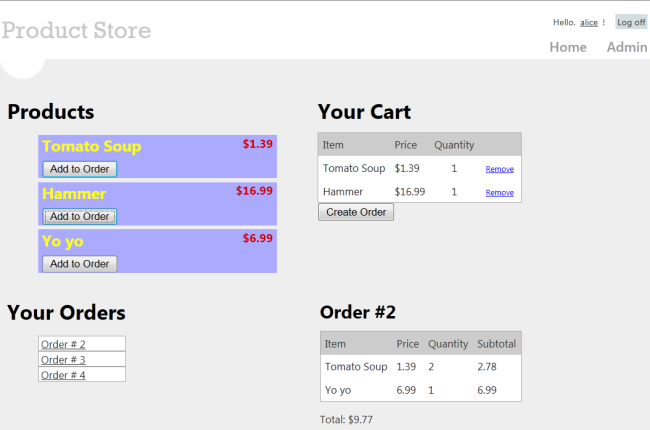
图2-8. ProductStore应用程序的浏览界面
注:作者对此应用程序作了简化,把一个在线商店常规的查看功能(产品列表、购物车、订单条目、订单细节)全部显示在一个Web页面上 — 译者注
Administrators can create, delete, or edit products:
管理员可以创建、删除,或编辑产品(见图2-9):
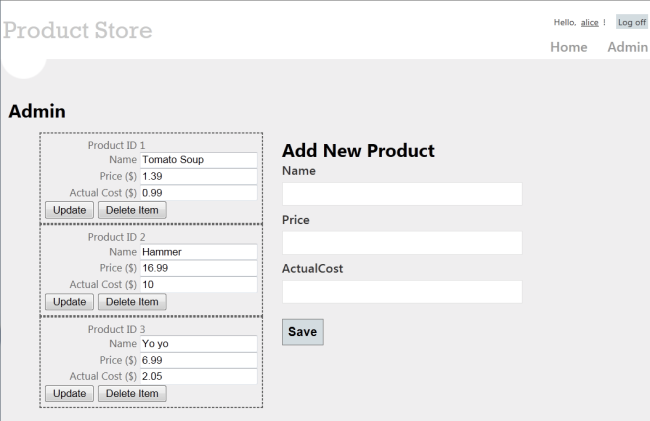
图2-9. ProductStore应用程序的管理界面
注:同样,作者对此应用程序作了简化,把一个在线商店的常规管理功能(产品的CRUD操作)全部显示在一个Web页面上 — 译者注
Skills You’ll Learn
将要学习的技能
Here’s what you’ll learn:
以下是你将学习的:
- How to use Entity Framework with ASP.NET Web API.
如何以ASP.NET Web API来使用实体框架 - How to use knockout.js to create a dynamic client UI.
如何用knockout.js来创建一个动态客户端UI。 - How to use forms authentication with Web API to authenticate users.
如何使用带有Web API的表单认证来认证用户。
Although this tutorial is self-contained, you might want to read the following tutorials first:
虽然这个教程是自包含的,但你也许想先阅读前面的两个教程:
- Your First ASP.NET Web API
第一个ASP.NET Web API - Creating a Web API that Supports CRUD Operations
创建一个支持CRUD操作的Web API
Some knowledge of ASP.NET MVC is also helpful.
有一些ASP.NET MVC方面的知识也是有帮助的。
Overview
概述
At a high level, here is the architecture of the application:
从一种高级层面上讲,以下是该应用程序的体系结构:
- ASP.NET MVC generates the HTML pages for the client.
ASP.NET MVC为客户端生成HTML页面。 - ASP.NET Web API exposes CRUD operations on the data (products and orders).
ASP.NET Web API暴露对数据的CRUD操作(产品和订单)。 - Entity Framework translates the C# models used by Web API into database entities.
实体框架把由Web API使用的C#模型转换成数据库实体。
上述体系结构如图2-10所示(译者注):
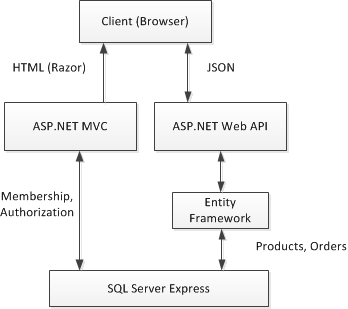
图2-10. 应用程序的体系结构
The following diagram shows how the domain objects are represented at various layers of the application: The database layer, the object model, and finally the wire format, which is used to transmit data to the client via HTTP.
下图展示了域对象在应用程序的各个层面上是如何表示的:数据库层(Database Layer)、对象模型(Object Model),以及最终的线条型格式(Wire Format),该格式用来通过HTTP把数据传送给客户端(见图2-11)。
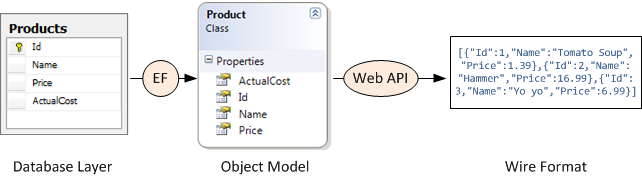
图2-11. 域对象在各层面上的表示
说明:由图2-11可见,在一个应用程序中由EF负责数据库与域模型对象之间的映射(当然是通过EF的对象关系映射ORM),由Web API负责域对象与线条格式的数据(JSON或XML)之间的转换,这些数据可以为客户端页面提供服务 — 译者注
Create the Visual Studio Project
创建Visual Studio项目
You can create the tutorial project using either Visual Web Developer Express or the full version of Visual Studio
可以用Visual Web Developer Express(VS的开发者版)或完整版的Visual Studio来创建这个教程项目。
From the Start page, click New Project.
从“开始页”点击“新项目”。
In the Templates pane, select Installed Templates and expand the Visual C# node. Under Visual C#, select Web. In the list of project templates, select ASP.NET MVC 4 Web Application. Name the project "ProductStore" and click OK.
在“模板”面板中选择“已安装模板”,并展开“Visual C#”节点。选择其下的“Web”。在项目模板列表中选择“ASP.NET MVC 4 Web应用程序”。命名此项目为“ProductStore(产品商店)”,并点击“OK”(见图2-12)。
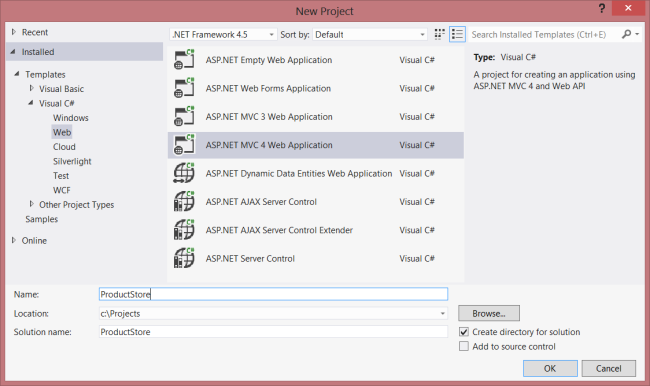
图2-12. 创建ProductStore项目
In the New ASP.NET MVC 4 Project dialog, select Internet Application and click OK.
在“新的ASP.NET MVC 4项目”对话框中选择“Internet应用程序”,点击“OK”(见图2-13)。
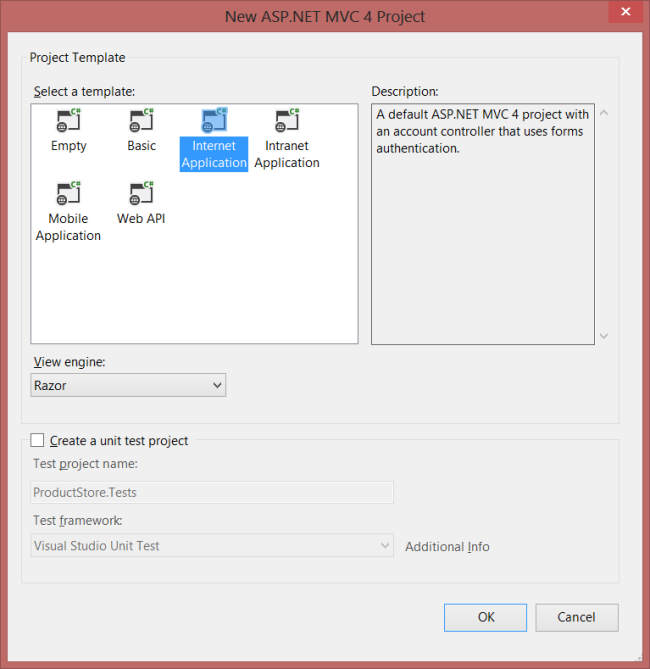
图2-13. 选择应用程序模板
The "Internet Application" template creates an ASP.NET MVC application that supports forms authentication. If you run the application now, it already has some features:
“Internet应用程序”模板会创建一个支持表单认证的ASP.NET MVC应用程序。如果现在运行此应用程序,它已经具有了一些特性:
- New users can register by clicking the “Register” link in the upper right corner.
通过点击右上角的“注册”,新用户可以进行注册。 - Registered users can log in by clicking the “Log in” link.
通过点击“登录”链接,已注册用户可以进行登录。
Membership information is persisted in a database that gets created automatically. For more information about forms authentication in ASP.NET MVC, see Walkthrough: Using Forms Authentication in ASP.NET MVC.
成员(Membership)信息会被持久化在一个自动创建的数据库中。关于ASP.NET MVC中表单认证的更多信息,请参阅“演练:在ASP.NET MVC中使用表单认证”。
Update the CSS File
更新CSS文件
This step is cosmetic, but it will make the pages render like the earlier screen shots.
这一步骤是装饰性的,但它会使页面渲染成前述的屏幕截图。
In Solution Explorer, expand the Content folder and open the file named Site.css. Add the following CSS styles:
在“解决方案资源管理器”中展开“Content”文件夹,并打开名为Site.css的文件。添加以下CSS样式:
.content {

    clear: both;

    width: 90%;

}

li {

    list-style-type: none;

}

#products li {

    width: 300px;

    background-color: #aaf;

    font-size: 1.5em;

    font-weight: bold;

    color: #ff0;

    margin: 0 0 5px 0;

    padding: 0 5px 0 5px;

}

.price  {

    float: right;

    color: #c00;

    font-size: 0.75em;

}

.details thead td {

    background-color: #CCCCCC;

    color: #333333;

}

.details td {

        padding: 6px;

}

.details td.qty {

        text-align: center;

}

#cart a {

        color: Blue;

        font-size: .75em;

}

#update-products li {

    padding: 5px;

    color: #666;

    border-style: dashed;

    border-width: 2px;

    border-color: #666;

}

#update-products li .item {

        width: 120px;

        display: inline-block;

        text-align: right;

}
【ASP.NET Web API教程】2.3 与实体框架一起使用Web API的更多相关文章
- 【ASP.NET Web API教程】3.2 通过.NET客户端调用Web API(C#)
原文:[ASP.NET Web API教程]3.2 通过.NET客户端调用Web API(C#) 注:本文是[ASP.NET Web API系列教程]的一部分,如果您是第一次看本博客文章,请先看前面的 ...
- EntityFramework_MVC4中EF5 新手入门教程之一 ---1.创建实体框架数据模型
Contoso University Web 应用程序 你会在这些教程中构建的应用程序是一个简单的大学网站. 用户可以查看和更新学生. 课程和教师信息.这里有几个屏幕,您将创建. 这个网站的用户界面 ...
- 【ASP.NET Web API教程】2 创建各种Web API
原文 [ASP.NET Web API教程]2 创建各种Web API Chapter 2: Creating Web APIs第2章 创建各种Web API 本文引自:http://www.asp. ...
- 从实体框架核心开始:构建一个ASP。NET Core应用程序与Web API和代码优先开发
下载StudentApplication.Web.zip - 599.5 KB 下载StudentApplication.API.zip - 11.5 KB 介绍 在上一篇文章中,我们了解了实体框架的 ...
- IdentityServer4 ASP.NET Core的OpenID Connect OAuth 2.0框架学习保护API
IdentityServer4 ASP.NET Core的OpenID Connect OAuth 2.0框架学习之保护API. 使用IdentityServer4 来实现使用客户端凭据保护ASP.N ...
- 【ASP.NET Web API教程】6.4 模型验证
本文是Web API系列教程的第6.4小节 6.4 Model Validation 6.4 模型验证 摘自:http://www.asp.net/web-api/overview/formats-a ...
- ASP.NET 5系列教程 (六): 在 MVC6 中创建 Web API
ASP.NET 5.0 的主要目标之一是统一MVC 和 Web API 框架应用. 接下来几篇文章中您会了解以下内容: ASP.NET MVC 6 中创建简单的web API. 如何从空的项目模板中启 ...
- 【ASP.NET Web API教程】6.1 媒体格式化器
http://www.cnblogs.com/r01cn/archive/2013/05/17/3083400.html 6.1 Media Formatters6.1 媒体格式化器 本文引自:htt ...
- 【ASP.NET Web API教程】1.1 第一个ASP.NET Web API
Your First ASP.NET Web API (C#)第一个ASP.NET Web API(C#) By Mike Wasson|January 21, 2012作者:Mike Wasson ...
随机推荐
- BNU 4067 求圆并
好久没写过单组数据的题目了 QAQ 赤裸裸的模板题 #include <cstdio> #include <cstring> #include <iostream> ...
- html向servlet传乱码解决办法
html 设置为utf-8格式 <meta http-equiv="content-type" content="text/html;charset=UTF-8&q ...
- .NET Core & ASP.NET Core 1.0
.NET Core & ASP.NET Core 1.0在Redhat峰会上正式发布 众所周知,Red Hat和微软正在努力使.NET Core成为Red Hat企业版Linux (RHEL) ...
- lucene 索引查看工具
luke 是 lucene 索引查看工具,基于 swing 开发的,是 lucene.solr.nutch 开发过程中不可或缺的工具.在测试搜索过程,进程出现搜不到东西或者搜到的东西不是想要的结果时, ...
- 关于C++异常机制的笔记(SEH, try-catch)
昨天晚上加班解决了一个问题,是由于无法正确的捕获到异常导致的.刚开始用try-catch,但是没法捕获到异常:后面改成SEH异常才解决.因此今天将这个问题重新梳理了一遍,关于try-catch, SE ...
- Ibatis的分页机制的缺陷
我们知道,Ibatis为我们提供了可以直接实现分页的方法 queryForList(String statementName, Object parameterObject, int skipResu ...
- win7(64位)php5.5-Apache2.4-环境安装
一.安装配置Apache2.4.7(httpd-2.4.7-win64-VC11.zip ) 1.解压下载的安装包:httpd-2.4.12-x64-vc11-r2.zip将其放到自己的安装目录(我的 ...
- JAVA技术专题综述之线程篇(1)
本文详细介绍JAVA技术专题综述之线程篇 编写具有多线程能力的程序经常会用到的方法有: run(),start(),wait(),notify(),notifyAll(),sleep(),yield( ...
- android一个页面上多个listview
android一个页面上多个listview,在滚动的时候,需要两个listview能够一起滚动,看起来是一个view. 这个功能的具体实现,参考: http://blog.csdn.net/xia2 ...
- 【译】在Asp.Net中操作PDF – iTextSharp -利用块,短语,段落添加文本
原文 [译]在Asp.Net中操作PDF – iTextSharp -利用块,短语,段落添加文本 本篇文章是讲述使用iTextSharp这个开源组件的系列文章的第三篇,iTextSharp可以通过As ...