
Cobbler自动化部署
一:PXE、Kickstart与Cobbler的概念:
PXE(preboot execute environment,预启动执行环境)是由Intel公司开发的技术,需要网卡的硬件支持,工作于C/S的网络模式,支持客户端通过网络从服务器下载映像,并支持客户端机器通过网络启动操作系统,在启动过程中,客户端需要从服务器分配IP地址、掩码、网关以及相关的配置文件路径,再用TFTP(trivial file transfer protocol)协议从服务器下载一个启动软件包到本机内存中执行,由这个启动软件包完成客户端的基本软件设置,从而引导预先安装在服务器中的终端操作系统,PXE可以引导多种操作系统,如:centos、redhat、windows 7等,所以说PXE是一直引导启动方式,用于引导PC或服务器的启动。
Kickstart是一种实现操作系统无人值守的安装方式,需要先定义一个配置文件,里面定义好root密码、分区、安装的包等等参数,此文件一般称为ks.cfg,客户端根据ks.cfg定义的ISO下载内核vmlinux和安装包,进行磁盘的分区与格式化,定义好的rpm包的安装,甚至是系统的参数优化等。
Cobbler翻译为中文是补鞋匠,但是在linux方面则是一个免费的用于系统安装部署的开源软件,cobbler是对PXE技术的二次基于python的开发,提供了CLI(命令行)和Web的管理方式,另外还提供了API(应用程序编程接口)接口,方便二次开发使用,相比PXE,cobbler支持多系统同时引导,而PXE只能一次引导一个系统的安装,cobbler通常与开源软件puppet、saltstack配合使用,进行操作系统的批量安装与部署优化,从而实现大批量linux系统的无人值守安装与服务部署,大大提升运维的工作效率,Cobbler是一种更高级的无人值守的系统安装方式,因为其可以同时引导多个不同的操作系统的安装与部署,但是Kickstart只能引导一个。
1.1、Kickstart流程:
- 1):客户端根据本地BIOS设置的的启动顺序,如果是从网卡启动就发出先基于RARP反向地址解析协议(Reverse Address Resolution Protocol)的协议报文,报文中包含自己的MAC地址,但是没有IP地址。
- 2):DHCP服务器收到请求后,返回给客户端IP地址、掩码、网关,另外还包含一个基于TFTP协议的文件服务器地址和要或获取的文件名称。
- 3):找TFTP服务器获取文件,一般是pxelinux.0 。
- 4):根据pxelinux.0指定的d地址下载efault文件。
- 5): 根据default文件指定的地址下载initrd.img、vmlinux和cfg文件。
- 6):将下载的内核解压在内存运行,这个过程相当于从硬盘当中加载的bootloader过程。
- 7):加载内核vmlinux和initrd.img,并将系统的引导交于内核。
- 7):启动anaconda安装程序进行系统安装。
二:Cobbler组件:
1、distro:定义安装的系统发行版,比如centos6.7是一个发行版,还可以根据不同的kickstack文件安装出不同业务场景的系统。
2.profile:定义配置文件,结合distro可以实现安装不同环境的操作系统。
3.system:为指定的主机配置特有的信息,比如主机名等。
4.repos:定义yum源。
5.images:定义在虚拟化环境中定义虚拟机的磁盘。
三:cobbler安装与配置:
1、安装cobbler:
[root@linux-node1 ~]# yum install cobbler cobbler-web pykickstart httpd
cobbler  #cobbler服务的主程序包

cobbler-web  #web管理界面

pykickstart  #检查语法是否正确

httpd     #http服务器
2、启动服务:
[root@linux-node1 ~]# systemctl  start httpd

[root@linux-node1 ~]# systemctl  start cobblerd

[root@linux-node1 ~]# systemctl enable httpd

Created symlink from /etc/systemd/system/multi-user.target.wants/httpd.service to /usr/lib/systemd/system/httpd.service.

[root@linux-node1 ~]# systemctl enable cobblerd

Created symlink from /etc/systemd/system/multi-user.target.wants/cobblerd.service to /usr/lib/systemd/system/cobblerd.service.
3、检查配置文件:
[root@linux-node1 ~]# cobbler check
The following are potential configuration items that you may want to fix:

 : The 'server' field in /etc/cobbler/settings must be set to something other than localhost, or kickstarting features will not work.  This should be a resolvable hostname or IP for the boot server as reachable by all machines that will use it.

 : For PXE to be functional, the 'next_server' field in /etc/cobbler/settings must be set to something other than 127.0.0.1, and should match the IP of the boot server on the PXE network.

 : change 'disable' to 'no' in /etc/xinetd.d/tftp

 : some network boot-loaders are missing from /var/lib/cobbler/loaders, you may run 'cobbler get-loaders' to download them, or, if you only want to handle x86/x86_64 netbooting, you may ensure that you have installed a *recent* version of the syslinux package installed and can ignore this message entirely.  Files in this directory, should you want to support all architectures, should include pxelinux., menu.c32, elilo.efi, and yaboot. The 'cobbler get-loaders' command is the easiest way to resolve these requirements.

 : enable and start rsyncd.service with systemctl

 : debmirror package is not installed, it will be required to manage debian deployments and repositories

 : The default password used by the sample templates for newly installed machines (default_password_crypted in /etc/cobbler/settings) is still set to 'cobbler' and should be changed, try: "openssl passwd -1 -salt 'random-phrase-here' 'your-password-here'" to generate new one

 : fencing tools were not found, and are required to use the (optional) power management features. install cman or fence-agents to use them
4.错误修正:
1.[root@linux-node1 ~]# vim /etc/cobbler/settings
next_server: 192.168.56.11

server: 192.168.56.11
2.
yum install xinetd

systemctl  enable xinetd

systemctl  start rsyncd.service

systemctl   restart cobblerd.service

systemctl enable rsyncd.service

cobbler check
3.准备启动文件:
cp /usr/share/syslinux/pxelinux.0 /usr/share/syslinux/menu.c32 /var/lib/cobbler/loaders/
4.修改默认密码
[root@linux-node1 ~]# openssl passwd -1 -salt $(openssl rand -hex 4)
5.安装配置dhcp
yum install dhcp
cp /usr/share/doc/dhcp-4.2.5/dhcpd.conf.example /etc/dhcp/dhcpd.conf
[root@linux-node1 cobbler]# cat /etc/dhcp/dhcpd.conf | grep -v "#" | grep -v "^$"
option domain-name "jack.com";
option domain-name-servers 192.168.56.11;
default-lease-time 600;
max-lease-time 7200;
log-facility local7;
subnet 192.168.56.0 netmask 255.255.255.0 {
range 192.168.56.100 192.168.56.200;
option routers 192.168.56.2;
next-server 192.168.56.11;
filename "pxelinux.0";
}
6.同步:
[root@linux-node1 ~]# cobbler sync

task started: --23_121731_sync

task started (id=Sync, time=Mon May  :: )

running pre-sync triggers

cleaning trees

removing: /var/lib/tftpboot/grub/images

copying bootloaders

trying hardlink /var/lib/cobbler/loaders/pxelinux. -> /var/lib/tftpboot/pxelinux.

trying hardlink /var/lib/cobbler/loaders/menu.c32 -> /var/lib/tftpboot/menu.c32

trying hardlink /var/lib/cobbler/loaders/yaboot -> /var/lib/tftpboot/yaboot

trying hardlink /usr/share/syslinux/memdisk -> /var/lib/tftpboot/memdisk

trying hardlink /var/lib/cobbler/loaders/grub-x86.efi -> /var/lib/tftpboot/grub/grub-x86.efi

trying hardlink /var/lib/cobbler/loaders/grub-x86_64.efi -> /var/lib/tftpboot/grub/grub-x86_64.efi

copying distros to tftpboot

copying images

generating PXE configuration files

generating PXE menu structure

rendering TFTPD files
7、配置distro:
查看帮助:
[root@linux-node1 ~]# cobbler --help

usage

=====

cobbler <distro|profile|system|repo|image|mgmtclass|package|file> ...

        [add|edit|copy|getks*|list|remove|rename|report] [options|--help]

cobbler <aclsetup|buildiso|import|list|replicate|report|reposync|sync|validateks|version|signature|get-loaders|hardlink> [options|--help]
[root@linux-node1 ~]# cobbler distro --help
[root@linux-node1 ~]# cobbler distro add --help
导入:
cobbler import --path=/mnt/ --name="Centos-7.2-x86_64" --kickstart=/var/lib/cobbler/kickstarts/cobbler-centos-7.2-x86_64.cfg
重启测试:
8.web管理:cobbler-web
[root@linux-node1 ~]# vim /etc/cobbler/modules.conf
module = authn_configfile #认证,默认是虚拟用户认证
9、生成密码:
[root@linux-node1 ~]# htdigest -c /etc/cobbler/users.digest Cobbler tom #添加一个叫tom的用户,放在Cobbler组
Adding password for cblradmin in realm cobbler.
New password:
Re-type new password:
[root@linux-node1 ~]#
10.使用https访问web,如:https://192.168.56.11/cobbler_web
三:自定义Centos 7的kickstack文件:
1、需要图形界面下安装system-config-kickstack命令启动图形进行自定义安装包,如下:
[root@localhost ~]# yum install system-config-kickstack -y
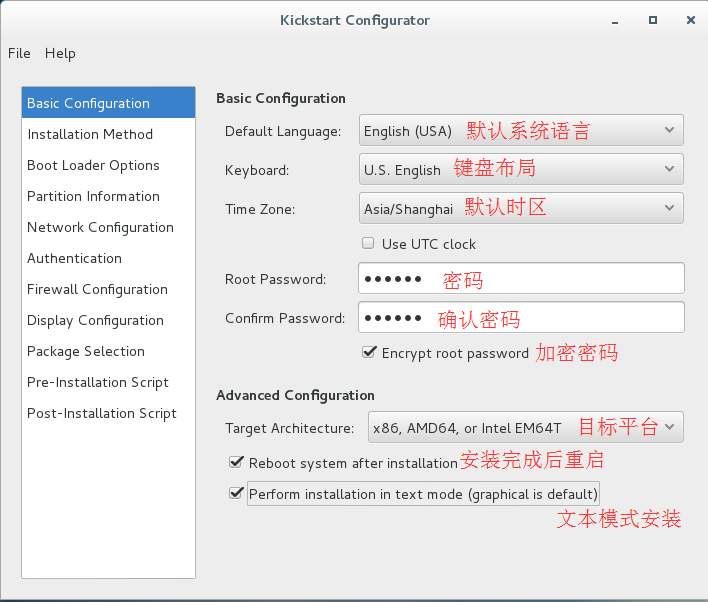
2、打开配置界面,开始自定义kickstack应答文件:
基础配置:
2、http 跳过
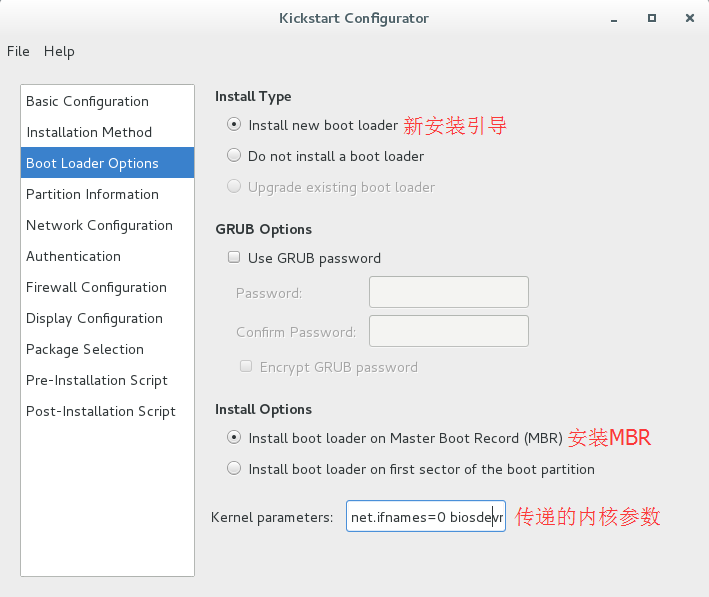
3、配置引导安装:
4、分区部分:

5、网络设置,暂不需要
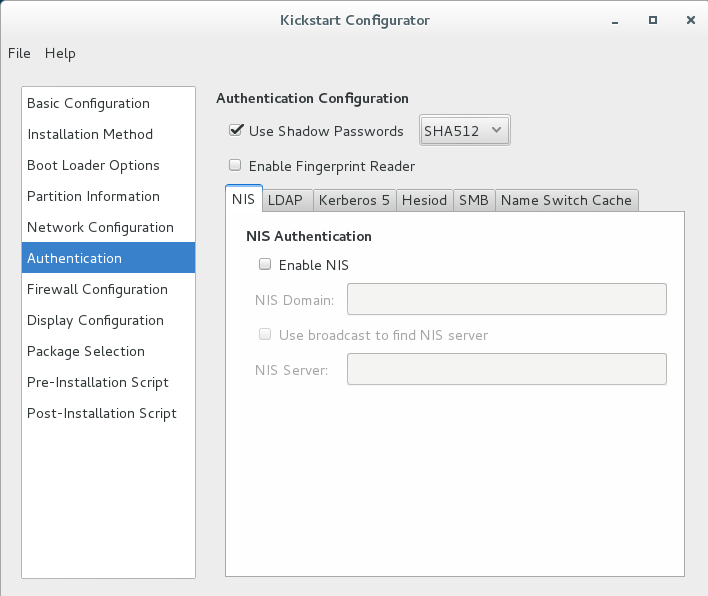
6、认证,默认即可:
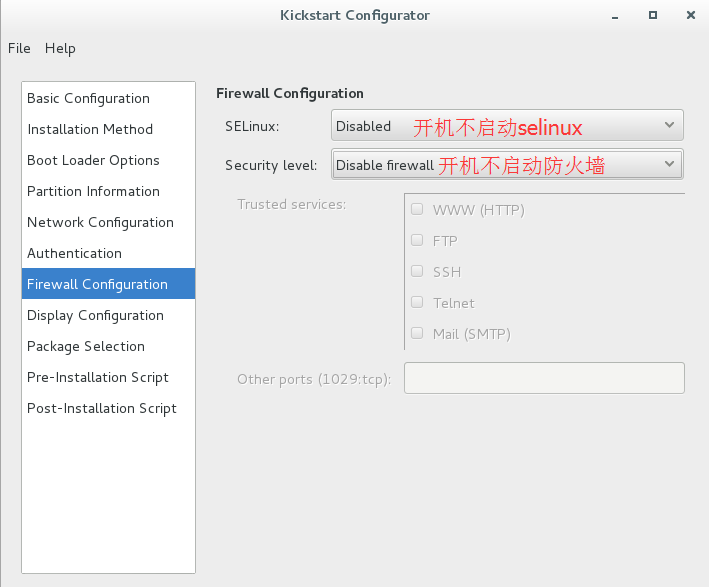
7、安全设置:
8、安装界面:
9、安装包包选择,可以自定义,一般选择最小化安装,最后保存为一个文件,内容如下:
Cobbler自动化部署的更多相关文章
- Cobbler自动化部署最佳实践
第1章 Cobbler自动化部署最佳实践 运维自动化在生产环境中占据着举足轻重的地位,尤其是面对几百台,几千台甚至几万台的服务器时,仅仅是安装操作系统,如果不通过自动化来完成,根本是不可想象的. 面对 ...
- 自动化运维之Cobbler自动化部署安装操作系统
Cobbler概述: Cobbler可以用来快速建立 Linux 网络安装环境,它已将 Linux 网络安装的技术门槛,从大专以上文化水平,成功降低到初中以下,连补鞋匠都能学会. 在生产环境中,经常批 ...
- (转)Cobbler自动化部署最佳实践
原文:http://www.xuliangwei.com/xubusi/446.html 运维自动化在生产环境中占据着举足轻重的地位,尤其是面对几百台,几千台甚至几万台的服务器时,仅仅是安装操作系统, ...
- 在CentOS安装cobbler自动化部署软件
#!/bin/bash##cobbler server addressip=192.168.119.133#DHCP server net and address fanweinet=192.168. ...
- Cobbler 自动化部署系统
yum安装 yum install -y epel-release yum install -y httpd dhcp tftp cobbler cobbler-web pykickstart xin ...
- Cobbler自动化部署系统
1.cobbler简介 cobbler是一个LInux服务器安装的服务,可以通过网络启动(PXE)的方式来快速安装.重装物理服务器和虚拟机,同时还可以管理DHCP,DNS等 cobbler可以 ...
- Cobbler 自动化部署 (转载)
https://www.cnblogs.com/linuxliu/p/7668048.html root默认密码为 123456 (建议修改) ks文件 #platform=x86, AMD64, o ...
- Cobbler自动化批量安装Linux操作系统 - 运维总结
一.Cobbler简述 Cobbler是一个自动化和简化系统安装的工具,通过使用网络引导来控制和启动安装.Cobbler的特性包括存储库镜像.Kickstart模板和连接电源管理系统.Cobbler通 ...
- 基于Centos7.2搭建Cobbler自动化批量部署操作系统服务
1 Cobbler服务器端系统环境配置 1.1 系统基本环境准备 [root@cobbler-server ~]# cat /etc/redhat-release CentOS L ...
随机推荐
- POJ 3294 Life Forms(后缀数组+二分答案)
[题目链接] http://poj.org/problem?id=3294 [题目大意] 求出在至少在一半字符串中出现的最长子串. 如果有多个符合的答案,请按照字典序输出. [题解] 将所有的字符串通 ...
- hdu4491 Windmill Animation (几何)
Windmill Animation Time Limit: 2000/1000 MS (Java/Others) Memory Limit: 32768/32768 K (Java/Other ...
- 【课程分享】ASP.NET MVC5&微信公众平台整合开发实战(响应式布局、JQuery Mobile,Windows Azure、微信核心开发)
对这个课程有兴趣的,能够联系我QQ2748165793 基础知识储备 ASP.NET MVC 5基础(6讲) 第一讲-初识ASP.NET MVC并搭建整合开发环境 第二讲-深入MVC开发模式 第三讲- ...
- iOS面试题03-UI控件
UI控件面试题 1.怎么解决缓存池端的问题(cell) 回答:1.>OS中不存在缓存池的情况,因为通常我们iOS开发,对象都是在需要的时候才会创建, 有种常用的说话叫做懒加载,还有在UITabl ...
- App引导页面源代码的实现
一.页面效果图
- 替换Avada主题的Google字体
刚玩WP的时候图省事,在themeforest买了排行第一的主题Avada,虽然强大,但对我目前的Blog应用而言实在太'重'了.而且老外的主题很多方面不接地气,比如谷歌字体.本文指导各位如何在Ava ...
- 【微信公众号】使用a标签打开链接显示空白
window.location.href 改成 top.location.href
- ES配置详解
elasticsearch的config文件夹里面有两个配置文件:elasticsearch.yml和logging.yml,第一个是es的基本配置文件,第二个是日志配置文件,es也是使用log4j来 ...
- BZOJ 1207: [HNOI2004]打鼹鼠( dp )
dp.. dp[ i ] = max( dp[ j ] + 1 ) ------------------------------------------------------------------ ...
- 什么是RAW数据源
RAW数据源 顾名思义,数据源就是数据的源头,怎么理解那? 大家可以把它想象成一个接口,会给我们返回数据,这个数据是动态的. 举个最简单的例子,比如我要在网页中加载出网站的标题,到时候每个页面都要用到 ...