
(原)ubuntu16中编译boost1.61.0库
转载请注明出处:
http://www.cnblogs.com/darkknightzh/p/5797940.html
参考网址:
http://www.boost.org/doc/libs/1_61_0/more/getting_started/unix-variants.html
http://blog.csdn.net/tedious/article/details/6793544
说明:boost库包含两部分:无需编译的头文件,及单独编译的库。单独编译的库如下:
Boost.Chrono
Boost.Context
Boost.Filesystem
Boost.GraphParallel
Boost.IOStreams
Boost.Locale
Boost.MPI
Boost.ProgramOptions
Boost.Python (see the Boost.Python build documentation before building and installing it)
Boost.Regex
Boost.Serialization
Boost.Signals
Boost.System
Boost.Thread
Boost.Timer
Boost.Wave
A few libraries have optional separately-compiled binaries:
Boost.DateTime has a binary component that is only needed if you're using its to_string/from_string or serialization features, or if you're targeting Visual C++ 6.x or Borland.
Boost.Graph also has a binary component that is only needed if you intend to parse GraphViz files.
Boost.Math has binary components for the TR1 and C99 cmath functions.
Boost.Random has a binary component which is only needed if you're using random_device.
Boost.Test can be used in “header-only” or “separately compiled” mode, although separate compilation is recommended for serious use.
Boost.Exception provides non-intrusive implementation of exception_ptr for 32-bit _MSC_VER==1310 and _MSC_VER==1400 which requires a separately-compiled binary. This is enabled by #define BOOST_ENABLE_NON_INTRUSIVE_EXCEPTION_PTR.
安装步骤(首先下载并解压缩文件,并cd到该文件夹内):
1. 运行bootstrap.sh:后面加上需要编译的库(如果不加的话,貌似只会编译最小的库,即包含基本功能的库)需要编译的自己选(可以见参考网址2里面完全编译)。
./bootstrap.sh --with-libraries= system,filesystem, thread,python
经过上命令后,可以看到,会编译哪些库:
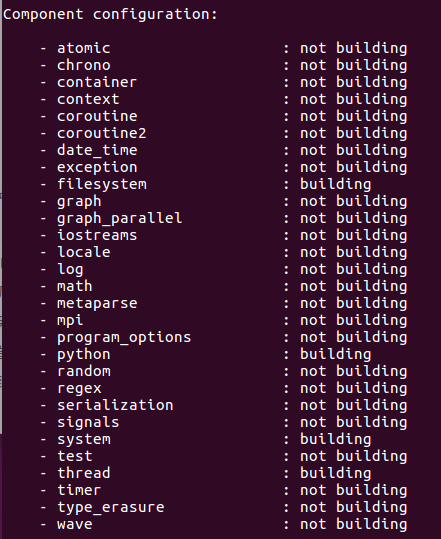
2. 运行./b2。直接这样用,提示权限不够,所以使用如下命令就可以成功:
sudo ./b2
成功编译了这些文件(和上图对应的库):

3. 将编译好的文件使用cp命令拷贝到系统的目录:
sudo cp -a stage/lib /usr/local

sudo cp -a boost /usr/local/include/boost
ps. 貌似这些目录不是ubuntu默认的库目录。ubuntu默认库目录是/usr/lib。所以上面拷贝时,可以使用:
sudo cp -a stage/lib /usr

sudo cp -a boost /usr/include
说明:
1. 使用--show-libraries查看哪些需要单独编译:
./bootstrap.sh --show-libraries

2. 全编译(没试过):
./bootstrap.sh --with-libraries= atomic,chrono,container,context,coroutine,coroutine2,date_time,exception,filesystem,graph,graph_parallel,iostreams,locale,with-log,math,metaparse,mpi,program_options,python,random,regex,serialization,signals,system,test,thread,timer,type_erasure,wave
在另一台电脑上,使用./bootstrap.sh --with-libraries= system,filesystem, thread,python,结果全编译出来了。。。
(原)ubuntu16中编译boost1.61.0库的更多相关文章
- vs2013编译boost1.55.0 32/64位
在使用vs2013编译boost-1.55.0之前,先要给boost做下修改: boost_1_55_0\boost\intrusive\detail\has_member_function_call ...
- 在vs2010中编译log4cxx-0.10.0详细方法(从下载、编译、解决错误详细介绍)
在vs2010中编译log4cxx-0.10.0详细方法(从下载.编译.解决错误详细介绍) http://blog.sina.com.cn/s/blog_a459dcf501013tbn.html
- 使用MSYS2环境中编译Qt5.5.0的补丁
Qt的configure脚本对MinGW静态编译支持不太完善,总有这样那样的问题.如果你不嫌麻烦,而且可以接受高版本的Qt的话,可以考虑使用我做的补丁在MSYS2环境中编译.Qt5.4.2的补丁 Qt ...
- 在VS中编译Opencascade6.6.0
话说,OpenCASCADE团队真的很给力,版本更新速度也是嗖嗖地.依稀记得上次编译OCC,那时候的第三方库.OCC本身几何引擎库,全都得自己编译. 于是,编译过程之艰苦也就可想而知了.最近重换系统, ...
- 在vs2010中编译log4cxx-0.10.0详细方法
本文一共包含了17个步骤,按照下面的步骤就可以完成vs2010中编译log4cxx的工作了. 1. 下载 log4cxx 以及 apr 和 apr-util 源码: a) http://www.apa ...
- (原)Ubuntu16中编译caffe
转载请注明出处: http://www.cnblogs.com/darkknightzh/p/5797526.html 参考网址: http://caffe.berkeleyvision.org/in ...
- (原)vs2013编译boost1.60库
转载请注明出处: http://www.cnblogs.com/darkknightzh/p/5394236.html 参考网址: http://www.cnblogs.com/chuncn/arch ...
- CentOS7中编译安装redis5.0
1. 环境介绍 CentOS7 (未安装Development Tools) 2. 下载Redis5.0-rc3 wget -O redis-5.0-rc3.tar.gz https://github ...
- 在vs2010中编译log4cxx-0.10.0具体方法(从下载、编译、解决错误具体介绍)
一. 简单介绍 log4cxx是Java社区著名的log4j的c++移植版.用于为C++程序提供日志功能,以便开发人员对目标程序进行调试和审计,log4cxx是apache软件基金会的开源项目,基于A ...
随机推荐
- QTableWidget简单操作
使用Qt设计师工具,在窗体上添加Table Widget控件,这样就可以使用ui全局变量来调用该控件了. Table Widget控件的应用 (1)设置列数和行数 //设¦¨¨置?列¢D数ºy和¨ª行 ...
- jquery国内cdn
推荐几个国内的jquery CDN服务地址吧: 新浪CDN,感觉很快,用的人很多,推荐使用! http://lib.sinaapp.com/js/jquery/1.9.1/jquery-1.9.1.m ...
- javascript第二课练习
<script type="text/javascript"> window.onload=function() //网页全部加载完后执行 { va ...
- Lua绑定C++类
原文:http://blog.csdn.net/chenee543216/article/details/12074771 以下是代码: Animal.h文件 #pragma once #ifndef ...
- 使用ARM和VMSS创建自动扩展的web集群
在很多的商业场景中,用户的访问,峰值时间都是很难预测的,尤其是做一些市场推广活动和促销的时候,到底部署什么规模的web集群合适,这一直是个问题,部署过量会造成高成本和资源不必要的浪费,部署过少,如果到 ...
- [LA] 3644 - X-Plosives [并查集]
A secret service developed a new kind of explosive that attain its volatile property only when a spe ...
- Blogger建立新文章 - Blog透视镜
使用Blogger,建立好Blog部落格之后,接着就是建立新文章,它是Blog部落格的灵魂,先从简单开始,来了解建立新文章的标题,文章中如何上传图片,建立卷标,及设定排程日期,定时自动发布等这些功能, ...
- Codeforces 366C Dima and Salad
http://codeforces.com/problemset/problem/366/C 题意:在一个冰箱里有n种水果,并且这些水果每一种都有一个美味度和一个卡路里的属性, 小明要从这些水果中选出 ...
- hex、bin、elf、axf文件区别
AXF和ELF axf文件是ARM的调试文件,除了包含bin的内容之外,还附加了其他的调试信息,这些调试信息加在可执行的二进制数据的前面.在调试的时候,这些调试信息是不必下到RAM中去的,真正下到RA ...
- 《Programming WPF》翻译 第6章 1.创建和使用资源
原文:<Programming WPF>翻译 第6章 1.创建和使用资源 资源这个词具有非常广泛的意义.任何对象都可以是一个资源.一个在用户界面中经常使用的Brush或者Color可以是一 ...