
Hadoop: Setup Maven project for MapReduce in 5mn
Hadoop: Setup Maven project for MapReduce in 5mn
I am sure I am not the only one who ever struggled with Hadoop eclipse plugin installation. This plugin strongly depends on your environment (eclipse, ant, jdk) and hadoop distribution and version. Moreover, it only provides the Old API for MapReduce.
It is so simple to create a maven project for Hadoop that wasting time trying to build this plugin becomes totally useless. I am describing on this article how to setup a first maven hadoop project for Cloudera CDH4 on eclipse.
Prerequisite
maven 3

jdk 1.6

eclipse with m2eclipse plugin installed
Add Cloudera repository
Cloudera jar files are not available on default Maven central repository. You need to explicitly add cloudera repo in your settings.xml (under ${HOME}/.m2/settings.xml).
|
1
2
3
4
5
6
7
8
9
10
11
12
13
14
15
16
17
18
19
20
21
22
23
24
25
26
27
28
29
30
31
32
33
34
35
|
<?xml version="1.0" encoding="UTF-8"?><settings> <profiles> <profile> <id>standard-extra-repos</id> <activation> <activeByDefault>true</activeByDefault> </activation> <repositories> <repository> <!-- Central Repository --> <id>central</id> <releases> <enabled>true</enabled> </releases> <snapshots> <enabled>true</enabled> </snapshots> </repository> <repository> <!-- Cloudera Repository --> <id>cloudera</id> <releases> <enabled>true</enabled> </releases> <snapshots> <enabled>true</enabled> </snapshots> </repository> </repositories> </profile> </profiles></settings> |
Create Maven project
On eclipse, create a new Maven project as follow

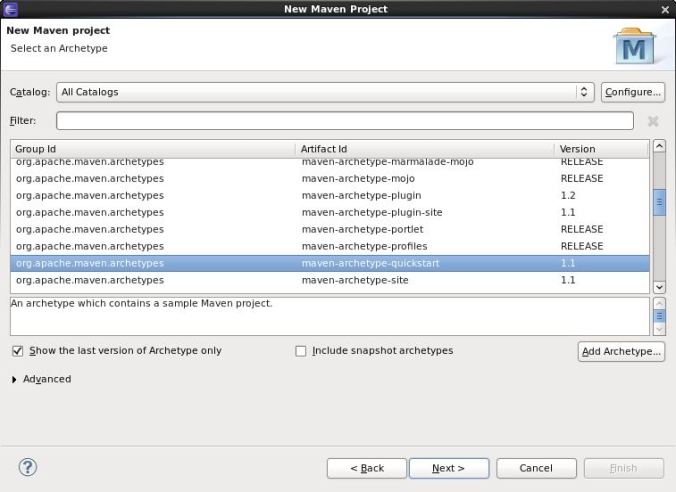
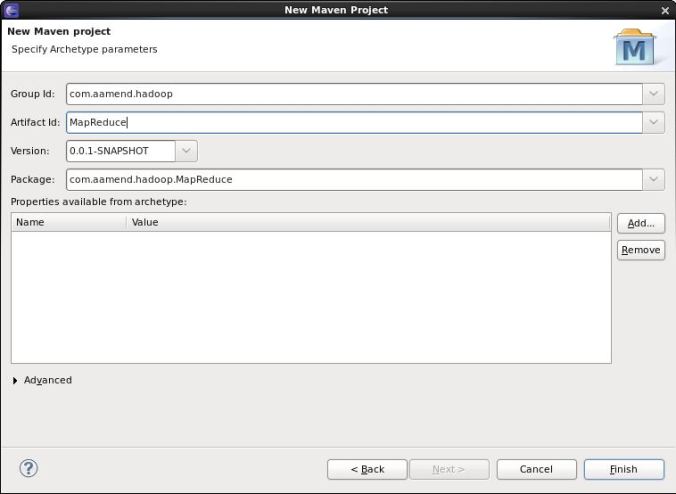
Add Hadoop Nature
For Cloudera distribution CDH4, open pom.xml file and add the following dependencies
|
1
2
3
4
5
6
7
8
9
10
11
12
13
14
15
16
17
18
19
20
21
22
23
24
25
26
27
28
29
30
31
32
33
34
35
36
37
38
39
40
41
42
43
44
45
46
47
48
49
50
51
52
53
54
55
56
57
58
59
60
61
62
63
64
65
66
67
68
69
70
71
|
<dependencyManagement> <dependencies> <dependency> <groupId>jdk.tools</groupId> <artifactId>jdk.tools</artifactId> <version>1.6</version> </dependency> <dependency> <groupId>org.apache.hadoop</groupId> <artifactId>hadoop-hdfs</artifactId> <version>2.0.0-cdh4.0.0</version> </dependency> <dependency> <groupId>org.apache.hadoop</groupId> <artifactId>hadoop-auth</artifactId> <version>2.0.0-cdh4.0.0</version> </dependency> <dependency> <groupId>org.apache.hadoop</groupId> <artifactId>hadoop-common</artifactId> <version>2.0.0-cdh4.0.0</version> </dependency> <dependency> <groupId>org.apache.hadoop</groupId> <artifactId>hadoop-core</artifactId> <version>2.0.0-mr1-cdh4.0.1</version> </dependency> <dependency> <groupId>junit</groupId> <artifactId>junit-dep</artifactId> <version>4.8.2</version> </dependency> </dependencies></dependencyManagement><dependencies> <dependency> <groupId>org.apache.hadoop</groupId> <artifactId>hadoop-hdfs</artifactId> </dependency> <dependency> <groupId>org.apache.hadoop</groupId> <artifactId>hadoop-auth</artifactId> </dependency> <dependency> <groupId>org.apache.hadoop</groupId> <artifactId>hadoop-common</artifactId> </dependency> <dependency> <groupId>org.apache.hadoop</groupId> <artifactId>hadoop-core</artifactId> </dependency> <dependency> <groupId>junit</groupId> <artifactId>junit</artifactId> <version>4.10</version> <scope>test</scope> </dependency></dependencies><build> <plugins> <plugin> <groupId>org.apache.maven.plugins</groupId> <artifactId>maven-compiler-plugin</artifactId> <version>2.1</version> <configuration> <source>1.6</source> <target>1.6</target> </configuration> </plugin> </plugins></build> |
Download dependencies
Now that you have added your Cloudera repository and created your project, download dependencies. This can be easily done by right-clicking on your eclipse project, “update Maven dependencies”.
All these dependencies must have been added on your .m2 repository.
[developer@localhost ~]$ find .m2/repository/org/apache/hadoop -name "*.jar"

.m2/repository/org/apache/hadoop/hadoop-tools/1.0.4/hadoop-tools-1.0.4.jar

.m2/repository/org/apache/hadoop/hadoop-common/2.0.0-cdh4.0.0/hadoop-common-2.0.0-cdh4.0.0-sources.jar

.m2/repository/org/apache/hadoop/hadoop-common/2.0.0-cdh4.0.0/hadoop-common-2.0.0-cdh4.0.0.jar

.m2/repository/org/apache/hadoop/hadoop-core/2.0.0-mr1-cdh4.0.1/hadoop-core-2.0.0-mr1-cdh4.0.1-sources.jar

.m2/repository/org/apache/hadoop/hadoop-core/2.0.0-mr1-cdh4.0.1/hadoop-core-2.0.0-mr1-cdh4.0.1.jar

.m2/repository/org/apache/hadoop/hadoop-hdfs/2.0.0-cdh4.0.0/hadoop-hdfs-2.0.0-cdh4.0.0.jar

.m2/repository/org/apache/hadoop/hadoop-streaming/1.0.4/hadoop-streaming-1.0.4.jar

.m2/repository/org/apache/hadoop/hadoop-auth/2.0.0-cdh4.0.0/hadoop-auth-2.0.0-cdh4.0.0.jar

[developer@localhost ~]$
Create WordCount example
Create your driver code
|
1
2
3
4
5
6
7
8
9
10
11
12
13
14
15
16
17
18
19
20
21
22
23
24
25
26
27
28
29
30
31
32
33
34
35
36
37
38
39
40
41
42
43
44
45
46
47
48
49
50
51
52
53
54
55
56
57
58
59
|
package com.aamend.hadoop.MapReduce;import java.io.IOException;import org.apache.hadoop.conf.Configuration;import org.apache.hadoop.fs.FileSystem;import org.apache.hadoop.fs.Path;import org.apache.hadoop.io.IntWritable;import org.apache.hadoop.io.Text;import org.apache.hadoop.mapreduce.Job;import org.apache.hadoop.mapreduce.lib.input.FileInputFormat;import org.apache.hadoop.mapreduce.lib.input.TextInputFormat;import org.apache.hadoop.mapreduce.lib.output.FileOutputFormat;import org.apache.hadoop.mapreduce.lib.output.TextOutputFormat;public class WordCount { public static void main(String[] args) throws IOException, InterruptedException, ClassNotFoundException { Path inputPath = new Path(args[0]); Path outputDir = new Path(args[1]); // Create configuration Configuration conf = new Configuration(true); // Create job Job job = new Job(conf, "WordCount"); job.setJarByClass(WordCountMapper.class); // Setup MapReduce job.setMapperClass(WordCountMapper.class); job.setReducerClass(WordCountReducer.class); job.setNumReduceTasks(1); // Specify key / value job.setOutputKeyClass(Text.class); job.setOutputValueClass(IntWritable.class); // Input FileInputFormat.addInputPath(job, inputPath); job.setInputFormatClass(TextInputFormat.class); // Output FileOutputFormat.setOutputPath(job, outputDir); job.setOutputFormatClass(TextOutputFormat.class); // Delete output if exists FileSystem hdfs = FileSystem.get(conf); if (hdfs.exists(outputDir)) hdfs.delete(outputDir, true); // Execute job int code = job.waitForCompletion(true) ? 0 : 1; System.exit(code); }} |
Create Mapper class
|
1
2
3
4
5
6
7
8
9
10
11
12
13
14
15
16
17
18
19
20
21
22
23
24
|
package com.aamend.hadoop.MapReduce;import java.io.IOException;import org.apache.hadoop.io.IntWritable;import org.apache.hadoop.io.Text;import org.apache.hadoop.mapreduce.Mapper;public class WordCountMapper extends Mapper<Object, Text, Text, IntWritable> { private final IntWritable ONE = new IntWritable(1); private Text word = new Text(); public void map(Object key, Text value, Context context) throws IOException, InterruptedException { String[] csv = value.toString().split(","); for (String str : csv) { word.set(str); context.write(word, ONE); } }} |
Create your Reducer class
|
1
2
3
4
5
6
7
8
9
10
11
12
13
14
15
16
17
18
19
20
|
package com.aamend.hadoop.MapReduce;import java.io.IOException;import org.apache.hadoop.io.IntWritable;import org.apache.hadoop.io.Text;import org.apache.hadoop.mapreduce.Reducer;public class WordCountReducer extends Reducer<Text, IntWritable, Text, IntWritable> { public void reduce(Text text, Iterable<IntWritable> values, Context context) throws IOException, InterruptedException { int sum = 0; for (IntWritable value : values) { sum += value.get(); } context.write(text, new IntWritable(sum)); }} |
Build project
Exporting jar file is actually out of the box using maven. Execute the following command
mvn clean install
You should see same output as below
.../...

[INFO]

[INFO] --- maven-jar-plugin:2.3.2:jar (default-jar) @ MapReduce ---

[INFO] Building jar: /home/developer/Workspace/hadoop/MapReduce/target/MapReduce-0.0.1-SNAPSHOT.jar

[INFO]

[INFO] --- maven-install-plugin:2.3.1:install (default-install) @ MapReduce ---

[INFO] Installing /home/developer/Workspace/hadoop/MapReduce/target/MapReduce-0.0.1-SNAPSHOT.jar to /home/developer/.m2/repository/com/aamend/hadoop/MapReduce/0.0.1-SNAPSHOT/MapReduce-0.0.1-SNAPSHOT.jar

[INFO] Installing /home/developer/Workspace/hadoop/MapReduce/pom.xml to /home/developer/.m2/repository/com/aamend/hadoop/MapReduce/0.0.1-SNAPSHOT/MapReduce-0.0.1-SNAPSHOT.pom

[INFO] ------------------------------------------------------------------------

[INFO] BUILD SUCCESS

[INFO] ------------------------------------------------------------------------

[INFO] Total time: 9.159s

[INFO] Finished at: Sat May 25 00:35:56 GMT+02:00 2013

[INFO] Final Memory: 16M/212M

[INFO] ------------------------------------------------------------------------
And your jar file must be available on project’s target directory (additionally in your ${HOME}/.m2 local repository).
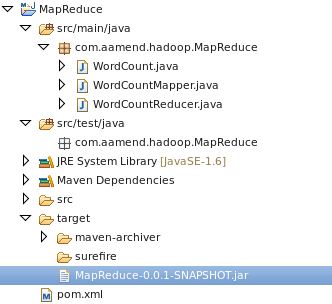
This jar is ready to be executed on your Hadoop environment.
hadoop jar MapReduce-0.0.1-SNAPSHOT.jar com.aamend.hadoop.MapReduce.WordCount input output
Each time I need to create a new Hadoop project, I simply copy pom.xml template described above, and that’s it..
Hadoop: Setup Maven project for MapReduce in 5mn的更多相关文章
- Hadoop: Add third-party libraries to MapReduce job
来自:http://hadoopi.wordpress.com/2014/06/05/hadoop-add-third-party-libraries-to-mapreduce-job/ Anybod ...
- hadoop集群配置方法---mapreduce应用:xml解析+wordcount详解---yarn配置项解析
注:以下链接均为近期hadoop集群搭建及mapreduce应用开发查找到的资料.使用hadoop2.6.0,其中hadoop集群配置过程下面的文章都有部分参考. hadoop集群配置方法: ---- ...
- 安装配置JDK+Eclipse+Maven、Eclipse里新建Maven Project以及HDFS命令和Java API-课堂内容
步骤:1.安装JDK→2.安装Eclipse→3.安装Maven→4. Eclipse里配置Maven (下载Windows版本,在Windows里安装使用.) 1.安装配置JDK ①官网下载Java ...
- 导入spark程序的maven依赖包时,无法导入,报错Unable to import maven project: See logs for details
问题:导入spark程序的maven依赖包时,无法导入,且报错:0:23 Unable to import maven project: See logs for details 2019-08-23 ...
- maven project中,在main方法上右键Run as Java Application时,提示错误:找不到或无法加载主类XXX.XXXX.XXX
新建了一个maven project项目,经过一大堆的修改操作之后,突然发现在main方法上右键运行时,竟然提示:错误:找不到或无法加载主类xxx.xxx.xxx可能原因1.eclipse出问题了,在 ...
- SSM框架整合首只拦路虎——Eclipse新建Maven Project界面select an archetype 空白
首先给大家说,本篇博客没有技术价值,纯属个人学习总结,权当给大家添加一乐.事件如有雷同,纯属巧合,莫怪! 前一段时间一直在看<淘淘商城>这个教程,里面讲的是SSM框架的一个电商项目.这不是 ...
- 【转载】Selenim入门环境的搭建--Java环境下的Java Maven Project
一.开发环境 操作系统: xp win7 win8 win10都可以 JDK: 1.6或者1.7 下载地址 JDK1.7下载 Eclipse: 官网下载比较新的版本,建议下载EE的版本 eclips ...
- Myeclipse 找不到Convert to maven project选项
https://my.oschina.net/u/2419190/blog/504417 Window > Preferences > General > Capabilities ...
- Eclipse无法启动报An internal error occurred during: "reload maven project". java.lang.NullPointerException
由于没有正常关机导致eclipse无法将数据正常写入配置文件导致无法启动.报这样一个异常 An internal error occurred during: "reload maven p ...
随机推荐
- Mysql创建多列唯一索引Sql
ALTER TABLE `t_city_combo` ADD UNIQUE INDEX ` t_city_combo_index` (`combo_id`, `combo_name`, `city_i ...
- windows下安装redis 以及phpredis的扩展 (windows redis php&php7)
一.工具准备 1. redis for windows 下载 https://github.com/MSOpenTech/redis 2. PHP扩展下载 http://pecl.php.net/pa ...
- 织梦DeDeCms会员登录或退出跳转到首页的修改方法
会员在主页登陆后,默认会跳转到会员中心,如果我们想登陆后,跳转到网站主页,那么就请参考下面的方法实现织梦DeDeCms会员登录或退出跳转到首页. 1.在根目录的member目录中找到index_do. ...
- SpringMVC上传文件的三种方式(转载)
直接上代码吧,大伙一看便知 这时:commonsmultipartresolver 的源码,可以研究一下 http://www.verysource.com/code/2337329_1/common ...
- php之快速入门学习-9(switch)
PHP Switch 语句 switch 语句用于根据多个不同条件执行不同动作. PHP Switch 语句 如果您希望有选择地执行若干代码块之一,请使用 switch 语句. <?php sw ...
- 自我分析-Spring IOC
Spring IOC容器实现原理大致是容器(Map)+反射(Java反射和cglib).Spring提供丰富的ApplicationContext.以FileSystemXmlApplicationC ...
- Android的startActivityForResult不起作用
之前startActivityForResult一直用的好好的,今天发现怎么也不起作用.检查后发现有两点影响了. 1.android:launchMode="singleTask" ...
- 如何更改删除window服务?
Cmd 下输入 sc delete 服务名 想要看服务名直接cmd下输入services.msc 打开服务, 例如删除apache服务 命令:sc delete Apache2.4
- SSH框架学习
首先,SSH不是一个框架,而是多个框架(struts+spring+hibernate)的集成,是目前较流行的一种Web应用程序开源集成框架,用于构建灵活.易于扩展的多层Web应用程序. 集成SSH框 ...
- 笔试题之ejb
ejb部分 1.EJB是基于哪些技术实现的?并说出SessionBean和EntityBean的区别,StatefulBean和StatelessBean的区别. EJB包括Session Bean. ...