
Android-fragment的替换
fragment的替换:是指一个Activity加载多个Fragment,当某些动作的时候在Activity替换Fragment显示;
昨天写的这几篇博客,Android-fragment简介-fragment的简单使用,Activity-fragment-ListView展示,Android-fragment生命周期,都是讲解了在Activity的Layout里面(使用fragment-class去指定加载Fragment)
注意:⚠️ 本篇博客,和昨天写的这几篇博客都是使用 android.app.Fragment 自身的Fragment,不是v4包的,两者是有不同之处的;
在使用Fragment开发过程中,有一个开发技巧:
1.如果Activity显示的画面,不会切换画面,就直接在Activity-Layout-<fragment 指定加载Fragment
2.如果Activity显示的画面,会切换,就在Activity-Layout-帧布局占位(把位置占住),然后在Activity代码中去替换fragment(fragment去替换帧布局)
Activity
package liudeli.activity.fragment;

import android.app.Activity;

import android.app.Fragment;

import android.app.FragmentTransaction;

import android.graphics.Color;

import android.os.Bundle;

import android.view.View;

import android.widget.Button;

import liudeli.activity.R;

public class MyTestFragmentActivity4 extends Activity implements View.OnClickListener {

    private Button msg;

    private Button persons;

    private Button my;

    @Override

    protected void onCreate(Bundle savedInstanceState) {

        super.onCreate(savedInstanceState);

        setContentView(R.layout.activity_test_fragment4);

        initView();

        initChangeFragment();

        initListener();

    }

    private void initView() {

        msg = findViewById(R.id.bt_msg);

        persons = findViewById(R.id.bt_persons);

        my = findViewById(R.id.bt_my);

    }

    /**

     * 初始化默认切换到 消息Fragment

     */

    private void initChangeFragment() {

        // 得到FragmentManager

        android.app.FragmentManager manager = getFragmentManager();

        // 开始事务 得到事务

        FragmentTransaction fragmentTransaction = manager.beginTransaction();

        // 替换操作

        fragmentTransaction.replace(R.id.frame_layout, new MsgFragment());

        // 提交

        fragmentTransaction.commit();

        setButton(0);

    }

    private void initListener() {

        msg.setOnClickListener(this);

        persons.setOnClickListener(this);

        my.setOnClickListener(this);

    }

    @Override

    public void onClick(View v) {

        // 得到FragmentManager

        android.app.FragmentManager manager = getFragmentManager();

        // 开始事务 得到事务

        FragmentTransaction fragmentTransaction = manager.beginTransaction();

        Fragment fragment = null;

        switch (v.getId()) {

            case R.id.bt_msg:

                fragment = new MsgFragment();

                setButton(0);

                break;

            case R.id.bt_persons:

                setButton(1);

                fragment = new PersonsFragment();

                break;

            case R.id.bt_my:

                setButton(2);

                fragment = new MyWoFragment();

                break;

        }

        // 替换操作

        fragmentTransaction.replace(R.id.frame_layout, fragment);

        // 提交

        fragmentTransaction.commit();

    }

    /**

     * 设置三个按钮的颜色

     * @param value

     */

    private void setButton(int value) {

        switch (value) {

            case 0:

                msg.setTextColor(Color.RED);

                persons.setTextColor(Color.BLACK);

                my.setTextColor(Color.BLACK);

                break;

            case 1:

                msg.setTextColor(Color.BLACK);

                persons.setTextColor(Color.RED);

                my.setTextColor(Color.BLACK);

                break;

            case 2:

                msg.setTextColor(Color.BLACK);

                persons.setTextColor(Color.BLACK);

                my.setTextColor(Color.RED);

                break;

        }

    }

}
Activity的布局文件
<?xml version="1.0" encoding="utf-8"?>

<LinearLayout

    xmlns:android="http://schemas.android.com/apk/res/android"

    android:layout_width="match_parent"

    android:layout_height="match_parent"

    android:orientation="vertical">

    <!-- 帧布局 下面的LinearLayout已经先填充了,剩下的控件我全部来填充  -->

    <FrameLayout

        android:id="@+id/frame_layout"

        android:layout_width="match_parent"

        android:layout_height="0dp"

        android:layout_weight="1"

        >

    </FrameLayout>

    <!-- 我的layout_weight默认为0,我先填充我的控件 -->

    <LinearLayout

        android:layout_width="match_parent"

        android:layout_height="wrap_content"

        android:padding="10dp"

        android:layout_below="@id/frame_layout">

        <Button

            android:id="@+id/bt_msg"

            android:layout_width="0dp"

            android:layout_height="match_parent"

            android:layout_weight="1"

            android:text="消息"

            android:gravity="center"

            android:textColor="@android:color/black"

            />

        <Button

            android:id="@+id/bt_persons"

            android:layout_width="0dp"

            android:layout_height="match_parent"

            android:layout_weight="1"

            android:text="好友"

            />

        <Button

            android:id="@+id/bt_my"

            android:layout_width="0dp"

            android:layout_height="match_parent"

            android:layout_weight="1"

            android:text="我的"

            />

    </LinearLayout>

</LinearLayout>
消息的Fragment,MsgFragment
package liudeli.activity.fragment;

import android.app.Fragment;

import android.os.Bundle;

import android.view.LayoutInflater;

import android.view.View;

import android.view.ViewGroup;

import android.widget.AdapterView;

import android.widget.ArrayAdapter;

import android.widget.ListAdapter;

import android.widget.ListView;

import android.widget.Toast;

public class MsgFragment extends Fragment {

    @Override

    public View onCreateView(LayoutInflater inflater, ViewGroup container, Bundle savedInstanceState) {

        super.onCreateView(inflater, container, savedInstanceState);

        return new ListView(getActivity()); // Fragment不能使用this

    }

    @Override

    public void onViewCreated(View view, Bundle savedInstanceState) {

        super.onViewCreated(view, savedInstanceState);

        final String[] data = new String[]{

                "你有一条消息1",

                "你有一条消息2",

                "你有一条消息3",

                "你有一条消息4",

                "你有一条消息5",

                "你有一条消息6",

                "你有一条未读消息6",

                "你有一条未读消息7",

                "你有一条未读消息8",

        };

        ListView listView = (ListView)view;

        ListAdapter listAdapter = new ArrayAdapter(getActivity(),

                                                           android.R.layout.simple_list_item_1,

                                                           android.R.id.text1,

                                                           data);

        listView.setAdapter(listAdapter);

        listView.setOnItemClickListener(new AdapterView.OnItemClickListener() {

            @Override

            public void onItemClick(AdapterView<?> parent, View view, int position, long id) {

                Toast.makeText(getActivity(), data[position], Toast.LENGTH_SHORT).show();

            }

        });

    }

}
好友的Fragment,PersonsFragment
package liudeli.activity.fragment;

import android.app.Fragment;

import android.os.Bundle;

import android.view.LayoutInflater;

import android.view.View;

import android.view.ViewGroup;

import android.widget.AdapterView;

import android.widget.ArrayAdapter;

import android.widget.ListAdapter;

import android.widget.ListView;

import android.widget.Toast;

public class PersonsFragment extends Fragment {

    @Override

    public View onCreateView(LayoutInflater inflater, ViewGroup container, Bundle savedInstanceState) {

        super.onCreateView(inflater, container, savedInstanceState);

        return new ListView(getActivity()); // Fragment不能使用this

    }

    @Override

    public void onViewCreated(View view, Bundle savedInstanceState) {

        super.onViewCreated(view, savedInstanceState);

        final String[] data = new String[]{

                "张三",

                "李四",

                "王五",

                "赵六",

                "王八",

                "朱九",

                "厨十",

                "阿名",

                "雄霸",

        };

        ListView listView = (ListView)view;

        ListAdapter listAdapter = new ArrayAdapter(getActivity(),

                                                           android.R.layout.simple_list_item_1,

                                                           android.R.id.text1,

                                                           data);

        listView.setAdapter(listAdapter);

        // ListVIew 设置可以解决,Item长按无反应的问题: android:descendantFocusability="blocksDescendants"

        // listView.setDescendantFocusability(2);

        /*listView.setOnItemLongClickListener(new AdapterView.OnItemLongClickListener() {

            @Override

            public boolean onItemLongClick(AdapterView<?> parent, View view, int position, long id) {

                Toast.makeText(getActivity(), data[position], Toast.LENGTH_SHORT).show();

                return true;

            }

        });*/

        listView.setOnItemClickListener(new AdapterView.OnItemClickListener() {

            @Override

            public void onItemClick(AdapterView<?> parent, View view, int position, long id) {

                Toast.makeText(getActivity(), data[position], Toast.LENGTH_SHORT).show();

            }

        });

    }

}
我的Fragment,MyWoFragment
package liudeli.activity.fragment;

import android.app.Fragment;

import android.os.Bundle;

import android.view.LayoutInflater;

import android.view.View;

import android.view.ViewGroup;

import android.widget.ArrayAdapter;

import android.widget.GridView;

import android.widget.ListAdapter;

import android.widget.ListView;

public class MyWoFragment extends Fragment {

    @Override

    public View onCreateView(LayoutInflater inflater, ViewGroup container, Bundle savedInstanceState) {

        super.onCreateView(inflater, container, savedInstanceState);

        return new GridView(getActivity()); // Fragment不能使用this

    }

    @Override

    public void onViewCreated(View view, Bundle savedInstanceState) {

        super.onViewCreated(view, savedInstanceState);

        String[] data = new String[]{

                "我的账号",

                "我的社交",

                "我的简洁",

                "我的钱包",

                "我的设置",

                "退出账号",

                "重置账号"

        };

        GridView gridView = (GridView)view;

        // 设置三列

        gridView.setNumColumns(3);

        ListAdapter listAdapter = new ArrayAdapter(getActivity(),

                                                           android.R.layout.simple_list_item_1,

                                                           android.R.id.text1,

                                                           data);

        gridView.setAdapter(listAdapter);

    }

}
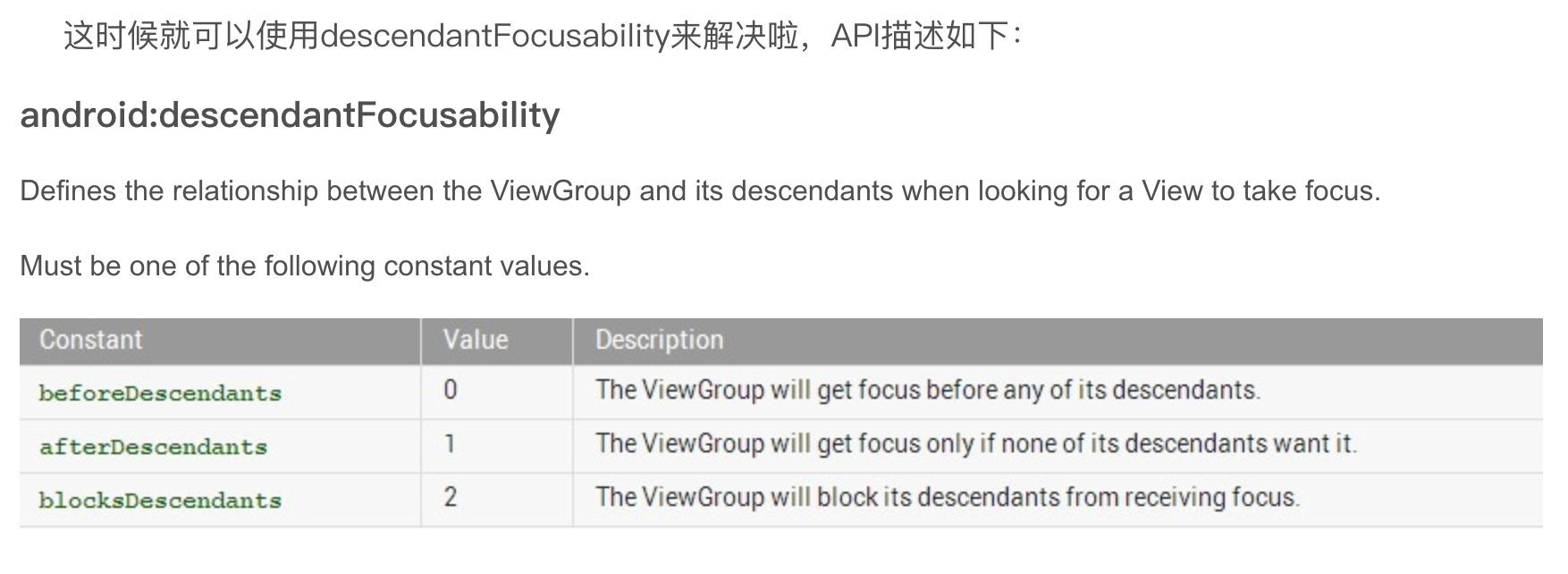
ListVIew 设置可以解决,Item长按无反应的问题:
效果:

Android-fragment的替换的更多相关文章
- Android Fragment 生命周期及其API使用(建议使用自定义View替换Fragment)
我为什么不主张使用Fragment Fragment:( Fragment就相当于一个有生命周期的View,它的生命周期被所在的Activity的生命周期管理 ) 生命周期回调说明: onAttach ...
- Android Fragment 生命周期及其正确使用(建议使用自定义View替换Fragment)
使用Fragment 官方例子中显示: 例如:一个学生Fragment,需要传入studentId,进行http请求显示,那么setArguments后防止杀掉Fragment后,参数为0,显示不了数 ...
- Android Fragment应用实战
现在Fragment的应用真的是越来越广泛了,之前Android在3.0版本加入Fragment的时候,主要是为了解决Android Pad屏幕比较大,空间不能充分利用的问题,但现在即使只是在手机上, ...
- Android Fragment应用实战,使用碎片向ActivityGroup说再见
转载请注明出处:http://blog.csdn.net/guolin_blog/article/details/13171191 现在Fragment的应用真的是越来越广泛了,之前Android在3 ...
- Android Fragment 解析和使用
Android Fragment的生命周期和Activity类似,实际可能会涉及到数据传递,onSaveInstanceState的状态保存,FragmentManager的管理和Transactio ...
- Android Fragment 完全解析
参考文章:http://blog.csdn.net/guolin_blog/article/details/8881711 http://blog.csdn.net/guolin_blog/artic ...
- Android Fragment详解
一.什么是Fragment Android在3.0中引入了fragments的概念,主要目的是用在大屏幕设备上--例如平板电脑上,支持更加动态和灵活的UI设计.平板电脑的屏幕要比手机的大得多,有更多的 ...
- Android Fragment 真正的完全解析(上)--转
转载请标明出处:http://blog.csdn.net/lmj623565791/article/details/37970961 自从Fragment出现,曾经有段时间,感觉大家谈什么都能跟Fra ...
- Xamarin Android Fragment的两种加载方式
android Fragment的重点: 3.0版本后引入,即minSdk要大于11 Fragment需要嵌套在Activity中使用,当然也可以嵌套到另外一个Fragment中,但这个被嵌套的Fra ...
- Android Fragment碎片
什么是碎片? 碎片(Fragment)是一种可以嵌入在活动当中的UI片段,它能让程序更加合理和充分地利用大屏幕的空间,因而在平板上应用的非常广泛.可以把Fragment当成Activity一个界面的一 ...
随机推荐
- referer null
Referer表示超链接源的URL!你想看到实验效果,要从a-->(能过<a href="b.jsp")b页面,然后在B里可以取得Refere参数! String ur ...
- HTML的实际演练1
1.HTML介绍 一个网站的建立都是HTML的,例如大家可以打开F12就可以看到浏览器的一个开发者模式,就可以看到网页的源代码了: 当然这网页他有很多的标签编写组成的,有的显示文字,段落,有的是个超链 ...
- where T:new() 是什么意思
经常看到方法后面加where T:new() ,下面来解释下 比如如下这个方法 protected static T CreateNewInstance<T>() where T : ...
- 把Excel导入SQL server时出现错误
在把Excel导入SQL server时出现“未在本地计算机上注册 Microsoft.ACE.OLEDB.12.0 ”该 错误信息:未在本地计算机上注册“microsoft.ACE.oledb.12 ...
- for循环计算阶乘
int x = 10; for(int y = x - 1; y >= 1; y--) { x = x * y; } System.out.println(x); 从10乘到1的阶乘写法. lo ...
- 删除Eclipse已有的SVN资源库位置
点击Eclipse菜单栏的[Window]->[Show View]->[Other],在弹出的对话框中,选择[SVN]->[SVN资源库],然后点击[OK]. 接着,在Eclips ...
- JdbcTemplate实现CRUD操作
------------------siwuxie095 JdbcTemplate 实现 CRUD 操作 1.J ...
- Loitor_产品(二)校准立体摄像机
[1]Loitor VI Sensor 可以通过 ROS 自自带的双目相机标定工工具 cameracalibrator.py 来标定相机内参,详细过程http://wiki.ros.org/camer ...
- 有关gitlab的神秘操作.....version&&domain设置...
在使用gitlab的时候,如果服务器IP变动,之前的domain写入了配置文件了,如下路径: [root@gitlab-server ~]# vim /var/opt/gitlab/gitlab-ra ...
- cron,at的权限控制
/etc/cron.deny存在 /etc/cron.deny不存在 /etc/cron.allow存在 只有/etc/cron.allow中列出的用户才能运行crontab -e:忽略/etc/ ...