
实验一:使用ADO.NET方式读数据
第一步:创建Asp.net应用程序
在VS中,点击文件->新建->项目,按如图方式选择并输入:

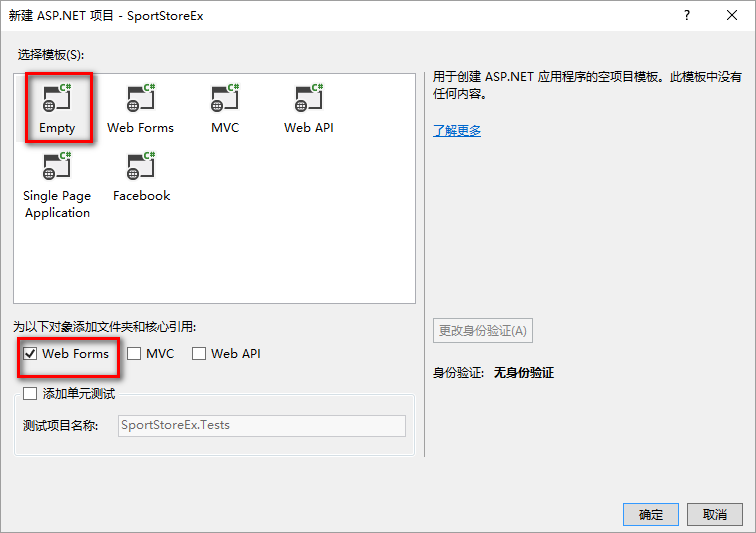
第二步:新建产品浏览网页窗体Listing.aspx:
在项目SportsStoreEx上点击右键,选中”添加“->”添加Web窗体“:

第三步:添加数据库
先点击下载SportStore数据库脚本,打开Sql Sever Managment Studio,登陆数据库服务器,在SSMS中打开SportStore数据库脚本,点击SSMS工具栏上的红色感叹号,运行脚本,SportStore数据库即建成,并有数据表Products,表中也有数据了。
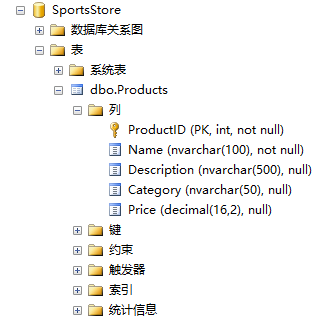
第四步:在项目SportStoreEx中添加数据模型类Product:
右键点击项目SportStore,选中添加->类,输入类名:Product。
类Product用来描述数据库中的Products表中的记录,类代码如下:
using System;

using System.Collections.Generic;

using System.Linq;

using System.Web;

namespace SportStoreEx

{

    public class Product

    {

        public int ProductID { get; set; }

        public string Name { get; set; }

        public string Description { get; set; }

        public string Category { get; set; }

        public decimal Price { get; set; }

    }

}
第五步:添加GetProducts()方法
双击Listing.aspx.cs文件,在Listing类里添加GetProducts()方法,代码如下:
using System;

using System.Collections.Generic;

using System.Data.SqlClient;

using System.Linq;

using System.Web;

using System.Web.UI;

using System.Web.UI.WebControls;

namespace SportStoreEx

{

    public partial class Listing : System.Web.UI.Page

    {

        protected void Page_Load(object sender, EventArgs e)

        {

        }

        protected IEnumerable<Product> GetProducts()

        {

            IList<Product> products = new List<Product>();

            string sql = "select ProductID,Name,Description,Category,Price from Products";

            var con = new SqlConnection("Data Source=.;Initial Catalog=SportsStore;Integrated Security=True");

            var cmd = new SqlCommand(sql, con);

            SqlDataReader dr;

            con.Open();

            dr = cmd.ExecuteReader();

            while (dr.Read())

            {

                var prod = new Product();

                prod.ProductID = dr.GetInt32();

                prod.Name = dr.GetString();

                prod.Description = dr.GetString();

                prod.Category = dr.GetString();

                prod.Price = dr.GetDecimal();

                products.Add(prod);

            }

            return products;

        }

    }

}
第六步:修改Listing.aspx文件:
<%@ Page Language="C#" AutoEventWireup="true" CodeBehind="Listing.aspx.cs" Inherits="SportStoreEx.Listing" %>

<!DOCTYPE html>

<html xmlns="http://www.w3.org/1999/xhtml">

<head runat="server">

<meta http-equiv="Content-Type" content="text/html; charset=utf-8"/>

    <title></title>

</head>

<body>

    <form id="form1" runat="server">

    <div>

        <%foreach (SportStoreEx.Product prod in GetProducts())

        {

            Response.Write("<div class='item'>");

            Response.Write(string.Format("<h3>{0}</h3>",prod.Name));

            Response.Write("</div>");

        }

        %>

    </div>

    </form>

</body>

</html>
第七步:运行代码。

实验一:使用ADO.NET方式读数据的更多相关文章
- ADO.NET基础、数据增删改查
ADO.NET:数据访问技术,就是将C#和MSSQL连接起来的一个纽带.我们可以通过ADO.NET将内存中的临时数据写入到数据库中,也可以将数据库中的数据提取到内存中供程序调用. 数据库数据的增.删. ...
- C#向文件写、读数据
using System; using System.Collections.Generic; using System.Linq; using System.Text; using System.T ...
- Redis学习——Redis持久化之AOF备份方式保存数据
新技术的出现一定是在老技术的基础之上,并且完善了老技术的某一些不足的地方,新技术和老技术就如同JAVA中的继承关系.子类(新技术)比父类(老技术)更加的强大! 在前面介绍了Redis学习--Redis ...
- Android学习笔记36:使用SQLite方式存储数据
在Android中一共提供了5种数据存储方式,分别为: (1)Files:通过FileInputStream和FileOutputStream对文件进行操作.具体使用方法可以参阅博文<Andro ...
- 使用VS2013操作MYSQL8 (ADO.NET方式 & EF6)
今天有时间测试了一下通过.net环境操作MYSQL数据库,测试过程及结果记录如下: 1.MYSQL安装 (1)我是从MYSQL官网下载的最新版,即MYSQL8.0,在MySql官网的下载页面,找到“M ...
- Redis 通过 RDB 方式进行数据备份与还原
Redis 通过 RDB 方式进行数据备份与还原 Intro 有的时候我们需要对 Redis 的数据进行迁移,今天介绍一下通过 RDB(快照)文件进行 Redis 数据的备份和还原 Redis 持久化 ...
- android 之HttpURLConnection的post,get方式请求数据
get方式和post方式的区别: 1.请求的URL地址不同: post:"http://xx:8081//servlet/LoginServlet" get:http://xxx: ...
- Android 采用post方式提交数据到服务器
接着上篇<Android 采用get方式提交数据到服务器>,本文来实现采用post方式提交数据到服务器 首先对比一下get方式和post方式: 修改布局: <LinearLayout ...
- Google判断广告点击作弊的几种方式和数据
Google判断广告点击作弊的几种方式和数据. 作弊广告点击的CTR数据太高网上有研究说如果CTR值大于了10%的站被干掉的可能性很高,他们会被单独拿出来分析.一般来说低于6-7%的CTR是安全红线 ...
随机推荐
- 欢迎来怼--第二十二次Scrum会议
欢迎来怼--第二十二次Scrum会议 一.小组信息 队名:欢迎来怼 小组成员 队长:田继平 成员:李圆圆,葛美义,王伟东,姜珊,邵朔,阚博文 小组照片 二.开会信息 时间:2017/11/10 17: ...
- Monty Hall 问题与贝叶斯定理的理解
三门问题(Monty Hall problem),是一个源自博弈论的数学游戏问题,大致出自美国的电视游戏节目Let's Make a Deal.问题的名字来自该节目的主持人蒙提·霍尔(Monty H ...
- 团队作业7——第二次项目冲刺(Beta版本12.07——12.08)
1.当天站立式会议照片 本次会议在5号公寓3楼召开,本次会议内容:①:熟悉每个人想做的模块.②:根据项目要求还没做的完成. 2.每个人的工作 经过会议讨论后确定了每个人的分工 组员 任务 陈福鹏 实现 ...
- Head First Java & final
- n位格雷曼实现
参考: 格雷码的实现 问题:产生n位元的所有格雷码. 格雷码(Gray Code)是一个数列集合,每个数使用二进位来表示,假设使用n位元来表示每个数字,任两个数之间只有一个位元值不同. 例如以下为 ...
- Linux adduser
- vue开发 ES5——> ES6设置
- Longest Increasing Subsequence的两种解法
问题描述: 给出一个未排序队列nums,如[10, 9, 2, 5, 3, 7, 101, 18].找出其中最长的增长序列,但不是连续增长序列,如[2, 3, 7, 101]就是对应的最长增长序列LI ...
- Windows 配置Reids集群 Redis Cluster
一 .所需软件:Redis.Ruby语言运行环境.Redis的Ruby驱动redis-xxxx.gem.创建Redis集群的工具redis-trib.rb 二 .安装配置redis redis下载地 ...
- python自动化之读写
############################################################################# #############在Windows上 ...