
JavaScript Event Delegation, and event.target vs. event.currentTarget
In this case, at the time you call console.log(e), there's a DOM element in the currentTarget property. But sometime later, that property is reset to null for some reason. When you expand the event object, that's what you see.
你的情况是,当调用console.log(e)时,currentTarget属性是有值的,但是过后这个值就被重置为null了。所以当你展开事件对象,看到的就是null。
<!DOCTYPE html>

<html lang="en">

<head>

    <meta charset="UTF-8">

    <title>Document</title>

    <style type="text/css">

        #wrapDiv,

        #innerP,

        #textSpan {

            margin: 5px;

            padding: 5px;

            box-sizing: border-box;

            cursor: default;

        }

        #wrapDiv {

            width: 300px;

            height: 300px;

            border: indianred 3px solid;

        }

        #innerP {

            width: 200px;

            height: 200px;

            border: hotpink 3px solid;

        }

        #textSpan {

            display: block;

            width: 100px;

            height: 100px;

            border: orange 3px solid;

        }

    </style>

</head>

<body>

    <div id="wrapDiv">wrapDiv

        <p id="innerP">innerP

            <span id="textSpan">textSpan</span>

        </p>

    </div>

    <script>

        var div = document.getElementById('wrapDiv');

        var p = document.getElementById('innerP');

        var span = document.getElementById('textSpan');

        div.onclick = function(ev){

            console.log(ev); //

            console.log("target:", ev.target);

            console.log("currentTarget:", ev.currentTarget);

        }

    </script>

</body>

</html>
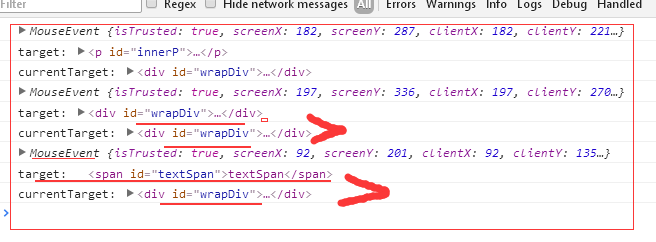
-----------------------------------------------
Event delegation is a popular methodology in JavaScript. It allows us to add an event listener to one parent, and avoid to add many event listeners to specific nodes. We can demonstrate this technique with simple example.
Let’s say we have a list with thousands of items:
<body>
  <div id="container">
   <ul id="list">
     <li><a href="#">Item 1</a></li>
     <li><a href="#">Item 2</a></li>
     <li><a href="#">Item 3</a></li>
     <li><a href="#">Item 4</a></li>
     ..................................
     <li><a href="#">Item 1000</a></li>
   </ul>
  </div>
</body>
With such number of items, it would be a nightmare to loop through every <a> element on the page, adding an event listener one after one. Moreover, it may “freeze” the page when JavaScript is trying to create them all.
So here comes the event delegation: When the event bubbles up to the body element, we can check the element that triggered the event, using the event object’s target property.
document.addEventListener("click", function(e) {
  if(e.target && e.target.nodeName == "A") {
  console.log("List item ", e.target.textContent, " was clicked!");
  }
});
// When we click the 2nd item, the page prints out:
"List item Item 2 was clicked!"
target vs. currentTarget
Since we already talked about the event.target property, there is another property called event.currentTarget in JavaScript event. It can be very confused by just reading about them on JavaScript documentation.
As we’ve seen from the last example, when we clicked the a element, clickevent bubbles up to <body> node of the document like below:
<a> → <li> → <ul> → <div> → <body>
Let’s add one more line of code and prints out what the e.currentTarget is from the example we used above:
document.addEventListener(“click”, function(e) {
  if(e.target && e.target.nodeName == “A”) {
    console.log(“List item “, e.target.textContent, “ was clicked!”);  // "List item Item 2 was clicked!"
  }
  console.log(e.currentTarget);  // #document
});
It prints out “document” since we attached current event listener to the document while e.target refers to <a> which we clicked.
We can also look at one more example to see the differences between target and currentTarget. This time, we add the event listener to the <ul>:
document.getElementById(“list”).addEventListener(“click”, function(e) {
  console.log(e.currentTarget);  //<ul><li>...</li><ul>
  console.log(e.target);         //<a href="#">Item 2</a>
);
Again, the currentTarget refers to the element that the event listener directly attached to while the target still refers to the specific <a> we clicked.
With these two properties target and currentTarget, we can easily manipulate the node when the event gets triggered, as well as the node the event is attached to.
JavaScript Event Delegation, and event.target vs. event.currentTarget的更多相关文章
- Event对象中的target属性和currentTarget属性的区别
先上结论: Event.target:触发事件的元素: Event.currentTarget:事件绑定的元素: 通过下面的例子来理解这两个属性的区别: 使用Event.target属性的例子:(我在 ...
- JavaScript Interview Questions: Event Delegation and This
David Posin helps you land that next programming position by understanding important JavaScript fund ...
- javascript 事件委托 event delegation
事件委托 event delegation 一.概念: 假设我们有很多个子元素,每个元素被点击时都会触发相应事件,普通的做法是给每个子元素添加一个事件监听. 而,事件委托则是给它们的父元素添加一个事件 ...
- javascript事件代理(Event Delegation)
看了几篇文章,放上来供参考 司徒正美的文章,Event Delegation Made Easy --------------------------------------------------- ...
- JavaScript------事件委托(event delegation)
简单的说,事件委托(event delegation)是在DOM上层(也就是在触发事件的元素的父元素上)定义事件的处理程序,而不是定义在触发事件的元素本身上. 首先我们来举这样一个例子:我有N个li元 ...
- window.event.srcElement与window.event.target 触发事件的元素 触发事件对象的获取,window.event与时间函数参数的event是同一个 事件对象
判断事件触发的元素: var tag = window.event.target || window.event.srcElement; if (tag.tagName.toLowerC ...
- JS:event对象下的target属性和取消冒泡事件
1.target 通过获取DOM元素 var box = document.getElementById("box"); document.box.onclick = functi ...
- 【前端】event.target 和 event.currentTarget 的区别
event.target 和 event.currentTarget 的区别 举例说明: <!DOCTYPE html> <html> <head> <tit ...
- javascript运行模式:并发模型 与Event Loop
看了阮一峰老师的JavaScript 运行机制详解:再谈Event Loop和[朴灵评注]的文章,查阅网上相关资料,把自己对javascript运行模式和EVENT loop的理解整理下,不一定对,日 ...
随机推荐
- dhcp 提示could not load neutron.agent
错误日志如下: N版存在问题,其它版本不知道 解决方法(代码问题): /usr/lib/python2.7/site-packages/neutron/common/utils.py 在这个方法上(d ...
- 提高django model效率的几个小方法
django的model效率不是很高,特别是在做大量的数据库操作的时候,如果你只用django来开企业站或者外包项目的话,那可以小跳过下,而你恰巧是效率狂或者说是对程序的效率要求比较高的话,那就要注意 ...
- [BZOJ5125]小Q的书架(决策单调性+分治DP+树状数组)
显然有决策单调性,但由于逆序对不容易计算,考虑分治DP. solve(k,x,y,l,r)表示当前需要选k段,待更新的位置为[l,r],这些位置的可能决策点区间为[x,y].暴力计算出(l+r)/2的 ...
- bzoj 4092 DP
简化题意: 给定两个集合A,B,A集合有一个权值,并且对应一个B集合的子集,求A的一个子集,满足权值和最小且对应的子集的并集是B集合. 感觉像网络流,但因为每个B中的元素对应一个A中的元素就行了,是o ...
- 计算机二级软件VC++6.0下载地址
计算机二级软件VC++6.0介绍: 适合所有参加全国计算机等级考试的童鞋们……见图如下: 下载地址:(以下两者任选其一即可) (1).计算机二级软件VC++6.0(16.35MB) (2).计算机二级 ...
- python开发_thread_布朗运动
这篇blog是非常有趣的,是的,他非常有趣 下面我将给大家介绍有关python中thread来实现布朗运动的一个例子 下面是运行效果: ================================ ...
- Codeforces Round #293 (Div. 2) A. Vitaly and Strings
A. Vitaly and Strings time limit per test 1 second memory limit per test 256 megabytes input standar ...
- h5的部分新元素或属性
#h5的新元素或属性 - datalist标签(新表单元素):规定了input元素可能的选项列表. * 条件:datalist的id属性值必须等于input元素的list属性值. ...
- Tasker to auto record incoming or outgoing call
Tasker to auto record incoming or outgoing call most of time, i was thinking of tasker can do the jo ...
- Make a DAC with a microcontroller's PWM timer
http://www.edn.com/design/analog/4337128/Make-a-DAC-with-a-microcontroller-s-PWM-timer Many embedded ...