
Easing圆环动画
Easing圆环动画

效果
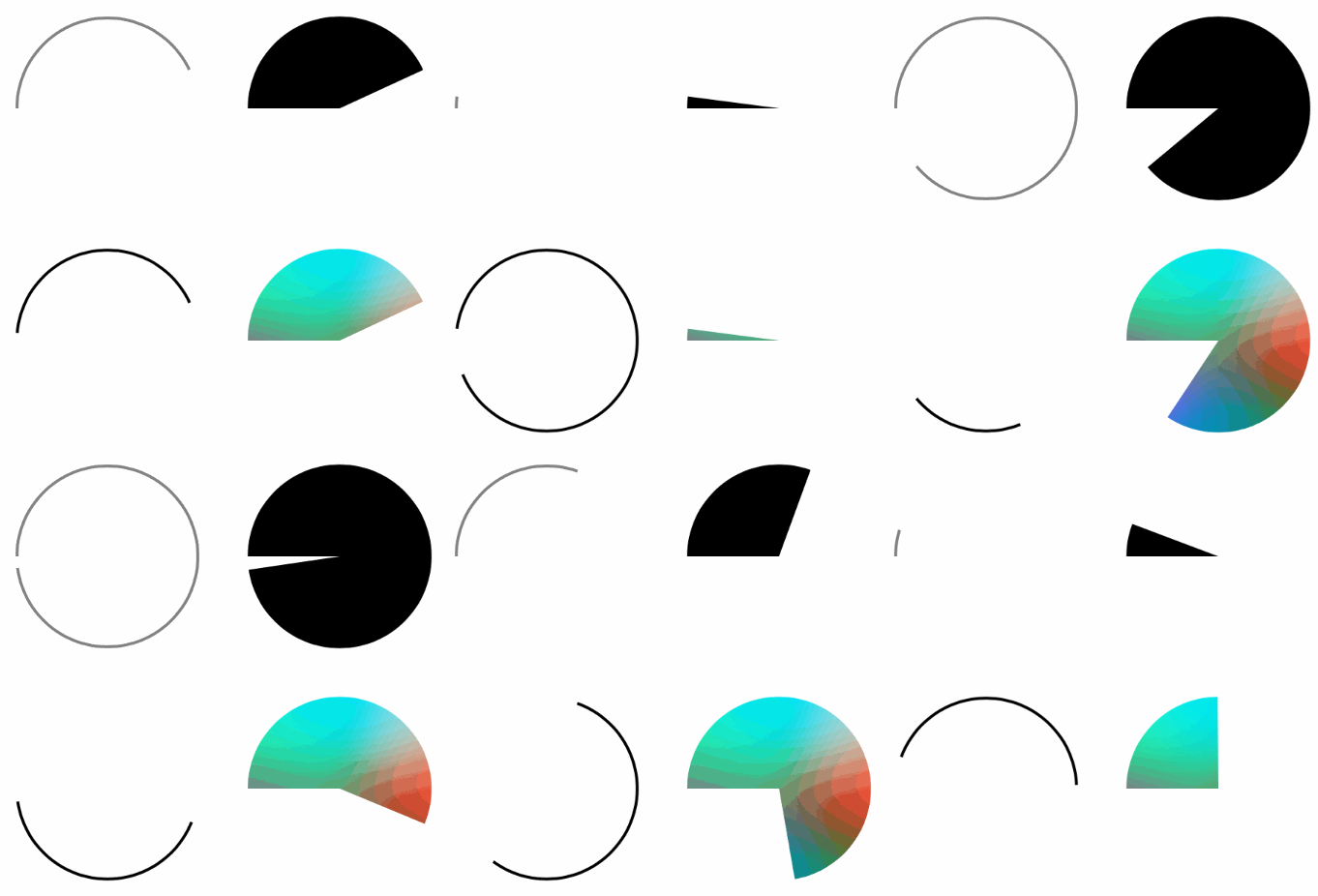

源码
https://github.com/YouXianMing/Animations
//

//  CircleView.h

//  YXMWeather

//

//  Created by XianMingYou on 15/11/12.

//  Copyright (c) 2015年 XianMingYou. All rights reserved.

//

#import <UIKit/UIKit.h>

#import "YXEasing.h"

@interface CircleView : UIView

/**

 *  线条宽度

 */

@property (nonatomic)         CGFloat   lineWidth;

/**

 *  线条颜色

 */

@property (nonatomic, strong) UIColor  *lineColor;

/**

 *  旋转方向

 */

@property (nonatomic)         BOOL      clockWise;

/**

 *  开始角度

 */

@property (nonatomic)         CGFloat   startAngle;

/**

 *  初始化view

 */

- (void)buildView;

/**

 *  做strokeEnd动画

 *

 *  @param value    取值 [0, 1]

 *  @param func     函数指针

 *  @param animated 是否执行动画

 *  @param duration 动画持续的时间

 */

- (void)strokeEnd:(CGFloat)value animationType:(AHEasingFunction)func animated:(BOOL)animated duration:(CGFloat)duration;

/**

 *  做strokeStart动画

 *

 *  @param value    取值 [0, 1]

 *  @param func     函数指针

 *  @param animated 是否执行动画

 *  @param duration 动画持续的时间

 */

- (void)strokeStart:(CGFloat)value animationType:(AHEasingFunction)func animated:(BOOL)animated duration:(CGFloat)duration;

/**

 *  便利构造器创建出实例对象

 *

 *  @param frame     frame值

 *  @param width     线条宽度

 *  @param color     线条颜色

 *  @param clockWise 是否是顺时钟

 *  @param angle     开始是否的角度(取值范围 0° ~ 360°)

 *

 *  @return 实例对象

 */

+ (instancetype)circleViewWithFrame:(CGRect)frame

                          lineWidth:(CGFloat)width

                          lineColor:(UIColor *)color

                          clockWise:(BOOL)clockWise

                         startAngle:(CGFloat)angle;

@end
//

//  CircleView.m

//  YXMWeather

//

//  Created by XianMingYou on 15/11/12.

//  Copyright (c) 2015年 XianMingYou. All rights reserved.

//

#import "CircleView.h"

// 将度数转换为弧度

#define   RADIAN(degrees)  ((M_PI * (degrees))/ 180.f)

// 将弧度转换为度数

#define   DEGREES(radian)  ((radian) * 180.f / M_PI)

@interface CircleView ()

/**

 *  圆形layer

 */

@property (nonatomic, strong) CAShapeLayer *circleLayer;

@end

@implementation CircleView

/**

 *  初始化frame值

 *

 *  @param frame 尺寸值

 *

 *  @return 实例对象

 */

- (instancetype)initWithFrame:(CGRect)frame {

    if (self = [super initWithFrame:frame]) {

        // 创建出layer

        [self createCircleLayer];

    }

    return self;

}

/**

 *  创建出layer

 */

- (void)createCircleLayer {

    self.circleLayer       = [CAShapeLayer layer];

    self.circleLayer.frame = self.bounds;

    [self.layer addSublayer:self.circleLayer];

}

/**

 *  初始化view

 */

- (void)buildView {

    // 初始化信息

    CGFloat  lineWidth = (self.lineWidth <=  ?  : self.lineWidth);

    UIColor *lineColor = (self.lineColor == nil ? [UIColor blackColor] : self.lineColor);

    CGSize   size      = self.bounds.size;

    CGFloat  radius    = size.width / .f - lineWidth / .f; // 设置半径(刚好贴到frame上面去)

    // 旋转方向

    BOOL clockWise = self.clockWise;

    CGFloat startAngle = ;

    CGFloat endAngle   = ;

    if (clockWise == YES) {

        startAngle = -RADIAN( - self.startAngle);

        endAngle   = RADIAN( + self.startAngle);

    } else {

        startAngle = RADIAN( - self.startAngle);

        endAngle   = -RADIAN( + self.startAngle);

    }

    // 创建出贝塞尔曲线

    UIBezierPath *circlePath \

        = [UIBezierPath bezierPathWithArcCenter:CGPointMake(size.height / .f, size.width / .f)

                                         radius:radius

                                     startAngle:startAngle

                                       endAngle:endAngle

                                      clockwise:clockWise];

    // 获取path

    self.circleLayer.path = circlePath.CGPath;

    // 设置颜色

    self.circleLayer.strokeColor = lineColor.CGColor;

    self.circleLayer.fillColor   = [[UIColor clearColor] CGColor];

    self.circleLayer.lineWidth   = lineWidth;

    self.circleLayer.strokeEnd   = .f;

}

- (void)strokeEnd:(CGFloat)value animationType:(AHEasingFunction)func animated:(BOOL)animated duration:(CGFloat)duration {

    // 过滤掉不合理的值

    if (value <= ) {

        value = ;

    } else if (value >= ) {

        value = .f;

    }

    if (animated) {

        // 关键帧动画

        CAKeyframeAnimation *keyAnimation = [CAKeyframeAnimation animation];

        keyAnimation.keyPath              = @"strokeEnd";

        keyAnimation.duration             = duration;

        keyAnimation.values               = \

            [YXEasing calculateFrameFromValue:self.circleLayer.strokeEnd

                                      toValue:value

                                         func:func

                                   frameCount:duration * ];

        // 执行动画

        self.circleLayer.strokeEnd = value;

        [self.circleLayer addAnimation:keyAnimation forKey:nil];

    } else {

        // 关闭动画

        [CATransaction setDisableActions:YES];

        self.circleLayer.strokeEnd = value;

        [CATransaction setDisableActions:NO];

    }

}

- (void)strokeStart:(CGFloat)value animationType:(AHEasingFunction)func animated:(BOOL)animated duration:(CGFloat)duration {

    // 过滤掉不合理的值

    if (value <= ) {

        value = ;

    } else if (value >= ) {

        value = .f;

    }

    if (animated) {

        // 关键帧动画

        CAKeyframeAnimation *keyAnimation = [CAKeyframeAnimation animation];

        keyAnimation.keyPath              = @"strokeStart";

        keyAnimation.duration             = duration;

        keyAnimation.values               = \

        [YXEasing calculateFrameFromValue:self.circleLayer.strokeStart

                                  toValue:value

                                     func:func

                               frameCount:duration * ];

        // 执行动画

        self.circleLayer.strokeStart = value;

        [self.circleLayer addAnimation:keyAnimation forKey:nil];

    } else {

        // 关闭动画

        [CATransaction setDisableActions:YES];

        self.circleLayer.strokeStart = value;

        [CATransaction setDisableActions:NO];

    }

}

+ (instancetype)circleViewWithFrame:(CGRect)frame

                          lineWidth:(CGFloat)width

                          lineColor:(UIColor *)color

                          clockWise:(BOOL)clockWise

                         startAngle:(CGFloat)angle {

    CircleView *circleView = [[CircleView alloc] initWithFrame:frame];

    circleView.lineWidth   = width;

    circleView.lineColor   = color;

    circleView.clockWise   = clockWise;

    circleView.startAngle  = angle;

    return circleView;

}

@end
细节

Easing圆环动画的更多相关文章
- Swift - EasingAnimation绘制圆环动画
Swift - EasingAnimation绘制圆环动画 效果 源码 https://github.com/YouXianMing/Swift-Animations // // CircleView ...
- Expression Blend实例中文教程(10) - 缓冲动画快速入门Easing
随着Rich Internet application(RIA)应用技术的发展,各个公司越来越注重于项目的用户体验性,在保证其功能完善,运行稳定的基础上,绚丽的UI和人性化的操作设计会给用户带来舒适的 ...
- 前端制作动画的几种方式(css3,js)
制作动态的网页是是前端工程师必备的技能,很好的实现动画能够极大的提高用户体验,增强交互效果,那么动画有多少实现方式,一直对此有选择恐惧症的我就总结一下,以便在开发的时候选择最好的实现方式. 1.css ...
- jQuery动画的实现
没有引入deferred机制,其余流程都有了 //////////// //创建动画缓动对象 // //////////// function Tween(value, prop, animation ...
- jQuery-1.9.1源码分析系列(十五) 动画处理
首先需要有队列(queue)的基本知识.见上一章. a.动画入口jQuery.fn.animate函数执行流程详解 先根据参数调用jQuery.speed获取动画相关参数,得到一个类似如下的对象:并且 ...
- jQuery-1.9.1源码分析系列(十五) 动画处理——缓动动画核心Tween
在jQuery内部函数Animation中调用到了createTweens()来创建缓动动画组,创建完成后的结果为: 可以看到上面的缓动动画组有四个原子动画组成.每一个原子动画的信息都包含在里面了. ...
- 读<jquery 权威指南>[3]-动画
一. 显示与隐藏——hide(),show() 1. 方法: hide(speed,[callback]); show(speed,[callback]); 说明:这两个方法还可以实现带动画效果的显示 ...
- Android 动画 setVisibility 后出错解决方法
===先说明下背景. 写的是个ListView 设置 adapter,并在列表末尾显示加载更多,点击 加载更多 时, 变成一个 圆环形的加载动画和 正在加载. 说明下,这个 加载动画是自己做得,一个圆 ...
- jQuery系列 第五章 jQuery框架动画特效
第五章 jQuery框架动画特效 5.1 jQuery动画特效说明 jQuery框架中为我们封装了众多的动画和特效方法,只需要调用对应的动画方法传递合适的参数,就能够方便的实现一些炫酷的效果,而且jQ ...
随机推荐
- .NetCore读取配置Json文件到类中并在程序使用
ConfigurationBuilder 这个类提供了配置绑定,在dnc中 Program中WebHost提供了默认的绑定(appsettings文件) 如果我们需要加载我们自己的json配置文件怎么 ...
- 黑马程序员_java基础笔记(03)...面向对象
—————————— ASP.Net+Android+IOS开发..Net培训.期待与您交流!—————————— 1:面向对象的概念,2 : 类和对象的关系,3 : 封装,4 : 构造函数,5 : ...
- dubbo-demo的运行
在学习dubbo时,最主要的是将dubbo运行起来. 现在先搭建起来简单的demo. 一:安装zookeeper(在wondows下安装,且是单机模式) 1.下载zookeeper 2.下载的版本 3 ...
- Linux 常用基本命令及应用技巧
需要pdf 版 联系我 我的文件中有目录一.Linux 的常用基本命令................................................................. ...
- mysql 函数group_concat()
本文通过实例介绍了MySQL中的group_concat函数的使用方法,比如select group_concat(name) .MySQL中group_concat函数完整的语法如下:group_c ...
- 【我要学python】面向对象系统学习
第一节:初识类的定义和调用 c1.py #类 = 面向对象 #类 最基本作用:封装 #类中不仅可以定义变量 还可以定义函数等等,例: class student( ): name = ' ' age ...
- 深度学习基础系列(九)| Dropout VS Batch Normalization? 是时候放弃Dropout了
Dropout是过去几年非常流行的正则化技术,可有效防止过拟合的发生.但从深度学习的发展趋势看,Batch Normalizaton(简称BN)正在逐步取代Dropout技术,特别是在卷积层.本文将首 ...
- 使用补丁修改DSDT/SSDT [DSDT/SSDT综合教程]
请尊重原贴作者 与 本贴楼主.原作者把自己丰富的经验分享给了大家,本贴作者每个贴子平均花了3个小时翻译. 所以,转载请注明出处:原贴地址:http://www.tonymacx86.com/ ...
- python使用web.py开发httpserver,解决post请求跨域问题
使用web.py做http server开发时,遇到postman能够正常请求到数据,但是浏览器无法请求到数据,查原因之后发现是跨域请求的问题. 跨域请求,就是在浏览器窗口中,和某个服务端通过某个 “ ...
- 极域电子教室3个没被发现的bug(V6 2007)
bug1:破坏文件传输 在教师端文件分发时利用各种方法退出极域电子教室(包括http://sunnysab.blog.163.com/blog/static/180375009201323191111 ...