
WPF获取相对位置、坐标的方法
1.获取鼠标在控件中的坐标:
 private void item_MouseDown(object sender, MouseButtonEventArgs e)

 {

         Point point = e.GetPosition(lbl);

  }

 //或者直接使用Mouse类的静态方法GetPosition(),

 //需要注意的是参数为IInputElement类型,也就是说要是能输入的控件

 Point point2 = Mouse.GetPosition(lbl2);

 lbl2.Content = "(" + point2.X + ", " + point2.Y + ")";
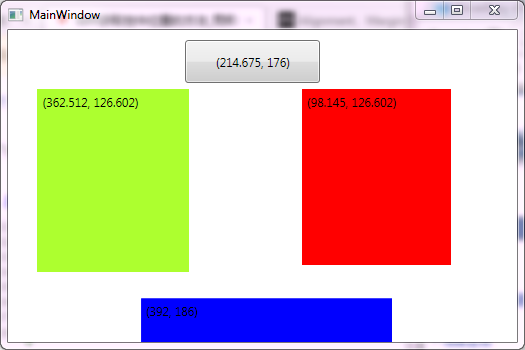
完整例子代码:
XAML代码
 <Window x:Class="WpfGetPointDemo.MainWindow"

         xmlns="http://schemas.microsoft.com/winfx/2006/xaml/presentation"

         xmlns:x="http://schemas.microsoft.com/winfx/2006/xaml"

         Title="MainWindow" Height="350" Width="525">

     <Grid x:Name="grid" MouseDown="item_MouseDown">

         <Label Background="Red" x:Name="lbl" Margin="293.855,59.398,66.145,77.319"/>

         <Label Background="GreenYellow" x:Name="lbl2" Margin="29.488,59.398,327.512,69.969"/>

         <Label Background="blue" x:Name="lbl3" HorizontalAlignment="Left" Margin="133.048,268.187,0,0" VerticalAlignment="Top" Width="250.952" Height="51.813"/>

         <Button x:Name="btn" HorizontalAlignment="Left" Margin="177.325,10,0,0" VerticalAlignment="Top" Width="135.09" RenderTransformOrigin="0.012,0.547" Height="43.252"/>

     </Grid>

 </Window>
后台C#代码
 using System;

 using System.Collections.Generic;

 using System.Linq;

 using System.Text;

 using System.Windows;

 using System.Windows.Controls;

 using System.Windows.Data;

 using System.Windows.Documents;

 using System.Windows.Input;

 using System.Windows.Media;

 using System.Windows.Media.Imaging;

 using System.Windows.Navigation;

 using System.Windows.Shapes;

 namespace WpfGetPointDemo

 {

     /// <summary>

     /// Interaction logic for MainWindow.xaml

     /// </summary>

     public partial class MainWindow : Window

     {

         public MainWindow()

         {

             InitializeComponent();

         }

         private void item_MouseDown(object sender, MouseButtonEventArgs e)

         {

             Point point = e.GetPosition(lbl);

             lbl.Content = "("+point.X+", "+point.Y+")";

             Point point2 = Mouse.GetPosition(lbl2);

             lbl2.Content = "(" + point2.X + ", " + point2.Y + ")";

             Point point3 = Mouse.GetPosition(grid);

             lbl3.Content = "(" + point3.X + ", " + point3.Y + ")";

             Point point4 = Mouse.GetPosition(btn);

             btn.Content = "(" + point4.X + ", " + point4.Y + ")";

         }

     }

 }
运行结果:

2.获取控件相对于两一个控件的坐标:
2.1. 直接使用 control1.TranslatePoint(new Point(), control2)
Point point = rectangle.TranslatePoint(new Point(),canvas);
2.2.获取控件在Window中的坐标
 Window window =  Window.GetWindow(canvas);

 Point  point  =  canvas.TransformToAncestor(window).Transform(new Point(, ));
引用:http://www.fengfly.com/plus/view-210427-1.html
WPF获取相对位置、坐标的方法的更多相关文章
- WPF 获取程序路径的一些方法,根据程序路径获取程序集信息
一.WPF 获取程序路径的一些方法方式一 应用程序域 //获取基目录即当前工作目录 string str_1 = System.AppDomain.CurrentDomain.BaseDirector ...
- WPF 获取系统 DPI 的多种方法
原文:WPF 获取系统 DPI 的多种方法 WPF 获取系统 DPI 的多种方法 由于 WPF 的尺寸单位和系统的 DPI 相关,我们有时需要获取 DPI 值来进行一些界面布局的调整,本文汇总了一些 ...
- js获取鼠标位置的各种方法
在一些DOM操作中我们经常会跟元素的位置打交道,鼠标交互式一个经常用到的方面,令人失望的是不同的浏览器下会有不同的结果甚至是有的浏览器下没结果,这篇文章就上鼠标点击位置坐标获取做一些简单的总结,没特殊 ...
- CGRectGet *** 获取控件坐标的方法
CGRectGetHeight返回label本身的高度 CGRectGetMinY返回label顶部的坐标 CGRectGetMaxY 返回label底部的坐标 CGRectGetMinX 返回lab ...
- WPF获取程序版本号(Version)的方法
1.第一种:通过System来获取 public static Version GetEdition() { return System.Reflection.Assembly.GetExecutin ...
- wpf获取webbroswer的两个方法
//跳转前的地址 private void WebBrowser_BeforeNavigate2(object pDisp, ref object URL, ref object Flags, ref ...
- WPF备忘录(2)WPF获取和设置鼠标位置与progressbar的使用方法
一.WPF 中获取和设置鼠标位置 方法一:WPF方法 Point p = Mouse.GetPosition(e.Source as FrameworkElement); Point p = (e.S ...
- WPF获取和设置鼠标位置与progressbar的使用方法
一.WPF 中获取和设置鼠标位置 方法一:WPF方法 Point p = Mouse.GetPosition(e.Source as FrameworkElement); Point p = (e.S ...
- WPF中获取TreeView以及ListView获取其本身滚动条的方法,可实现自行调节scoll滚动的位置(可相应获取任何控件中的内部滚动条)
原文:WPF中获取TreeView以及ListView获取其本身滚动条的方法,可实现自行调节scoll滚动的位置(可相应获取任何控件中的内部滚动条) 对于TreeView而言: TreeViewAut ...
随机推荐
- Oracle EBS - Setup: 配置文件Profile
http://blog.csdn.net/lfl6848433/article/details/8696939 Oracle EBS - Setup: 配置文件Profile 1.诊断Diagnost ...
- FreeBSD查看即时网络流量
1.数据包 “netstat 1″一秒钟累计一次,”netstat 2″两秒钟累计一次.依此类推 2.查看网卡流量:”systat -if 1″每秒钟刷新一次,”systat -if 2″两秒钟刷新一 ...
- fastreport字体加粗
procedure MasterData1OnBeforePrint(Sender: TfrxComponent); begin IF (<frxDB_cdsresult."res_C ...
- Python2.7升级至Python3.6
Python2.7升级至Python3.6 今天在CentOS7.2上将python2.7升级至python3.6时遇到了诸多问题,下面将升级步骤以及解决方法一一列举. 1.安装Python3.6 安 ...
- WPF 最简单的TextBox水印
最简单的TextBox加水印的方法,但是不具有很强的通用性. 如果你只是使用一次,或者用的不多,偷偷懒可以使用. 因为此方法只需要修改TextBox的Template,而不用重写何任代码. 注意: 1 ...
- .net加密web.config文件
这篇文章我将介绍如何利用ASP.NET来加密和解密Web.config中连接字符串,之前只写了第二种方式,现在将两种方式都写出来,供大家参考.不管使用哪种方式我们在程序中都不需要写任何代码来解密连接字 ...
- WebAPI的AuthorizeAttribute扩展类中获取POST提交的数据
在WEBAPI中,AuthorizeAttribute类重写时,如何获取post数据是个难题,网上找资料也不好使,只能自己研究,通过研究发现,WEBAPI给了我们获取POST数据的可能,下面介绍一下: ...
- (php)实现万年历
<?php //修改页面编码 header("content-type:text/html;charset=utf-8"); //获取当前年 $year=$_GET['y'] ...
- c#开发sqlite
教程:https://www.cnblogs.com/icebutterfly/p/7850689.html 下载sqlite-netFx40-setup-bundle-x64-2010-1.0.96 ...
- 《ASP.NET MVC 5 破境之道》:第一境 ASP.Net MVC5项目初探 — 第一节:运行第一个MVC5项目
第一境 ASP.Net MVC5项目初探 — 第一节:运行第一个MVC5项目 创建一个MVC项目,是很容易的,大部分工作,VS都帮我们完成了.只需要按照如下步骤按部就班就可以了. 打开VS2017,选 ...