
SpringBoot优化内嵌的Tomcat ---设置MaxConnections
maxConnections、maxThreads、acceptCount:
如果tomcat当前处理的请求数小于等于maxConnections,则acceptCount所对应的队列会是空。即有3个窗口,2个人来,就不需要排队
如果tomcat当前处理的请求数大于maxConnections,则新来的请求会放到队列长度为acceptCount的队列中。即有3个窗口,5个人来,就需要排队
maxThreads是tomcat中实际处理请求的并发数,即同时可以处理几个请求。 如果maxThreads=2,即3个窗口,后面只有2个人在处理
使用kill -9杀掉springboot应用后,立马java -jar重启,会报错,需要等待一段时间才能启动成功,
报错的原因是:/tmp/tomcat-docbase.4749794910434376321.9086] is not valid
以下是详细错误信息:
Caused by: org.apache.catalina.LifecycleException: Failed to start component [org.apache.catalina.webresources.StandardRoot@53001498]

at org.apache.catalina.util.LifecycleBase.start(LifecycleBase.java:158) ~[tomcat-embed-core-8.5.4.jar!/:8.5.4]

at org.apache.catalina.core.StandardContext.resourcesStart(StandardContext.java:4831) ~[tomcat-embed-core-8.5.4.jar!/:8.5.4]

at org.apache.catalina.core.StandardContext.startInternal(StandardContext.java:4963) ~[tomcat-embed-core-8.5.4.jar!/:8.5.4]

... 7 more

Caused by: java.lang.IllegalArgumentException: The main resource set specified [/tmp/tomcat-docbase.4749794910434376321.9086] is not valid

at org.apache.catalina.webresources.StandardRoot.createMainResourceSet(StandardRoot.java:725) ~[tomcat-embed-core-8.5.4.jar!/:8.5.4]

at org.apache.catalina.webresources.StandardRoot.startInternal(StandardRoot.java:686) ~[tomcat-embed-core-8.5.4.jar!/:8.5.4]

at org.apache.catalina.util.LifecycleBase.start(LifecycleBase.java:152) ~[tomcat-embed-core-8.5.4.jar!/:8.5.4]

at org.apache.catalina.core.StandardContext.resourcesStart(StandardContext.java:4831) ~[tomcat-embed-core-8.5.4.jar!/:8.5.4]

at org.apache.catalina.core.StandardContext.startInternal(StandardContext.java:4963) ~[tomcat-embed-core-8.5.4.jar!/:8.5.4]

... 7 more

mealtime-report-[15:48:37:716] [ERROR] - org.apache.juli.logging.DirectJDKLog.log(DirectJDKLog.java:181) - A child container failed during start
[root@localhost tmp]# ls -dlt tomcat*

drwxr-xr-x  root root  May  : tomcat.2482651926943103152.4444

drwxr-xr-x  root root  May  : tomcat-docbase.1606353072223048027.4444

drwxr-xr-x  root root  May  : tomcat.6427937730432992105.4004

drwxr-xr-x  root root  May  : tomcat-docbase.9014354490424152602.4004

drwxr-xr-x  root root  May  : tomcat.365692316696650885.2000

drwxr-xr-x  root root  May  : tomcat-docbase.8871210702020412482.2000

drwxr-xr-x  root root  May  : tomcat.9194454391130879725.2222

drwxr-xr-x  root root  May  : tomcat-docbase.6449009990528406178.2222

drwxr-xr-x  root root  May  : tomcat.7533402776366547594.3333

drwxr-xr-x  root root  May  : tomcat-docbase.8347169054078560101.3333

drwxr-xr-x  root root  May  : tomcat.5755321441664547955.3004

drwxr-xr-x  root root  May  : tomcat-docbase.4368794759444711233.3004

drwxr-xr-x  root root  May  : tomcat.7487101127514666304.4444

drwxr-xr-x  root root  May  : tomcat-docbase.3505389582011000978.4444

drwxr-xr-x  root root  May  : tomcat.6483749742824168608.4004

drwxr-xr-x  root root  May  : tomcat-docbase.2936863713994400124.4004

drwxr-xr-x  root root  May  : tomcat.8814016287852028090.2000

drwxr-xr-x  root root  May  : tomcat-docbase.5759661693624441557.2000

drwxr-xr-x  root root  May  : tomcat.3084296173620137759.2222

drwxr-xr-x  root root  May  : tomcat-docbase.2913734529869658765.2222

drwxr-xr-x  root root  May  : tomcat.1261539854295462589.3333

drwxr-xr-x  root root  May  : tomcat-docbase.4327066414867055940.3333

drwxr-xr-x  root root  May  : tomcat.1652439996406851728.3004

drwxr-xr-x  root root  May  : tomcat-docbase.5233226104416503892.3004

drwxr-xr-x  root root  May  : tomcat.8505864110333115533.3333

drwxr-xr-x  root root  May  : tomcat-docbase.5036544091928181133.3333

drwxr-xr-x  root root  May  : tomcat.494020510980868278.3004

drwxr-xr-x  root root  May  : tomcat-docbase.468265602651303178.3004

drwxr-xr-x  root root  May  : tomcat.8093369488059063930.3004

drwxr-xr-x  root root  May  : tomcat-docbase.7679645853200594654.3004

drwxr-xr-x  root root  May  : tomcat.5040740781547956399.4444

drwxr-xr-x  root root  May  : tomcat-docbase.8256790475295084303.4444

drwxr-xr-x  root root  May  : tomcat.7344112750169248130.4004

drwxr-xr-x  root root  May  : tomcat-docbase.2016044219412775812.4004

drwxr-xr-x  root root  May  : tomcat.3866209351076068036.4444
site:tomcat.apache.org maxConnections
| Attribute | Description |
|---|---|
acceptCount |
The maximum queue length for incoming connection requests when all possible request processing threads are in use. Any requests received when the queue is full will be refused. The default value is 100. |
maxConnections |
The maximum number of connections that the server will accept and process at any given time. When this number has been reached, the server will accept, but not process, one further connection. This additional connection be blocked until the number of connections being processed falls below maxConnections at which point the server will start accepting and processing new connections again. Note that once the limit has been reached, the operating system may still accept connections based on the For NIO/NIO2 only, setting the value to -1, will disable the maxConnections feature and connections will not be counted. |
maxThreads |
The maximum number of request processing threads to be created by this Connector, which therefore determines the maximum number of simultaneous requests that can be handled. If not specified, this attribute is set to 200. If an executor is associated with this connector, this attribute is ignored as the connector will execute tasks using the executor rather than an internal thread pool. Note that if an executor is configured any value set for this attribute will be recorded correctly but it will be reported (e.g. via JMX) as |
http://tomcat.apache.org/tomcat-9.0-doc/config/http.html
详解:maxConnections、maxThreads、acceptCount
tomcat中maxConnections、maxThreads、acceptCount的具体含义是什么呢?参考官方文档,对三者的含义说明如下:
一、accept-count:最大等待数
官方文档的说明为:当所有的请求处理线程都在使用时,所能接收的连接请求的队列的最大长度。当队列已满时,任何的连接请求都将被拒绝。accept-count的默认值为100。
详细的来说:当调用HTTP请求数达到tomcat的最大线程数时,还有新的HTTP请求到来,这时tomcat会将该请求放在等待队列中,这个acceptCount就是指能够接受的最大等待数,默认100。如果等待队列也被放满了,这个时候再来新的请求就会被tomcat拒绝(connection refused)。
二、maxThreads:最大线程数
每一次HTTP请求到达Web服务,tomcat都会创建一个线程来处理该请求,那么最大线程数决定了Web服务容器可以同时处理多少个请求。maxThreads默认200,肯定建议增加。但是,增加线程是有成本的,更多的线程,不仅仅会带来更多的线程上下文切换成本,而且意味着带来更多的内存消耗。JVM中默认情况下在创建新线程时会分配大小为1M的线程栈,所以,更多的线程异味着需要更多的内存。线程数的经验值为:1核2g内存为200,线程数经验值200;4核8g内存,线程数经验值800。
三、maxConnections:最大连接数
官方文档的说明为:
这个参数是指在同一时间,tomcat能够接受的最大连接数。对于Java的阻塞式BIO,默认值是maxthreads的值;如果在BIO模式使用定制的Executor执行器,默认值将是执行器中maxthreads的值。对于Java 新的NIO模式,maxConnections 默认值是10000。
对于windows上APR/native IO模式,maxConnections默认值为8192,这是出于性能原因,如果配置的值不是1024的倍数,maxConnections 的实际值将减少到1024的最大倍数。
如果设置为-1,则禁用maxconnections功能,表示不限制tomcat容器的连接数。
maxConnections和accept-count的关系为:当连接数达到最大值maxConnections后,系统会继续接收连接,但不会超过acceptCount的值。
四、参数设置
(1)maxThreads的设置既与应用的特点有关,也与服务器的CPU核心数量有关。
通过前面介绍可以知道,maxThreads数量应该远大于CPU核心数量;而且CPU核心数越大,maxThreads应该越大;应用中CPU越不密集(IO越密集),maxThreads应该越大,以便能够充分利用CPU。
当然,maxThreads的值并不是越大越好,如果maxThreads过大,那么CPU会花费大量的时间用于线程的切换,整体效率会降低。
(2)maxConnections的设置与Tomcat的运行模式有关。如果tomcat使用的是BIO,那么maxConnections的值应该与maxThreads一致;如果tomcat使用的是NIO,maxConnections值应该远大于maxThreads。
(3)通过前面的介绍可以知道,虽然tomcat同时可以处理的连接数目是maxConnections,但服务器中可以同时接收的连接数为maxConnections+acceptCount 。
acceptCount的设置,与应用在连接过高情况下希望做出什么反应有关系。
如果设置过大,后面进入的请求等待时间会很长;如果设置过小,后面进入的请求立马返回connection refused。
https://blog.csdn.net/zzzgd_666/article/details/88740198
1.4.3 图解:maxConnections、maxThreads、acceptCount关系
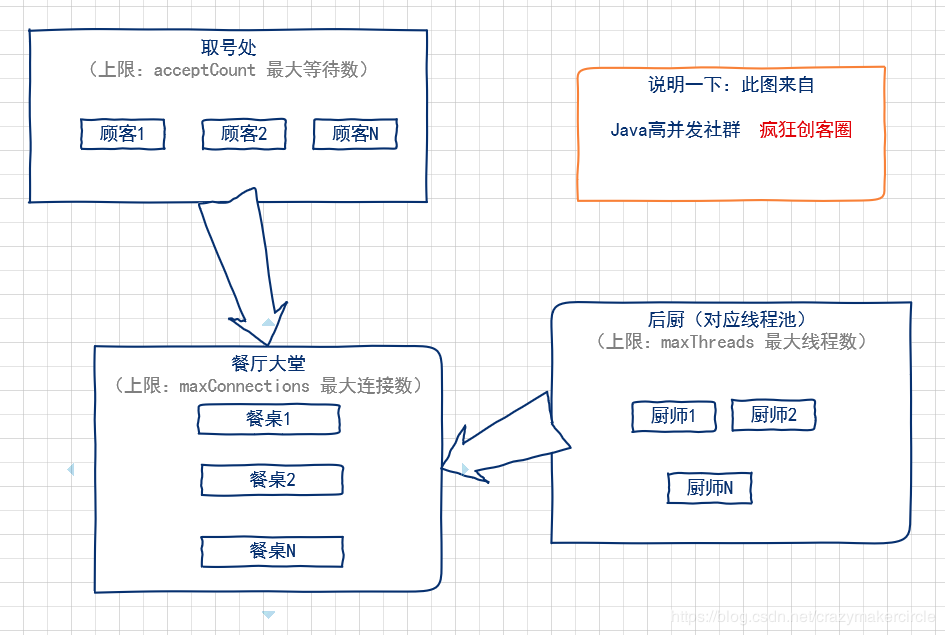
用一个形象的比喻,通俗易懂的解释一下tomcat的最大线程数(maxThreads)、最大等待数(acceptCount)和最大连接数(maxConnections)三者之间的关系。
我们可以把tomcat比做一个火锅店,流程是取号、入座、叫服务员,可以做一下三个形象的类比:
(1)acceptCount 最大等待数
可以类比为火锅店的排号处能够容纳排号的最大数量;排号的数量不是无限制的,火锅店的排号到了一定数据量之后,服务往往会说:已经客满。
(2)maxConnections 最大连接数
可以类比为火锅店的大堂的餐桌数量,也就是可以就餐的桌数。如果所有的桌子都已经坐满,则表示餐厅已满,已经达到了服务的数量上线,不能再有顾客进入餐厅了。
(3)maxThreads:最大线程数
可以类比为厨师的个数。每一个厨师,在同一时刻,只能给一张餐桌炒菜,就像极了JVM中的一条线程。
整个就餐的流程,大致如下:
(1)取号:如果maxConnections连接数没有满,就不需要取号,因为还有空余的餐桌,直接被大堂服务员领上餐桌,点菜就餐即可。如果 maxConnections 连接数满了,但是取号人数没有达到 acceptCount,则取号成功。如果取号人数已达到acceptCount,则拿号失败,会得到Tomcat的Connection refused connect 的回复信息。
(2)上桌:如果有餐桌空出来了,表示maxConnections连接数没有满,排队的人,可以进入大堂上桌就餐。
(3)就餐:就餐需要厨师炒菜。厨师的数量,比顾客的数量,肯定会少一些。一个厨师一定需要给多张餐桌炒菜,如果就餐的人越多,厨师也会忙不过来。这时候就可以增加厨师,一增加到上限maxThreads的值,如果还是不够,只能是拖慢每一张餐桌的上菜速度,这种情况,就是大家常见的“上一道菜吃光了,下一道菜还没有上”尴尬场景。
maxConnections、maxThreads、acceptCount关系图如下
https://www.cnblogs.com/crazymakercircle/p/11748214.html
对tomcat连接器3个属性maxConnections、maxThreads、acceptCount的理解:
maxConnections描述红色部分说明当连接数达到最大值后,系统会继续接收连接但不会超过acceptCount的值。
理解:
我们可以把tomcat比做一个电影院,流程是取号、买票、观影,acceptCount比作前厅(容纳取到号的人)、maxConnections比作大厅(容纳买到票的人)、maxThreads比作影厅(可以理解一个影厅只容纳一个人,因为一个线程同时只处理一个请求),以下场景是针对已达到maxConnections最大值来讨论的
1)取号:如果前厅人数已达到acceptCount,则拿号失败,会得到Connection refused connect的回复信息。反之则会进入前厅,等待买票。
2)买票:当大厅人数小于maxConnections时,前厅的人就可以进入大厅
3)观影:当影厅的人离开时,大厅的部分人能进入影厅,一般来讲大厅的容量要远大于影厅的数量。
本文是针对apache-tomcat-7.0.55做的测试。
tomcat server.xml配置参数
<Connector port="8080" protocol="org.apache.coyote.http11.Http11NioProtocol" acceptCount="2" maxConnections="10" maxThreads="2"
connectionTimeout="20000"
redirectPort="8443" />
Servlet的代码:休眠20秒
protected void doGet(HttpServletRequest request, HttpServletResponse response) throws ServletException, IOException {

try {

InputStream is = request.getInputStream();

System.out.println(new Date()+":"+is+"开始");

Thread.sleep(20000);

System.out.println(new Date()+":"+is+"结束");

} catch (InterruptedException e) {

// TODO Auto-generated catch block

e.printStackTrace();

}

}
一个请求或一个connection的生命周期:可以简单的理解为从doGet或doPost开始response响应结束。
使用JMeter测试,线程数20,连接超时时间10s,响应超时时间30s
测试结果:
察看结果数:
第1秒:8个请求得到响应数据:Connection refused connect
第20秒:2个请求正常响应
第30秒:剩余10个请求得到响应数据:Readtimed out
tomcat日志:
打印12组开始结束的日志,说明tomcat会处理acceptCount+maxConnections的请求,说明只要取到号,有足够的耐心,就肯定能够看到电影。
————————————————
版权声明:本文为CSDN博主「mazi2004」的原创文章,遵循 CC 4.0 BY-SA 版权协议,转载请附上原文出处链接及本声明。
原文链接:https://blog.csdn.net/kaka20099527/article/details/53285348
SpringBoot优化内嵌的Tomcat ---设置MaxConnections的更多相关文章
- SpringBoot优化内嵌的Tomcat
SpringBoot测试版本 <parent> <groupId>org.springframework.boot</groupId> <artifactId ...
- SpringBoot 优化内嵌的Tomcat
在通过SpringBoot调用其它服务时,报错 org.springframework.web.client.ResourceAccessException: I/O error on POST re ...
- 015-Spring Boot 定制和优化内嵌的Tomcat
一.内嵌web容器 参看http://www.cnblogs.com/bjlhx/p/8372584.html 查看源码可知提供以下三种: 二.定制优化tomcat 2.1.配置文件配置 通过appl ...
- springBoot定制内嵌的Tomcat
此篇仅介绍配置方式,详细配置内容百度查阅 工程结构: 可以通过配置的方式设置参数,如下 application.properties #配置tomcat端口 # server.port= 8888 # ...
- Spring Boot 内嵌容器 Tomcat / Undertow / Jetty 优雅停机实现
Spring Boot 内嵌容器 Tomcat / Undertow / Jetty 优雅停机实现 Anoyi 精讲JAVA 精讲JAVA 微信号 toooooooozi 功能介绍 讲解java深层次 ...
- springboot去除内嵌tomcat和打包在tomcat中运行需要做的步骤
去除内嵌tomcat和添加jsp依赖 去除内嵌tomcat 在springboot启动依赖中去除内嵌tomcat <dependency> <groupId>org.sprin ...
- SpringBoot Boot内嵌Tomcat
Spring Boot: SpringBoot-start-web 里面依赖的环境中 如果是外部的Tomcat 容器,可以通过修改config进行配置 内嵌的呢? 如何定制和修改Servlet容器的相 ...
- Spring Boot 定制与优化内置的Tomcat容器
1.Spring Boot定制与优化内置Tomcat容器. > 内置的容器有三个分别是Undertow.Jetty.Tomcat,Spring Boot 对这三个容器分别进行了实现,它们上层接口 ...
- springboot~mongo内嵌集合的操作
对于mongodb的内嵌对象的各种操作大叔在.net平台时已经说过,同时大叔也自己封装过mongo的仓储,使用也都很方便,而在java springboot框架里当然也有对应的方法,下面主要说一下,希 ...
随机推荐
- 数学图形之罗马曲面(RomanSurface)
罗马曲面,像是一个被捏扁的正四面体. 本文将展示罗马曲面的生成算法和切图,使用自己定义语法的脚本代码生成数学图形.相关软件参见:数学图形可视化工具,该软件免费开源.QQ交流群: 367752815 维 ...
- C语言中static的作用及C语言中使用静态函数有何好处
转自:http://www.jb51.net/article/74830.htm 在C语言中,static的作用有三条:一是隐藏功能,二是保持持久性功能,三是默认初始化为0. 在C语言中,static ...
- OTL翻译(8) -- otl_long_string/otl_long_unicode_string类
otl_long_string/olt_long_unicode_string 这两个类主要用来处理大对象数据.从OTL4.0版本开始,otl_long_string还可以处理任何类型的RAW/BIA ...
- QT学习:c++解析html相关
原来我做爬虫的时候,对页面进行解析的时候总是用很简单粗暴的方法,直接找规律.后来在网上看到了gumbo,尝试了一下,发现确实很好用,所以向大家推荐一下. 以下转自:http://blog.csdn.n ...
- go语言基础之结构体做函数参数 值传递和地址传递
1.结构体做函数参数值传递 示例: package main //必须有个main包 import "fmt" //定义一个结构体类型 type Student struct { ...
- dev -c++ 快捷键
转自:http://blog.csdn.net/abcjennifer/article/details/7259222 F8:开始调试 F7:进一步执行当前行,并跳到下一行 F4:添加查看 ctrl ...
- [Node.js] Child Process with fork() to handle heavy calculation process
When build server, if we have a API endpoint requires some heavy calculation process, it will block ...
- Jmeter测试报告可视化(Excel, html以及jenkins集成)
做性能测试通常在none GUI的命令行模式下运行Jmeter. 例如: jmeter -n -t /opt/las/JMeter/TestPlan/test.jmx -l /opt/las/JMet ...
- Linux远程上传、下载文件的方法
主要内容: ftp命令 scp命令 WinScp Putty (PSCP) Xshell 一.ftp命令 服务器有安装ftp Server,另外一台linux可以使用ftp的client程序来进行文件 ...
- nm 命令 程序符号信息查看
http://www.cnblogs.com/wangkangluo1/archive/2012/07/02/2572438.html 用途 显示关于对象文件.可执行文件以及对象文件库里的符号信息. ...