
iOS - Label 数字动态变化
1、数字动态变化
具体实现代码见 GitHub 源码 QExtension
QCountingLabel.h
	/// 文本数字变化方式枚举

	typedef NS_ENUM(NSUInteger, QCountingMethod) {

	    QCountingMethodEaseInOut,     // 开始结束慢,中间快

	    QCountingMethodEaseIn,        // 开始慢,结束快

	    QCountingMethodEaseOut,       // 开始快,结束慢

	    QCountingMethodLinear         // 匀速

	};

	@interface QCountingLabel : UILabel

	/// 文本数字样式,默认为 @"%f"

	@property (nonatomic, strong) NSString *format;

	/// 文本数字分隔符样式,例如 @"###,##0.00"

	@property (nonatomic, strong) NSString *positiveFormat;

	/// 文本数字变化方式,默认为 EaseInOut

	@property (nonatomic, assign) QCountingMethod method;

	/// 文本数字变化时间,默认为 2.0

	@property (nonatomic, assign) NSTimeInterval animationDuration;

	/// 文本数字样式 Block

	@property (nonatomic, copy) NSString *(^formatBlock)(CGFloat);

	/// 富文本数字样式 Block

	@property (nonatomic, copy) NSAttributedString *(^attributedFormatBlock)(CGFloat);

	/// 文本数字变化完成回调 Block

	@property (nonatomic, copy) void (^completionBlock)();

	/**

	 *  文本数字在指定时间内从起始值变化到结束值

	 *

	 *  @param frame            控件的 frame

	 *  @param format           文本数字样式,默认为 @"%f"

	 *  @param positiveFormat   文本数字分隔符样式

	 *  @param method           文本数字变化方式,默认为 EaseInOut

	 *  @param startValue       起始值

	 *  @param endValue         结束值

	 *  @param duration         变化时间

	 *  @param completion       完成回调

	 *

	 *  @return QCountingLabel 对象

	 */

	+ (instancetype)q_countingLabelWithFrame:(CGRect)frame

	                                  format:(NSString *)format

	                          positiveFormat:(nullable NSString *)positiveFormat

	                                  method:(QCountingMethod)method

	                               fromValue:(CGFloat)startValue

	                                 toValue:(CGFloat)endValue

	                            withDuration:(NSTimeInterval)duration

	                              completion:(void (^)())completion;

	/**

	 *  文本数字从起始值变化到结束值

	 *

	 *  <p> 默认变化时间 2.0 秒 <p>

	 *

	 *  @param startValue   起始值

	 *  @param endValue     结束值

	 *

	 *  @return nil

	 */

	- (void)q_countFromValue:(CGFloat)startValue toValue:(CGFloat)endValue;

	/**

	 *  文本数字在指定时间内从起始值变化到结束值

	 *

	 *  @param startValue   起始值

	 *  @param endValue     结束值

	 *  @param duration     变化时间

	 *

	 *  @return nil

	 */

	- (void)q_countFromValue:(CGFloat)startValue toValue:(CGFloat)endValue withDuration:(NSTimeInterval)duration;

	/**

	 *  文本数字从当前值变化到结束值

	 *

	 *  <p> 默认变化时间 2.0 秒 <p>

	 *

	 *  @param endValue     结束值

	 *

	 *  @return nil

	 */

	- (void)q_countFromCurrentValueToValue:(CGFloat)endValue;

	/**

	 *  文本数字在指定时间内从当前值变化到结束值

	 *

	 *  @param endValue     结束值

	 *  @param duration     变化时间

	 *

	 *  @return nil

	 */

	- (void)q_countFromCurrentValueToValue:(CGFloat)endValue withDuration:(NSTimeInterval)duration;

	/**

	 *  文本数字从 0 变化到结束值

	 *

	 *  <p> 默认变化时间 2.0 秒 <p>

	 *

	 *  @param endValue     结束值

	 *

	 *  @return nil

	 */

	- (void)q_countFromZeroToValue:(CGFloat)endValue;

	/**

	 *  文本数字在指定时间内从 0 变化到结束值

	 *

	 *  @param endValue     结束值

	 *  @param duration     变化时间

	 *

	 *  @return nil

	 */

	- (void)q_countFromZeroToValue:(CGFloat)endValue withDuration:(NSTimeInterval)duration;

	@end
QCountingLabel.m
	#ifndef kQLabelCounterRate

	#define kQLabelCounterRate 3.0

	#endif

	NS_ASSUME_NONNULL_BEGIN

	@interface QCountingLabel ()

	@property (nonatomic, assign) CGFloat startingValue;

	@property (nonatomic, assign) CGFloat destinationValue;

	@property (nonatomic, assign) NSTimeInterval progress;

	@property (nonatomic, assign) NSTimeInterval lastUpdate;

	@property (nonatomic, assign) NSTimeInterval totalTime;

	@property (nonatomic, assign) CGFloat easingRate;

	@property (nonatomic, strong, nullable) CADisplayLink *timer;

	@end

	@implementation QCountingLabel

	#pragma mark - 文本数字变化方法

	/// 创建 QCountingLabel 对象

	+ (instancetype)q_countingLabelWithFrame:(CGRect)frame

	                                  format:(NSString *)format

	                          positiveFormat:(nullable NSString *)positiveFormat

	                                  method:(QCountingMethod)method

	                               fromValue:(CGFloat)startValue

	                                 toValue:(CGFloat)endValue

	                            withDuration:(NSTimeInterval)duration

	                              completion:(void (^)())completion {

	    QCountingLabel *label = [[self alloc] initWithFrame:frame];

	    label.format = format;

	    label.positiveFormat = positiveFormat;

	    label.method = method;

	    label.completionBlock = completion;

	    [label q_countFromValue:startValue toValue:endValue withDuration:duration];

	    return label;

	}

	/// 文本数字从起始值变化到结束值

	- (void)q_countFromValue:(CGFloat)startValue toValue:(CGFloat)endValue {

	    if (self.animationDuration == 0.0f) {

	        self.animationDuration = 2.0f;

	    }

	    [self q_countFromValue:startValue toValue:endValue withDuration:self.animationDuration];

	}

	/// 文本数字在指定时间内从起始值变化到结束值

	- (void)q_countFromValue:(CGFloat)startValue toValue:(CGFloat)endValue withDuration:(NSTimeInterval)duration {

	    self.startingValue = startValue;

	    self.destinationValue = endValue;

	    // remove any (possible) old timers

	    [self.timer invalidate];

	    self.timer = nil;

	    if (duration == 0.0) {

	        // No animation

	        [self q_setTextValue:endValue];

	        if (self.completionBlock) {

	            self.completionBlock();

	        }

	        return;

	    }

	    self.easingRate = 3.0f;

	    self.progress = 0;

	    self.totalTime = duration;

	    self.lastUpdate = [NSDate timeIntervalSinceReferenceDate];

	    if (self.format == nil) {

	        self.format = @"%f";

	    }

	    CADisplayLink *timer = [CADisplayLink displayLinkWithTarget:self selector:@selector(q_timerUpdate:)];

	    timer.frameInterval = 2;

	    [timer addToRunLoop:[NSRunLoop mainRunLoop] forMode:NSDefaultRunLoopMode];

	    [timer addToRunLoop:[NSRunLoop mainRunLoop] forMode:UITrackingRunLoopMode];

	    self.timer = timer;

	}

	/// 文本数字从当前值变化到结束值

	- (void)q_countFromCurrentValueToValue:(CGFloat)endValue {

	    [self q_countFromValue:[self q_getCurrentValue] toValue:endValue];

	}

	/// 文本数字在指定时间内从当前值变化到结束值

	- (void)q_countFromCurrentValueToValue:(CGFloat)endValue withDuration:(NSTimeInterval)duration {

	    [self q_countFromValue:[self q_getCurrentValue] toValue:endValue withDuration:duration];

	}

	/// 文本数字从 0 变化到结束值

	- (void)q_countFromZeroToValue:(CGFloat)endValue {

	    [self q_countFromValue:0.0f toValue:endValue];

	}

	/// 文本数字在指定时间内从 0 变化到结束值

	- (void)q_countFromZeroToValue:(CGFloat)endValue withDuration:(NSTimeInterval)duration {

	    [self q_countFromValue:0.0f toValue:endValue withDuration:duration];

	}

	/// format setter

	- (void)setFormat:(NSString *)format {

	    _format = format;

	    // update label with new format

	    [self q_setTextValue:self.q_getCurrentValue];

	}

	#pragma mark - 工具方法

	/// 定时器定时响应事件处理

	- (void)q_timerUpdate:(NSTimer *)timer {

	    // update progress

	    NSTimeInterval now = [NSDate timeIntervalSinceReferenceDate];

	    self.progress += now - self.lastUpdate;

	    self.lastUpdate = now;

	    if (self.progress >= self.totalTime) {

	        [self.timer invalidate];

	        self.timer = nil;

	        self.progress = self.totalTime;

	    }

	    [self q_setTextValue:[self q_getCurrentValue]];

	    if (self.progress == self.totalTime) {

	        if (self.completionBlock) {

	            self.completionBlock();

	        }

	    }

	}

	/// 设置数值

	- (void)q_setTextValue:(CGFloat)value {

	    if (self.attributedFormatBlock != nil) {

	        self.attributedText = self.attributedFormatBlock(value);

	    } else if (self.formatBlock != nil) {

	        self.text = self.formatBlock(value);

	    } else {

	        // check if counting with ints - cast to int

	        if ([self.format rangeOfString:@"%(.*)d" options:NSRegularExpressionSearch].location != NSNotFound ||

	            [self.format rangeOfString:@"%(.*)i"].location != NSNotFound) {

	            // 整型样式

	            self.text = [NSString stringWithFormat:self.format, (int)value];

	        } else if (self.positiveFormat.length > 0) {

	            // 带千分位分隔符的浮点型样式

	            NSString *str = [NSString stringWithFormat:self.format, value];

	            NSNumberFormatter *formatter = [[NSNumberFormatter alloc] init];

	            formatter.numberStyle = NSNumberFormatterDecimalStyle;

	            [formatter setPositiveFormat:self.positiveFormat];

	            NSString *formatterString = [formatter stringFromNumber:[NSNumber numberWithFloat:[str floatValue]]];

	            self.text = formatterString;

	        } else {

	            // 普通浮点型样式

	            self.text = [NSString stringWithFormat:self.format, value];

	        }

	    }

	}

	/// 获取当前值

	- (CGFloat)q_getCurrentValue {

	    if (self.progress >= self.totalTime) {

	        return self.destinationValue;

	    }

	    CGFloat percent = self.progress / self.totalTime;

	    CGFloat updateVal = [self update:percent];

	    return self.startingValue + (updateVal * (self.destinationValue - self.startingValue));

	}

	/// 更新数值

	- (CGFloat)update:(CGFloat)t {

	    switch (self.method) {

	        case 0: {

	            int sign = 1;

	            int r = (int)kQLabelCounterRate;

	            if (r % 2 == 0) {

	                sign = -1;

	            }

	            t *= 2;

	            if (t < 1) {

	                return 0.5f * powf(t, kQLabelCounterRate);

	            } else {

	                return sign * 0.5f * (powf(t - 2, kQLabelCounterRate) + sign * 2);

	            }

	            break;

	        }

	        case 1: {

	            return powf(t, kQLabelCounterRate);

	            break;

	        }

	        case 2: {

	            return 1.0 - powf((1.0 - t), kQLabelCounterRate);

	            break;

	        }

	        case 3: {

	            return t;

	            break;

	        }

	        default:

	            return t;

	    }

	}

	@end
使用
1、初始化
QCountingLabel 继承自 UILabel, 初始化和 UILabel 一样
	// 创建 QCountingLabel 对象

	QCountingLabel *countingLabel = [[QCountingLabel alloc] initWithFrame:CGRectMake(0, 0, 300, 120)];

	[self.view addSubview:countingLabel];

	// 常规设置,QCountingLabel 继承 UILabel, 设置和 UILabel 一样

	countingLabel.center = self.view.center;

	countingLabel.backgroundColor = [[UIColor lightGrayColor] colorWithAlphaComponent:0.5];

	countingLabel.font = [UIFont systemFontOfSize:50];

	countingLabel.textColor = [UIColor redColor];

	countingLabel.textAlignment = NSTextAlignmentCenter;
也可以使用类方法一体式创建设置
	// 创建 QCountingLabel 对象

	QCountingLabel *countingLabel = [QCountingLabel q_countingLabelWithFrame:CGRectMake(50, 100, 300, 120)

	                                                                  format:@"%f"

	                                                          positiveFormat:@"###,###.##"

	                                                                  method:QCountingMethodEaseOut

	                                                               fromValue:20

	                                                                 toValue:3048.64

	                                                            withDuration:10.0f

	                                                              completion:^{

	    NSLog(@"completion");

	}];

	[self.view addSubview:countingLabel];
2、设置文本样式
不设置时默认为 @"%f"
	// 设置文本样式

	countingLabel.format = @"%d";
也可以使用 block 设置普通样式或富文本样式
	// 设置文本样式,使用 block 可以根据不同的值设置多种不同的样式

	countingLabel.formatBlock = ^NSString *(CGFloat value) {

	    NSInteger years = value / 12;

	    NSInteger months = (NSInteger)value % 12;

	    if (years == 0) {

	        return [NSString stringWithFormat: @"%ld 个月", (long)months];

	    } else {

	        return [NSString stringWithFormat: @"%ld 年, %ld 个月", (long)years, (long)months];

	    }

	};
3、设置文本分隔符样式
设置金额等金融数字时可以奢姿带有千分位分隔符的浮点数样式
	// 设置分隔符样式

	countingLabel.positiveFormat = @"###,###.##";
4、设置文本变化方式
不设置时默认为 EaseInOut
	// 设置文本变化方式

	countingLabel.method = QCountingMethodLinear;
5、设置变化范围及动画时间
不设置时间时默认为 2 秒
	[countingLabel q_countFromValue:10 toValue:100];

	[countingLabel q_countFromValue:10 toValue:100 withDuration:1.0f];
6、设置变化完成时的回调
数字变化完成时,可以设置回调,再执行其他的操作
	// 设置变化完成时的回调

	countingLabel.completionBlock = ^void () {

	    NSLog(@"completion");

	};
1.1 整数样式数字的变化
创建设置代码
	@property (nonatomic, strong) QCountingLabel *countingLabel;

	// 创建 QCountingLabel 对象

	self.countingLabel = [[QCountingLabel alloc] initWithFrame:CGRectMake(0, 0, 300, 120)];

	[self.view addSubview:self.countingLabel];

	// 常规设置,QCountingLabel 继承 UILabel, 设置和 UILabel 一样

	self.countingLabel.center = self.view.center;

	self.countingLabel.backgroundColor = [[UIColor lightGrayColor] colorWithAlphaComponent:0.5];

	self.countingLabel.font = [UIFont systemFontOfSize:50];

	self.countingLabel.textColor = [UIColor redColor];

	self.countingLabel.textAlignment = NSTextAlignmentCenter;

	// 设置文本样式

	self.countingLabel.format = @"%d";

	// 设置变化范围及动画时间

	[self.countingLabel q_countFromValue:10 toValue:1000 withDuration:1.0f];
效果

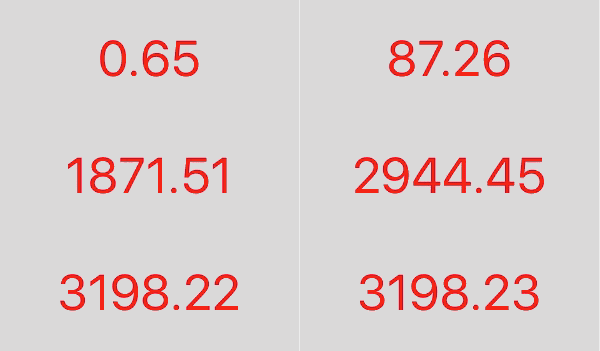
1.2 浮点数样式数字的变化
创建设置代码
	@property (nonatomic, strong) QCountingLabel *countingLabel;

	// 创建 QCountingLabel 对象

	self.countingLabel = [[QCountingLabel alloc] initWithFrame:CGRectMake(0, 0, 300, 120)];

	[self.view addSubview:self.countingLabel];

	// 常规设置,QCountingLabel 继承 UILabel, 设置和 UILabel 一样

	self.countingLabel.center = self.view.center;

	self.countingLabel.backgroundColor = [[UIColor lightGrayColor] colorWithAlphaComponent:0.5];

	self.countingLabel.font = [UIFont systemFontOfSize:50];

	self.countingLabel.textColor = [UIColor redColor];

	self.countingLabel.textAlignment = NSTextAlignmentCenter;

	// 设置文本样式

	self.countingLabel.format = @"%.2f";

	// 设置变化范围及动画时间

	[self.countingLabel q_countFromValue:0 toValue:3198.23 withDuration:1.0f];
效果
1.3 带有千分位分隔符的浮点数
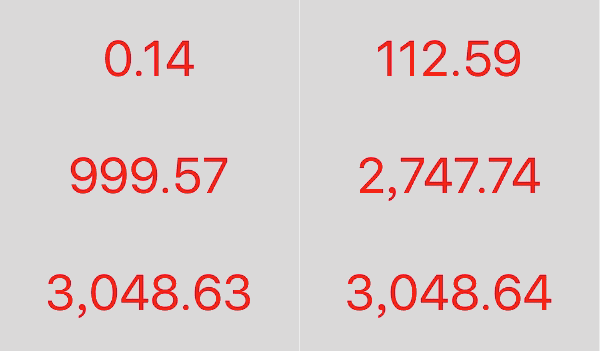
创建设置代码
	@property (nonatomic, strong) QCountingLabel *countingLabel;

	// 创建 QCountingLabel 对象

	self.countingLabel = [[QCountingLabel alloc] initWithFrame:CGRectMake(0, 0, 300, 120)];

	[self.view addSubview:self.countingLabel];

	// 常规设置,QCountingLabel 继承 UILabel, 设置和 UILabel 一样

	self.countingLabel.center = self.view.center;

	self.countingLabel.backgroundColor = [[UIColor lightGrayColor] colorWithAlphaComponent:0.5];

	self.countingLabel.font = [UIFont systemFontOfSize:50];

	self.countingLabel.textColor = [UIColor redColor];

	self.countingLabel.textAlignment = NSTextAlignmentCenter;

	// 设置文本样式

	self.countingLabel.format = @"%.2f";

	// 设置分隔符样式

	self.countingLabel.positiveFormat = @"###,###.##";

	// 设置变化范围及动画时间

	[self.countingLabel q_countFromValue:0 toValue:3048.64 withDuration:1.0f];
效果
iOS - Label 数字动态变化的更多相关文章
- Pop–实现任意iOS对象的任意属性的动态变化
简介 Pop 是一个可扩展的动画引擎,可用于实现任意iOS对象的任意属性的动态变化,支持一般动画,弹性动画和渐变动画三种类型. 项目主页: pop 最新示例: 点击下载 注意: 官方代码中,并不包含实 ...
- jQuery Validate input是动态变化的
表单验证 $("#dataList").append("<div id='data"+dataNum+"' style='padding-top ...
- iOS中关于动态Tableview中的cell数据传输的多线程问题解决之拙见
iOS中关于动态Tableview中的cell数据传输的多线程问题解决之拙见 (2015-12-05 12:48:20)[编辑][删除] 转载▼ 首先我们先明确一下问题: 1.因为UI是在主线 ...
- js实现页面时间动态变化
利用函数嵌套和setTimeout函数实现时间动态变化 var myDate = new Date(); myDate.getYear(); //获取当前年份(2位) myDate.getFullYe ...
- 李洪强iOS开发之动态获取UILabel的bounds
李洪强iOS开发之动态获取UILabel的bounds 在使用UILabel存放字符串时,经常需要获取label的长宽数据,本文列出了部分常用的计算方法. 1.获取宽度,获取字符串不折行单行显示时所需 ...
- 编辑表格输入内容、根据input输入框输入数字动态生成表格行数、编辑表格内容提交传给后台数据处理
编辑表格输入内容.根据input输入框输入数字动态生成表格行数.编辑表格内容提交传给后台数据处理 记录自己学习做的东西,写的小demo,希望对大家也有帮助! 代码如下: <!DOCTYPE ht ...
- 初识IOS,Label控件的应用。
初识IOS,Label控件的应用. // // ViewController.m // Gua.test // // Created by 郭美男 on 16/5/31. // Copyright © ...
- ios 开发中 动态库 与静态库的区别
使用静态库的好处 1,模块化,分工合作 2,避免少量改动经常导致大量的重复编译连接 3,也可以重用,注意不是共享使用 动态库使用有如下好处: 1使用动态库,可以将最终可执行文件体积缩小 2使用动态库, ...
- 【转】提示框第三方库之MBProgressHUD iOS toast效果 动态提示框效果
原文网址:http://www.zhimengzhe.com/IOSkaifa/37910.html MBProgressHUD是一个开源项目,实现了很多种样式的提示框,使用上简单.方便,并且可以对显 ...
随机推荐
- 容器list使用之erase(其他容器也通用)
今天无论如何要写点东西,算是搞清楚了一点东西吧.有点小小的成就感. 之前在程序里面使用了list容器,其中用到了erase()函数,之前一直没出现问题,这两天突然莫名奇妙.花了点时间,搞清楚了eras ...
- go语言之进阶篇成员操作
1.成员操作 示例: package main import "fmt" type Person struct { name string //名字 sex byte //性别, ...
- 内存泄漏 Memory Leaks 内存优化 MD
Markdown版本笔记 我的GitHub首页 我的博客 我的微信 我的邮箱 MyAndroidBlogs baiqiantao baiqiantao bqt20094 baiqiantao@sina ...
- Java基础(十四):泛型
一.Java 泛型: Java 泛型(generics)是 JDK 5 中引入的一个新特性, 泛型提供了编译时类型安全检测机制,该机制允许程序员在编译时检测到非法的类型. 泛型的本质是参数化类型,也就 ...
- 盘点linux系统中的12条性能调优命令。
导读 性能调优一直是运维工程师最重要的工作之一,如果您所在的生产环境中遇到了系统响应速度慢,硬盘IO吞吐量异常,数据处理速度低于预期值的情况,又或者如CPU.内存.硬盘.网络等系统资源长期处于耗尽的状 ...
- Cognos由于JAVA_HOME冲突引起的错误假象
Cognos的安装和配置并不是很复杂,但是对于初次安装的用户来说,还是要注意一些细节,比如JDK问题,今天我们就来阐述一下这个问题 场景1: 作为一个开发人员,很多人是十八般武艺样样精通,难免已经在自 ...
- cognos report同比环比以及默认为当前月分析
现在的需求是按月份分析不同时期的余额数据,.(报表工具:cognos report:建模工具:FM) ------------------------------------------------- ...
- C++的四种初始化形式以及类型转换
C++中有如下的方式来初始化一个变量. 但当进行类型转换时,只有两种方式可用,其他两种方式会报错.
- Hibernate(五)基本数据类型
一.Hibernate的基本数据类型 3种数据类型之间的对应关系 Hibernate映射类型 Java类型 标准SQL类型 integer java.lang.Integer INTEGER long ...
- windows 安装 docker
.https://download.docker.com/win/stable/InstallDocker.msi .设置环境变量 C:\Program Files (x86)\Git\bin .如果 ...