
yum安装MangoDB
1:操作系统信息

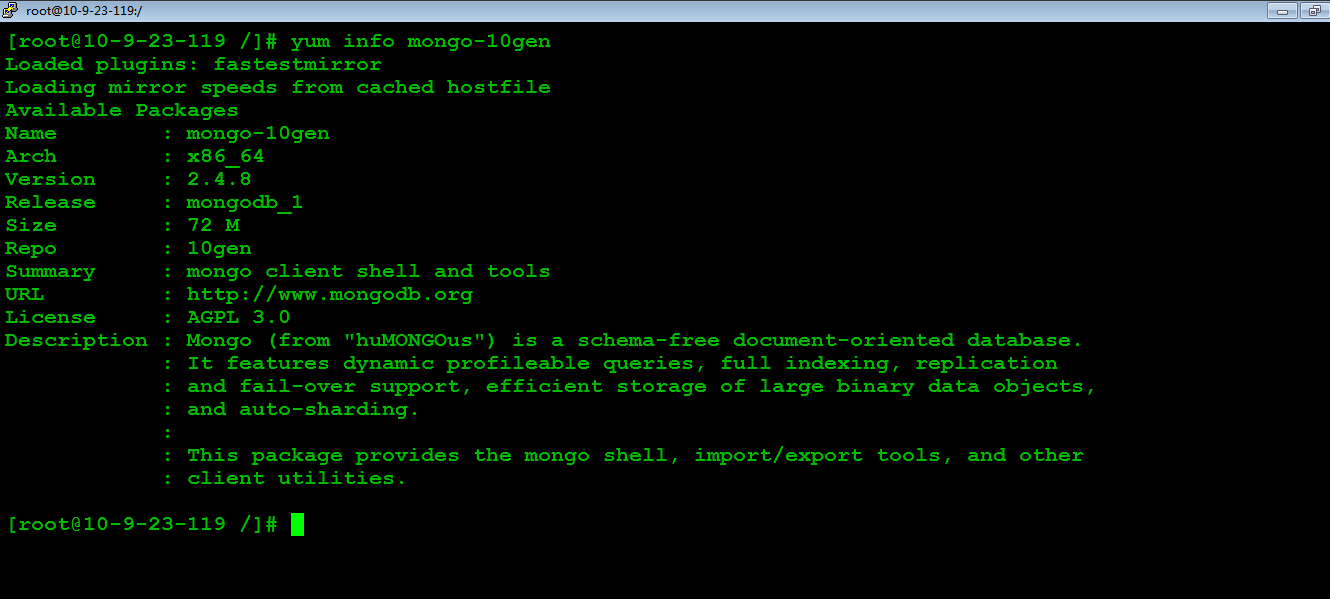
2:yum命令查看MongoDB的包信息
3:配置yum源
#vi /etc/yum.repos.d/10gen.repo

4:查看mongoDB的服务器包的信息

5:安装MongoDB的服务器端和客户端工具
#yum install mongo-10gen-server
#yum install mongo-10gen
卸载:
#yum -y remove mongo-10gen-server
6:启动MongoDB服务(以后有更新了,停掉mongodb,执行#yum update mongo-10gen mongo-10gen-server 即可)
#service mongod start

7:MongoDB配置文件

# mongo.conf

#where to log

logpath=/var/log/mongo/mongod.log

logappend=true

# fork and run in background

fork = true

#port =

dbpath=/var/lib/mongo

# location of pidfile

pidfilepath = /var/run/mongodb/mongod.pid

# Disables write-ahead journaling

# nojournal = true

# Enables periodic logging of CPU utilization and I/O wait

#cpu = true

# Turn on/off security.  Off is currently the default

#noauth = true

#auth = true

# Verbose logging output.

#verbose = true

# Inspect all client data for validity on receipt (useful for

# developing drivers)

#objcheck = true

# Enable db quota management

#quota = true

# Set oplogging level where n is

#   =off (default)

#   =W

#   =R

#   =both

#   =W+some reads

#diaglog =

# Ignore query hints

#nohints = true

# Disable the HTTP interface (Defaults to localhost:).

#nohttpinterface = true

# Turns off server-side scripting.  This will result in greatly limited

# functionality

#noscripting = true

# Turns off table scans.  Any query that would do a table scan fails.

#notablescan = true

# Disable data file preallocation.

#noprealloc = true

# Specify .ns file size for new databases.

# nssize = <size>

# Accout token for Mongo monitoring server.

#mms-token = <token>

# Server name for Mongo monitoring server.

#mms-name = <server-name>

# Ping interval for Mongo monitoring server.

#mms-interval = <seconds>

# Replication Options

# in replicated mongo databases, specify here whether this is a slave or master

#slave = true

#source = master.example.com

# Slave only: specify a single database to replicate

#only = master.example.com

# or

#master = true

#source = slave.example.com
yum安装MangoDB的更多相关文章
- yum安装php,php-fpm
1.检查当前安装的PHP包 yum list installed | grep php 如果有安装的PHP包,先删除他们 yum remove php.x86_64 php-cli.x86_64 ph ...
- Linux下yum安装MySQL
写这篇文章的原因是:在刚开始使用Linux操作系统时想要搭建LAMP环境,于是开始在Google和百度上各种寻找资料,碰到了不是很多的问题后,我决定写这篇文章总结一下在Linux下yum安装MySQL ...
- salt源码安装软件和yum安装软件
上面简单列出了源码安装的sls文件书写思路. 涉及到一些固定的思路:如, 1,拷贝 解压安装时候需要依赖tar.gz存在 如果已安装则无需再次安装. 2,启动脚本 加入chk时候需要文件存在,如果已添 ...
- CentOS 7.0 使用 yum 安装 MariaDB 与 MariaDB 的简单配置
1.安装MariaDB 安装命令 yum -y install mariadb mariadb-server 安装完成MariaDB,首先启动MariaDB,两条命令都可以 systemctl sta ...
- centos7下使用yum安装mysql
CentOS7的yum源中默认好像是没有mysql的.为了解决这个问题,我们要先下载mysql的repo源. 1. 下载mysql的repo源 wget http://repo.mysql.com/m ...
- 编译安装 varnish-4.1.2和yum 安装 varnish-4.0.3
vanish可以让用户自己选择缓存数据是存于内存还是硬盘,存于内存一般基于二八法则即常访问的数据是磁盘存储的总数据五分之一,因此内存也应该是硬盘文件大概五分之一.如果有多台vanish则,总内存满足即 ...
- Linux Yum 安装JDK
1.查看CentOS自带JDK是否已安装. 输入:yum list installed |grep java. 2.若有自带安装的JDK,如何卸载CentOS系统自带Java环境? 卸载JDK相关文件 ...
- CentOS下yum安装LAMP
1. 用yum安装Apache,Mysql,PHP. 1.1安装Apache yum install httpd httpd-devel 安装完成后,用/etc/init.d/httpd start ...
- centos 6.5 yum安装 mysql 5.6
1. 查看系统里面有没有mysql 的repo yum repolist all | grep mysql 2. 如果没有发现,则需要配置repo 注意,如果要使用5.7 或者其他任何版本,只能有 ...
随机推荐
- KVM资源划分分配技巧
kvm有个叫做超分的概念,根据这个特性可以分配出超出物理机配置的数台虚拟机. 以下是自己总结的一些划分技巧: 一.最保守方法(性能最好) 根据物理机的资源,按虚拟机的数量叠加但不超过物理机的总和.不超 ...
- MC34063A development aid
http://www.nomad.ee/micros/mc34063a/index.shtml This is a simple-minded design tool that allows you ...
- IP配制
http://blog.csdn.net/laoyiin/article/details/5722977
- .Net C#上传文件最大设置
<!--网页允许的最大设置节点--> <system.web> <httpRuntime targetFramework="4.5" maxReque ...
- MySQL数据库事务各隔离级别加锁情况--Repeatable Read && MVCC(转)
本文转自https://m.imooc.com/article/details?article_id=17289 感谢作者 上节回顾 上两篇记录了我对MySQL 事务 隔离级别read uncommi ...
- 咏南WEB框架群集
咏南WEB框架群集 咏南WEB框架支持群集部署,支持负载均衡和自动故障转移. 咏南WEB群集部署在阿里云服务器上面. 在线测试:http://47.106.93.126:9999/
- Selenium2+python自动化33-文件上传(send_keys)
前言 文件上传是web页面上很常见的一个功能,自动化成功中操作起来却不是那么简单. 一般分两个场景:一种是input标签,这种可以用selenium提供的send_keys()方法轻松解决: 另外一种 ...
- jsp中简易版本的图片上传程序
1.下载相应的组件的最新版本 Commons FileUpload 可以在http://jakarta.apache.org/commons/fileupload/下载 附加的Commons IO ...
- CALayer(持续更新)
CALayer The CALayer class manages image-based content and allows you to perform animations on that c ...
- [转]Unicode和UTF-8的关系
Unicode和UTF-8的关系作者: 张军 原文地址: http://blog.renren.com/blog/284133452/485453790 今天中午,我突然想搞清楚Unicode和UTF ...