
vue 中 使用 tradingview
加载页面时初始化方法: mounted
可以在 mounted 方法中调用 methods 的中的方法
使用 data 中的数据时,在每个方法的开始推荐先定义 var that = this
现在还不明白开始时为什么执行两次 resolveSymbol 方法
不要纠结页面的数据怎么获取到某个方法中的,它自己就获取了。例如 resolveSymbol 方法,根据商品名称解析商品信息。你在输入框中输入某个商品时,值自动被 resolveSymbol 方法获取。
在 gerBar 方法中,执行回调函数的时候,eg: settimeout(callback, 1000)让其 1 秒后执行,因为 若去后台获取数据采用 axios.post() 是异步的。
开始时 执行顺序:
createChartData -> subscribeSymbol -> unsubscribeSymbol -> TradingView.onready -> onChartReady -> onReady(图表雏形) -> resolveSymbol -> getBar
切换商品时顺序:
searchSymbols -> resolveSymbol -> getBar
<!-- TradingView Widget BEGIN -->
<html>
<head>
<link rel="icon" href="https://static.jianshukeji.com/highcharts/images/favicon.ico">
<meta name="viewport" content="width=device-width, initial-scale=1">
<script src="https://cdn.staticfile.org/vue/2.2.2/vue.min.js"></script>
<script src="//unpkg.com/vue/dist/vue.js"></script>
<script src="//unpkg.com/element-ui@2.4.11/lib/index.js"></script>
<script src="https://img.hcharts.cn/highcharts/highcharts.js"></script>
<script src="https://img.hcharts.cn/highcharts/modules/exporting.js"></script>
<script src="https://img.hcharts.cn/highcharts/modules/series-label.js"></script>
<script src="https://img.hcharts.cn/highcharts/modules/oldie.js"></script>
<script src="https://img.hcharts.cn/highcharts-plugins/highcharts-zh_CN.js"></script>
<link rel="stylesheet" type="text/css" href="//unpkg.com/element-ui@2.4.11/lib/theme-chalk/index.css">
<script type="text/javascript" src="/static/charting_library-master/charting_library/charting_library.min.js"></script>
<script type="text/javascript" src="/static/charting_library-master/datafeeds/udf/dist/polyfills.js"></script>
<script type="text/javascript" src="/static/charting_library-master/datafeeds/udf/dist/bundle.js"></script>
</head> <body>
<div id="app">
<el-button type="primary" @click="getVal('M1905')">M1905</el-button>
<el-button type="primary" @click="getVal('C1905')">C1905</el-button>
<el-button type="primary" @click="getVal('RB1905')">RB1905</el-button>
<el-button type="primary" @click="getVal('A1905')">A1905</el-button>
</div>
<div id="tv_chart_container"></div> </body>
<!-- 先引入 Vue -->
<script src="/static/js/vue.min.js"></script>
<script src="/static/js/axios.min.js"></script>
<!-- 引入组件库 -->
<script src="/static/js/index.js"></script>
<script src="http://cdn.hcharts.cn/highcharts/modules/data.js"></script>
<script type="text/javascript"> var host = window.location; var vm = new Vue({
el: 'tv_chart_container',
mounted: function () {
var that = this;
that.chart_data = that.createChartData();
TradingView.onready(function () {
that.chart = window.tvWidget = new TradingView.widget({
symbol: 'M1905',
height: '900',
width: '1500',
interval: that.interval,
toolbar_bg: '#c5c5c8',
timezone: 'Asia/Shanghai',
time_frames: [
{text: "1h", resolution: "1"},
{text: "6h", resolution: "15"},
{text: "1d", resolution: "30"},
{text: "3d", resolution: "30"},
{text: "1w", resolution: "30"},
{text: "1m", resolution: "1D"},
{text: "3m", resolution: "1D"},
{text: "6m", resolution: "3D"},
{text: "1y", resolution: "1W"},
{text: "100y", resolution: "W", description: "All", title: "All"},
],
container_id: 'tv_chart_container',
library_path: '/static/charting_library-master/charting_library/',
locale: 'zh',
//datafeed: new Datafeeds.UDFCompatibleDatafeed("https://demo_feed.tradingview.com"),
datafeed: that.chart_data,
disabled_features: [
'volume_force_overlay',// 成交量与k线分离
//'header_symbol_search',// 允许搜索商品
],
overrides: {
//'volumePaneSize': 'small', //成交量高度设置,可选值 large, medium, small, tiny
//'mainSeriesProperties.priceAxisProperties.autoScale':false,
//'mainSeriesProperties.priceLineColor': '#001bff',
//'mainSeriesProperties.priceLineWidth': 5,
}
});
that.chart.onChartReady(function () {
//that.chart.chart().createStudy('MA Cross', false, false); // K线图添加初始化曲线
});
}); },
data: function () {
return {
chart_data: null,
chart: null,
symbol:null,
symbolAndInterval: null,
dataBar: [],
interval: 'D',
inDayResolutions: ['1', '5', '15', '30'],
symInfo: [
{
"name": 'M1905',
"timezone": "Asia/Shanghai",
"pricescale": 500,
"minmov": 1,
"ticker": 'M1905',
"description": "DIdontKnow",
"session": "0900-1630",
"type": "stock",
"has_intraday": true,
"intraday_multipliers": this.inDayResolutions,
"has_weekly_and_monthly": false,
},
{
"name": 'C1905',
"timezone": "Asia/Shanghai",
"pricescale": 100,
"exchange": "NYSE",
"point": 2,
"minmov": 1,
"ticker": 'C1905',
"description": "BOEIGN CO",
"session": "24x7",
"type": "bitcoin",
"has_intraday": true,//是否具有日内分钟数据,为true 则所在周期在intraday_multipliers数组中提供
"intraday_multipliers": this.inDayResolutions,
"has_weekly_and_monthly": false,
"has_no_volume": false,
"regular_session": "24x7"
},
{
"name": 'A1905',
"timezone": "Asia/Shanghai",
"pricescale": 100,
"exchange": "NYSE",
"point": 2,
"minmov": 1,
"ticker": 'A1905',
"description": "BOEIGN CO",
"session": "24x7",
"type": "bitcoin",
"has_intraday": true,//是否具有日内分钟数据,为true 则所在周期在intraday_multipliers数组中提供
"intraday_multipliers": this.inDayResolutions,
"has_weekly_and_monthly": false,
"has_no_volume": false,
"regular_session": "24x7"
},
{
"name": 'RB1905',
"timezone": "Asia/Shanghai",
"pricescale": 100,
"exchange": "NYSE",
"point": 2,
"minmov": 1,
"ticker": 'RB1905',
"description": "BOEIGN CO",
"session": "24x7",
"type": "bitcoin",
"has_intraday": true,//是否具有日内分钟数据,为true 则所在周期在intraday_multipliers数组中提供
"intraday_multipliers": this.inDayResolutions,
"has_weekly_and_monthly": false,
"has_no_volume": false,
"regular_session": "24x7"
},
],
searchList: [
{
"symbol": "M1905",
"full_name": "NYSE:M1905",
"description": "BOEING CO",
"exchange": "Cboe BZX",
"ticker": "M1905",
"type": "stock"
},
{
"symbol": "C1905",
"full_name": "NYSE:C1905",
"description": "THE CHEMOURS COMPANY LLC",
"exchange": "Cboe BZX",
"ticker": "C1905",
"type": "stock"
},
{
"symbol": "RB1905",
"full_name": "NYSE:RB1905",
"description": "DOMINION ENERGY INC",
"exchange": "Cboe BZX",
"ticker": "RB1905",
"type": "stock"
},
{
"symbol": "A1905",
"full_name": "NYSE:A1905",
"description": "EL PASO ELECTRIC CO",
"exchange": "Cboe BZX",
"ticker": "A1905",
"type": "stock"
},
],
supported_resolutions: ['1', '5', '15', '30', 'D', 'W', 'M'],
}
},
methods: {
createChartData: function () {
var that = this;
Datafeeds.Container = function () {
//this._configuration=configurationData
that._configuration = {
supports_search: false,
supports_group_request: false,
exchanges: [{value: 'DV', name: 'NYSE', desc: 'DeVry Education Group Inc.'}],
supported_resolutions: that.supported_resolutions,
supports_marks: false,
supports_time: false,
supports_timescale_marks: false,
symbols_types: [{name: 'Ny', value: 'dv'}],
}
}
Datafeeds.Container.prototype.onReady = function (callback) {
if (that._configuration) {
setTimeout(function () {
callback(that._configuration);
}, 1000);
}
}
Datafeeds.Container.prototype.resolveSymbol = function (symbolName, onSymbolResolvedCallback, onResolveErrorCallback) {
var symInfoTemp = null;
if (symbolName == 'M1905')
symInfoTemp = that.symInfo[0]
else if (symbolName == 'C1905')
symInfoTemp = that.symInfo[1];
else if (symbolName == 'A1905')
symInfoTemp = that.symInfo[2];
else symInfoTemp = that.symInfo[3];
setTimeout(function () {
onSymbolResolvedCallback(symInfoTemp);//商品信息
}, 0);
}
Datafeeds.Container.prototype.searchSymbols = function (userInput, exchange, symbolType, onResultReadyCallback) {
setTimeout(function () {
onResultReadyCallback(that.searchList);
}, 0)
}
Datafeeds.Container.prototype.getBars = function (symbolInfo, resolution, timeFrom, timeTo, onDataCallback) {
console.log("resolution: "+resolution);
console.log("timeFrom: "+timeFrom);
console.log("timeTo: "+timeTo);
that.interval = resolution;
that.symbol = symbolInfo.name;
that.changeSearch(that.symbol, that.interval, timeFrom, timeTo);
setTimeout(function () {
onDataCallback(that.dataBar);//商品数据
},1500);
}
Datafeeds.Container.prototype.subscribeBars = function (symbolInfo, resolution, onRealtimeCallback, subscriberUID, onResetCacheNeededCallback) {
}
Datafeeds.Container.prototype.unsubscribeBars = function (subscribeUID) {
}
return new Datafeeds.Container;
},
changeSearch: function (symbolName, resolution, timeFrom, timeTo) {
var that = this;
axios.post(host+'getChartData', {
symbolName: symbolName,
resolution: resolution,
timeFrom: timeFrom,
timeTo: timeTo,
}).then(res => {
if(res.data.result_code == "success"){
var chartData = res.data.data;
that.dataBar.splice(0, that.dataBar.length);
for (var i = 0; i < chartData.chartDataTime.length; i++) {
var time = chartData.chartDataTime[i];
var high = chartData.chartDataHigh[i];
var low = chartData.chartDataLow[i];
var close = chartData.chartDataClose[i];
var open = chartData.chartDataOpen[i];
var volume = chartData.chartDataVolume[i];
that.dataBar.push({
time: time,
close: close,
open: open,
high: high,
low: low,
volume: volume
})
}
}
}); }, },
watch: {
symbol: function(val){
var that = this;
that.chart.setSymbol(that.symbol, that.interval, function () { });
}
}
});
var ap = {
data: function () {
return { }
},
methods: {
getVal: function (symbol) {
vm.symbol = symbol;
}
}
};
var Ctor = Vue.extend(ap);
new Ctor().$mount('#app'); </script>
<style>
#app{
float: right;
margin-right: 10%;
}
</style>
</html>
TradingView
工作需要,点击按钮进行切换商品: 如图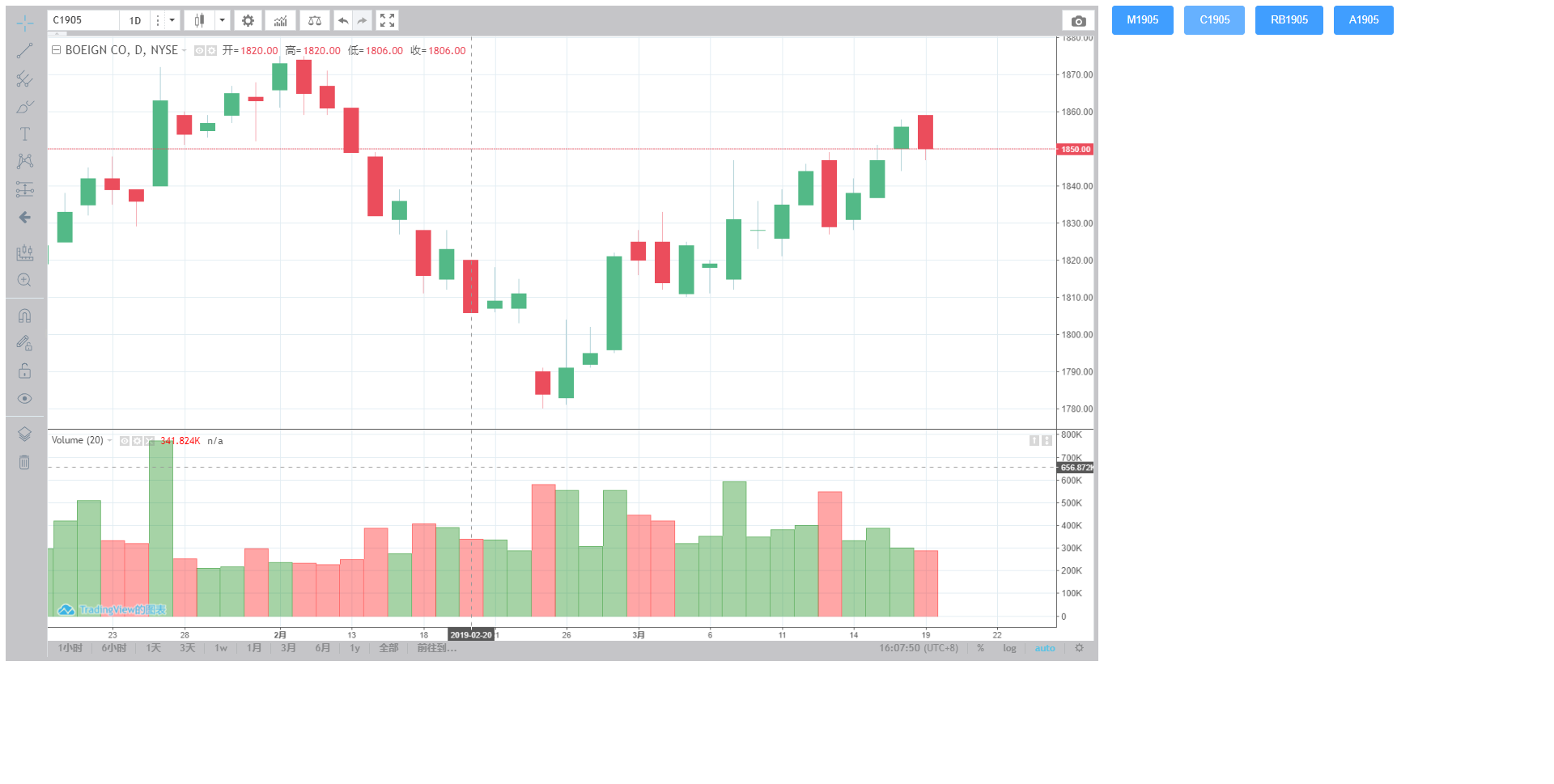
vue 中 使用 tradingview的更多相关文章
- Vue中引入TradingView制作K线图
**前言: 本文使用的是1.10版本 , 可通过TradingView.version()查看当前版本. 附上开发文档地址:https://zlq4863947.gitbooks.i...** 一.修 ...
- vue中如何不通过路由直接获取url中的参数
前言:为什么要不通过路由直接获取url中的参数? vue中使用路由的方式设置url参数,但是这种方式必须要在路径中附带参数,而且这个参数是需要在vue的路由中提前设置好的. 相对来说,在某些情况下直接 ...
- vue中的重要特性
一.vue中的自定义组件 html的代码: <!DOCTYPE html> <html lang="en"> <head> <meta c ...
- Vue中comoputed中的数据绑定
Vue中的数据实现响应式绑定是在初始化的时候利用definePrototype的定义set和get过滤器,在进行组件模板编译时实现water的监听搜集依赖项,当数据发生变化时在set中通过调用dep. ...
- vue中使用stompjs实现mqtt消息推送通知
最近在研究vue+webAPI进行前后端分离,在一些如前端定时循环请求后台接口判断状态等应用场景用使用mqtt进行主动的消息推送能够很大程度的减小服务端接口的压力,提高系统的效率,而且可以利用mqtt ...
- Vue中应用CORS实现AJAX跨域,及它在 form data 和 request payload 的小坑处理
基本概念部分(一):理解CORS 说道Vue的跨域AJAX,我想先梳理一遍CORS跨域,"跨域资源共享"(Cross-origin resource sharing),它是一个W3 ...
- vue中watched属性
watched属性,vue中的观察属性,可用来监听一个值的变化 默认有两个参数,新值,旧值 data (){ return { currentCity: "深圳" } } watc ...
- 七、vue中v-for有时候对页面不会重新渲染,数组变化后如何到渲染页面
v-for不能进行双向数据绑定,页面渲染完成后,再次更改v-for遍历的数据,js里面打印的数据看到数据值已经更改,但是页面的数据就是没有渲染,这是为什么呢? vue中v-for和angularj ...
- 【Vue】Vue中的父子组件通讯以及使用sync同步父子组件数据
前言: 之前写过一篇文章<在不同场景下Vue组件间的数据交流>,但现在来看,其中关于“父子组件通信”的介绍仍有诸多缺漏或者不当之处, 正好这几天学习了关于用sync修饰符做父子组件数据双向 ...
随机推荐
- CSS3实战之多列
CSS2中如果要设计多列布局,常用的方法有浮动和定位,但是浮动容易错位,定位无法满足模块的自适应能力,以及模块之间的文档流联动的需要.为了解决多列布局的难题,CSS3新增了多列自动布局功能. 利用多列 ...
- 转载http中302与301的区别
http://blog.csdn.net/qmhball/article/details/7838989 一.官方说法301,302 都是HTTP状态的编码,都代表着某个URL发生了转移,不同之处在于 ...
- python json dumps loads
请看以上图片可知 1. python requests里面返回的是json 字符串, 说白了是字符串.不能直接取里面对应的值. 2. 取值的话,需要把json字符串转换成字典, 用json.loads ...
- Getting Real 摘记
第二章 起始点 一个很好的做软件的方式就是一开始用它来解决你自己的问题.由于你自己变成了软件的目标受众因此你会知道什么是重要的什么不是.这样做下去将会是推出一个突破性产品的伟大起始点. 手头有多少钱就 ...
- java学习第01天(程序开发体验)
1.基本写法 class Demo{ public static void main(String[] args){ System.out.print("Hello World") ...
- JS 数组 foreach 和 map
本文地址:http://www.cnblogs.com/veinyin/p/8794677.html foreach 和 map 都是数组的迭代方法,对数组的每一项执行给定函数,不会改变原数组. 两 ...
- transparent 透明效果
background-color:transparent;就是把背景色设置为透明. 实际上background默认的颜色就是透明的属性.所以写和不写都是一样的 span{ width: 0; heig ...
- perl6 Net::HTTP 不能发送https请求
如下命安装必要的包: sudo apt install libssl1.0.0 libssl-dev zef install IO::Socket::SSL zef install Net::HTTP
- java 判断上传文件大小
/** * 判断文件大小 * * @param file * 文件 * @param size * 限制大小 * @param unit * 限制单位(B,K,M,G) * @return */ pu ...
- Prepare tasks for django project deployment.md
As we know, there are some boring tasks while deploy Django project, like create db, do migrations a ...