
Spring Boot 计划任务中的一个“坑”
计划任务功能在应用程序及其常见,使用Spring Boot的@Scheduled 注解可以很方便的定义一个计划任务。然而在实际开发过程当中还应该注意它的计划任务默认是放在容量为1个线程的线程池中执行,即任务与任务之间是串行执行的。如果没有注意这个问题,开发的应用可能出现不按照设定计划执行的情况。本文将介绍几种增加定时任务线程池的方式。
验证Spring Boot计划任务中的“坑”
其实是验证Spring Boot 中执行任务的线程只有1个。先定义两个任务,输出任务执行时的线程ID,如果ID一样则认为这两个任务是一个线程执行的。这意味着,某个任务即使到达了执行时间,如果还有任务没有执行完,它也不能开始。
package com.example.springbootlearning.schedule;

import org.springframework.scheduling.annotation.EnableScheduling;

import org.springframework.scheduling.annotation.Scheduled;

import org.springframework.stereotype.Component;

@Component

@EnableScheduling

public class ScheduleDemo {

    @Scheduled(fixedRate = 5000)

    public void work1() throws InterruptedException {

        System.out.println(System.currentTimeMillis() + ":" + Thread.currentThread().getId() + ": work1 Begin.");

        Thread.sleep(3000L);

        System.out.println(System.currentTimeMillis() + ":" + Thread.currentThread().getId() + ": work1 End.");

    }

    @Scheduled(fixedRate = 5000)

    public void work2() throws InterruptedException {

        System.out.println(System.currentTimeMillis() + ":" + Thread.currentThread().getId() + ": work2 Begin.");

        Thread.sleep(3000L);

        System.out.println(System.currentTimeMillis() + ":" + Thread.currentThread().getId() + ": work2 End.");

    }

}
部分输出:
1577949369664:20: work2 Begin.

1577949371665:20: work2 End.

1577949371665:20: work1 Begin.

1577949373665:20: work1 End.

......
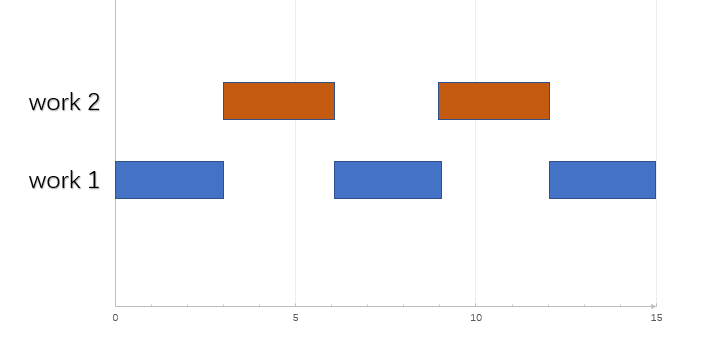
以上代码定义了两个任务work1和work2,都是每5000ms执行一次,输出开始执行时间戳,线程ID,和结束时间戳。从输出可以看出,执行两个work的线程是相同的(ID都是20),work2先抢占线程资源,work2 执行结束之后 work1才开始执行。这导致:本来按计划work1应该每5秒执行一次,现在却变成了每6秒执行一次。如图:
让计划任务在不同的线程中执行
要让计划任务在不同的线程中执行,只需要自己去定义执行任务的线程池就可以了。具体操作就是添加一个实现了 SchedulingConfigurer 接口的配置类,然后在配置类里面设置线程池。具体代码如下:
package com.example.springbootlearning.schedule;

import org.springframework.context.annotation.Configuration;

import org.springframework.scheduling.annotation.SchedulingConfigurer;

import org.springframework.scheduling.config.ScheduledTaskRegistrar;

import java.util.concurrent.Executors;

@Configuration

public class ScheduleConfiguration implements SchedulingConfigurer {

    @Override

    public void configureTasks(ScheduledTaskRegistrar scheduledTaskRegistrar) {

        // 将 Scheduler 设置为容量为 5 的计划任务线程池。

        scheduledTaskRegistrar.setScheduler(Executors.newScheduledThreadPool(5));

    }

}
Spring Boot 版本2.1.0之后,可以直接在配置文件中设置 spring.task.scheduling.pool.size 的值来配置计划任务线程池的容量,而不需要额外再写一个类。
spring.task.scheduling.pool.size=5
输出:
1577953149351:20: work2 Begin.

1577953149352:21: work1 Begin.
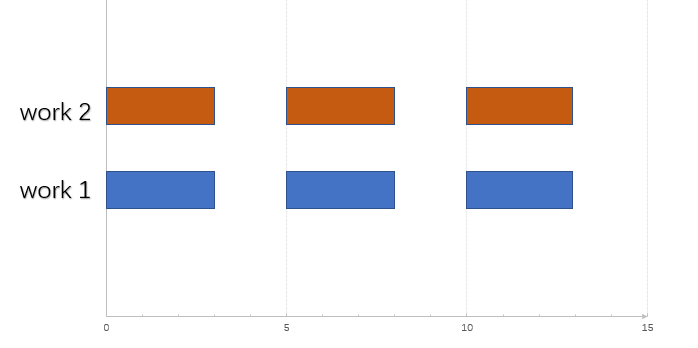
从输出可以看出,两个任务可以认为是同时开始的(相差1毫秒),分别在ID为20和ID为21的线程中执行。如图:
小结
Spring Boot 定时任务的线程数默认是1,直接使用它调用定时任务会导致不同的任务无法并行执行。因此在使用它之前应该根据需求在application.properties中修改它的线程池容量;或者实现SchedulingConfigurer接口,并在重写的方法中自定义一个线程池。
Spring Boot 计划任务中的一个“坑”的更多相关文章
- spring boot: 计划任务@ EnableScheduling和@Scheduled
spring boot: 计划任务@ EnableScheduling和@Scheduled @Scheduled中的参数说明 @Scheduled(fixedRate=2000):上一次开始执行时间 ...
- Spring Boot 2.2 增加了一个新功能,启动飞起~
前几天栈长分享了一个好玩的框架:一个比Spring Boot快44倍的Java框架!,是不是感觉 Spring Boot 略慢?今天讲一下 Spring Boot 添加的这个新特性,可以大大提升 Sp ...
- spring boot 学习(六)spring boot 各版本中使用 log4j2 记录日志
spring boot 各版本中使用 log4j2 记录日志 前言 Spring Boot中默认日志工具是 logback,只不过我不太喜欢 logback.为了更好支持 spring boot 框架 ...
- Spring Boot和Feign中使用Java 8时间日期API(LocalDate等)的序列化问题【转】
Spring Boot和Feign中使用Java 8时间日期API(LocalDate等)的序列化问题 http://blog.didispace.com/Spring-Boot-And-Feign- ...
- Spring Boot源码中模块详解
Spring Boot源码中模块详解 一.源码 spring boot2.1版本源码地址:https://github.com/spring-projects/spring-boot/tree/2.1 ...
- 最详细的 Spring Boot 多模块开发与排坑指南
创建项目 创建一个 SpringBoot 项目非常的简单,简单到这里根本不用再提.你可以在使用 IDEA 新建项目时直接选择 Spring Initlalize 创建一个 Spring Boot 项目 ...
- andriod8.1.0源码编译中的一个坑-package com.sun.javadoc does not exist
这里记录编译过程中的一个坑!!! 编译过程中出现了下面的报错 external/doclava/src/com/google/doclava/ClassInfo.java:20: error: pac ...
- 阿里P7级教你如何在Spring Boot应用程序中使用Redis
在Spring Boot应用程序中使用Redis缓存的步骤: 1.要获得Redis连接,我们可以使用Lettuce或Jedis客户端库,Spring Boot 2.0启动程序spring-boot-s ...
- spring boot开发,jar包一个一个来启动太麻烦了,写一个bat文件一键启动
spring boot开发,jar包一个一个来启动太麻烦了,写一个bat文件一键启动 @echo offcd D:\workProject\bushustart cmd /c "title ...
随机推荐
- 软工项目WordCount
1.Github项目地址:https://github.com/JameMo/WordCount-for-C 2.在程序的各个模块的开发上耗费的时间: PSP2.1 Personal S ...
- 个人项目(wc.exe)
一.项目在GitHub上的地址: ·https://github.com/DawsonHuang/Word_Count 二.项目描述: ·项目名:WordCount(以下简称WC或项目) ·项目简述: ...
- 【Alpha冲刺阶段】Scrum Meeting Daily1
1.会议简述 会议开展时间 2020/5/22 8:30-9:00 PM 会议基本内容摘要 讨论了基础的分工,以及明确了各自模块需要完成的任务 参与讨论人员 全体参与 特别说明 会议需要每天都开展!! ...
- 一个小时学会用 Go 编写命令行工具
前言 最近因为项目需要写了一段时间的 Go ,相对于 Java 来说语法简单同时又有着一些 Python 之类的语法糖,让人大呼"真香". 但现阶段相对来说还是 Python 写的 ...
- Angular:自定义属性指令
①在命令行窗口下用 CLI 命令ng g directive创建指令类文件 ②将directives/light.directive.ts文件改造一番 import { Directive, Elem ...
- 短视频去水印v1.0(还支持74个平台)
软件介绍: 一款很好用的短视频去水印软件,支持74个平台无水印解析,还支持批量视频解析只需要输入账号主页链接就可以了哦,快来下载试试吧! 软件版本:1.0 支持系统:安卓 软件大小:22. ...
- Centos7.8安装Redis
一.安装gcc依赖 由于 redis 是用 C 语言开发,安装之前必先确认是否安装 gcc 环境(gcc -v),如果没有安装,执行以下命令进行安装 [root@localhost local]# ...
- vue第五单元(v-if和v-show以及v-for的灵活应用 watch以及computed的区别 (常见效果) #课程目标
第五单元(v-if和v-show以及v-for的灵活应用 watch以及computed的区别 (常见效果) #课程目标 精通 v-if v-else v-else-if 的使用 精通 v-show ...
- 移动端 Swiper
一.什么是swiper 开源.免费.强大的触摸滑动插件 Swiper常用于移动端网站的内容触摸滑动 Swiper能实现触屏焦点图.触屏Tab切换.触屏多图切换等常用效果 #二.如何使用 1.首先加载插 ...
- Visual Studio 默认git拉取Github出错 No error could not read Username for 'https://github.com': terminal prompts disabled
发布到远程存储库时遇到错误: Git failed with a fatal error.fatal: HttpRequestException encountered. ��������ʱ��� ...