
攻防世界 reverse easy_Maze
easy_Maze
从题目可得知是简单的迷宫问题
int __cdecl main(int argc, const char **argv, const char **envp)

{

  __int64 v3; // rax

  int v5[49]; // [rsp+0h] [rbp-270h]

  int temp_data[7][7]; // [rsp+D0h] [rbp-1A0h]

  _DWORD org_maze_data[7][7]; // [rsp+1A0h] [rbp-D0h]

  org_maze_data[0][0] = 1;

  org_maze_data[0][1] = 1;

  org_maze_data[0][2] = -1;

  org_maze_data[0][3] = 1;

  org_maze_data[0][4] = -1;

  org_maze_data[0][5] = 1;

  org_maze_data[0][6] = -1;

  org_maze_data[1][0] = 0;

  org_maze_data[1][1] = 0;

  org_maze_data[1][2] = 0;

  org_maze_data[1][3] = 0;

  org_maze_data[1][4] = 1;

  org_maze_data[1][5] = -1;

  org_maze_data[1][6] = 0;

  org_maze_data[2][0] = 0;

  org_maze_data[2][1] = 1;

  org_maze_data[2][2] = 0;

  org_maze_data[2][3] = 0;

  org_maze_data[2][4] = 1;

  org_maze_data[2][5] = 0;

  org_maze_data[2][6] = -1;

  org_maze_data[3][0] = -1;

  org_maze_data[3][1] = 0;

  org_maze_data[3][2] = 1;

  org_maze_data[3][3] = 0;

  org_maze_data[3][4] = 1;

  org_maze_data[3][5] = -1;

  org_maze_data[3][6] = 0;

  org_maze_data[4][0] = -1;

  org_maze_data[4][1] = 0;

  org_maze_data[4][2] = 0;

  org_maze_data[4][3] = 0;

  org_maze_data[4][4] = 0;

  org_maze_data[4][5] = 0;

  org_maze_data[4][6] = 1;

  org_maze_data[5][0] = -1;

  org_maze_data[5][1] = -1;

  org_maze_data[5][2] = 1;

  org_maze_data[5][3] = -1;

  org_maze_data[5][4] = 0;

  org_maze_data[5][5] = -1;

  org_maze_data[5][6] = 2;

  org_maze_data[6][0] = 1;

  org_maze_data[6][1] = -1;

  org_maze_data[6][2] = 0;

  org_maze_data[6][3] = 0;

  org_maze_data[6][4] = -1;

  org_maze_data[6][5] = 1;

  org_maze_data[6][6] = 0;

  memset(temp_data, 0, 192uLL);

  temp_data[6][6] = 0;

  memset(v5, 0, 192uLL);

  v5[48] = 0;

  Step_0(org_maze_data, 7, temp_data);          // 变换迷宫数据

  Step_1(temp_data, 7, (int (*)[7])v5);         // 变换迷宫数据

  v3 = std::operator<<<std::char_traits<char>>(&_bss_start, "Please help me out!");

  std::ostream::operator<<(v3, &std::endl<char,std::char_traits<char>>);

  Step_2((int (*)[7])v5, 7);                    // 输入,验证

  system("pause");

  return 0;

}
迷宫经过了两次变换,我们需要动态调试dump出最终迷宫数据。
dump
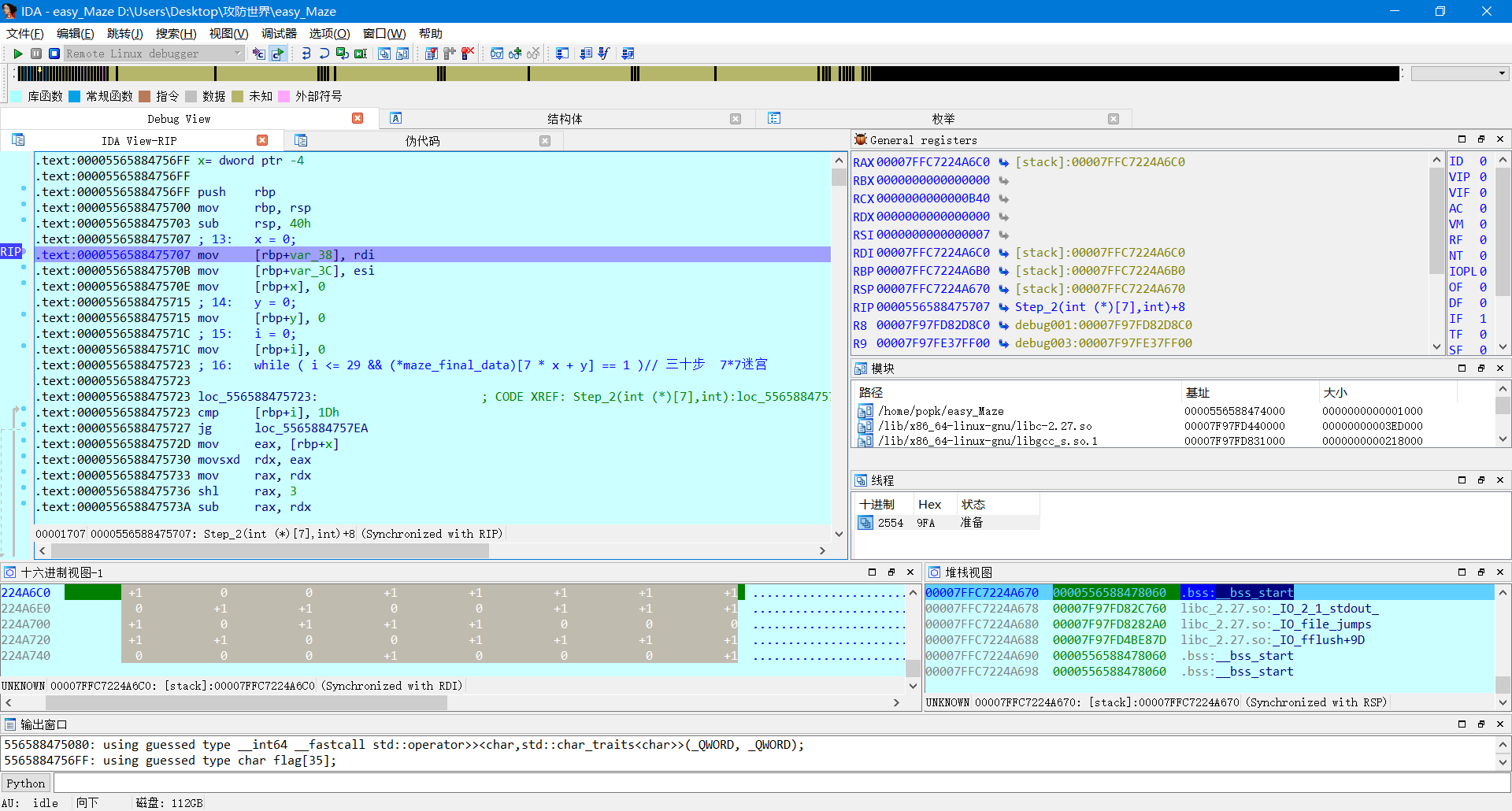
关注Step_2函数
__int64 __fastcall Step_2(int (*maze_final_data)[7])

{

  int index; // eax

  __int64 v2; // rax

  __int64 v3; // rax

  __int64 result; // rax

  __int64 v5; // rax

  char flag[35]; // [rsp+10h] [rbp-30h]

  char myinput; // [rsp+33h] [rbp-Dh]

  int i; // [rsp+34h] [rbp-Ch]

  int y; // [rsp+38h] [rbp-8h]

  int x; // [rsp+3Ch] [rbp-4h]

  x = 0;

  y = 0;

  i = 0;

  while ( i <= 29 && (*maze_final_data)[7 * x + y] == 1 )// 三十步  7*7迷宫; 走1

  {

    std::operator>><char,std::char_traits<char>>(&std::cin, &myinput);

    index = i++;

    flag[index] = myinput;

    if ( myinput == 'd' )

    {                                           // d向右

      ++y;

    }

    else if ( myinput > 'd' )

    {

      if ( myinput == 's' )

      {

        ++x;                                    // s向下

      }

      else

      {

        if ( myinput != 'w' )

          goto LABEL_14;

        --x;                                    // w向上

      }

    }

    else if ( myinput == 'a' )

    {                                           // a向左

      --y;

    }

    else

    {

LABEL_14:

      v2 = std::operator<<<std::char_traits<char>>(&_bss_start, "include illegal words.");

      std::ostream::operator<<(v2, &std::endl<char,std::char_traits<char>>);

    }

  }

  if ( x != 6 || y != 6 )                       // 终点 第49个

  {

    v5 = std::operator<<<std::char_traits<char>>(&_bss_start, "Oh no!,Please try again~~");

    std::ostream::operator<<(v5, &std::endl<char,std::char_traits<char>>);

    result = 0LL;

  }

  else

  {

    v3 = std::operator<<<std::char_traits<char>>(&_bss_start, "Congratulations!");

    std::ostream::operator<<(v3, &std::endl<char,std::char_traits<char>>);

    output(flag, i);

    result = 1LL;

  }

  return result;

}
可得到迷宫题的几个关键:
- 迷宫数据
- 起点 [0][0]
- 终点[6][6]
- 迷宫操作:wsad-->上下左右
最终的迷宫数据:
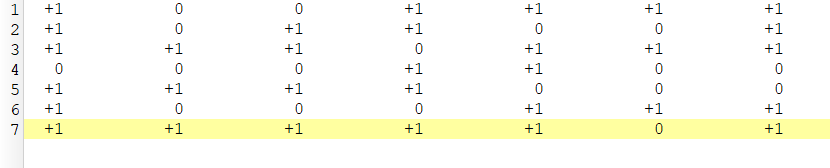
操作:ssddwdwdddssaasasaaassddddwdds
UNCTF{ssddwdwdddssaasasaaassddddwdds}
//------------------------------------------------------------//----------- Created with 010 Editor -----------//------ www.sweetscape.com/010editor/ ------//// File : D:\Users\Desktop\¹¥·ÀÊÀ½ç\final_maze// Address : 0 (0x0)// Size : 400 (0x190)//------------------------------------------------------------unsigned char hexData[400] = { 0x01, 0x00, 0x00, 0x00, 0x00, 0x00, 0x00, 0x00, 0x00, 0x00, 0x00, 0x00, 0x01, 0x00, 0x00, 0x00, 0x01, 0x00, 0x00, 0x00, 0x01, 0x00, 0x00, 0x00, 0x01, 0x00, 0x00, 0x00, 0x01, 0x00, 0x00, 0x00, 0x00, 0x00, 0x00, 0x00, 0x01, 0x00, 0x00, 0x00, 0x01, 0x00, 0x00, 0x00, 0x00, 0x00, 0x00, 0x00, 0x00, 0x00, 0x00, 0x00, 0x01, 0x00, 0x00, 0x00, 0x01, 0x00, 0x00, 0x00, 0x01, 0x00, 0x00, 0x00, 0x01, 0x00, 0x00, 0x00, 0x00, 0x00, 0x00, 0x00, 0x01, 0x00, 0x00, 0x00, 0x01, 0x00, 0x00, 0x00, 0x01, 0x00, 0x00, 0x00, 0x00, 0x00, 0x00, 0x00, 0x00, 0x00, 0x00, 0x00, 0x00, 0x00, 0x00, 0x00, 0x01, 0x00, 0x00, 0x00, 0x01, 0x00, 0x00, 0x00, 0x00, 0x00, 0x00, 0x00, 0x00, 0x00, 0x00, 0x00, 0x01, 0x00, 0x00, 0x00, 0x01, 0x00, 0x00, 0x00, 0x01, 0x00, 0x00, 0x00, 0x01, 0x00, 0x00, 0x00, 0x00, 0x00, 0x00, 0x00, 0x00, 0x00, 0x00, 0x00, 0x00, 0x00, 0x00, 0x00, 0x01, 0x00, 0x00, 0x00, 0x00, 0x00, 0x00, 0x00, 0x00, 0x00, 0x00, 0x00, 0x00, 0x00, 0x00, 0x00, 0x01, 0x00, 0x00, 0x00, 0x01, 0x00, 0x00, 0x00, 0x01, 0x00, 0x00, 0x00, 0x01, 0x00, 0x00, 0x00, 0x01, 0x00, 0x00, 0x00, 0x01, 0x00, 0x00, 0x00, 0x01, 0x00, 0x00, 0x00, 0x01, 0x00, 0x00, 0x00, 0x00, 0x00, 0x00, 0x00, 0x01, 0x00, 0x00, 0x00, 0x00, 0x00, 0x00, 0x00, 0x00, 0x00, 0x00, 0x00, 0x00, 0x00, 0x00, 0x00, 0xFF, 0xFF, 0xFF, 0xFF, 0x00, 0x00, 0x00, 0x00, 0xFF, 0xFF, 0xFF, 0xFF, 0x00, 0x00, 0x00, 0x00, 0x01, 0x00, 0x00, 0x00, 0x02, 0x00, 0x00, 0x00, 0x00, 0x00, 0x00, 0x00, 0x01, 0x00, 0x00, 0x00, 0xFF, 0xFF, 0xFF, 0xFF, 0x00, 0x00, 0x00, 0x00, 0xFF, 0xFF, 0xFF, 0xFF, 0x00, 0x00, 0x00, 0x00, 0xFF, 0xFF, 0xFF, 0xFF, 0x01, 0x00, 0x00, 0x00, 0xFF, 0xFF, 0xFF, 0xFF, 0x01, 0x00, 0x00, 0x00, 0x01, 0x00, 0x00, 0x00, 0x01, 0x00, 0x00, 0x00, 0x00, 0x00, 0x00, 0x00, 0x00, 0x00, 0x00, 0x00, 0xFF, 0xFF, 0xFF, 0xFF, 0x01, 0x00, 0x00, 0x00, 0x00, 0x00, 0x00, 0x00, 0x00, 0x00, 0x00, 0x00, 0x00, 0x00, 0x00, 0x00, 0x00, 0x00, 0x00, 0x00, 0xFF, 0xFF, 0xFF, 0xFF, 0x00, 0x00, 0x00, 0x00, 0xFF, 0xFF, 0xFF, 0xFF, 0x00, 0x00, 0x00, 0x00, 0x00, 0x00, 0x00, 0x00, 0x01, 0x00, 0x00, 0x00, 0x00, 0x00, 0x00, 0x00, 0x01, 0x00, 0x00, 0x00, 0x00, 0x00, 0x00, 0x00, 0x01, 0x00, 0x00, 0x00, 0x00, 0x00, 0x00, 0x00, 0x01, 0x00, 0x00, 0x00, 0x00, 0x00, 0x00, 0x00, 0x00, 0x00, 0x00, 0x00, 0xFF, 0xFF, 0xFF, 0xFF, 0xFF, 0xFF, 0xFF, 0xFF, 0x01, 0x00, 0x00, 0x00, 0x00, 0x00, 0x00, 0x00, 0x00, 0x00, 0x00, 0x00, 0xFF, 0xFF, 0xFF, 0xFF, 0xFF, 0xFF, 0xFF, 0xFF, 0xFF, 0xFF, 0xFF, 0xFF };
攻防世界 reverse easy_Maze的更多相关文章
- 攻防世界 reverse 进阶 10 Reverse Box
攻防世界中此题信息未给全,题目来源为[TWCTF-2016:Reverse] Reverse Box 网上有很多wp是使用gdb脚本,这里找到一个本地还原关键算法,然后再爆破的 https://www ...
- 攻防世界 reverse evil
这是2017 ddctf的一道逆向题, 挑战:<恶意软件分析> 赛题背景: 员工小A收到了一封邮件,带一个文档附件,小A随手打开了附件.随后IT部门发现小A的电脑发出了异常网络访问请求,进 ...
- 攻防世界 reverse tt3441810
tt3441810 tinyctf-2014 附件给了一堆数据,将十六进制数据部分提取出来, flag应该隐藏在里面,(这算啥子re,) 保留可显示字符,然后去除填充字符(找规律 0.0) 处理脚本: ...
- 攻防世界 reverse 进阶 APK-逆向2
APK-逆向2 Hack-you-2014 (看名以为是安卓逆向呢0.0,搞错了吧) 程序是.net写的,直接祭出神器dnSpy 1 using System; 2 using System.Diag ...
- 攻防世界 reverse Windows_Reverse2
Windows_Reverse2 2019_DDCTF 查壳: 寻找oep-->dump-->iat修复 便可成功脱壳 int __cdecl main(int argc, con ...
- 攻防世界 reverse BabyXor
BabyXor 2019_UNCTF 查壳 脱壳 dump 脱壳后 IDA静态分析 int main_0() { void *v0; // eax int v1; // ST5C_4 char ...
- 攻防世界 reverse parallel-comparator-200
parallel-comparator-200 school-ctf-winter-2015 https://github.com/ctfs/write-ups-2015/tree/master/sc ...
- 攻防世界 reverse 进阶 8-The_Maya_Society Hack.lu-2017
8.The_Maya_Society Hack.lu-2017 在linux下将时间调整为2012-12-21,运行即可得到flag. 下面进行分析 1 signed __int64 __fastca ...
- 攻防世界 reverse seven
seven hctf2018 这是一个驱动文件 ida载入,查找字符串 根据字符串来到函数:sub_1400012F0 __int64 __fastcall sub_1400012F0(__int6 ...
随机推荐
- ewebeditor 路径
1.关键文件的名称和路径Admin_Login.asp 登录页面Admin_Default.asp 管理首页Admin_Style.aspAdmin_UploadFile.aspUpload.aspA ...
- Linux 应用开发----socket编程笔记
Linux socket编程 套接字定义描述 套接字的域 AF_INET ====>IPv4 AF_INET6 ====>IPv6 AF_UNIX ====>unix 域 AF_UP ...
- Linux 驱动框架---驱动中的并发
并发指多个执行单元被同时.并行的执行,而并发执行的单元对共享资源的访问就容易导致竟态.并发产生的情况分为抢占和并行(多核)和硬抢占(中断).Linux为解决这一问题增加了一系列的接口来解决并发导致的竟 ...
- Spring Cloud Alibaba+Nacos搭建微服务架构
1. Spring Cloud Alibaba 简介 Spring Cloud Alibaba是阿里巴巴为分布式应用提供的一站式解决方案,能够更方便快捷地搭建分布式平台,nacos拥有着替换eu ...
- js 深入原理讲解系列-事件循环
js 深入原理讲解系列-事件循环 能看懂这一题你就掌握了 js 事件循环的核心原理 不要专业的术语,说人话,讲明白! Q: 输出下面 console.log 的正确的顺序? console.log(' ...
- Vue 组件之间通信 All in One
Vue 组件之间通信 All in One 组件间通信 1. 父子组件之间通信 https://stackblitz.com/edit/vue-parent-child-commutation?fil ...
- CSS 设置多行文本省略号 ...
CSS 设置多行文本省略号 ... .box{ display: -webkit-box; overflow: hidden; text-overflow: ellipsis; word-wrap: ...
- taro table component
taro table component https://juejin.im/post/5d901696f265da5b926bbcaa https://taro-ext.jd.com/search? ...
- vuex bug & vue computed setter
vuex bug & vue computed setter https://vuejs.org/v2/guide/computed.html#Computed-Setter [Vue war ...
- elasticsearch如何设计索引
本文为博客园作者所写: 一寸HUI,个人博客地址:https://www.cnblogs.com/zsql/ 最近在做es相关的工作,所以记录下自己的一些想法,可能很多方面不会很全面,但是基本都是经过 ...