
SSH框架搭建详细步骤整理
学习Java面前有两座山,一座山叫SSM,一座山叫SSH,跨越了这两座山之后才能感受到这个语言的魅力所在,SSM框架的搭建详细在之前博客已经涉及了,今天来整理SSH框架详细步骤;
生有涯 而 学无涯
搭建步骤有:
- 创建Web Project项目;
- 导入jar包
- 配置web.xml相关信息
- 配置applicationContext.xml相关信息
- 配置JDBC
- 配置Struts.xml
- 配置log4j日志文件
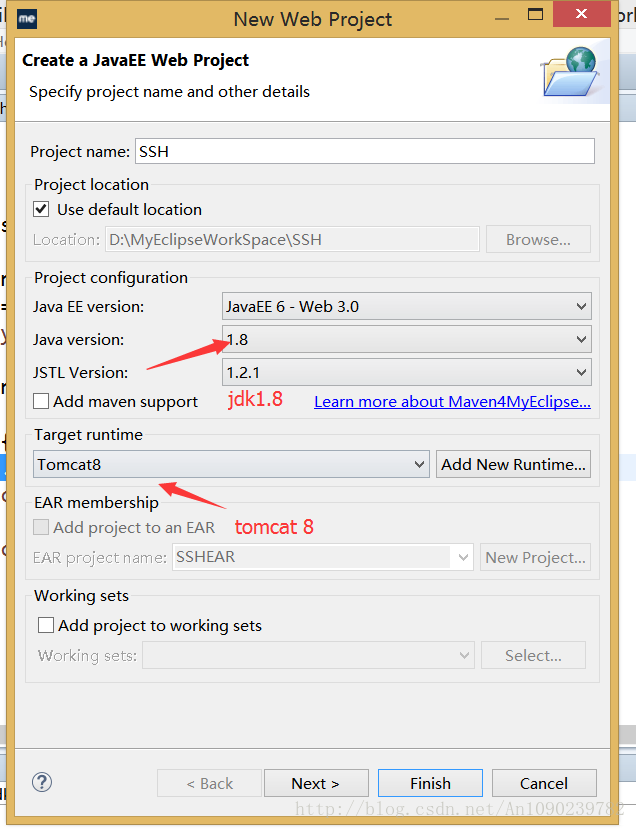
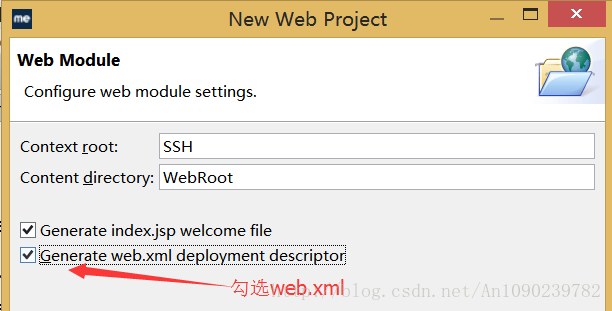
首先,打开你的MyEclipse 2015;创建一个新的Web Project项目;其中选择jdk版本为1.8;Tomcat版本为tomcat8;next–>next 勾选web.xml配置文件,finish;
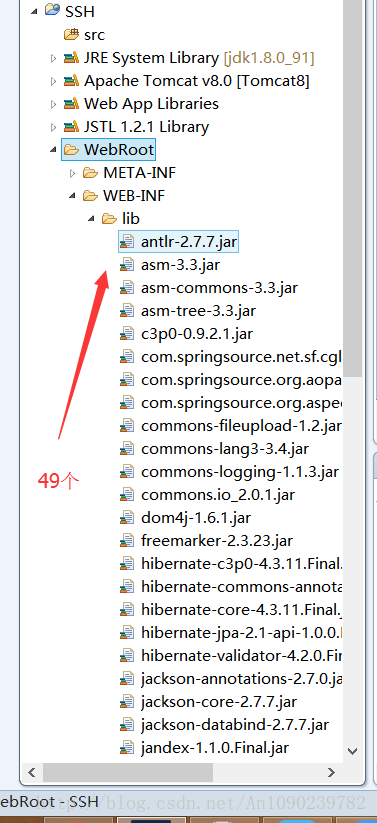
然后需要导入Jar包,将Jar包全部导入至lib文件夹下;(如需Jar包可加QQ:1090239782,可分享与您);
打开web.xml配置Spring,Struts 以及中文乱码解决;该部分直接附上源码:
<?xml version="1.0" encoding="UTF-8"?>

<web-app xmlns:xsi="http://www.w3.org/2001/XMLSchema-instance" xmlns="http://java.sun.com/xml/ns/javaee" xsi:schemaLocation="http://java.sun.com/xml/ns/javaee http://java.sun.com/xml/ns/javaee/web-app_3_0.xsd" id="WebApp_ID" version="3.0">

  <display-name>SSH</display-name>

  <welcome-file-list>

    <welcome-file>index.html</welcome-file>

    <welcome-file>index.htm</welcome-file>

    <welcome-file>index.jsp</welcome-file>

    <welcome-file>default.html</welcome-file>

    <welcome-file>default.htm</welcome-file>

    <welcome-file>default.jsp</welcome-file>

  </welcome-file-list>

  <!-- 配置监听器 -->

    <context-param>

        <!-- 上下文配置路径 -->

        <param-name>contextConfigLocation</param-name>

        <!-- 访问spring配置信息 -->

        <param-value>classpath:applicationContext.xml</param-value>

    </context-param>

    <!-- 配置spring启动listener入口 -->

    <listener>

        <listener-class>org.springframework.web.context.ContextLoaderListener</listener-class>

    </listener>

    <!-- 中文乱码解决 -->

    <filter>

        <filter-name>EncodingFilter</filter-name>

        <filter-class>org.springframework.web.filter.CharacterEncodingFilter</filter-class>

        <init-param>

            <param-name>encoding</param-name>

            <param-value>utf-8</param-value>

        </init-param>

    </filter>

    <filter-mapping>

        <filter-name>EncodingFilter</filter-name>

        <url-pattern>/*</url-pattern>

    </filter-mapping>

    <!-- Struts 2配置信息 -->

    <filter>

        <filter-name>struts2</filter-name>

        <filter-class>org.apache.struts2.dispatcher.filter.StrutsPrepareAndExecuteFilter</filter-class>

    </filter>

      <filter-mapping>

        <filter-name>struts2</filter-name>

        <url-pattern>/*</url-pattern>

      </filter-mapping>

</web-app>
然后,配置application-Context.xml文件,注意Hibernate的版本;
数据源的配置与SSM不同;

配置 application-Context.xml文件中Hibernate的事务处理器及配置文件;附上源码:
<?xml version="1.0" encoding="UTF-8"?>

<beans xmlns="http://www.springframework.org/schema/beans"

    xmlns:xsi="http://www.w3.org/2001/XMLSchema-instance"

    xmlns:p="http://www.springframework.org/schema/p"

    xmlns:aop="http://www.springframework.org/schema/aop"

    xmlns:context="http://www.springframework.org/schema/context"

    xmlns:jee="http://www.springframework.org/schema/jee"

    xmlns:tx="http://www.springframework.org/schema/tx"

    xsi:schemaLocation="

        http://www.springframework.org/schema/aop

        http://www.springframework.org/schema/aop/spring-aop.xsd

        http://www.springframework.org/schema/beans

        http://www.springframework.org/schema/beans/spring-beans.xsd

        http://www.springframework.org/schema/context

        http://www.springframework.org/schema/context/spring-context.xsd

        http://www.springframework.org/schema/jee

        http://www.springframework.org/schema/jee/spring-jee.xsd

        http://www.springframework.org/schema/tx

        http://www.springframework.org/schema/tx/spring-tx.xsd">

    <context:component-scan base-package="com.jredu" />

    <context:property-placeholder location="classpath:jdbc.properties"/>

    <bean id="dataSource"

        class="com.mchange.v2.c3p0.ComboPooledDataSource"

        p:driverClass="${jdbc.driverClassName}"

        p:jdbcUrl="${jdbc.url}"

        p:user="${jdbc.username}"

        p:password="${jdbc.password}"

        p:initialPoolSize="${jdbc.initialSize}"

        p:maxPoolSize="${jdbc.maxActive}"/>

    <bean id="sessionFactory" class="org.springframework.orm.hibernate4.LocalSessionFactoryBean">

        <property name="dataSource" ref="dataSource"/>

        <property name="hibernateProperties">

            <props>

                <prop key="show_sql">true</prop>

                <prop key="hibernate.dialect">org.hibernate.dialect.Oracle10gDialect</prop>

                <prop key="hbm2ddl.auto">update</prop>

                <prop key="hibernate.temp.use_jdbc_metadata_defaults">false</prop>

            </props>

        </property>

        <!-- Hibernate的映射文件 -->

        <property name="mappingLocations">

            <list>

                <value>classpath:com/jredu/entity/*.hbm.xml</value>

            </list>

        </property>

    </bean>

    <!-- 与SSM框架的区别所在 -->

    <bean id="transactionManager"

        class="org.springframework.orm.hibernate4.HibernateTransactionManager">

        <property name="sessionFactory" ref="sessionFactory"/>

    </bean>

    <tx:advice id="txAdvice" transaction-manager="transactionManager">

        <tx:attributes>

            <tx:method name="add*" propagation="REQUIRED" />

            <tx:method name="append*" propagation="REQUIRED" />

            <tx:method name="insert*" propagation="REQUIRED" />

            <tx:method name="save*" propagation="REQUIRED" />

            <tx:method name="update*" propagation="REQUIRED" />

            <tx:method name="modify*" propagation="REQUIRED" />

            <tx:method name="edit*" propagation="REQUIRED" />

            <tx:method name="delete*" propagation="REQUIRED" />

            <tx:method name="remove*" propagation="REQUIRED" />

            <tx:method name="repair" propagation="REQUIRED" />

            <tx:method name="delAndRepair" propagation="REQUIRED" />

            <tx:method name="get*" propagation="SUPPORTS" />

            <tx:method name="find*" propagation="SUPPORTS" />

            <tx:method name="load*" propagation="SUPPORTS" />

            <tx:method name="search*" propagation="SUPPORTS" />

            <tx:method name="datagrid*" propagation="SUPPORTS" />

            <tx:method name="*" propagation="SUPPORTS" />

        </tx:attributes>

    </tx:advice>

    <aop:config>

        <aop:pointcut id="serviceOperation"

            expression="execution(* com.jredu.service.*.*(..))" />

        <aop:advisor advice-ref="txAdvice" pointcut-ref="serviceOperation" />

    </aop:config>

    <!-- 通过Spring来管理Action -->

    <bean id="userAction" class="com.jredu.action.UserAction"></bean>

</beans>
然后,配置JDBC;
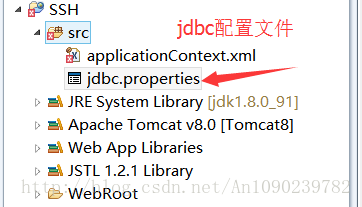
附上源码:
jdbc.driverClassName=oracle.jdbc.driver.OracleDriver

jdbc.url=jdbc\:oracle\:thin\:@localhost\:1521\:XXXX

jdbc.username=XXXXXXXX

jdbc.password=XXXXXXX

jdbc.initialSize=0

jdbc.maxActive=20

jdbc.maxIdle=20

jdbc.minIdle=1

jdbc.maxWait=60000
配置Struts 配置文件及其国际化配置;
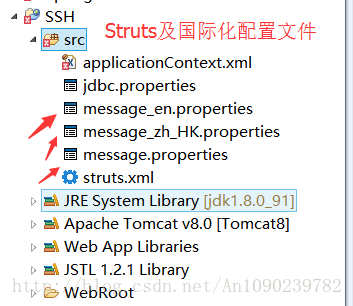
附上Struts配置文件源码:
<?xml version="1.0" encoding="UTF-8" ?>

<!DOCTYPE struts PUBLIC

    "-//Apache Software Foundation//DTD Struts Configuration 2.5//EN"

    "http://struts.apache.org/dtds/struts-2.5.dtd">

<struts>

    <!-- struts默认样式是xhtml -->

    <!-- <constant name="struts.ui.theme" value="simple"/> -->

    <constant name="struts.enable.DynamicMethodInvocation" value="true" />

    <!-- 设置默认资源文件 -->

    <constant name="struts.custom.i18n.resources" value="message_zh_HK"/>

    <!-- 设置编码格式 -->

    <constant name="struts.i18n.encoding" value="UTF-8"/>

    <!-- struts结合spring的配置意思是  Struts2的action由Spring来负责进行实例化  -->

    <constant name="struts.objectFactory" value="spring" />

    <!-- 创建一个default包,继承自Struts2的struts-default包 -->

    <package name="default" namespace="/" extends="struts-default">

    </package>

</struts>
配置log4j 日志文件(log4j.properties)
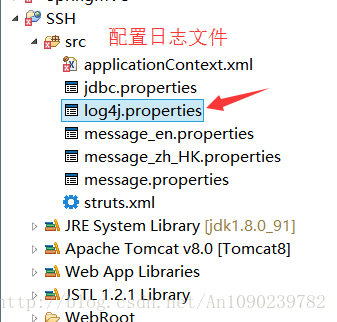
至此,完整的SSH框架已经搭建完毕,下篇博客,就介绍一个SSH框架完成一个小的登录功能;
SSH框架搭建详细步骤整理的更多相关文章
- 转 SSH框架搭建详细图文教程
原址:http://blog.sina.com.cn/s/blog_a6a6b3cd01017c57.html 什么是SSH? SSH对应 struts spring hibernatestruts ...
- SSH框架搭建详细图文教程(转)
这篇文章看的我醍醐灌顶的感觉,比之前本科时候学习的SSH架构 要清晰数倍 非常感觉这篇博主的文章 文章链接为:http://blog.sina.com.cn/s/blog_a6a6b3cd01017 ...
- SSH框架搭建 详细图文教程
转载请标明原文地址 一.什么是SSH? SSH是JavaEE中三种框架(Struts+Spring+Hibernate)的集成框架,是目前比较流行的一种Java Web开源框架. SSH主要用于Jav ...
- SSH框架搭建详细图文教程
转载请标明原文地址:http://www.cnblogs.com/zhangyukof/p/6762554.html 一.什么是SSH? SSH是JavaEE中三种框架(Struts+Spring+H ...
- Python3之Django框架搭建详细步骤
安装Django 自行下载的pip,可执行如下命令: pip install django 下载python3版本可以自带pip3 ,命令如下: pip3 install django 此命令会下载d ...
- [转载]SSH框架搭建详细图文教程
http://www.cnblogs.com/hoobey/p/5512924.html
- ssh框架搭建的基本步骤(以及各部分作用)
ssh框架搭建的基本步骤(以及各部分作用) 一.首先,明确spring,struts,hibernate在环境中各自的作用. struts: 用来响应用户的action,对应到相应的类进行 ...
- SSH框架搭建步骤总结以及Hibernate二级缓存,查询缓存
二级缓存.查询缓存 一级缓存: 默认启动,生命周期是和session同步的,session独享 二级缓存: 需要加载配置信息,生命周期是和应用服务器同步,session共享 1:在hibernate. ...
- SSM、SSH框架搭建,面试点总结
文章目录 1.SSM如何搭建:三个框架的搭建: 2.SSM系统架构 3.SSM整合步骤 4.Spring,Spring MVC,MyBatis,Hibernate个人总结 5.面试资源 关于SSM.S ...
随机推荐
- TurtleBot3使用课程-第二节a(北京智能佳)
目录 1.[第3类]LRF(LDS)传感器 2 1.1 传感器包安装 2 1.1.1 传感器端口访问设置 2 1.1.2 运行hlds_laser_publisher节点 2 1.1.3 在RViz中 ...
- 写一个react hook:useLoading
在写业务的过程中,我们总是会遇到这样的需求,在请求时显示一个 loading,然后请求结束后展示数据.以一个是不是 vip 的场景为例,如果不加入 loading 状态,页面可能在未请求的时候显示非 ...
- Linux下的screen和作业任务管理
一.screen 首先介绍下screen,screen是Linux下的一个任务容器,开启了之后就可以让任务在后台执行而不会被网络中断或者是终端退出而影响到. 在Linux中有一些耗时比较久的操作(例如 ...
- Flutter 基础组件:输入框和表单
前言 Material组件库中提供了输入框组件TextField和表单组件Form. 输入框TextField 接口描述 const TextField({ Key key, // 编辑框的控制器,通 ...
- Java向指定Excel写入读取数据
今天在开发中遇到用户列表导入导出的功能实现,这里了解到使用POI函数库可以完成此任务!特此记录一下 POI Apache POI是Apache软件基金会开放的源码函数库,POI提供API给Java程序 ...
- 实现strStr
Implement strStr(). Return the index of the first occurrence of needle in haystack, or -1 if needle ...
- Netty入门一:服务端应用搭建 & 启动过程源码分析
最近周末也没啥事就学学Netty,同时打算写一些博客记录一下(写的过程理解更加深刻了) 本文主要从三个方法来呈现:Netty核心组件简介.Netty服务端创建.Netty启动过程源码分析 如果你对Ne ...
- QPinter 常用绘制图像的方法
阅读本文大概需要 3 分钟 我们在开发软件的过程中,绘制图像功能必不可少,使用 Qt 绘制图像时非常简单,只需要传递几个参数就可以实现功能,在 Qt 中绘制图像的 api有好几个 void drawI ...
- linux中进制转换
方式一:使用$[]或$(()) 格式为:$[base#number]或$((base#number)),其中base为进制,number为对应进制数. 这种方式输入2进制.16进制等,但只能输出为10 ...
- 5.2 Spring5源码--Spring AOP源码分析二
目标: 1. 什么是AOP, 什么是AspectJ 2. 什么是Spring AOP 3. Spring AOP注解版实现原理 4. Spring AOP切面原理解析 一. 认识AOP及其使用 详见博 ...