
Spring-cloud-netflix-hystrix
服务注册中心eureka-server已经搭好,并且SPRING-CLOUD-NETFLIX-EUREKA-CLIENT-APPLICATION提供一个hello服务
畏怯还编写一个eureka-client-consumer服务消费者,去消费该服务,如果在真实环境中SPRING-CLOUD-NETFLIX-EUREKA-CLIENT-APPLICATION服务挂了,就需要采用熔断机制hystrix
Hystrix特性
1.断路器机制
断路器很好理解, 当Hystrix Command请求后端服务失败数量超过一定比例(默认50%), 断路器会切换到开路状态(Open). 这时所有请求会直接失败而不会发送到后端服务. 断路器保持在开路状态一段时间后(默认5秒), 自动切换到半开路状态(HALF-OPEN). 这时会判断下一次请求的返回情况, 如果请求成功, 断路器切回闭路状态(CLOSED), 否则重新切换到开路状态(OPEN). Hystrix的断路器就像我们家庭电路中的保险丝, 一旦后端服务不可用, 断路器会直接切断请求链, 避免发送大量无效请求影响系统吞吐量, 并且断路器有自我检测并恢复的能力.
2.Fallback
Fallback相当于是降级操作. 对于查询操作, 我们可以实现一个fallback方法, 当请求后端服务出现异常的时候, 可以使用fallback方法返回的值. fallback方法的返回值一般是设置的默认值或者来自缓存.
3.资源隔离
在Hystrix中, 主要通过线程池来实现资源隔离. 通常在使用的时候我们会根据调用的远程服务划分出多个线程池. 例如调用产品服务的Command放入A线程池, 调用账户服务的Command放入B线程池. 这样做的主要优点是运行环境被隔离开了. 这样就算调用服务的代码存在bug或者由于其他原因导致自己所在线程池被耗尽时, 不会对系统的其他服务造成影响. 但是带来的代价就是维护多个线程池会对系统带来额外的性能开销. 如果是对性能有严格要求而且确信自己调用服务的客户端代码不会出问题的话, 可以使用Hystrix的信号模式(Semaphores)来隔离资源.
构建服务熔断项目
一、新建module,勾选springcloud对应模块
pom.xml
<?xml version="1.0" encoding="UTF-8"?>

<project xmlns="http://maven.apache.org/POM/4.0.0" xmlns:xsi="http://www.w3.org/2001/XMLSchema-instance"

         xsi:schemaLocation="http://maven.apache.org/POM/4.0.0 https://maven.apache.org/xsd/maven-4.0.0.xsd">

    <modelVersion>4.0.0</modelVersion>

    <parent>

        <groupId>lf.liyouyou</groupId>

        <artifactId>spring-cloud-netflix-demo</artifactId>

        <version>1.0-SNAPSHOT</version>

    </parent>

    <groupId>lf.youyou</groupId>

    <artifactId>spring-cloud-eureka-client-consumer</artifactId>

    <version>0.0.1-SNAPSHOT</version>

    <name>spring-cloud-eureka-client-consumer</name>

    <description>Demo project for Spring Boot</description>

    <dependencies>

        <dependency>

            <groupId>org.springframework.boot</groupId>

            <artifactId>spring-boot-starter-web</artifactId>

        </dependency>

        <dependency>

            <groupId>org.springframework.cloud</groupId>

            <artifactId>spring-cloud-starter-netflix-eureka-client</artifactId>

        </dependency>

        <dependency>

            <groupId>org.springframework.cloud</groupId>

            <artifactId>spring-cloud-starter-openfeign</artifactId>

        </dependency>

        <dependency>

            <groupId>org.springframework.boot</groupId>

            <artifactId>spring-boot-starter-test</artifactId>

            <scope>test</scope>

            <exclusions>

                <exclusion>

                    <groupId>org.junit.vintage</groupId>

                    <artifactId>junit-vintage-engine</artifactId>

                </exclusion>

            </exclusions>

        </dependency>

    </dependencies>

</project>
二、启动类添加注解
@SpringBootApplication

@EnableDiscoveryClient

@EnableFeignClients

public class SpringCloudEurekaClientConsumerApplication {

    public static void main(String[] args) {

        SpringApplication.run(SpringCloudEurekaClientConsumerApplication.class, args);

    }

}
三、编写代码
Feign接口,指定熔断类
@FeignClient(name="spring-cloud-netflix-eureka-client-application",fallback = HelloRemoteHystrix.class)

public interface HelloRemote {

    @RequestMapping(value = "/hello")

    public String hello(@RequestParam(value = "name") String name);

}
熔断类:
@Component

public class HelloRemoteHystrix implements HelloRemote{

    @Override

    public String hello(@RequestParam(value = "name") String name) {

        return "hello " +name+", this messge send failed ";

    }

}
Controller:
@RestController

public class HelloController {

    @Autowired

    HelloRemote helloRemote;

    @RequestMapping("/hello/{name}")

    public String index(@PathVariable("name") String name) {

        return helloRemote.hello(name);

    }

    @RequestMapping("/methodHystrix")

    @HystrixCommand(fallbackMethod = "methodHystrix")//方法熔断

    public String getString() {

        int i = 1/0;

        return "methodHystrix";
    }

    public String methodHystrix(){

        return "methodHystrix";
    }

}
四、配置application.properties:
spring.application.name=spring-cloud-netflix-consumer-hystrix

server.port=9091

eureka.client.service-url.defaultZone=http://localhost:8000/eureka/

feign.hystrix.enabled=true
启动项目,访问注册中心 http://localhost:8000/ 查看eureka面板(若之前项目未启动,则需要全部启动)

访问:http://localhost:9091/hello/lf
hello lf,nice to meet you!
关闭spring-cloud-netflix-eureka-client-application服务,再访问,即可看到
hello lf, this messge send failed
直接访问:http://localhost:9091/methodHystrix 方法熔断
返回:methodHystrix
spring.application.name=spring-cloud-netflix-consumer-hystrix

server.port=9091

eureka.client.service-url.defaultZone=http://localhost:8000/eureka/

feign.hystrix.enabled=true

#默认只开启了health和info,设置为*,则包含所有的web入口端点

management.endpoints.web.exposure.include=*

hystrix.dashboard.proxy-stream-allow-list=*
访问:http://localhost:9091/hello/lf
hello lf,this is first messge
关闭spring-cloud-netflix-service-application服务,再访问,即可看到
hello lf, this messge send failed
直接访问:http://localhost:9091/methodHystrix
返回:methodHystrix
输入:http://localhost:9091/hystrix 进入如下页面:

注意自己的应用是在本地还是外部,本地用http,不同版本路径不同,2.0版本路径为../actuator/hystrix.stream
输入之后点击 monitor,进入页面
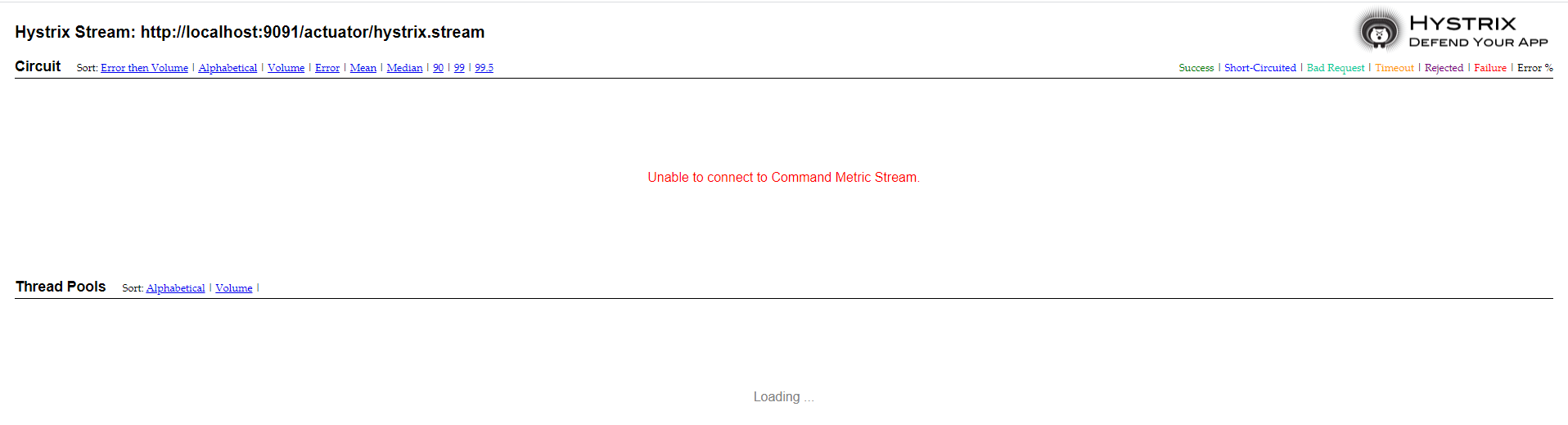
出现 Unable to connect to Command Metric Stream.显示未连接
(1)访问自己的应用服务,http://localhost:9091/actuator/hystrix.stream,显示ping,调用熔断接口http://localhost:9091/hello/lf,返回data
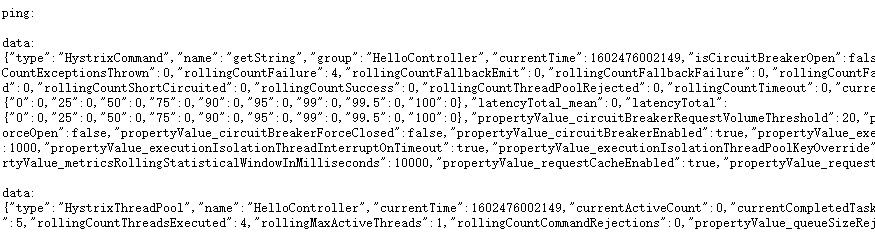
排除的代码、注解、包的问题
(2)查看debug日志,若出现
Proxy opening connection to: http://localhost:9091/actuator/hystrix.stream
WARN 6980 --- [nio-9091-exec-8] ashboardConfiguration$ProxyStreamServlet : Failed opening connection to http://localhost:9091/actuator/hystrix.stream : 404 : HTTP/1.1 404
则需要在application.properties配置中,打开actuator访问
management.endpoints.web.exposure.include=*
(3)查看debug日志,若出现
WARN 9888 --- [nio-9091-exec-3] ashboardConfiguration$ProxyStreamServlet : Origin parameter: http://localhost:9091/actuator/hystrix.stream is not in the allowed list of proxy host names.
If it should be allowed add it to hystrix.dashboard.proxyStreamAllowList.
则需要在application.properties配置中,打开代理访问
hystrix.dashboard.proxy-stream-allow-list=*
重新启动项目,重新访问,进入hystrix面板
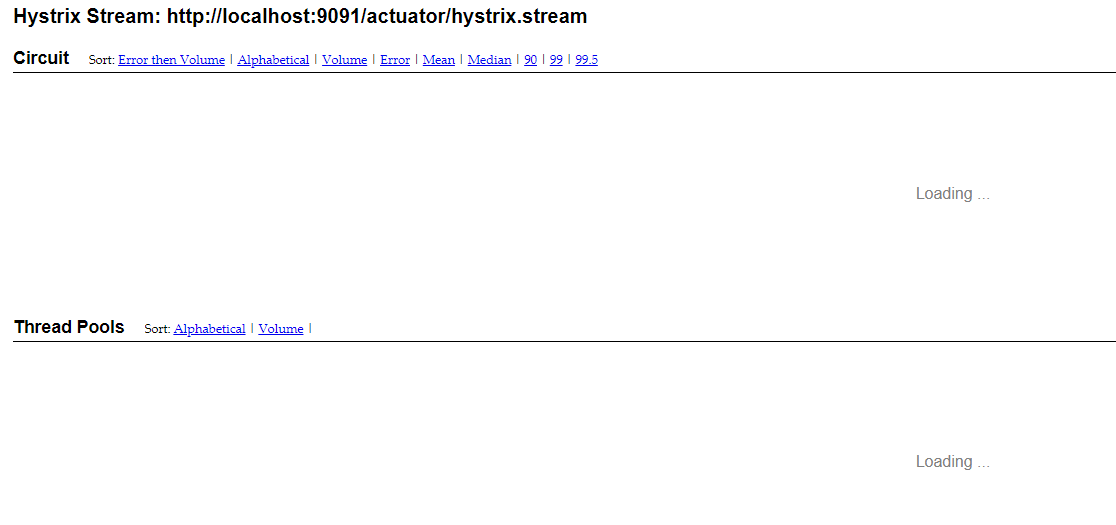
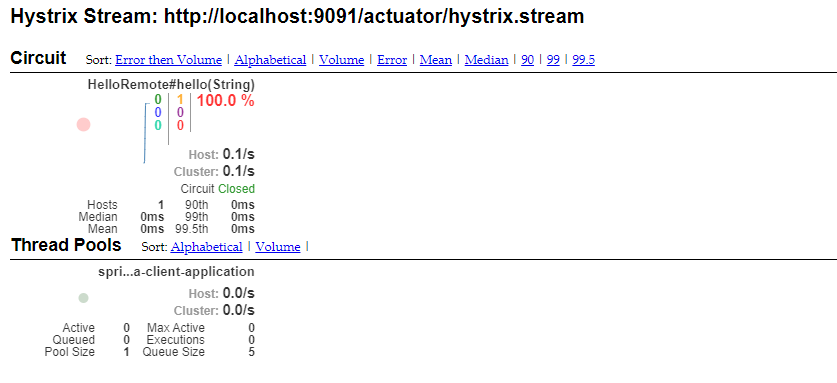
访问熔断接口,面板如下
If it should be allowed add it to hystrix.dashboard.proxyStreamAllowList.
则需要在application.properties配置中,打开代理访问
spring-cloud-netflix-consumer-hystrix
Spring-cloud-netflix-hystrix的更多相关文章
- springcloud学习04- 断路器Spring Cloud Netflix Hystrix
依赖上个博客:https://www.cnblogs.com/wang-liang-blogs/p/12072423.html 1.断路器存在的原因 引用博客 https://blog.csdn.ne ...
- Spring Cloud Netflix Hystrix介绍和使用
前面我们搭建了具有服务降级功能的Hystrix客户端,现在我们来详细了解下Hystrix的一些功能. Hystrix的意思是豪猪,大家都知道,就是长满刺的猪...实际上,它表明了该框架的主要功能:自我 ...
- Spring Cloud Netflix项目进入维护模式
任何项目都有其生命周期,Spring Could Netflix也不例外,官宣已进入维护模式,如果在新项目开始考虑技术选型时要考虑到这点风险,并考虑绕道的可能性. 原创: itmuch IT牧场 这 ...
- spring cloud连载第三篇之Spring Cloud Netflix
1. Service Discovery: Eureka Server(服务发现:eureka服务器) 1.1 依赖 <dependency> <groupId>org.spr ...
- Spring Cloud Netflix概览和架构设计
Spring Cloud简介 Spring Cloud是基于Spring Boot的一整套实现微服务的框架.他提供了微服务开发所需的配置管理.服务发现.断路器.智能路由.微代理.控制总线.全局锁.决策 ...
- 分布式微服务技术之 Spring Cloud Netflix
1 背景 Netflix 是全球十大视频网站中唯一收费站点,是美国互联网流媒体播放商,由于访问量巨大,转型为云计算公司. 由Netflix公司主持开发了一套代码框架和库Netflix OSS即open ...
- Spring Cloud之Hystrix服务保护框架
服务保护利器 微服务高可用技术 大型复杂的分布式系统中,高可用相关的技术架构非常重要. 高可用架构非常重要的一个环节,就是如何将分布式系统中的各个服务打造成高可用的服务,从而足以应对分布式系统环境中的 ...
- SpringCloud学习笔记(2)----Spring Cloud Netflix之Eureka的使用
1. Spring Cloud Netflix Spring Cloud Netflix 是Spring Cloud 的核心子项目,是对Netflix公司一系列开源产品的封装.它为Spring Bo ...
- 基于Spring Cloud Netflix的TCC柔性事务和EDA事件驱动示例
Solar Spring Cloud为开发者提供了快速构建分布式系统中的一些常见工具,如分布式配置中心,服务发现与注册中心,智能路由,服务熔断及降级,消息总线,分布式追踪的解决方案等. 本次实战以模拟 ...
- Spring Cloud 学习--Hystrix应用
上一篇介绍了Hystrix基本功能和单独使用的方式,今天继续学习如何将Hystrix融入SpringCloud组件中去. 在Ribbon上使用熔断器 在 pom.xml 文件中引入 hystrix 的 ...
随机推荐
- CodeMonkey少儿编程第2章 turnTo对象
目标 了解对象的概念 了解方法与对象的关系 掌握turnTo指令的用法 在开始本章的学习之前,我们先来复习一下上一章的知识点. 在第1章中,我们学会了在这个游戏中最简单的两个指令. step x 其中 ...
- 拒演"拼命工作"的苦情戏,如何更聪明地提高工作效率?
前几天PDD的事情又把互联网打工人的工作状态推向了大众视野,引起了大家的口诛笔伐.但是目前来看这种愤慨终究是暂时的,作用甚微.在大环境短时间无法改变的前提下,想想如何应对,或许比在网上愤愤不平破口大骂 ...
- JVM有哪些垃圾回收器
JVM 的垃圾回收器 目录 JVM 的垃圾回收器 经典垃圾收集器 Serial 收集器 ParNew 收集器 Parallel Scavenge 收集器 Serial Old 收集器 Parallel ...
- 2、fork函数与进程ID
1. fork函数 fork函数用于克隆一份当前的进程资源,调用fork函数之后,进程一分为二,并且两个进程的资源是一样的(只是资源内容完全一样,并不是同一份资源).fork函数的函数原型为:pid_ ...
- cfsetispeed、cfsetospeed和cfsetspeed探究
在我https://www.cnblogs.com/Suzkfly/p/11055532.html这篇博客中有一个疑问,就是在串口设置波特率的域中,没有将输入输出波特率分开,那为什么会有几个不同的设置 ...
- 解决windows与虚拟机ubuntu互相ping不通的问题
工作中经常用Ubuntu开发,而Ubuntu是安装在虚拟机中的,在弄网络开发的时候经常会用windows下的网络调试工具与Ubuntu中写好的网络程序进行通信,首先要保证windows与Ubuntu能 ...
- Tensorflow-交叉熵&过拟合
交叉熵 二次代价函数 原理 缺陷 假如我们目标是收敛到0.A点为0.82离目标比较近,梯度比较大,权值调整比较大.B点为0.98离目标比较远,梯度比较小,权值调整比较小.调整方案不合理. 交叉熵代价函 ...
- smtplib.py
def _print_debug(self, *args): if self.debuglevel > 1: print(datetime.datetime.now().time(), *arg ...
- Linux 从4.12内核版本开始移除了 tcp_tw_recycle 配置。 tcp_max_tw_buckets TIME-WAIT 稳定值
被抛弃的tcp_recycle_小米云技术-CSDN博客_sysctl: cannot stat /proc/sys/net/ipv4/tcp_tw_recy https://blog.csdn.ne ...
- win api 窗口操作-窗口置顶与寻找与激活
https://docs.microsoft.com/en-us/windows/win32/api/winuser/nf-winuser-setwindowpos https://docs.micr ...