
Java-GUI基础(三)java.swing
1. 简介
swing与awt:可以认为awt是swing的前身,awt即Abstrace Window Toolkit抽象窗口工具包,swing是为了解决awt在开发中的问题而开发的,是awt的改良。
因此,在功能上swing比awt更加全面,而使用方法并未太大的差别,swing中的类名称通常在awt的类名称前添加字母J,如Frame-->JFrame。
本文对swing中以下部分进行解释:
窗口/面板、弹窗、标签、面板、按钮、列表、文本(框/域,密码框)
2. 窗口、面板
建立
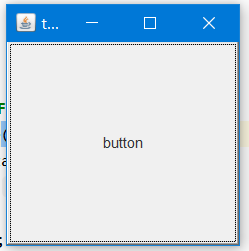
JFrame、JPanel,在构建窗口中一般使用init()方法进行定义,init()只是一个普通方法,但是使用者比较广泛,就如同初学者多使用helloWorld()方法一样
此外,在swing中需要添加Container对象用以添加组件或相关设置
swing中提供了默认的关闭事件(开发者也可以自己编写监听器)
public class JFrameDemo{

         public static void main(String[] args){

                 new JFrameDemo.init();

                 //静态方法不能调用非静态方法--创建对象生成窗口

         }

         public void init(){

                 JFrame jframe = new JFrame("titleForJFrame");

                 Container container = jframe.getContentPane();//获取容器对象

                 jframe.setDefaultCloseOperation(WindowConstants.EXIT_ON_CLOSE);

                 jframe.setBounds(200,200,200,200);

                 jframe.setVisible(true);

                 Button button = new Button("button");

                 container.add(button);

          }

}
除上述外还可通过继承JFrame类来实现
public class JFrameDemo{

         public static void main(String[])args{

                 new MyFrame();

         }

}

class MyJFrame extends JFrame{

         public MyJFrame(){

                 setBounds(200,200,200,200);

                 setVisible(true);

                 Container container = getContentPane();

                 Button button = new Button("button");

                 container.add(button);

         }

}
布局
除直接对容器的布局管理之外还可在组件上设置
JLabel jLabel = new JLabel("label");

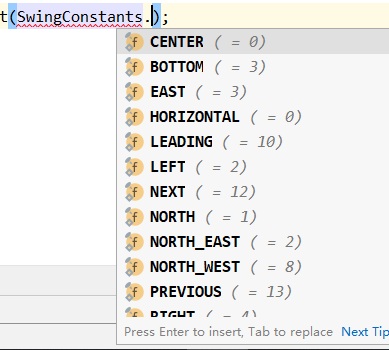
jLabel.setHorizontalAlignment(SwingConstants.CENTER);
3. 弹窗
JDialog,弹窗
与其他窗口一样是在事件发生时显示出来的新窗口,JFrame视为主窗口的话JDialog可视为副窗口
默认具有关闭事件,不用单独写

public class DialogDemo{

    public static void main(String[] args){

        new MainJFrame().init();

    }

}

class MainJFrame extends JFrame {

    public void init(){

        setBounds(200,200,200,200);

        setVisible(true);

        setDefaultCloseOperation(WindowConstants.EXIT_ON_CLOSE);

        Container container = getContentPane();

        container.setLayout(null);

        JButton jButton = new JButton("button");

        jButton.setBounds(20,20,150,150);

        jButton.addActionListener(new ActionListener(){

            @Override

            public void actionPerformed(ActionEvent e){

                new MyDialog();

            }

        });

        container.add(jButton);

    }

}

class MyDialog extends JDialog{

    public MyDialog(){

        setBounds(300,300,100,100);

        JLabel jLabel = new JLabel("label");

        setVisible(true);

    }

}
4. 标签
JLabel,主体为一串文字,可加上图标,即Icon、ImageIcon
标签:
public class JLabelDemo {

    public static void main(String[] args) {

        new MyJFrameDemo();

    }

}

class MyJFrameDemo extends JFrame{

    public MyJFrameDemo(){

        setBounds(200,200,200,200);

        setVisible(true);

        JLabel jLabel = new JLabel("this is a label");

        jLabel.setBackground(Color.BLUE);

        Container container = getContentPane();

        container.add(jLabel);

        container.setBackground(Color.CYAN);

        setDefaultCloseOperation(WindowConstants.EXIT_ON_CLOSE);

    }

}
获取、添加标签
图形图标
public class Demo {

    public static void main(String[] args) {

        new MyFrame01().init();

    }

}

class MyIcon implements Icon {

    private int width, height;

    public MyIcon() {

    }

    public MyIcon(int width, int height) {

        this.height = height;

        this.width = width;

    }

    @Override

    public void paintIcon(Component c, Graphics g, int x, int y) {

        g.fillOval(x, y, width, height);

    }

    @Override

    public int getIconWidth() {

        return width;

    }

    @Override

    public int getIconHeight() {

        return height;

    }

}

class MyFrame01 extends JFrame {

    public void init() {

        setBounds(200, 200, 200, 200);

        setVisible(true);

        Container container = getContentPane();

        JLabel jLabel = new JLabel("this ia a label", new MyIcon(15,15), SwingConstants.CENTER);

        container.add(jLabel);

    }

}
图片图标
public class Demo {

    public static void main(String[] args) {

        new MyJFrameDemo();

    }

}

class MyJFrameDemo extends JFrame {

    public MyJFrameDemo(){

        URL url = MyJFrameDemo.class.getResource("wx.jpg");

        //获取图片地址

        ImageIcon imageIcon = new ImageIcon(url);

        //将图片地址加载至图片图标

        setBounds(200,200,200,200);

        setVisible(true);

        JLabel jLabel = new JLabel("this is a label");

        jLabel.setIcon(imageIcon);

        jLabel.setHorizontalAlignment(SwingConstants.WEST);

        //以上上句等价于:JLabel jLabel = new JLabel("this is a label",imageIcon,SwingConstants.CENTER);

        Container container = getContentPane();

        container.add(jLabel);

        container.setBackground(Color.CYAN);

        setDefaultCloseOperation(WindowConstants.EXIT_ON_CLOSE);

    }

}
5. 面板
实现原理与awt基本一致,分为普通面板和滚动面板
基本面板
JPanel
public class Demo {
    public static void main(String[] args) {
        new JPanelDemo01().init();
    }
}
class JPanelDemo extends JFrame{
    public void init(){
        setBounds(200,200,200,200);
        setVisible(true);
        setDefaultCloseOperation(WindowConstants.EXIT_ON_CLOSE);
        Container container = getContentPane();
        JPanel jPanel = new JPanel();
        JButton jButton1 = new JButton("1");
        JButton jButton2 = new JButton("2");
        JButton jButton3 = new JButton("3");
        JButton jButton4 = new JButton("4");
        JButton jButton5 = new JButton("5");
        JButton jButton6 = new JButton("6");
        jPanel.setLayout(new GridLayout(2,3,10,10));
        jPanel.add(jButton1);
        jPanel.add(jButton2);
        jPanel.add(jButton3);
        jPanel.add(jButton4);
        jPanel.add(jButton5);
        jPanel.add(jButton6);
        container.add(jPanel);
    }
}
滚动面板
JScrollPane
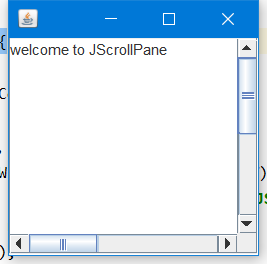
当文本超过窗口大小是会有滚动条
public class Demo {

    public static void main(String[] args) {

        new MyFrameDemo().init();

    }

}

class MyFrameDemo extends JFrame {

    public void init() {

        Container container = getContentPane();

        setVisible(true);

        setBounds(200, 200, 200, 200);

        setDefaultCloseOperation(WindowConstants.EXIT_ON_CLOSE);

        JTextArea jTextArea = new JTextArea("welcome to JScrollPane", 20, 50);

        JScrollPane jScrollPane = new JScrollPane(jTextArea);

        container.add(jScrollPane);

    }

}
6. 按钮
普通按钮,图片按钮,单选按钮,多选按钮
普通按钮 JButton
public class Demo {

    public static void main(String[] args) {

        new JButtonDemo01().init();

    }

}

class JButtonDemo01 extends JFrame{

    public void init(){

        setBounds(200,200,200,200);

        setDefaultCloseOperation(WindowConstants.EXIT_ON_CLOSE);

        setVisible(true);

        JButton jButton1 = new JButton("button");

        JButton jButton2 = new JButton("button");

        JButton jButton3 = new JButton("button");

        JButton jButton4 = new JButton("button");

        JButton jButton5 = new JButton("button");

        Container container = getContentPane();

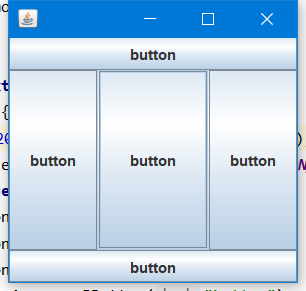
        container.add(jButton1,BorderLayout.WEST);

        container.add(jButton2,BorderLayout.SOUTH);

        container.add(jButton3,BorderLayout.NORTH);

        container.add(jButton4,BorderLayout.CENTER);

        container.add(jButton5,BorderLayout.EAST);

    }

}
图片按钮
public class ButtonDemo extends JFrame {

    public ButtonDemo(){

        //get container

        Container container = getContentPane();

        URL url = ButtonDemo.class.getResource("wx.jpg");

        Icon icon = new ImageIcon(url);

        //put this icon on the button

        JButton jButton = new JButton();

        jButton.setIcon(icon);

        //setup the tip text (display when mouse stay on it)

        jButton.setToolTipText("this is a pic-button");

        container.add(jButton);

        setBounds(200,200,200,200);

        setBackground(Color.GREEN);

        setVisible(true);

        setDefaultCloseOperation(WindowConstants.EXIT_ON_CLOSE);

    }

    public static void main(String[] args) {

        new ButtonDemo();

    }

}
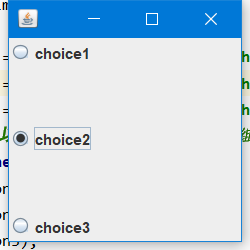
单选按钮
public class Demo extends JFrame {

    public Demo(){

        Container container = getContentPane();

        URL url = Demo.class.getResource("wx.jpg");

        ImageIcon imageIcon = new ImageIcon(url);

        //single choice outline

        //JRadioButton的声明和添加偶尔会出现一些意外,原因不明

        JRadioButton jRadioButton1 = new JRadioButton("choice1");

        JRadioButton jRadioButton2 = new JRadioButton("choice2");

        JRadioButton jRadioButton3 = new JRadioButton("choice3");

        //由于单选框只能选择一个,所以我们通常将其分组,就是一个组只能选一个,如果不分组的话三个都可以被选中,即形式上变成了多选框

        ButtonGroup buttonGroup = new ButtonGroup();

        buttonGroup.add(jRadioButton1);

        buttonGroup.add(jRadioButton2);

        buttonGroup.add(jRadioButton3);

        //add button

        container.add(jRadioButton1,BorderLayout.NORTH);

        container.add(jRadioButton2,BorderLayout.CENTER);

        container.add(jRadioButton3,BorderLayout.SOUTH);

        setVisible(true);

        setBounds(200,200,200,200);

        setDefaultCloseOperation(WindowConstants.EXIT_ON_CLOSE);

    }

    public static void main(String[] args) {

        new SingleButtonDemo();

    }

}
多选按钮
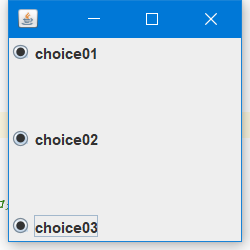
JCheckBox
public class JCheckBoxDemo extends JFrame {

    public JCheckBoxDemo(){

        JCheckBox jCheckBox1 = new JCheckBox("choice01");

        JCheckBox jCheckBox2 = new JCheckBox("choice02");

        JCheckBox jCheckBox3 = new JCheckBox("choice03");

        //added into container

        container.add(jCheckBox1,BorderLayout.SOUTH);

        container.add(jCheckBox2,0);

        container.add(jCheckBox3,"North");

        //按钮位置设定的三种写法

        setVisible(true);

        setBounds(200,200,200,200);

        setDefaultCloseOperation(WindowConstants.EXIT_ON_CLOSE);

    }

    public static void main(String[] args) {

        new JCheckBoxDemo();

    }

}
6. 列表
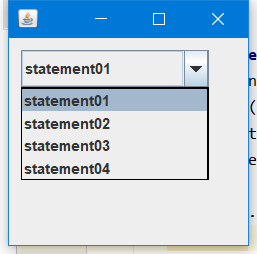
下拉框 JComBox
public class Demo {

    public static void main(String[] args) {

        new JComBox().init();

    }

}

class JComBox extends JFrame{

    public void init(){

        setBounds(200,200,200,200);

        setDefaultCloseOperation(WindowConstants.EXIT_ON_CLOSE);

        setVisible(true);

        Container container = getContentPane();

        container.setLayout(null);

        JComboBox jComboBox = new JComboBox();

        jComboBox.setToolTipText("this is a ComBox");

        jComboBox.addItem("statement01");

        jComboBox.addItem("statement02");

        jComboBox.addItem("statement03");

        jComboBox.addItem("statement04");

        jComboBox.setLocation(10,10);

        jComboBox.setSize(150,30);

        container.add(jComboBox);

    }

}
列表框 JList
public class Demo {

    public static void main(String[] args) {

        new JListDemo().init();

    }

}

class JListDemo extends JFrame {

    public void init() {

        setVisible(true);

        setBounds(200, 200, 200, 200);

        setDefaultCloseOperation(WindowConstants.EXIT_ON_CLOSE);

        Container container = getContentPane();

        container.setBackground(Color.BLACK);

        container.setLayout(null);

        setResizable(false);

        String[] str = {"statement01", "statement02", "statement03", "statement04"};

        JList jList = new JList(str);

        jList.setBackground(Color.CYAN);

        jList.setSize(150,80);

        jList.setLocation(20,20);

        container.add(jList);

    }

}

7. 文本
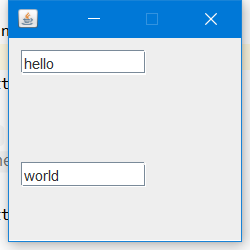
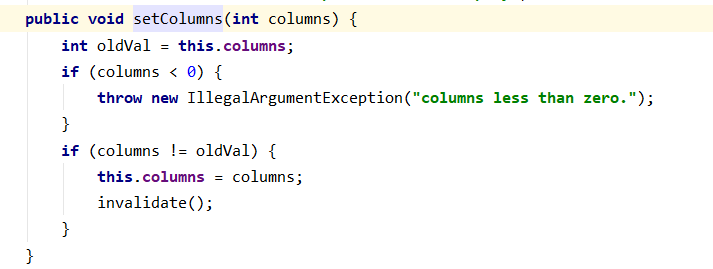
文本框 JTextField
public class Demo {

    public static void main(String[] args) {

        new JTextFieldDemo().init();

    }

}

class JTextFieldDemo extends JFrame{

    public void init(){

        setBounds(200,200,200,200);

        setVisible(true);

        setDefaultCloseOperation(WindowConstants.EXIT_ON_CLOSE);

        setResizable(false);

        Container container = getContentPane();

        container.setLayout(null);

        JTextField jTextField01 = new JTextField();

        jTextField01.setText("hello");

        jTextField01.setLocation(10,10);

        jTextField01.setSize(100,20);

        jTextField01.setColumns(10);

        JTextField jTextField02 = new JTextField();

        jTextField02.setText("world");

        jTextField02.setLocation(10,100);

        jTextField02.setSize(100,20);

        jTextField02.setColumns(10);

        container.add(jTextField01,BorderLayout.NORTH);

        container.add(jTextField02,BorderLayout.SOUTH);

    }

}
文本域
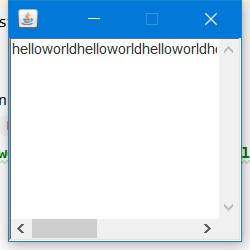
TextArea
public class Demo {

    public static void main(String[] args) {

        new JTextAreaDemo().init();

    }

}

class JTextAreaDemo extends JFrame {

    public void init() {

        setBounds(200, 200, 200, 200);

        setDefaultCloseOperation(WindowConstants.EXIT_ON_CLOSE);

        setVisible(true);

        setResizable(false);

        Container container = getContentPane();

        TextArea jTextArea = new TextArea(20,50);

        jTextArea.setText("helloworldhelloworldhelloworldhelloworldhelloworldhelloworldhelloworldhelloworld");

        container.add(jTextArea);

    }

}
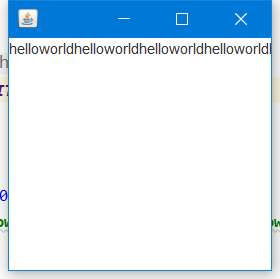
JTextArea
public class Demo {

    public static void main(String[] args) {

        new JTextAreaDemo().init();

    }

}

class JTextAreaDemo extends JFrame {

    public void init() {

        setBounds(200, 200, 200, 200);

        setDefaultCloseOperation(WindowConstants.EXIT_ON_CLOSE);

        setVisible(true);

        setResizable(true);

        Container container = getContentPane();

        JTextArea jTextArea = new JTextArea(20,50);

        jTextArea.setText("helloworldhelloworldhelloworldhelloworldhelloworldhelloworldhelloworldhelloworld");

        container.add(jTextArea);

    }

}
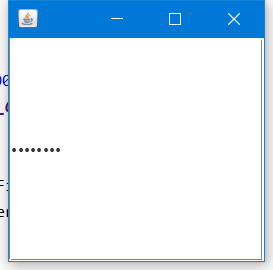
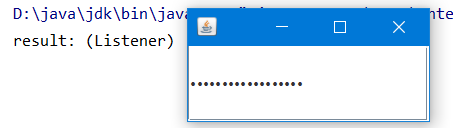
密码框 JPasswordField
public class Demo {

    public static void main(String[] args) {

        new JPasswordFieldDemo();

    }

}

class JPasswordFieldDemo extends JFrame{

    public JPasswordFieldDemo(){

        setBounds(200,200,200,200);

        setDefaultCloseOperation(WindowConstants.EXIT_ON_CLOSE);

        setVisible(true);

        Container container = getContentPane();

        JPasswordField jPasswordField = new JPasswordField();

        jPasswordField.addActionListener(new MyListener000());

        container.add(jPasswordField);

    }

}

class MyListener000 implements ActionListener{

    @Override

    public void actionPerformed(ActionEvent e) {

        String str = e.getActionCommand();

        System.out.println(str);

    }

}
Java-GUI基础(三)java.swing的更多相关文章
- 浅谈JAVA GUI中,AWT与Swing的区别、联系及优缺点
浅谈JAVA GUI中,AWT与Swing的区别.联系及优缺点 A.区别 1.发布的时间 AWT是在JDK 1.0版本时提出的 Swing是在AWT之后提出的(JAVA 2) 2. ”重量” AWT是 ...
- Java GUI编程中AWT/swing/SWT的优缺点
http://www.cnblogs.com/dugang/archive/2010/10/22/1858478.html AWT AWT是Abstract Window Toolkit(抽象窗口工具 ...
- Java语言基础及java核心
一.Java语言特点 1. 简单 2. 面向对象 3. 分布式 4. 健壮 5. 安全 6. 中性架构跨平台 7. 超强的可移植性 8. 高性能 9. 多线程 二.java的环境变量 JAVA_HOM ...
- Java 数组基础,java.util.Arrays
定义数组 方式1(推荐,更能表明数组类型) 方式2(同C语言) 方式3定义时直接初始化 数组运用基础 数组长度 equals() 数组元素不为基本数据类型时 二维数组 二维数组基础 变长的二维数组 j ...
- java线程基础知识----java线程模型
转载自http://www.cnblogs.com/nexiyi/p/java_memory_model_and_thread.html 1. 概述 多任务和高并发是衡量一台计算机处理器的能力重要指标 ...
- 【Java并发基础】Java内存模型解决有序性和可见性
前言 解决并发编程中的可见性和有序性问题最直接的方法就是禁用CPU缓存和编译器的优化.但是,禁用这两者又会影响程序性能.于是我们要做的是按需禁用CPU缓存和编译器的优化. 如何按需禁用CPU缓存和编译 ...
- 【Java并发基础】Java线程的生命周期
前言 线程是操作系统中的一个概念,支持多线程的语言都是对OS中的线程进行了封装.要学好线程,就要搞清除它的生命周期,也就是生命周期各个节点的状态转换机制.不同的开发语言对操作系统中的线程进行了不同的封 ...
- Java 语言基础 (初识Java语言, 变量和数据类型, 运算符, 流程控制语句, 数组)
初始 Java 语言 Java SE -- Java Platform, Standard Edition 是 Java 平台的基础 Java SE 以前称为 J2SE, 可以编写桌面应用和基于 we ...
- Java 学习笔记 (三) Java 日期类型
以下内容摘自: https://www.cnblogs.com/crazylqy/p/4172324.html import java.sql.Timestamp; import java.text ...
- java线程基础知识----java daemon线程
java线程是一个运用很广泛的重点知识,我们很有必要了解java的daemon线程. 1.首先我们必须清楚的认识到java的线程分为两类: 用户线程和daemon线程 A. 用户线程: 用户线程可以简 ...
随机推荐
- VARCHART XGantt如何计算截止日期
甘特图从1998年的第一个商用版本开始就致力于计划编制和项目管理方面控件的研究和开发,经过20多年的积累和沉淀,目前可为软件开发商和最终用户提供最顶级的计划编制和项目管理的控件产品,帮助用户快速的整合 ...
- JavaScript函数报错SyntaxError: expected expression, got ';'
故事背景:编写Javaweb项目,在火狐浏览器下运行时firebug报错SyntaxError: expected expression, got ';'或者SyntaxError: expected ...
- 085 01 Android 零基础入门 02 Java面向对象 01 Java面向对象基础 02 构造方法介绍 04 构造方法调用
085 01 Android 零基础入门 02 Java面向对象 01 Java面向对象基础 02 构造方法介绍 04 构造方法调用 本文知识点:构造方法调用 说明:因为时间紧张,本人写博客过程中只是 ...
- 062 01 Android 零基础入门 01 Java基础语法 07 Java二维数组 01 二维数组应用
062 01 Android 零基础入门 01 Java基础语法 07 Java二维数组 01 二维数组应用 本文知识点:二维数组应用 二维数组的声明和创建 ? 出现空指针异常 数组的名字指向数组的第 ...
- 01 . OpenResty简介部署,优缺点,压测,适用场景及用Lua实现服务灰度发布
简介 OpenResty 是一个基于 Nginx 与 Lua 的高性能 Web 平台,其内部集成了大量精良的 Lua 库.第三方模块以及大多数的依赖项.用于方便地搭建能够处理超高并发.扩展性极高的动态 ...
- 【记】《.net之美》之读书笔记(二) C#中的泛型
前言 上一篇读书笔记,很多小伙伴说这本书很不错,所以趁着国庆假期,继续我的读书之旅,来跟随书中作者一起温习并掌握第二章的内容吧. 一.理解泛型 1.为什么要使用泛型?-----通过使用泛型,可以极大地 ...
- ASP。NET Core Blazor CRUD使用实体框架和Web API
下载source code - 1.7 MB 介绍 *请查看我的Youtube视频链接来学习ASP.NET Core Blazor CRUD使用实体框架和Web API. 在本文中,我们将了解如何为A ...
- Java变量命名前俩个字母仅含有一个大写字母的坑
背景 前几周在做项目fetch切换,即将HttpUtils调用改成使用Feign调用.大概代码如下: // 原代码 String resultJson = HttpUtil.get(url + &qu ...
- RFC 8684---TCP Extensions for Multipath Operation with Multiple Addresses
https://datatracker.ietf.org/doc/rfc8684/?include_text=1 TCP Extensions for Multipath Operation with ...
- [wxpusher]分享一个服务器推送消息到微信上的小工具,可以用于微信推送提醒和告警。
背景 作为一个程序员,业余搞点自己的东西很正常,一般程序员都会有一两台自己的服务器,谁叫今天xx云搞活动,明天yy云搞活动呢. 自家的服务器用来跑爬虫,跑博客,或者跑一些个人业务,但当服务有新状态,抢 ...