
【MVC】 文件及URL 的整理
我们平时在做Asp.Net MVC(以下就简称mvc)项目的时候,页面文件结构都用了“/Views/Controllers/page.aspx”,而把一些PartialView呢放在/Views/Shared 目录下面,但如果PartialView越来越多了呢。。。。如果其中还混杂着几个MasterPage,几个Error.aspx。。。。这个目录看起来就。。。。。
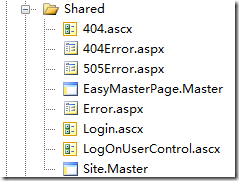
O my lady gaga!忒难看了,如果多了以后那更难看了。。。。。
为了看起来好看点,我准备分目录存放,我的目标是:
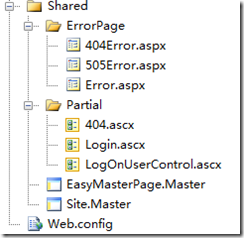
打开Home\Index.asp文件,放一个Login的PartialView吧。先运行一下看看吧。。。一定肯定以及确定不能运行,因为我们的mvc根本没有找到所需的文件,错误信息“The partial view 'xxx' was not found”。
我们知道mvc在查找文件的时候,会到2个目录下查找,一个是Controller目录,一个就是Shared目录,寻找Action.aspx或者Action.ascx,我们看下源代码(我下载的是asp.net mvc rc2),通过查看源代码,得知查找View或者PartialView都是通过IViewEngine.FindView和IViewEngine.FindPartialView来查找的。通过静态类:ViewEngines中的Engines,递归寻找,如果找到就显示,如果没有找到就报异常了。
ViewEngines.Engines.Add(new WebFormViewEngine
{ViewLocationFormats = new string[]
{"~/Views/Shared/Error/{0}.aspx"},
PartialViewLocationFormats = new string[]
{"~/Views/Shared/Partial/{0}.ascx"},
MasterLocationFormats = new string[]
{"~/Views/Shared/Master/{0}.Master"},
AreaMasterLocationFormats = new string[]
{"~/Areas/{1}/Share/Master/{0}.Master"}
});
.src_container{background-color:#e7e5dc; width:99%; overflow:hidden; margin:12px 0 12px 0 !important; padding:0px 3px 3px 0px}
.src_container .titlebar{ background-color:#d4dfff; border:1px solid #4f81bd; border-bottom:0; padding:3px 24px; margin:0; width:auto; line-height:120%; overflow:hidden; text-align:left; font-size:12px}
.src_container .toolbar{ display:inline; font-weight:normal; font-size:100%; float:right; cursor:hand; color:#00f; text-align:left; overflow:hidden}
.toolbar span.button{ display:inline; font-weight:normal; font-size:100%; cursor:hand; color:#00f; text-align:left; overflow:hidden; cursor:pointer;}
.src_container div.clientarea{ background-color:white; border:1px solid #4f81bd; margin:0; width:auto !important; width:100%; height:auto; overflow:auto; text-align:left; font-size:12px; font-family: "Courier New","Consolas","Fixedsys",courier,monospace,serif}
.src_container ol.mainarea{ padding:0 0 0 52px; margin:0; background-color:#f7f7ff !important}
.number_show{ padding-left:52px !important; list-style:decimal outside !important}
.number_show li{ list-style:decimal outside !important; border-left:1px dotted #4f81bd}
.number_hide{ padding-left:0px !important; list-style-type:none !important}
.number_hide li{ list-style-type:none !important; border-left:0px}
ol.mainarea li{ display:list-item !important; font-size:12px !important; margin:0 !important; line-height:18px !important; padding:0 0 0 0px !important; background-color:#f7f7ff !important; color:#4f81bd}
ol.mainarea li pre{color:black; line-height:18px; padding:0 0 0 12px !important; margin:0em; background-color:#fff !important}
.linewrap ol.mainarea li pre{white-space:pre-wrap; white-space:-moz-pre-wrapwhite-space:-pre-wrap; white-space:-o-pre-wrap; word-wrap:break-word}
ol.mainarea li pre.alt{ background-color:#f7f7ff !important}

【MVC】 文件及URL 的整理的更多相关文章
- [ThinkPHP]MVC模块和URL访问
## ThinkPHP 3 MVC模式和URL访问#讲师:赵桐正微博:http://weibo.com/zhaotongzheng 本节课大纲: 一.什么是MVC // ...
- MVC文件上传-使用jQuery.FileUpload和Backload组件实现文件上传
本篇使用客户端jQuery-File-Upload插件和服务端Badkload组件实现多文件异步上传.MVC文件上传相关兄弟篇: 处理文件上传的服务端组件Backload 用于处理文件上传的服务端组件 ...
- ASP.NET MVC 文件上传和路径处理
ASP.NET MVC 文件上传和路径处理总结 目录 文件的上传和路径处理必须解决下面列出的实际问题: 1.重复文件处理 2.单独文件上传 3.编辑器中文件上传 4.处理文章中的图片路径 5.处理上传 ...
- 【ASP.NET MVC 牛刀小试】 URL Route
例子引入 先看看如下例子,你能完全明白吗? using System; using System.Collections.Generic; using System.Linq; using Syste ...
- HTML5 本地文件操作之FileSystemAPI整理(二)
一.文件目录操作 1.DirectoryEntry对象 属性: 1.isFile: 操作对象的是否为文件,DirectoryEntry对象固定其值为false 2.isDirectory: 操作对象是 ...
- MVC文件图片ajax上传轻量级解决方案,使用客户端JSAjaxFileUploader插件01-单文件上传
前段时间做了几个关于图片.文件上传的Demo,使用客户端Query-File-Upload插件和服务端Badkload组件实现多文件异步上传,比如"MVC文件上传04-使用客户端jQuery ...
- MVC文件上传09-使用客户端jQuery-File-Upload插件和服务端Backload组件让每个用户有专属文件夹,并在其中创建分类子文件夹
为用户创建专属上传文件夹后,如果想在其中再创建分类子文件夹,该怎么做?可以在提交文件的视图中再添加一个隐藏域,并设置 name="uploadContext". 相关兄弟篇: MV ...
- MVC文件上传08-使用客户端jQuery-File-Upload插件和服务端Backload组件让每个用户有专属文件夹
当需要为每个用户建立一个专属上传文件夹的时候,可以在提交文件的视图中添加一个隐藏域,并设置name="objectContext". 相关兄弟篇: MVC文件上传01-使用jque ...
- MVC文件上传07-使用客户端jQuery-File-Upload插件和服务端Backload组件裁剪上传图片
本篇通过在配置文件中设置,对上传图片修剪后保存到指定文件夹. 相关兄弟篇: MVC文件上传01-使用jquery异步上传并客户端验证类型和大小 MVC文件上传02-使用HttpPostedFileB ...
随机推荐
- python(17) 获取acfun弹幕,评论和视频信息
每天一点linux命令:新建文件夹
- 拥抱高效、拥抱 Bugtags 之来自用户的声音(四)
小编按:这是一篇 Bugtags 用户来稿,经过一段时间的密集使用,他已然觉得 Bugtags 是 App 开发者的好帮手,感谢解铃 App - 楚琪同学对 Bugtags 的信赖和支持.小编在这里诚 ...
- ruby字符串学习笔记5
1获取字符串某部分 s = "My kingdom for a string!" s.slice(3,7) # kingdom s[3,7] # kingdom s[/.ing/] ...
- SQL Server 2005中的分区表(二):如何添加、查询、修改分区表中的数据(转)
在创建完分区表后,可以向分区表中直接插入数据,而不用去管它这些数据放在哪个物理上的数据表中.接上篇文章,我们在创建好的分区表中插入几条数据 insert Sale ([Name],[SaleTime] ...
- [ActionScript3.0] 为内建类添加方法
通过使用prototype在继承内建类特性的同时加入新方法 Array.prototype.removeElement = function (item:*):void { var index:int ...
- [POJ 3211] Washing Clothes (动态规划)
题目链接:http://poj.org/problem?id=3211 题意:有M件衣服,每种衣服有一种颜色,一共有N种颜色.现在两个人洗衣服,规则是必须把这一种颜色的衣服全部洗完才能去洗下一种颜色的 ...
- 反射IsGenericType
var propertyType = propertyInfo.PropertyType; if (propertyType.IsGenericType && propertyType ...
- JQuery基础教程:选择元素(上)
jQuery最强大的特性之一就是它能够简化在DOM中选择元素的任务,DOM中的对象网络与家谱有几分类似,当我们提到网络中元素之间的关系时,会使用类似描述家庭关系的术语,比如父元素.子元素,等等.通过一 ...
- HDU 1043 八数码 Eight A*算法
Eight Time Limit: 10000/5000 MS (Java/Others) Memory Limit: 65536/32768 K (Java/Others)Total Subm ...
- CCF真题Z型输出
#include<stdio.h> #include<iostream> #include<string.h> #include<algorithm> ...