
Achieving High Availability and Scalability - ARR and NLB
Achieving High Availability and Scalability:
Microsoft Application Request Routing (ARR) for IIS 7.0 and above and Network Load Balancing (NLB).
| Microsoft Corporation |
|---|
| Author: Ahmed Bisht, Won Yoo |
| Published: November 13, 2008 |
Abstract
This document provides prescriptive guidance about how Application Request Routing (ARR) can be used with Network Load Balancing (NLB) to achieve high availability and scalability.
Overview
Microsoft Application Request Routing (ARR) for IIS 7.0 and above is a proxy-based routing module that forwards HTTP requests to content servers based on HTTP headers, server variables, and load balance algorithms. A typical ARR deployment is illustrated in the diagram below:
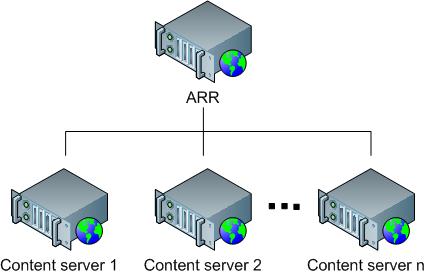
While ARR provides high availability and scalability for the content servers, the overall deployment is not highly available or scalable because:
- ARR is the single point of failure.
- The scalability of the content servers is limited by the maximum capacity of one ARR server.
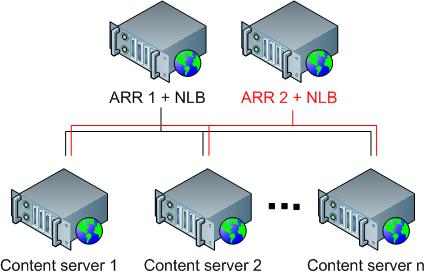
In order to overcome these challenges, administrators may consider using multiple ARR servers with Network Load Balancing (NLB). ARR can be deployed in active/passive mode to only achieve high availability or in active/active mode to achieve both high availability and scalability. This whitepaper describes how ARR and NLB can be deployed together to enable the core ARR scenarios while achieving overall high availability and scalability. NLB is available on all SKUs of Windows Server 2008.
Use of Application Request Routing and Network Load Balancing
ARR is built as a module on top of IIS and is designed to make the routing decisions at layer 7 (application). More accurately, ARR relies on another IIS module, URL Rewrite, to inspect the incoming HTTP request headers and server variables to make the routing decisions. Given this design, administrators could write intelligent routing rules based on the application level information, such as:
- Host name (HTTP_HOST): Route traffic to different content servers based on host name.
- Requested resource (URL): Based on file extensions, determine whether the requested resources are for static content or dynamic content and route the requests accordingly.
- Client information (HTTP_USER_AGENT): Based on the browser type and version, route the requests to appropriate content servers.
- Custom headers (Set as a cookie by applications): Route traffic based on cookie information set by applications, such as user preference or user ID.
Above are just some of the examples. For a complete list of HTTP headers and server variables, refer to Appendix A.
Because NLB makes the routing decisions at layer 3, application specific information, such as HTTP headers and server variables, can not be used to provide application level based routing. At the same time, ARR does not provide fault tolerant deployment features for itself and must rely on other complementary technologies and solutions to achieve high availability for the ARR tier. NLB operates at a different level on the network stack and is enabled on the same servers as where ARR is deployed:
Scenario 1: HTTP-based routing and load balancing
The HTTP-based routing and load balancing scenario enables a 3-tier deployment architecture that involves:
- Tier 1 (Web): Provides dual purposes of processing static content and routing and load balancing the remaining dynamic requests to tier 2 servers.
- Tier 2 (Application): Processes dynamic content that relies on business logic.
- Tier 3 (Data): Stores data.
The following diagram illustrates the 3-tier deployment:
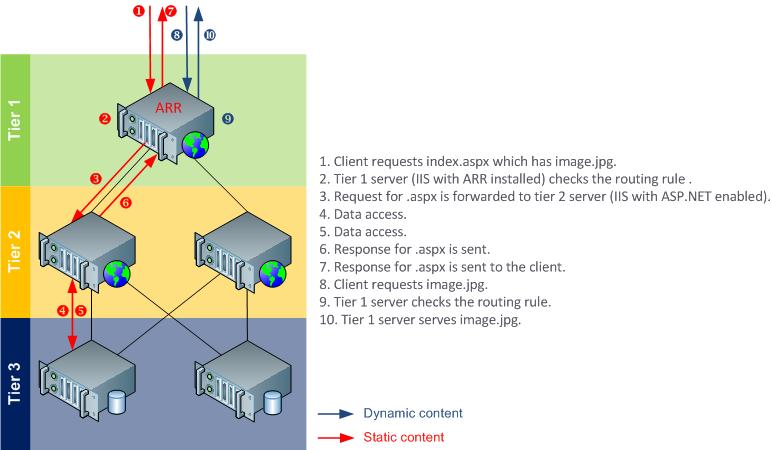
Although the above example shows a routing rule that differentiates the static content from the dynamic content, another common scenario is to differentiate presentation requests from Web service requests.
OPTION1: ACTIVE/PASSIVE
In Active/Passive mode, typically there are two ARR servers in which one server processes the requests while the other server stands by as a failover server. As noted above, while this configuration achieves high availability by removing the single point of failure, it is not a scale out solution since the aggregate capacity of the content servers is limited by the maximum capacity of one ARR server.
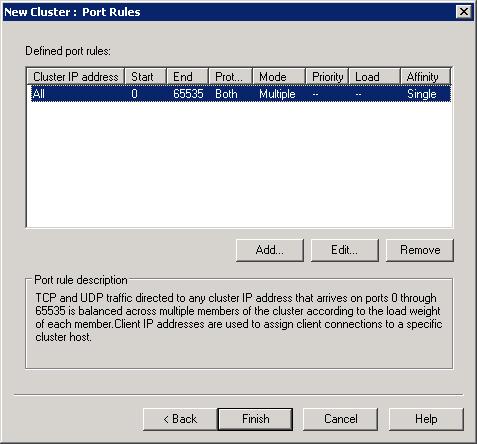
In this setup, since two ARR servers are configured the same way, a shared configuration is used. First, install ARR on both servers, then create the NLB cluster. The NLB cluster is configured to accept traffic on only one of the cluster nodes. This is achieved by configuring the cluster port rules with single host filtering mode. The node accepting the traffic is determined by the host priority setting of the NLB cluster nodes. Refer to NLB configuration for more details.
With the exception of the host name affinity feature in ARR, there is no runtime state information that must be shared between the two ARR servers. Therefore, for this scenario, no special configuration is needed on either ARR or NLB. Even if you use the server affinity feature in ARR, the affinitized state information will be made available to the passive server through a cookie in the request header.
This scenario is fully supported in the ARR Version 1 release.
ARR configuration
Step 1: Enable shared configuration on two ARR servers.
Follow the steps in this document to set up shared configuration in IIS.
Step 2: Configure 3-tier deployment architecture using ARR.
Follow the steps in this document to configure ARR in 3-tier deployment architecture.
- At a high level, the above document describes:
- How to make static content available on the ARR server.
- How to write URL rewrite rules for static content so that they are served directly from the ARR server.
- How to write URL rewrite rules for dynamic content so that they are forwarded to the application servers.
NLB configuration
The NLB configuration is divided into the following steps:
- Install the NLB feature on all ARR servers.
- Create NLB cluster for ARR.
- Configure NLB for active/passive deployment.
Install the NLB feature on all ARR servers
- Open Server Manager.
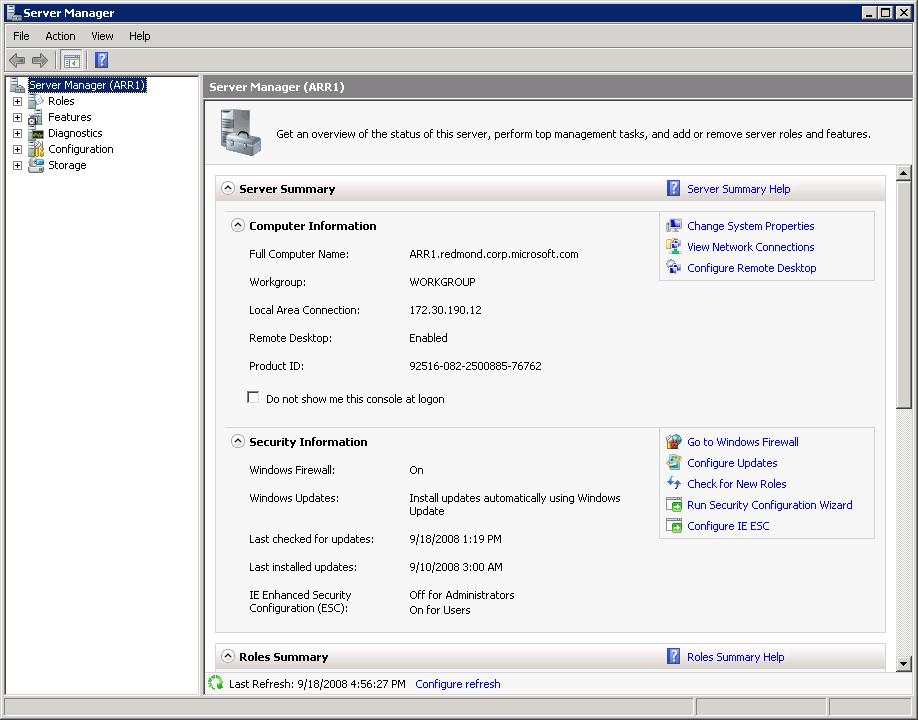
- Expand Features.
- Click Add Features.
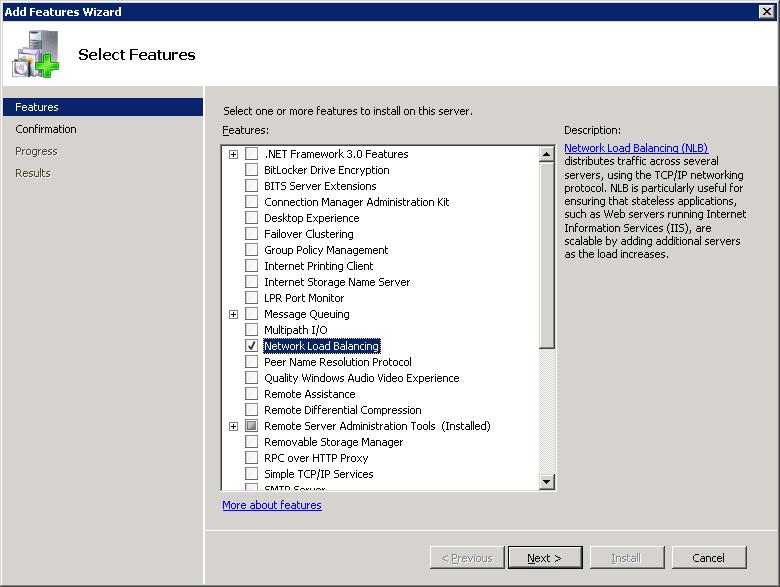
- In the Add Features Wizard, select Network Load Balancing.
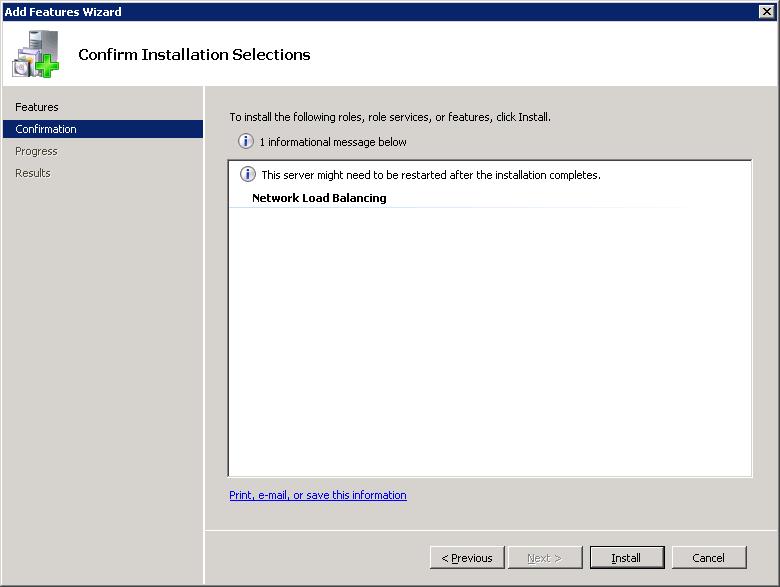
- Click Install to confirm installation of the NLB feature.
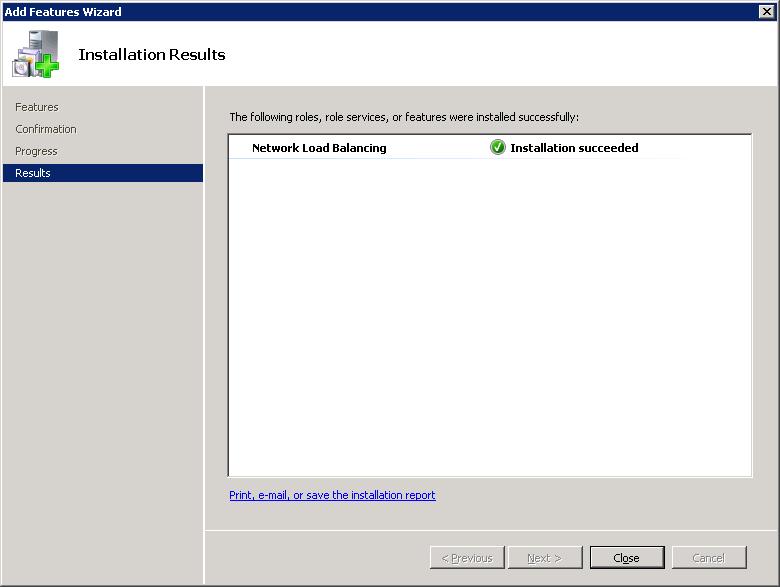
- Verify that the NLB feature installed successfully.
- Repeat the above steps on all ARR servers.
Create NLB cluster for ARR
- Verify that NLB is installed on all instances of ARR servers.
- Go to Start > All Programs > Administrative Tools, and open the Network Load Balancing Manager.
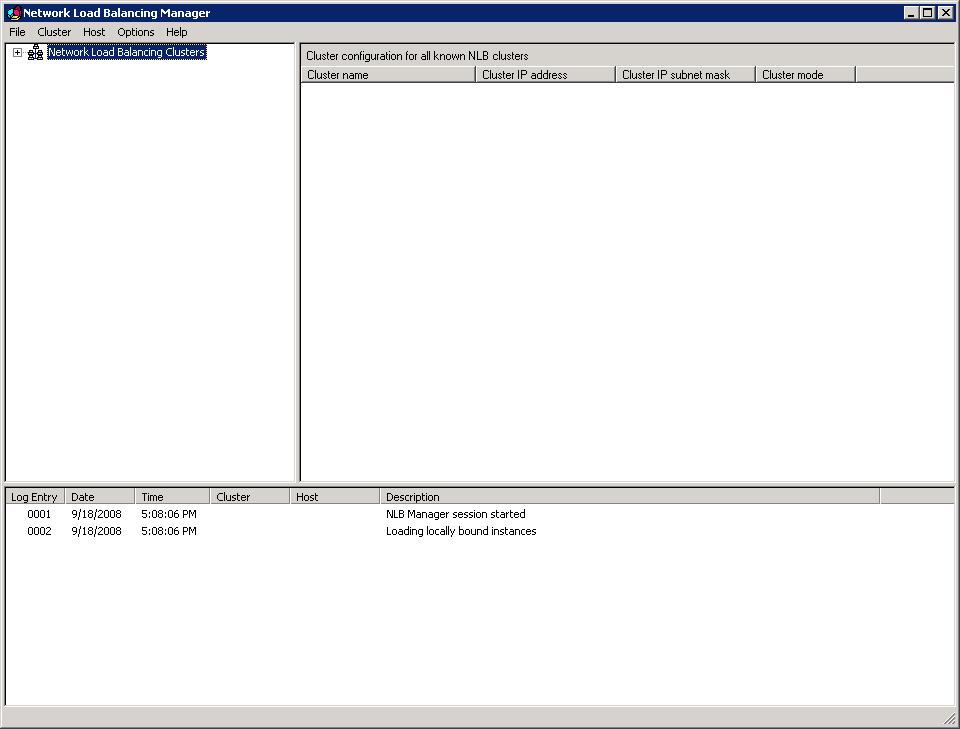
- Right-click on Network Load Balancing Clusters, and then select New Cluster.
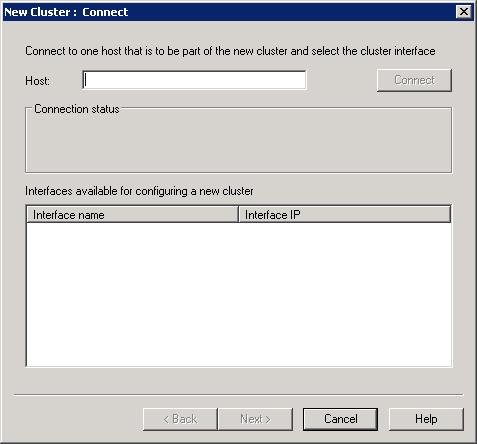
- In the New Cluster dialog box, in the Host text box, type the server address of one of the ARR servers. If there are multiple interfaces, type the server address that you want to create the NLB cluster on.
.jpg?cdn_id=2015-04-08-001)
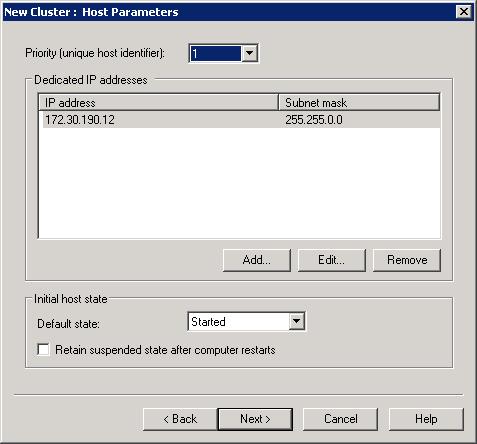
- In active/passive mode (single host mode in NLB), the priority determines the order in which failover takes place. By default, the server with priority 1 is the active node.
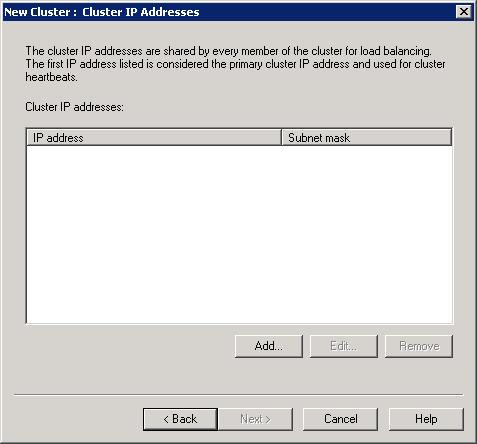
- The cluster IP, a virtual IP address, is needed. Click Add. This is the IP address that clients will communicate with.
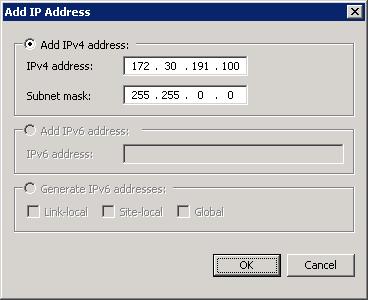
- Type the virtual IP address, and then click OK.
- Click Next.
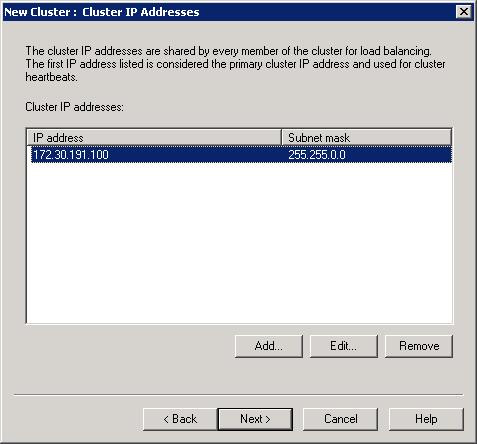
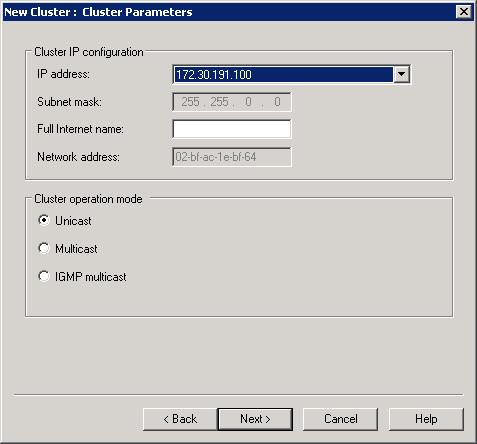
- Accept the default values. For more detailed information, refer to the Appendix.
- Click Finish to complete the creation of the NLB cluster.
- Now that the NLB cluster is created, you can add additional members to the cluster. Follow the remaining steps on all additional member servers. In the Network Load Balancing Manager, right-click on the newly selected cluster, and then select Add Host To Cluster.
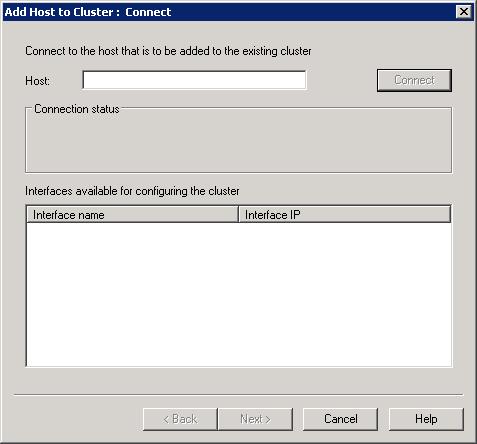
- Type the server address of the member to be added. If there are multiple interfaces, select the one that should be used by the NLB cluster.
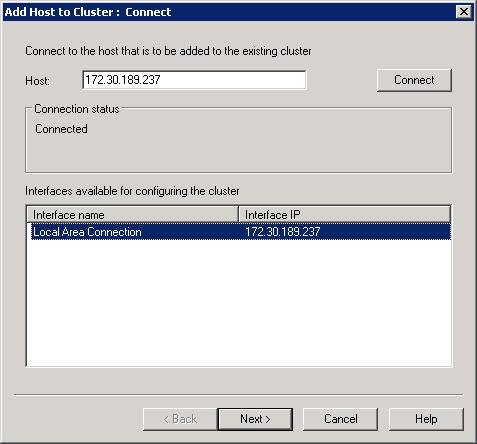
- Note that the priority assignment is mutually exclusive and unique among the member servers in the cluster. In active/passive mode (single host mode in NLB), the priority determines the order of fail-over.
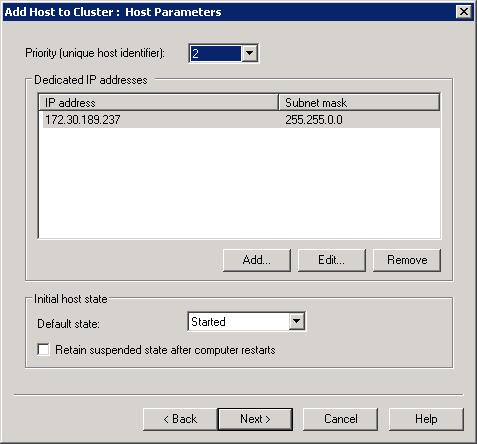
- Click Finish to add the member server to the cluster.
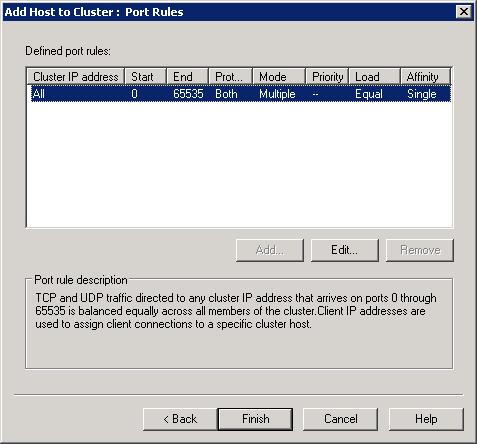
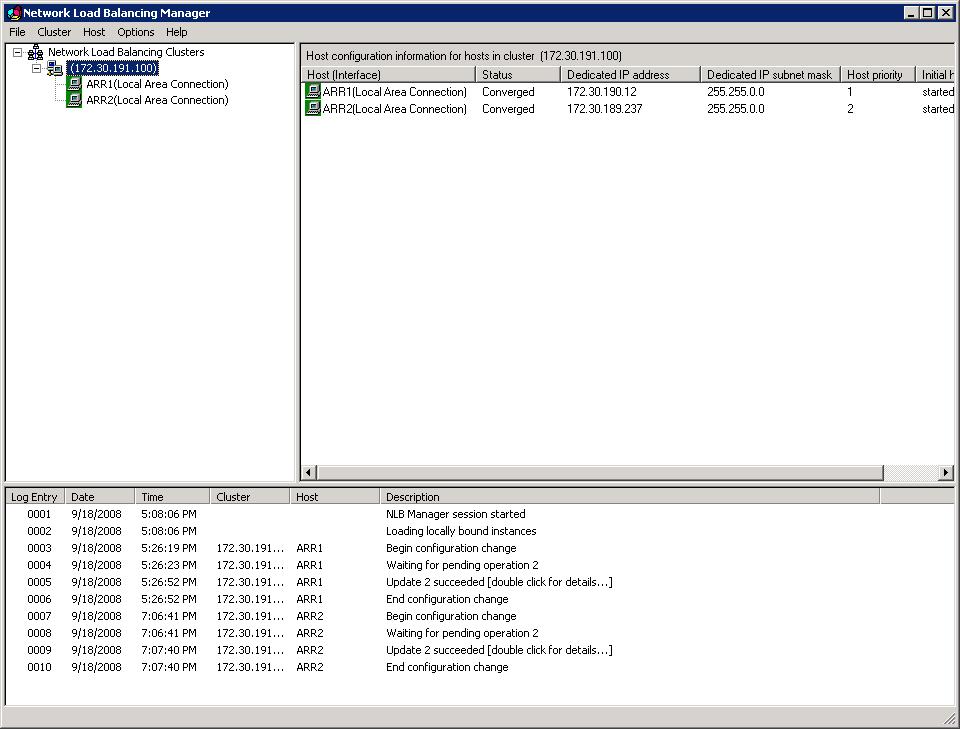
- The Network Load Balancer Manager should look similar to the following:
Configure NLB for active/passive deployment
- To configure NLB for active/passive deployment, in the Network Load Balancing Manager, right-click the cluster, and then select Cluster Properties. Click on the Port Rules tab. Click Edit.
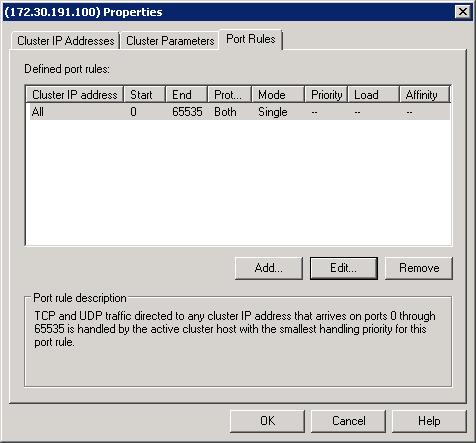
- Select Single host, and then click OK.
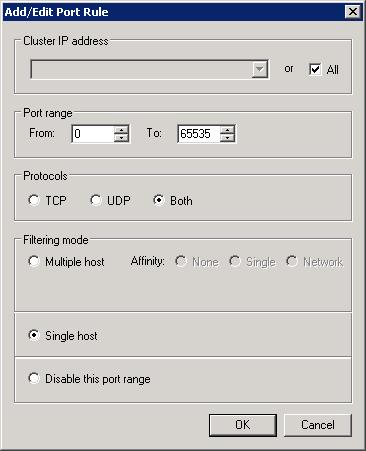
NLB is configured successfully to work in active/passive mode with ARR.
OPTION2: ACTIVE/ACTIVE
In Active/Active mode, you can have two or more ARR servers. This configuration achieves both high availability and scalability, unlike the Active/Pass mode, which achieves only high availability.
As noted previously, since multiple ARR servers are configured the same way, a shared configuration is used. The major difference is how NLB is configured. In order to utilize all ARR servers at the same time, the NLB cluster port rule is configured in multiple host mode.
Regardless of whether the affinity feature is enabled on NLB or not, no special configuration is needed on the ARR servers. For one, the ARR servers use one shared configuration so that they are configured the same way. Secondly, since ARR uses a client cookie to store the server affinity information for its own use, this information is available per request and therefore available across the ARR servers. The recommendation for NLB is to set affinity to none since it results in a more even load distribution.
This scenario is fully supported in the ARR Version 1 release.
ARR configuration
The ARR configuration for Active/Active is identical to that of Active/Passive. The main difference is how NLB is configured.
Step 1: Enable shared configuration on two ARR servers.
Follow the steps in this document to set up shared configuration in IIS.
Step 2: Configure 3-tier deployment architecture using ARR.
Follow the steps in this document to configure ARR in 3-tier deployment architecture.
- At a high level, the above document describes:
- How to make static content available on the ARR server.
- How to write URL rewrite rules for static content so that they are served directly from the ARR server.
- How to write URL rewrite rules for dynamic content so that they are forwarded to the application servers.
NLB configuration
The NLB configuration is divided into the following steps:
- Install the NLB feature on all ARR servers.
- Create NLB cluster for ARR.
- Configure NLB for active/active deployment.
Install the NLB feature on all ARR servers: Documented here.
Create NLB cluster for ARR: Documented here.
Configure NLB for active/active deployment.
- To configure NLB for active/active deployment, in the Network Load Balancing Manager, right-click on the cluster, and then select Cluster Properties. Click on the Port Rules tab. Click Edit.
- Select Multiple host. For the Affinity setting, select None. As mentioned above, the recommendation is to not use affinity in NLB since it will result in a better load distribution.
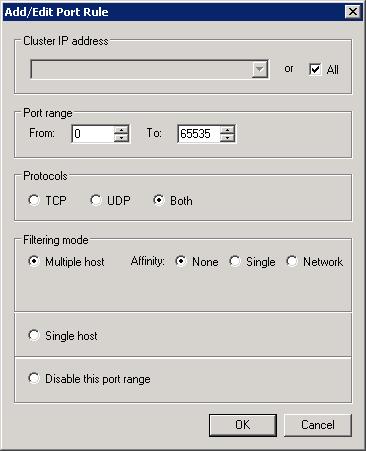
NLB is configured successfully to work in active/active mode with ARR.
Scenario 2: Shared hosting using host name affinity
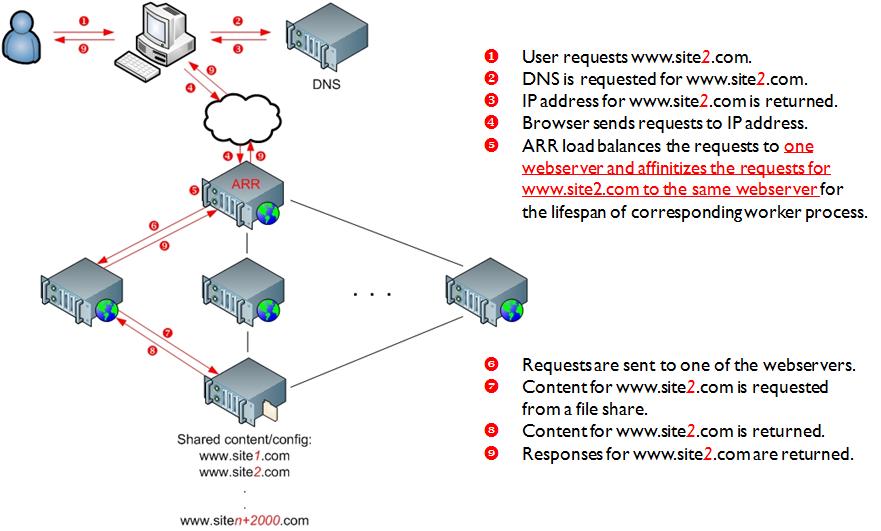
This scenario utilizes the host name affinity feature in ARR to enable a shared hosting deployment to:
- Reduce the manual management and maintenance involved with traditional shared hosting deployment.
- Maximize the existing server resources while ensuring that all server resources are evenly utilized.
- Easily scale out the environment.
- Create business opportunities to sell additional capacity.
For more information about shared hosting and ARR, refer to this document.
The following diagram illustrates the shared hosting environment using ARR:
OPTION1: ACTIVE/PASSIVE
As noted previously, in Active/Passive mode, typically there are two ARR servers in which one server processes the requests while the other server stands by as a failover server. While this configuration achieves high availability by removing the single point of failure, it is not a scale out solution since the aggregate capacity of the content servers is limited by the maximum capacity of one ARR server.
In this setup, since two ARR servers are configured the same way, a shared configuration is used. The NLB cluster is configured to accept traffic only on one of the cluster nodes. This is achieved by configuring the cluster rules with single host filtering mode. The node accepting the traffic is determined by the host priority setting of the NLB cluster nodes. Refer to NLB configuration for more details.
The host name affinity feature in ARR affinitizes the requests to a particular server (or a group of servers in RC) based on the host name. The runtime state information of affinitized mapping between the host names and the content servers is stored in memory within an instance of an ARR server. In the ARR Version 1 release, ARR leverages Microsoft External Cache Version 1 for IIS to share and maintain this runtime state between multiple ARR servers. More information about this scenario is available inthis document.
This scenario is fully supported in the ARR Version 1 release.
ARR configuration
Step 1: Configure ARR for shared hosting with host name affinity.
- Follow the steps in this document to configure the host name affinity feature in ARR for shared hosting.
Step 2: Enable and configure External Cache.
- Follow the steps in this document to enable and configure External Cache.
NLB configuration
The NLB configuration is divided into the following steps:
- Install the NLB feature.
- Create NLB cluster for ARR.
- Configure NLB for active/passive deployment.
Install the NLB feature: Documented here.
Create NLB cluster for ARR: Documented here.
Configure NLB for active/passive deployment: Documented here.
OPTION2: ACTIVE/ACTIVE IN ARR
In Active/Active mode, you can have two or more ARR servers. This configuration achieves both high availability and scalability, unlike the Active/Passive mode, which achieves only high availability.
Since multiple ARR servers are configured the same way, a shared configuration is used. In order to utilize all ARR servers at the same time, NLB is configured in multiple host mode.
As noted previously, the runtime state information of affinitized mapping between the host names and the content servers is stored in memory within an instance of an ARR server. In order to share this information among multiple ARR servers, Microsoft External Cache for IIS is used. For more information about External Cache, refer to this document.
ARR configuration
The ARR configuration for Active/Active is identical to that of Active/Passive. The main difference is how NLB is configured.
Step 1: Configure ARR for shared hosting with host name affinity.
- Follow the steps in this document to configure the host name affinity feature in ARR for shared hosting.
Step 2: Enable and configure External Cache.
- Follow the steps in this document to enable and configure External Cache.
NLB configuration
The NLB configuration is divided into the following steps:
- Install the NLB feature.
- Create NLB cluster for ARR.
- Configure NLB for active/active deployment.
Install the NLB feature: Documented here.
Create NLB cluster for ARR: Documented here.
Configure NLB for active/active deployment: Documented here. The recommendation is to not use affinity in NLB for this ARR scenario.
Summary
In this whitepaper, two main ARR scenarios were reviewed to achieve high availability and scalability by deploying multiple ARR servers and using NLB.
Appendix
APPENDIX A: ALL AVAILABLE HTTP HEADERS AND SERVER VARIABLES FOR WRITING ROUTING DECISION RULES
| ALL_HTTP | ALL_RAW | APPL_MD_PATH |
| APPL_PHYSICAL_PATH | CERT_COOKIE | CERT_FLAGS |
| CERT_ISSUER | CERT_KEYSIZE | CERT_SECRETKEYSIZE |
| CERT_SERIALNUMBER | CERT_SERVER_ISSUER | CERT_SERVER_SUBJECT |
| CERT_SUBJECT | CONTENT_LENGTH | CONTENT_TYPE |
| DOCUMENT_ROOT | GATEWAY_INTERFACE | HTTP_ACCEPT |
| HTTP_ACCEPT_ENCODING | HTTP_ACCEPT_LANGUAGE | HTTP_CONNECTION |
| HTTP_CONTENT_LENGTH | HTTP_HOST | HTTP_IF_MODIFIED_SINCE |
| HTTP_IF_NONE_MATCH | HTTP_REFERER | HTTP_UA_CPU |
| HTTP_USER_AGENT | HTTPS | HTTPS_KEYSIZE |
| HTTPS_SECRETKEYSIZE | HTTPS_SERVER_ISSUER | HTTPS_SERVER_SUBJECT |
| INSTANCE_ID | INSTANCE_META_PATH | LOCAL_ADDR |
| PATH_INFO | PATH_TRANSLATED | QUERY_STRING |
| REMOTE_ADDR | REMOTE_HOST | REMOTE_PORT |
| REMOTE_USER | REQUEST_FILENAME | REQUEST_METHOD |
| REQUEST_URI | SCRIPT_FILENAME | SCRIPT_NAME |
| SERVER_ADDR | SERVER_NAME | SERVER_PORT |
| SERVER_PORT_SECURE | SERVER_PROTOCOL | SERVER_SOFTWARE |
| URL |
Appendix B: Additional NLB documentation
- NLB Server Core instructions:
- NLB and SSL:
- http://technet2.microsoft.com/windowsserver/en/library/b8afa015-543d-4129-ac34-f64d45f52c751033.mspx?mfr=true
- http://technet2.microsoft.com/windowsserver2008/en/library/2f5d0612-75f9-4883-bf52-d11c7cda907f1033.mspx?mfr=true
- http://technet2.microsoft.com/WindowsServer/en/library/1fa923cd-2d0b-4270-8433-07d58b0f5d4b1033.mspx?mfr=true
- http://support.microsoft.com/?id=313299
- Other NLB links:
- http://technet.microsoft.com/en-us/library/cc782694.aspx
- http://technet.microsoft.com/en-us/library/cc778263.aspx
- http://support.microsoft.com/kb/323437
- http://technet2.microsoft.com/windowsserver2008/en/library/cf7a20f6-fd77-44be-8db1-6590e3b711bb1033.mspx
- http://support.microsoft.com/kb/890159/en-us
- http://blogs.msdn.com/clustering
Achieving High Availability and Scalability - ARR and NLB的更多相关文章
- Windows NLB搭配IIS的ARR搭建高可用环境(转载)
原文地址:http://www.cnblogs.com/shanyou/archive/2010/04/28/1723276.html 在现行的许多网络应用中,有时一台服务器往往不能满足客户端的要求, ...
- In partitioned databases, trading some consistency for availability can lead to dramatic improvements in scalability.
In partitioned databases, trading some consistency for availability can lead to dramatic improvement ...
- windows NLB+ARR实现Web负载均衡高可用/可伸缩
基于IIS的ARR负载均衡 基于NLB负载均衡 这两篇分别分ARR 和 NLB基本配置,下面我们讲讲,如何组合使用,搭配成高可用/可伸缩集群. 什么是高可用,可伸缩 ? 高可用:是指系统经过专门设计减 ...
- B4 and After: Managing Hierarchy, Partitioning, and Asymmetry for Availability and Scale in Google’s Sofware-Defined WAN
B4及之后:为谷歌软件定义WAN的可用性和扩展管理层次化.划分和不对称 本文为SIGCOMM 2018会议论文,由谷歌提供. 笔者翻译了该论文.由于时间仓促,且笔者英文能力有限,错误之处在所难免:欢迎 ...
- iSCSI Network Designs: Part 5 – iSCSI Multipathing, Host Bus Adapters, High Availability and Redundancy
iSCSI Network Designs: Part 5 – iSCSI Multipathing, Host Bus Adapters, High Availability and Redunda ...
- Network Load Balancing Technical Overview--reference
http://technet.microsoft.com/en-us/library/bb742455.aspx Abstract Network Load Balancing, a clusteri ...
- (转) [it-ebooks]电子书列表
[it-ebooks]电子书列表 [2014]: Learning Objective-C by Developing iPhone Games || Leverage Xcode and Obj ...
- Massively parallel supercomputer
A novel massively parallel supercomputer of hundreds of teraOPS-scale includes node architectures ba ...
- Using Amazon API Gateway with microservices deployed on Amazon ECS
One convenient way to run microservices is to deploy them as Docker containers. Docker containers ar ...
随机推荐
- Python 命令行参数和getopt模块详解
有时候我们需要写一些脚本处理一些任务,这时候往往需要提供一些命令行参数,根据不同参数进行不同的处理,在Python里,命令行的参数和C语言很类似(因为标准Python是用C语言实现的).在C语言里,m ...
- Java 13 字符串
1 String对象不可变 每一个修改String值的方法 实际上都是创建一个全新的String对象 public class Immutable { public static String upc ...
- 一张图看懂360°全景和VR的区别
2016年开始,Facebook.谷歌.腾讯.阿里等互联网巨头都已开始抢食VR(虚拟现实)这块的大蛋糕,虚拟现实发展速度惊人.在这样强势发展的背景下,一些产品也开始打着VR的幌子,挂着VR的噱头卖起来 ...
- Mysql有两种存储引擎:InnoDB与Myisam
http://www.cnblogs.com/kevingrace/p/5685355.html
- Openvpn 安装简述
1.固定本地IP地址 vim /etc/sysconfig/network-scripts/ifcfg-eth0 2.同步时间.安装ntpd yum install ntpddate netupda ...
- 苹果审核Metadata Rejected
最近提交了 公司的一个 app,收到了appStore拒绝的信息及邮件 拒绝后的状态改为了:metadata rejected 邮件里面有这样一句话 意思大致就是: 你的app先被显示为 Metada ...
- NKW
JavaScript几种原生函数 - 博客频道 - CSDN.NEThttp://blog.csdn.net/h378588270/article/details/12948163 .json_百度搜 ...
- js时间显示设置
//对日期中部分小于10的数字前边添加0 function zero(s){ return s < 10 ? '0' + s: s; } var date=new Date(), year = ...
- 【MYSQL】创建虚表来辅助数据库查询
在进行数据库查询时,有时需要用到对既有的数据表进行多表查询得出的临时条件的数据表,就可以暂时创建成为虚表,并赋予简单明了的字段名以及临时表名. 例题a:查询出每门课程低于平均成绩的学生姓名.课程名称. ...
- alpha发布(技术随笔)
昨天是班级里面每个小组要进行alpha演示,大家都很努力的去做自己的项目.我们nice!组没有演示自己的项目,只一点很惭愧,身为组员没有协助组长按时完成项目,这一点自己也感觉很抱歉,虽然每天感觉自己都 ...