
CSS常用布局整理
固定宽度布局
1-2-1布局(浮动)
<html xmlns="http://www.w3.org/1999/xhtml">

<head>

<title>固定宽度-float</title>

<style type="text/css">

#header,#footer,#container{

    width: 760px;

    margin: 0 auto;

}

#content {

    float: left;

    width: 500px;

    background: #d5ddf3;

}

#side {

    float: left;

    width: 260px;

    background: #d2d8de;

}

#footer {

    clear: both;

    background: #d5ddf3;

}

</style>

</head>

<body>

    <h2>Page Header</h2>

</div>

<div id="container">

    <div id="content">

        <h2>Page Content 1</h2>

        <p>This is content.This is content.This is content.This is content.This is content.This is content.This is content.This is content.This is content.This is content.This is content.This is content.This is content.This is content.This is content.This is content.This is content.This is content.This is content.This is content.This is content.</p>

    </div>

    <div id="side">

        <h2>Side Bar 1</h2>

        <p>This is side.This is side.This is side.This is side.This is side.This is side.This is side.This is side.</p>

    </div>

</div>

<div id="footer">

        <h2>Page Footer</h2>

</div>

</body>

</html>
效果图:

正中间的两个div都浮动起来,且包含块的宽度是固定值。Footer清除浮动防止浮动块覆盖。
1-2-1布局(绝对定位)
<html xmlns="http://www.w3.org/1999/xhtml">

<head>

<title>固定宽度-absolute</title>

<style type="text/css">

#header,#footer,#container{

    width: 760px;

    margin: 0 auto;

}

#container{

    position:relative;

}

#content {

    width: 500px;

    margin-right:260px;

    background: #d5ddf3;

}

#side {

    position:absolute;

    top:0;

    right:0;

    width: 260px;

    background: #d2d8de;

}

#footer {

    background: #d5ddf3;

}

</style>

</head>

<body>

    <h2>Page Header</h2>

</div>

<div id="container">

    <div id="content">

        <h2>Page Content 1</h2>

        <p>This is content.This is content.This is content.This is content.This is content.This is content.This is content.This is content.This is content.This is content.This is content.This is content.This is content.This is content.This is content.This is content.This is content.This is content.This is content.This is content.This is content.</p>

    </div>

    <div id="side">

        <h2>Side Bar 1</h2>

        <p>This is side.This is side.This is side.This is side.This is side.This is side.This is side.This is side.</p>

    </div>

</div>

<div id="footer">

        <h2>Page Footer</h2>

</div>

</body>

</html>
效果图:
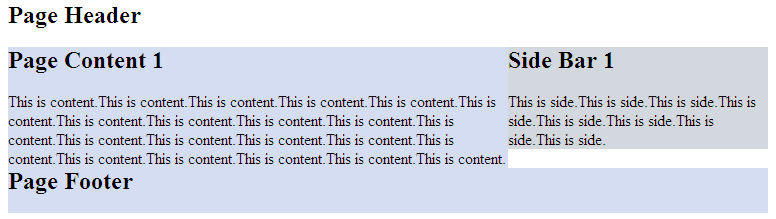
但是有一点要注意,由于用绝对定位的块脱离的文档流,当绝对定位块高度小于旁边块高度的时候,会与其他块重叠。
流式布局
<html xmlns="http://www.w3.org/1999/xhtml">

<head>

<title>float</title>

<style type="text/css">

#header,#footer,#container{

    width: 85%;

    margin:0 auto;

}

#content {

    float:left;

    width: 66%;

    background: #d5ddf3;

}

#side {

    float:right;

    width: 33%;

    background: #d2d8de;

}

#footer {

    cleat:both;

    background: #d5ddf3;

}

</style>

</head>

<body>

<div id="header">

    <h2>Page Header</h2>

</div>

<div id="container">

    <div id="content">

        <h2>Page Content 1</h2>

        <p>This is content.This is content.This is content.This is content.This is content.This is content.This is content.This is content.This is content.This is content.This is content.This is content.This is content.This is content.This is content.This is content.This is content.This is content.This is content.This is content.This is content.</p>

    </div>

    <div id="side">

        <h2>Side Bar 1</h2>

        <p>This is side.This is side.This is side.This is side.This is side.This is side.This is side.This is side.</p>

    </div>

</div>

<div id="footer">

        <h2>Page Footer</h2>

</div>

</body>

</html>
效果图:
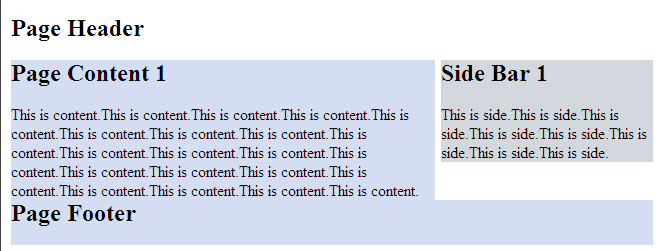
注意:确保不要使得某列的宽度太大。
另外,百分比布局经常会结合min-width和max-width使用。
CSS常用布局整理的更多相关文章
- CSS常用布局整理(二)
1-2-1单列变宽布局 side列定宽300px,content列变宽,尺寸是100%-300px.核心的问题就是浮动列的宽度应该等于“100% - 300px”,而CSS显然不支持这种带有减法运算的 ...
- CSS常用布局实现方法
CSS 布局对我来说,既熟悉又陌生.我既能实现它,又没有很好的了解它.所以想总结一下,梳理一下 CSS 中常用的一列,两列,三列布局等的实现方法.本文小白,仅供参考.但也要了解下浮动,定位等. 一.一 ...
- css常用布局
1.一列布局 html: <div class="header"></div> <div class="body">< ...
- css 常用布局
「前端那些事儿」③ CSS 布局方案 我们在日常开发中经常遇到布局问题,下面罗列几种常用的css布局方案 话不多说,上代码! 居中布局 以下居中布局均以不定宽为前提,定宽情况包含其中 1.水平居中 a ...
- HTML/CSS 常用单词整理
页面布局(layout) header 头部/页眉: index 首页/索引: logo 标志: nav/sub_nav 导航/子导航: banner 横幅广告: main/content 主体/内容 ...
- CSS常用布局方式-两列布局、三列布局
CSS基础 2.几种布局方式1)table布局 当年主流的布局方式,第一种是通过table tr td布局 示例: <style type="text/css"> ta ...
- html+css 常用布局
1.中间固定宽度,两侧自适应 1.1 flex布局 <!DOCTYPE html><html lang="en"> <head> <met ...
- CSS常用样式整理
元素边框显示圆角:-moz-border-radius适用于火狐浏览器,-webkit-border-radius适用于Safari和Chrome两种浏览器. 浏览器渐变背景颜色: FILTER: p ...
- CSS Flex布局整理
Flex布局 display: flex; 将对象作为弹性伸缩盒展示,用于块级元素 display: inline-flex; 将对象作为弹性伸缩盒展示,用于行内元素 注意兼容问题: webkit内核 ...
随机推荐
- iphone Dev 开发实例8: Parsing an RSS Feed Using NSXMLParser
From : http://useyourloaf.com/blog/2010/10/16/parsing-an-rss-feed-using-nsxmlparser.html Structure o ...
- C++模板元编程 - 1 基本数据类型和运算
这是博客开通前几天做的,C++的模板没办法存方便的浮点数,算了. 基本类型的设计参考了vczh轮子叔模仿boost的MPL的设计. 话说template和typename写多了真是无限烦人啊,不得已定 ...
- 一步步优化JVM五:优化延迟或者响应时间(1)
http://blog.csdn.net/zhoutao198712/article/details/7791969 本节的目标是做一些优化以满足对应用对延迟的需求.这次需要几个步骤,包括完 ...
- docker一些命令
1.创建image(先创建Dockerfile) docker build -t xxx/xxx . 2.删除image docker rmi xxxxx(image id) docker rmi r ...
- bootstrap-按钮样式
<div class="container"> <!-- 按钮的背景色 --> <div class="row"> < ...
- pgdump使用
pgdump dbname-h hostIp-U user-p port-t schema_name.table_name-s // nodata-f // to output file /opt/P ...
- java获取任意日期
现有两个办法 1:Date as = new Date(new Date().getTime()-24*60*60*1000); SimpleDateFormat matter1 = new Sim ...
- arm-linux-objcopy
被用来复制一个目标文件的内容到另一个文件中,可用于不同源文件的之间的格式转换示例: arm-linux-objcopy –O binary –S file.elf file.bin 常用的选项(大写) ...
- JVM加载class文件的原理机制
Java中的所有类,都需要由类加载器装载到JVM中才能运行.类加载器本身也是一个类,而它的工作就是把class文件从硬盘读取到内存中.在写程序的时候,我们几乎不需要关心类的加载,因为这些都是隐式装载的 ...
- 服务器压力测试 ab
1.ab命令原理 Apache自带的ab命令模拟多线程并发请求,测试服务器负载压力,也可以测试nginx.lighthttp.IIS等其它Web服务器的压力(测试其它服务器时需单独下载ab压力测试工具 ...