
Reporting Service 服务启动时报错The service did not respond to the start or control request in a timely fashion
案例环境:
启动一台数据库服务器(Windows Server 2003)的Reporting Service(SQL Server 2008 R2)服务时,出现如下错误信息:
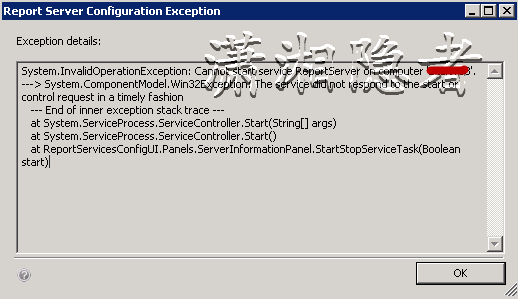
System.InvalidOperationException: Cannot start service ReportServer on computer 'xxx'. ---> System.ComponentModel.Win32Exception: The service did not respond to the start or control request in a timely fashion
--- End of inner exception stack trace ---
at System.ServiceProcess.ServiceController.Start(String[] args)
at System.ServiceProcess.ServiceController.Start()
at ReportServicesConfigUI.Panels.ServerInformationPanel.StartStopServiceTask(Boolean start)
从网上搜索了一些资料后发现:出现这个错误是因为安装了MS12-070 security patch (http://support.microsoft.com/kb/2716429) 导致:因为安装了这个安全补丁后,当.NET应用程序启动时, .NET Framework就会尝试去验证Microsoft程序集是否正确并且没有被修改过。.NET Framework是通过连接到公布在互联网的服务器来验证的。当.NET Framework框架试图连接到互联网上的服务器去验证时超时或时间比较长,这就会使得其他超时设置比较短的.NET 应用程序(如 SSIS 或 SSRS)启动失败,出现下面错误信息。
"The request failed or the service did not respond in a timely fashion."
英文原文如下所:
When a .NET application startup the .NET Framework it tries to check if the Microsoft assemblies are right and have not been modified, this is done connecting to a server that has a revocation list in internet. When the framework tries to connect to the server to check if it has access to internet with an elevated timeout, this makes that any other .NET application that has less timeout setting fails (as SSIS or SSRS) with the error message you are getting.
The error message you are getting when you try to start SSRS:
"The request failed or the service did not respond in a timely fashion."
Means that the SSRS timeout is lower than the timeout of the connection to the revoke list server. Some recent windows updates have introduced this issue after you installed SP2 of SSRS 2008 R2. We are aware of this problem and we have already provided several workarounds.
This issue affects to all applications that runs on .NET framework 2.0 and there are several workarounds for this problem
解决方法:
第一种解决方案:
1: 点击开始(Start)菜单,点击运行(Run),输入regedit命令
2: 找到HKEY_LOCAL_MACHINE\SYSTEM\CurrentControlSet\Control.
3: 找到ServicesPipeTimeout选项,单击右键选项“编辑”选项,选择“Decimal"选项,输入60000. 有可能你找不到ServicesPipeTimeout选项,这时你就需要新建该选项。然后如上所述设置其值。

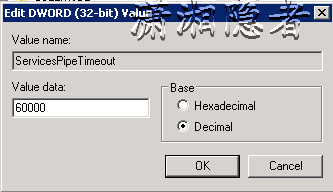
4:设置完成后,需要重启服务器才能生效。
我按上面方案就讲问题解决了,博客Reporting Services service doesn't start after the installation of MS12-070 security patch中介绍,如果第一种方案没有解决问题,可以通过下面第二种方案、第三种方案解决问题
第二种解决方案:
如果第一种方案没有解决问题,你可以通过通过设置ReportingServicesService.exe.config配置文件禁用认证检查。ReportingServicesService.exe.config通常位于C:\Program Files\Microsoft SQL Server\<RS Instance>\Reporting Services\ReportServer\bin 。其中我这台服务器的路径为C:\Program Files\Microsoft SQL Server\MSRS10_50.MSSQLSERVER\Reporting Services\ReportServer\bin ,在ReportingServicesService.exe.config 添加"<generatePublisherEvidence enabled="false"/>"
英文原文如下:
2nd workaround:
If the first action plan didn't work, try disabled the certificate checking in the ReportingServicesService.exe.config file:
Edit the ReportingServicesService.exe.config file usually located in this folder: C:\Program Files\Microsoft SQL Server\<RS Instance>\Reporting Services\ReportServer\bin
Add the "<generatePublisherEvidence enabled="false"/>" within the <Runtime> tag
Patch the server with the KB.
If you want to distribute this workaround to many users you can créate a script in PowerShell
第三种解决方案:
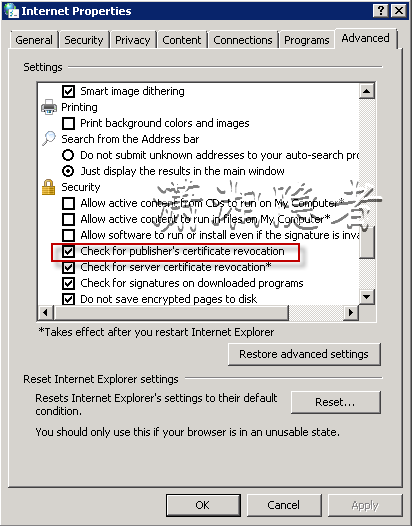
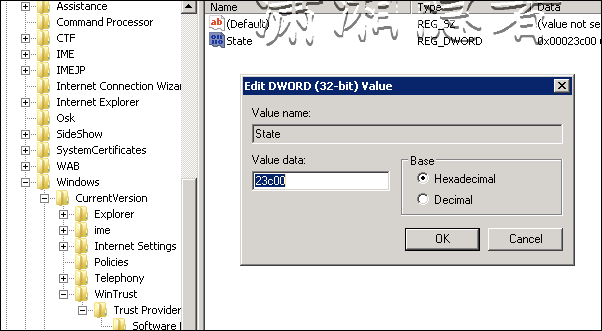
在控制面板里面找到”Internet Option“,在高级设置里面找到”Check for publisher's certificate revocation" 选项,去掉勾选即可。如果 SSRS服务是以Network Service账号启动,那么修改“Internet Option”选项并不会使之生效。如果是这样,你可以为SSRS服务账号修改下面一些配置,修改注册表
HKEY_USERS\<SID>\Software\Microsoft\Windows\CurrentVersion\WinTrust\TrustProviders\Software 下State值
从原先的0x00023c00改为0x00023e00
英文原文如下:
3rd workaround:
Another option would be disabling the global checking of the certificated in the machine following the steps below:
o Start -> Control panel
o Internet Options
o Advanced
o Uncheck "Check for publisher’s certificate revocation"
If the services are running under the Network Service account the change to the revocation in internet options is not working for them. In that case, you can perform the following changes for the SSRS service account:
Modify the following setting in the registry:
HKEY_USERS\<SID>\Software\Microsoft\Windows\CurrentVersion\WinTrust\TrustProviders\Software
Where the default value for State key is 0x00023c00
And you will need to change it to 0x00023e00
(More information in: http://support.microsoft.com/kb/2715304)
In order to get the Windows SID for this user and be able to find out the previous registry key, please follow the below instructions.
- Download SPGETSID tool from http://technet.microsoft.com/en-us/sysinternals/bb897417.aspx
- Once it is installed and save to a local file, open a cmd window (with administrator privileges ) and navigate through the cmd to the folder where this spgetsid.exe is located.
- Then type the following command line: spgetsid domain\user (where the domain\user is your SSRS service account)
- Once get the SID please go to the previous registry key for this user and apply the change.
S-1-5-20 is the SID for Network Service, and for other SIDs: http://support.microsoft.com/kb/243330
SID: S-1-5-18
Name: Local System
Description: A service account that is used by the operating system.
SID: S-1-5-19
Name: NT Authority
Description: Local Service
SID: S-1-5-20
Name: NT Authority
Description: Network Service
参考资料:
Reporting Service 服务启动时报错The service did not respond to the start or control request in a timely fashion的更多相关文章
- IIS Default Web Site : The service did not response to the start or control request in a timely fashion
IIS Default Web Site无法启动,提示错误:The service did not response to the start or control request in a time ...
- 【spring cloud】spring cloud分布式服务eureka启动时报错:java.lang.NoSuchMethodError: org.springframework.boot.builder.SpringApplicationBuilder.<init>([Ljava/lang/Object;)V
spring cloud分布式服务eureka启动时报错:java.lang.NoSuchMethodError: org.springframework.boot.builder.SpringApp ...
- MySQL 从 5.5 升级到 5.6,启动时报错 [ERROR] Plugin 'InnoDB' init function returned error
MySQL 从 5.5 升级到 5.6,启动时报错: [ERROR] Plugin 'InnoDB' init function returned error. [ERROR] Plugin 'Inn ...
- solr启动时报错org.apache.solr.common.SolrException: undefined field text的解决办法
solr启动时报错org.apache.solr.common.SolrException: undefined field text的解决办法 原创 2015年08月21日 20:47:40 标签: ...
- Android 开发环境 —— Eclipse 启动时报错:Error when loading the SDK
简述: Eclipse 启动时报错:Error when loading the SDK 错误信息: Error when loading the SDK: Error: Error parsing ...
- 新安装的soapui启动时报错及解决方法
今天新安装了soapui准备测试一下接口,结果安装成功后启动时报错:The JVM could not be started. The maximum heap size (-Xmx) might b ...
- mysql启动时报错:Starting MySQL... ERROR! The server quit without updating PID file (/opt/mysql/data/mysql.pid)
mysql启动报错Starting MySQL... ERROR! The server quit without updating PID file (/opt/mysql/data/mysql.p ...
- docker启动时报错
docker安装成功后,启动时报错. 1.后来排查后发现yum install docker安装的是从test存储库中安装的. 后来我指定了特定的版本后,而且从stable存储库安装的,以后再启动就好 ...
- nginx启动时报错
nginx启动时报错 原因:nginx: [emerg] mkdir() "/var/cache/nginx/client_temp" failed /var/cache/ngin ...
随机推荐
- JavaWeb学习总结(五十二)——使用JavaMail创建邮件和发送邮件
一.RFC882文档简单说明 RFC882文档规定了如何编写一封简单的邮件(纯文本邮件),一封简单的邮件包含邮件头和邮件体两个部分,邮件头和邮件体之间使用空行分隔. 邮件头包含的内容有: from字段 ...
- Cesium原理篇:1最长的一帧之渲染调度
原计划开始着手地形系列,但发现如果想要从逻辑上彻底了解地形相关的细节,那还是需要了解Cesium的数据调度过程,这样才能更好的理解,因此,打算先整体介绍一下Cesium的渲染过程,然后在过渡到其中的两 ...
- 关于Javascript中通过实例对象修改原型对象属性值的问题
Javascript中的数据值有两大类:基本类型的数据值和引用类型的数据值. 基本类型的数据值有5种:null.undefined.number.boolean和string. 引用类型的数据值往大的 ...
- [Java 基础]基础语法
Java代码基本规范 大小写敏感:Java是大小写敏感的,这就意味着标识符Hello与hello是不同的. 类名:对于所有的类来说,类名的首字母应该大写.如果类名由若干单词组成,那么每个单词的首字母应 ...
- 【十大经典数据挖掘算法】kNN
[十大经典数据挖掘算法]系列 C4.5 K-Means SVM Apriori EM PageRank AdaBoost kNN Naïve Bayes CART 1. 引言 顶级数据挖掘会议ICDM ...
- 原生AJAX入门讲解(含实例)
相对于jQuery.YUI以及其他一些类库的AJAX封装,原生JS的AJAX显得那么的尴尬,兼容性不好,要记很多的方法属性,调用不便捷,代码臃肿...但我还是想说,原生JS才是最根本最底层的知识(虽然 ...
- AngularJS----基本操作
之前的学习基本了解了AngularJS的常用方法,下来就继续学习吧. 创建自定义的指令 除了内置指令,我们可以创建自定义指令.通过.directive函数来添加. <div change-dat ...
- Effective java笔记(六),方法
38.检查参数的有效性 绝大多数方法和构造器对于传递给它们的参数值都会有限制.如,对象引用不能为null,数组索引有范围限制等.应该在文档中指明所有这些限制,并在方法的开头处检查参数,以强制施加这些限 ...
- .net登录的一般模式
思路: 1.检查登录: private string CheckLogin(HttpContext context) { Model.TUser model = (Model.TUser)contex ...
- 在公有云AZURE上部署私有云AZUREPACK以及WEBSITE CLOUD(一)
(一)前言 本文主要介绍了实践部署AzurePack的Website Cloud的过程.在部署之前, 首先要对AzurePack有个基本的了解. Azure Pack是微软的私有云方案,具有弹性. ...