
IdentityServer 部署踩坑记
IdentityServer 部署踩坑记
Intro
周末终于部署了 IdentityServer 以及 IdentityServerAdmin 项目,踩了几个坑,在此记录分享一下。
部署架构
项目是基于 IdentityServerAdmin 项目修改的,感谢作者的开源付出,有需要 IdentityServer 管理需求的可以关注一下,觉得好用的可以给个 star 支持一下 https://github.com/skoruba/IdentityServer4.Admin
实际部署的有两个服务,一个是 IdentityServer 项目(https://id.weihanli.xyz),一个是 IdentityAdmin 项目(<https://id-admin.weihanli.xyz>)。
两个服务都是部署在一台服务器上,这一台服务器上部署一个单节点的 kubernetes,两个服务都是部署在 k8s 上并通过 NortPort 的方式对外提供服务,外面有一层 nginx 做了请求转发同时提供对外 https 的支持。
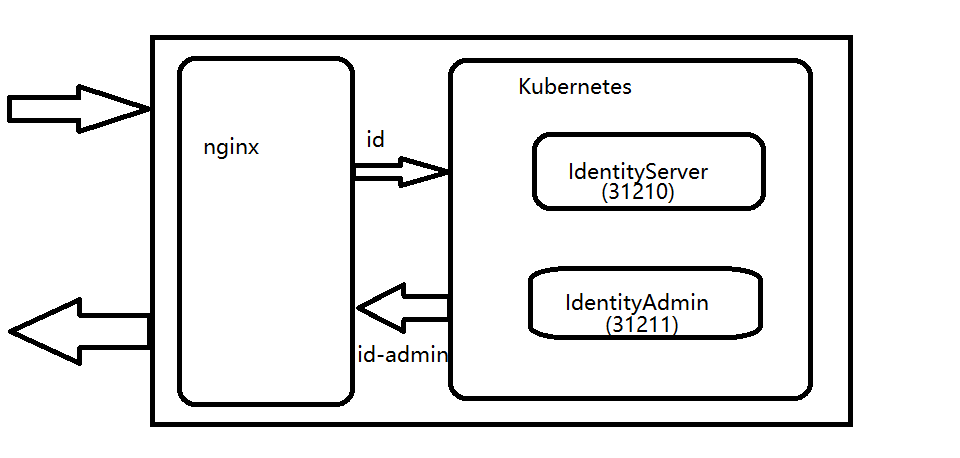
最初的 nginx 配置如下
server {

      listen 443;

      ssl_certificate            /home/pipeline/.acme.sh/*.weihanli.xyz/*.weihanli.xyz.cer;

      ssl_certificate_key      /home/pipeline/.acme.sh/*.weihanli.xyz/*.weihanli.xyz.key;

      server_name id.weihanli.xyz;

      location / {

         proxy_pass http://172.17.0.2:31210;

         proxy_set_header X-Real-IP $remote_addr;

         proxy_set_header X-Forwarded-For $proxy_add_x_forwarded_for;

     }

}

server {

      listen 443;

      ssl_certificate            /home/pipeline/.acme.sh/*.weihanli.xyz/*.weihanli.xyz.cer;

      ssl_certificate_key      /home/pipeline/.acme.sh/*.weihanli.xyz/*.weihanli.xyz.key;

      server_name id-admin.weihanli.xyz;

      location / {

         proxy_pass http://172.17.0.2:31211;

         proxy_set_header X-Real-IP $remote_addr;

         proxy_set_header X-Forwarded-For $proxy_add_x_forwarded_for;

     }

}
IdentityServer重定向到内网地址
部署起来之后,IdentityServer 可以访问,但是 IdentityAdmin 访问的时候会重定向到 IdentityServer 去登录,在发生重定向的时候会重定向到内网地址,重定向到了 172.17.0.1:31210 这个内网地址,这个地址是一个内网地址,公网肯定是没有办法访问的,在网上 Google 了半天发现有个类似的问题 网络回流(NAT Loopback/ Hairpin NAT),大概就是在同一网段的内网中的两个服务通信的时候通过公网域名没有办法访问,会转换成内网IP访问,所以发生重定向的时候会出现原本是域名重定向但是却变成了内网IP(不确定我的这种情况是不是属于网络回流的情况,有网络大佬的话可以帮忙分析一下,万分感谢)
因为使用了 nginx 并且转发后的内网 IP 地址是 nginx 转发到的请求地址,所以又 Google 了 nginx proxy redirect 关键词,最后找到一个解决方案 https://unix.stackexchange.com/questions/290141/nginx-reverse-proxy-redirection
最后生效的 nginx 完整配置如下:
server {

      listen 443 http2;

      ssl_certificate            /home/pipeline/.acme.sh/*.weihanli.xyz/*.weihanli.xyz.cer;

      ssl_certificate_key      /home/pipeline/.acme.sh/*.weihanli.xyz/*.weihanli.xyz.key;

      server_name id-admin.weihanli.xyz;

      location / {

         proxy_pass http://172.17.0.2:31211;

         proxy_redirect http://172.17.0.2:31210/ https://id.weihanli.xyz/;

         proxy_set_header Host $host;

         proxy_set_header Referer $http_referer;

         proxy_set_header X-Real-IP $remote_addr;

         proxy_set_header X-Forwarded-For $proxy_add_x_forwarded_for;

     }

}
增加了上面的配置之后再发生重定向的时候地址就是正确的了,不再是一个内网IP 了
Invalid Token
Identity Server 重定向的问题解决之后,马上就出现了新的问题。。。
首先在 Identity Server 登录成功之后返回到 IdentityAdmin 的时候会报错,查看日志可以看到是 token 不合法的问题,起初是 issuer 不对的问题,我想可能是 issuer 可能 http/https 不一致的问题,于是增加了一个配置,直接在注册 IdentityServer 的时候使用指定的 issuer ,想着这样就不会有 http/https 的问题,于是重新部署,重新尝试之后,token 还是有问题,日志显示是token 签名验证错误,这时不经意之间看了一眼 IdentityServer 的 发现文档,打开之后发现里面的各种 endpoint 都是 http 的,后来发现 IdentityServer 有一个 PublicOrigin 的配置,把这个配置配置成 https://id.weihanli.xyz 之后就没有 invalid token 之类的错误了,再看发现文档的时候,endpoint 也是基于 https 的了。
Identity-Admin 502
在 IdentityServer 登录成功之后重定向到 IdentityAdmin 的时候 502,但是服务是存在的 在日志里只找到下面这样的错误日志
Microsoft.IdentityModel.Protocols.OpenIdConnect.OpenIdConnectProtocolException: Message contains error: 'invalid_grant' , error_description: 'error_description is null', error_uri: 'error_uri is null'
在网上 Google 之后找到了这个issue: https://github.com/IdentityServer/IdentityServer4/issues/1670,尝试了下面这个解决方案解决了,是因为重定向的时候请求信息太大了
nginx 中 IdentityAdmin 项目增加配置:
proxy_buffer_size          128k;

proxy_buffers              4 256k;

proxy_busy_buffers_size    256k;
修改之后,执行 sudo nginx -s reload 重新加载配置之后就正常了
More
最后现在在用的有效的完整的 nginx 配置如下:
server {

      listen 443 http2;

      ssl_certificate            /home/pipeline/.acme.sh/*.weihanli.xyz/*.weihanli.xyz.cer;

      ssl_certificate_key      /home/pipeline/.acme.sh/*.weihanli.xyz/*.weihanli.xyz.key;

      server_name id.weihanli.xyz;

      location / {

         proxy_pass http://172.17.0.2:31210;

         proxy_redirect off;

         proxy_set_header Host $host;

         proxy_set_header Referer $http_referer;

         proxy_set_header X-Real-IP $remote_addr;

         proxy_set_header X-Forwarded-For $proxy_add_x_forwarded_for;

     }

}

server {

      listen 443 http2;

      ssl_certificate            /home/pipeline/.acme.sh/*.weihanli.xyz/*.weihanli.xyz.cer;

      ssl_certificate_key      /home/pipeline/.acme.sh/*.weihanli.xyz/*.weihanli.xyz.key;

      server_name id-admin.weihanli.xyz;

      location / {

         proxy_pass http://172.17.0.2:31211;

         proxy_redirect http://172.17.0.2:31210/ https://id.weihanli.xyz/;

         proxy_buffer_size          128k;

         proxy_buffers              4 256k;

         proxy_busy_buffers_size    256k;

         proxy_set_header Host $host;

         proxy_set_header Referer $http_referer;

         proxy_set_header X-Real-IP $remote_addr;

         proxy_set_header X-Forwarded-For $proxy_add_x_forwarded_for;

     }

}
Reference
- https://github.com/IdentityServer/IdentityServer4
- https://github.com/skoruba/IdentityServer4.Admin
- https://unix.stackexchange.com/questions/290141/nginx-reverse-proxy-redirection
- https://github.com/IdentityServer/IdentityServer4/issues/1670
- http://docs.identityserver.io/en/latest/topics/deployment.html#typical-architecture
- http://docs.identityserver.io/en/latest/reference/options.html
- https://github.com/OpenReservation/Identity
IdentityServer 部署踩坑记的更多相关文章
- Spark踩坑记——数据库(Hbase+Mysql)
[TOC] 前言 在使用Spark Streaming的过程中对于计算产生结果的进行持久化时,我们往往需要操作数据库,去统计或者改变一些值.最近一个实时消费者处理任务,在使用spark streami ...
- Spark踩坑记——共享变量
[TOC] 前言 Spark踩坑记--初试 Spark踩坑记--数据库(Hbase+Mysql) Spark踩坑记--Spark Streaming+kafka应用及调优 在前面总结的几篇spark踩 ...
- Spark踩坑记——从RDD看集群调度
[TOC] 前言 在Spark的使用中,性能的调优配置过程中,查阅了很多资料,之前自己总结过两篇小博文Spark踩坑记--初试和Spark踩坑记--数据库(Hbase+Mysql),第一篇概况的归纳了 ...
- [转]Spark 踩坑记:数据库(Hbase+Mysql)
https://cloud.tencent.com/developer/article/1004820 Spark 踩坑记:数据库(Hbase+Mysql) 前言 在使用Spark Streaming ...
- Spark踩坑记——数据库(Hbase+Mysql)转
转自:http://www.cnblogs.com/xlturing/p/spark.html 前言 在使用Spark Streaming的过程中对于计算产生结果的进行持久化时,我们往往需要操作数据库 ...
- Spring @Transactional踩坑记
@Transactional踩坑记 总述 Spring在1.2引入@Transactional注解, 该注解的引入使得我们可以简单地通过在方法或者类上添加@Transactional注解,实现事务 ...
- windows container 踩坑记
windows container 踩坑记 Intro 我们有一些服务是 dotnet framework 的,不能直接跑在 docker linux container 下面,最近一直在折腾把它部署 ...
- Vue + TypeScript + Element 搭建简洁时尚的博客网站及踩坑记
前言 本文讲解如何在 Vue 项目中使用 TypeScript 来搭建并开发项目,并在此过程中踩过的坑 . TypeScript 具有类型系统,且是 JavaScript 的超集,TypeScript ...
- WinUI 3 踩坑记:从创建项目到发布
本文是 WinUI 3 踩坑记 的一部分,该系列发布于 GitHub@Scighost/WinUI3Keng,若内容出现冲突以 GitHub 上的为准. 创建项目 现在 WinUI 3 的入门体验比刚 ...
随机推荐
- python3 flask shell
python shell来操作flask flask shell 报错: from flask_bootstrap import BootstrapImportError: No module nam ...
- Educational Codeforces Round 83 (Rated for Div. 2)A--C
题意:给出一个边数为n的等边多边形,问是否可以变成m的等边多边形.条件是同一个中心,共用原顶点. 解析:直接n%m==0即可,这样就是平分了.签到题没得说了. #include<iostream ...
- OpenCV中Mat的基本用法:创建、复制
OpenCV中Mat的基本用法:创建.复制 一.Mat类的创建: 1.方法一: 通过读入一张图像,直接将其转换成Mat对象. Mat image = imread("test.jpg&quo ...
- 0312 java接口测试三棱军刺rest-assured
背景 java程序员一般写的是后端服务是JavaWeb类型的项目,主要包括Http接口和dubbo接口,Http接口一般采用的rest风格,那么如何快速的对rest接口在第三方的测试框架上进行测试呢? ...
- 安装部署hyperledger fabric1.0
安装环境 CentOS7 1.安装Docker Docker Hub在国外,安装会较慢,可用国内镜像DaoCloud.可执行以下命令安装Docker. sudo yum install -y yum- ...
- vlc 播放器的点播和广播服务
vlc 是一个开源的,同时跨平台的播放器.在研究 rtsp 协议时发现,它同时还是一个强大的流媒体服务器 VLM VLM(VideoLAN Manager) 在 vlc 中是一个小型的媒体管理器,它能 ...
- MVC超链接调用控制器内的方法
<a href="hello/Layout?name=Tom"><h1><span>Hello</span>World</h1 ...
- 使用Python批量获取学生期末考试成绩
以下是我们学校对于期末考试成绩临时查询的一个网站 我突发奇想,可不可以通过爬虫的方式批量获取成绩信息 于是说干就干 首先观察网页的请求 通过查看,我们可以很明显看到网站查询是通过对https://wx ...
- javaScript 基础知识汇总(九)
1.Rest 参数 与 Spread 操作符 当我们在代码中遇到“..."时,它不是Rest参数就是Spread操作符 区分方法: 若...出现在函数的参数列表,那它表示的就是Rest参数, ...
- vscode 的tab空格设置设置为4的方法
1.点击“文件>首选项>设置” 进入设置页面,设置如下几个选项 2.在“文件>首选项>设置” 的“用户设置”里添加 "editor.detectIndentation ...