
MVC学生管理系统-阶段II(添加学生信息)
项目源码 :https://download.csdn.net/download/weixin_44718300/11091042
前期准备,主体框架,学生列表显示 请看上一篇文章
本文是对阶段一的增加部分,不建议跳跃查看
NO01.在list表中添加一个添加学生连接
 <tr >

			<td colspan="8"><a href="add.jsp">添加</a></td>

		</tr>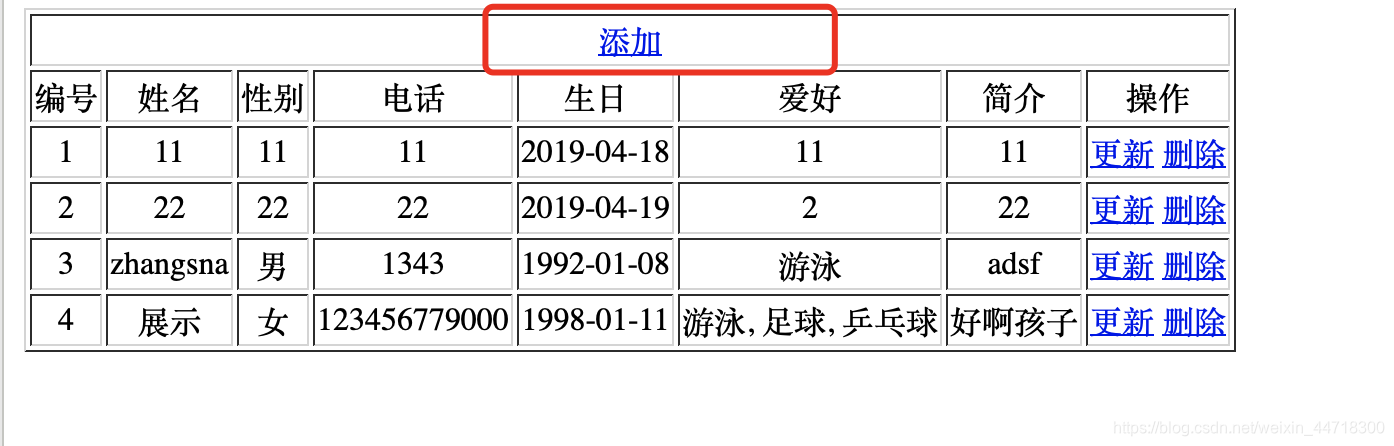
NO02.添加一个add.jsp
<%@ page language="java" contentType="text/html; charset=UTF-8"

	pageEncoding="UTF-8"%>

<!DOCTYPE html>

<html>

<head>

<meta charset="UTF-8">

<title>添加学生</title>

</head>

<body>

	<form method="post" action="AddServlet">

		<table border="1">

			<tr>

				<td>姓名</td>

				<td><input type="text" name="sname"></td>

			</tr>

			<tr>

				<td>性别</td>

				<td><input type="radio" name="gender" value="男">男 <input

					type="radio" name="gender" value="女">女</td>

			</tr>

			<tr>

				<td>电话</td>

				<td><input type="text" name="phone"></td>

			</tr>

			<tr>

				<td>生日</td>

				<td><input type="text" name="birthday"></td>

			</tr>

			<tr>

				<td>爱好</td>

				<td><input type="checkbox" name="hobby" value="篮球">篮球 <input

					type="checkbox" name="hobby" value="游泳">游泳 <input

					type="checkbox" name="hobby" value="足球">足球 <input

					type="checkbox" name="hobby" value="乒乓球">乒乓球 <input

					type="checkbox" name="hobby" value="学习">学习</td>

			</tr>

			<tr>

				<td>简介</td>

				<td><textarea name="info" rows="3" cols="20"></textarea></td>

			</tr>

			<tr>

				<td colspan="2"><input type="submit" value="添加"></td>

			</tr>

		</table>

	</form>

</body>

</html>
NO03.修改Student类,添加一个有参构造(不需要ID)和一个无参构造
NO04.添加一个增加学生的Servlet
获取表单上提交过来的值然后插入数据库后显示原来的列表
package com.rick.servlet;

import java.io.IOException;

import java.text.ParseException;

import java.text.SimpleDateFormat;

import java.util.Arrays;

import java.util.Date;

import javax.servlet.ServletException;

import javax.servlet.http.HttpServlet;

import javax.servlet.http.HttpServletRequest;

import javax.servlet.http.HttpServletResponse;

import com.rick.been.Student;

import com.rick.sercive.StudentService;

import com.rick.sercive.impl.StudentServiceImpl;

public class AddServlet extends HttpServlet {

	protected void doGet(HttpServletRequest request, HttpServletResponse response)

			throws ServletException, IOException {

		request.setCharacterEncoding("UTF-8");

//    1.获得表提交上来的数据

		String sname = request.getParameter("sname");

		String gender = request.getParameter("gender");

		String phone = request.getParameter("phone");

		String birthday = request.getParameter("birthday");

		String info = request.getParameter("info");

		//String hobby = request.getParameter("hobby");//这个方法只能拿出一个数据

		String[] h = request.getParameterValues("hobby");

		String hobby = Arrays.toString(h);//得到的h是一个地址,用Arrays.toString转换成字符串

		hobby = hobby.substring(1,hobby.length()-1);//但是得到的东西前后会有[]还得用substring去掉前后

//	  2、添加到数据库

		try {

			Date birthdaydate = new SimpleDateFormat("yyyy-mm-dd").parse(birthday);

			//在Student类中添加一个无参和一个有参构造

			Student student = new Student(sname, gender, phone, birthdaydate, hobby, info);

			StudentService service = new StudentServiceImpl();

			service.insert(student);

//	  3、跳转到列表

			//这里直接跳转到页面上,那么这个页面会重新翻译一次,上面那个request的请求存放的数据没有了

			//request.getRequestDispatcher("list.jsp").forward(request, response);

			request.getRequestDispatcher("StudentListServlet").forward(request, response);

		} catch (Exception e) {

			// TODO Auto-generated catch block

			e.printStackTrace();

		}

	}

	protected void doPost(HttpServletRequest request, HttpServletResponse response)

			throws ServletException, IOException {

		// TODO Auto-generated method stub

		doGet(request, response);

	}

}
NO05.修改StudentDao接口,添加一个方法
//添加学生

	void insert(Student student) throws SQLException;
NO06.修改StudentDao接口的实现类StudentDaoImpl,添加一个方法
@Override

	public void insert(Student student) throws SQLException {

		QueryRunner runner = new QueryRunner(JDBCUtil.getDataSouce());

		runner.update("insert into stu values(null,?,?,?,?,?,?)",

				student.getSname(),student.getGender(),student.getPhone(),

				student.getBirthday(),student.getHobby(),student.getInfo());

	}
NO07.修改StudentService接口,添加一个方法
//添加

	void insert(Student student) throws SQLException;
NO08.修改StudentService接口的实现类StudentServiceImpl,添加一个方法
@Override

	public void insert(Student student) throws SQLException {

		StudentDao dao = new StudentDaoImpl();

		dao.insert(student);

	}
MVC学生管理系统-阶段II(添加学生信息)的更多相关文章
- MVC学生管理系统-阶段IV(修改学生信息)
项目源码 :https://download.csdn.net/download/weixin_44718300/11091042 前期准备,主体框架, 学生列表显示 请看阶段一文章 添加学生信息 ...
- MVC学生管理系统-阶段III(删除学生信息)
项目源码 :https://download.csdn.net/download/weixin_44718300/11091042 前期准备,主体框架,学生列表显示 请看阶段一文章 添加学生信息 ...
- MVC学生管理系统-阶段V(模糊查询)
项目源码 :https://download.csdn.net/download/weixin_44718300/11091042 此处省略一段话.去上一篇查看 NO01:修改list.jsp < ...
- MVC学生管理系统-阶段I(显示学生列表)
项目源码 :https://download.csdn.net/download/weixin_44718300/11091042 目录 MVC设计模式 前期准备: NO01:新建一个index.js ...
- python开发的学生管理系统
python开发的学生管理系统(基础版) #定义一个函数,显示可以使用的功能列表给用户 def showInfo(): print("-"*30) print(" 学生管 ...
- python简易版学生管理系统
#coding=utf- def showInfo(): print("**************") print(" 学生管理系统") print(&quo ...
- 非常简约学生管理系统——HashSet进行编写
很小的一个练习,可以参考一下啊~~~~~~ 1:注意:学生类中进行多个重要方法的重写 package com.xt.homework; public class Student { private S ...
- <每日一题>题目7:简单的学生管理系统V1.0
''' # 学生管理系统v1.0 # 添加学生的信息 # 删除学生的信息 # 修改学生的信息 # 查看学生的信息 #遍历学生的信息 #退出系统 ''' import json #1 显示操作功能 de ...
- Winform 学生管理系统增删改查
数据库: create database adonet go use adonet go create table xue ( code ), name ), sex bit, birth datet ...
随机推荐
- 题解 CF1131C 【Birthday】
CF大水题 题意:给你n个人,他们的身高是a[i],让你将这几个人排成一个环,使得他们两两之间身高差的和最小. 思路:简单到爆了,恶意评分上蓝.直接将那几个人排个序,然后按序左右放就行了,也就是说1号 ...
- StringGrid换行功能
关闭stringgrid的defaultdrawing功能 StringGrid1.Cells[cCol,cRow] := '测试1'+#13#10+'测试2'; procedure TForm1.S ...
- 题解 nflsoj489 【六校联合训练 CSP #15】小D与随机
题目链接 考虑枚举好点的集合.此时要考虑的问题是如何填入\(1\sim n\)这些数使得恰好我们枚举到的这些点是好点,即:求出有多少种合法的填数方案. \(1\)号点一定是好点.那么除\(1\)号点外 ...
- 5G/NR OTA (Over The Air) 测试详解
原文链接:http://www.sharetechnote.com/html/5G/5G_OTA.html 1 什么是OTA (Over The Air) OTA代表Over The Air.为了使用 ...
- Rabbitmq与spring整合之重要组件介绍——AMQP声明式配置&RabbitTemplate组件
上一节是使用rabbitAdmin的管理组件进行声明队列,交换器,绑定等操作,本节则是采用AMQP声明式配置来声明这些东西.AMQP声明主要是通过@Bean注解进行的. 配置: package com ...
- 在web.xml中可以设置jsp标签吗?
<jsp-config> <taglib> <taglib-uri>http://java.sun.com/jstl/core</taglib-uri> ...
- HTML中用自定义字体实现小图标icon(不是原作, 只是一个研究笔记)
最近在做一个项目时, 研究了一下新浪微博的前端, 看到首页中那个图标了吗, 以前看到这类效果的第一反应就是用一个gif之类的图标做出来!! 但在研究的过程, 发现了一个小技巧, 注意那个em标签中的文 ...
- 010-PHP输出数组中第某个元素
<?php $monthName = array(1 => "January", "February", "March",//初 ...
- gulp和npm等安装
提前安装了node.js, https://nodejs.org/zh-cn/download/ 跟着提示安装就行,然后执行一下命令cdm看下版本号如下图就说明安装成功了 安装包里面集成了npm,然后 ...
- 51nod 1276:岛屿的数量 很好玩的题目
1276 岛屿的数量 题目来源: Codility 基准时间限制:1 秒 空间限制:131072 KB 分值: 20 难度:3级算法题 收藏 取消关注 有N个岛连在一起形成了一个大的岛屿,如果海平 ...