
Standard Aras Dialogs
In a another blog post, we covered how to open dialogs within Aras Innovator using custom forms and HTML pages. However, Aras Innovator also supports a number of built-in dialogs that offer common functionality. A previous blog post also covers how to open a date dialog from within a custom Method, but you can also use this same approach to open numerous other dialogs like an Item Search Dialog and a File Selector as well.
You’ve most likely seen a number of these before, and in this blog post, we will cover how to open these dialogs from your own client-side methods.
Standard Aras Dialogs
In addition to opening forms or custom HTML pages as dialogs, Aras Innovator 11.0 also comes with several differentuilt-in dialog types as well.
Search Dialogs
One of the most common of these is the SearchDialog which allows a user to search for, select, and return one or more Items. In the example below, I am opening a SearchDialog on the Part ItemType and printing out the item number of any part selected.
| var param = { | |
| aras: top.aras, | |
| type: 'SearchDialog', | |
| dialogWidth: 700, | |
| dialogHeight: 450, | |
| itemtypeName: 'Part' | |
| }; | |
| function callback(res) { | |
| if (res) { | |
| var itemNumber = res.keyed_name; | |
| alert("Part #" + itemNumber + " was selected"); | |
| } | |
| } | |
| var topWnd = top.aras.getMostTopWindowWithAras(); | |
| var wnd = topWnd ? topWnd : window; | |
| wnd.ArasModules.MaximazableDialog.show('iframe', param).promise.then(callback); |
This sample also demonstrates the MaximazableDialog (with that spelling). There is no functional difference between this and a regular dialog except for an additional button in the toolbar that will expand the dialog to the dimensions of the parent window.
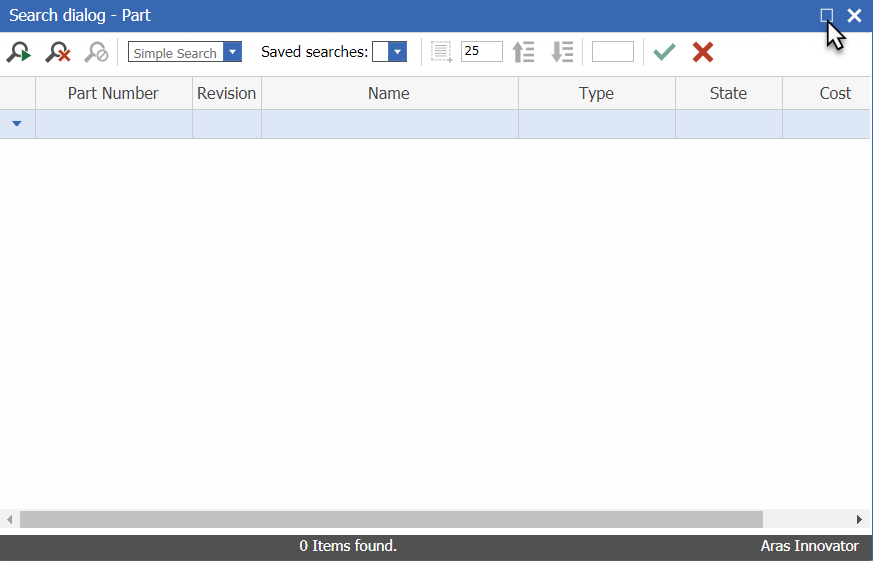
Other standard Dialogs
You can see that we can display different dialogs by passing in an argument to the “type” parameter. A full list of “types” and the arguments that can be passed in can be found below. Note that not all arguments may be necessary.
- All (Every dialog type expects these parameters)
- aras – The aras object to give the dialog access to the standard aras functions
- SearchDialog
- itemtypeName – The name of the ItemType to open a search dialog for
- itemtypeID – The ID of the ItemType to open a search dialog for
- handler – A function that handles the return value of the search dialog
- sourceItemTypeName – *See below*
- sourcePropertyName – You can trigger an “onSearchDialog” event of a property by specifying both the name of the parent ItemType and the property name that contains the event
- mutliselect – A boolean indicating if a user can return more than one value
- ImageBrowser
- showOnlyExternalFile – A boolean indicating if a user should be able to select one of the internal Aras icons
- Date
- date – The default date that the date dialog will start on when it is opened
- format – The date format of the string that will be returned
- HTMLEditorDialog
- sHtml – The source HTML that will load in the editor when it is opened
- RevisionsDialog
- itemID – The ID of the item to open the revisions dialog for
- itemTypeName – The name of the ItemType the item is an instance of
- doNotOpenItemOnDblClick – A boolean indicating whether a user should be able to open an item from the revisions dialog
- ManageFileProperty
- onchange – A function to run if the file property is changed
- fileNode – The node of the File Item
- fileId – The ID of the File Item
- editable – A boolean indicating whether the File should be able to be changed
- cleanup – A boolean indicating whether the File can be deleted
- Text
- content – The text to be displayed in the dialog
- isEditMode – A boolean indicating whether the text should be editable
- Color
- oldColor – The color that should be initially selected when the dialog is opened
Aras Alerts
In addition to all of these dialogs, Aras Innovator 11.0 also includes several different single-use dialogs to display messages to the end user.
AlertError
If a user inputs some invalid data or if something serious goes wrong in client-side code, you can easily throw an error using the sample below.
aras.AlertError("Something went very wrong");
AlertWarning
If something less serious goes wrong, you can use instead throw a warning to the user.
aras.AlertWarning("Something went only slightly wrong");
AlertSuccess
Lastly, when you want to inform your users that something has gone right, you can display an unobtrusive success message using the following sample.
aras.AlertSuccess("Something went right!");
Success alerts are very helpful in providing feedback. For example, you can use a success message to indicate that data has been successfully copied to a user’s clipboard.
Aras Prompts
Aras Innovator 11.0 also comes with two different kinds of dialogs to get simple information from users. These functions are very similar to the built-in JavaScript prompt and confirm functions. However, using the Aras prompt and confirm will ensure that the dialogs look similar across all browsers.
prompt
You can pass in both a message or question you want answered from the user as well as a default value to the textbox of the prompt.
aras.prompt("Are you excited to try out all of these cool new dialogs?", "Yes!");
confirm
There are times when you want users to confirm that they really want to go through with an action. For example, you could have a button on a form that deletes an item. In these cases, you can use the built-in confirm function.
aras.confirm("Are you sure you want to delete this item?");
Confirms will display a window with your message as well as an OK and cancel button. If a user clicks OK the function will return true, otherwise it will return false.
In Conclusion
The built-in Aras dialogs offer a simple way to accomplish common tasks. Additionally, they can ensure that any custom functionality you create keeps a consistent look with the rest of Aras Innovator.
Leave a comment if you learned something or if you have any questions about dialogs that this blog post didn’t cover!
Standard Aras Dialogs的更多相关文章
- Xamarin.Forms 开发资源集合(复制)
复制:https://www.cnblogs.com/mschen/p/10199997.html 收集整理了下 Xamarin.Forms 的学习参考资料,分享给大家,稍后会不断补充: UI样式 S ...
- Xamarin.Forms 开发资源集合
收集整理了下 Xamarin.Forms 的学习参考资料,分享给大家,稍后会不断补充: UI样式 Snppts: Xamarin Forms UI Snippets. Prebuilt Templat ...
- Devexpress VCL Build v2013 vol 14.1.3 发布
我修,我修,修修修. New Major Features in 14.1 What's New in VCL Products 14.1 Breaking Changes To learn abou ...
- 整理 Xamarin.Forms - Plugins
Open Source Components for Xamarin Xamarin官方整理的一些开源组件,有需要可以先到这里找 GitHub: xamarin/XamarinComponents: ...
- SharePoint 2010 Pop-Up Dialogs
转:http://kyleschaeffer.com/sharepoint/sharepoint-2010-pop-up-dialogs/ SharePoint 2010 makes it incre ...
- Aras Innovator如何配置SMTP中转Office365
参考文档:http://www.ebdadvisors.com/blog/2015/7/31/configure-an-smtp-server-in-windows-iis-for-aras-inno ...
- 理解 .NET Platform Standard
相关博文:ASP.NET 5 Target framework dnx451 and dnxcore50 .NET Platform Standard:https://github.com/dotne ...
- Standard C 语言标准函数库介绍
全面巩固所知所学,往精通方向迈进! Standard C 语言标准函数库速查 (Cheat Sheet) from:http://ganquan.info/standard-c/function/ C ...
- Python语言中对于json数据的编解码——Usage of json a Python standard library
一.概述 1.1 关于JSON数据格式 JSON (JavaScript Object Notation), specified by RFC 7159 (which obsoletes RFC 46 ...
随机推荐
- Java服务端对Cookie的简单操作
Java服务端对Cookie的简单操作 时间 2016-04-07 10:39:44 极客头条 原文 http://www.cuiyongzhi.com/index.php/post/15.html ...
- SciPy 教程
章节 SciPy 介绍 SciPy 安装 SciPy 基础功能 SciPy 特殊函数 SciPy k均值聚类 SciPy 常量 SciPy fftpack(傅里叶变换) SciPy 积分 SciPy ...
- R 对数变换 《回归分析与线性统计模型》page103
BG:在box-cox变换中,当λ = 0时即为对数变换. 当所分析变量的标准差相对于均值而言比较大时,这种变换特别有用.对数据作对数变换常常起到降低数据波动性和减少不对称性的作用..这一变换也能有效 ...
- Python最新暴力破解WiFi,攻破所有密码限制,最强破解!
暴力破解wifi密码 这个代码也是非常简单,这里需要用Python中的pywifi这个库,所以需要在DOS命令下安装这个库,同样使用pip install pywifi,很简单就安装成功了,我用的是P ...
- 012.CI4框架CodeIgniter, 加载并调用自己的Libraries库
01. 在Libraries目录创建一个Mylib文件,内容是一个简单的类 <?php namespace App\Controllers; class Home extends BaseCon ...
- 004.Oracle数据库 , 查询多字段连接合并
/*Oracle数据库查询日期在两者之间*/ SELECT PKID , OCCUR_DATE, PKID || TO_CHAR( OCCUR_DATE, ' yyyy/mm/dd hh24:mi:s ...
- Golang的标准输入输出
Golang的标准输入输出 作者:尹正杰 版权声明:原创作品,谢绝转载!否则将追究法律责任. 在很多情况下,我们希望用户通过键盘输入一个数值,存储到某个变量中,然后将该变量的值取出来,进行操作.这时候 ...
- wireshark混杂模式
来自:https://blog.csdn.net/mukami0621/article/details/78645825 通过设置网卡为混杂模式就能捕获局域网内所有发包内容,包括非广播包和非发给自己主 ...
- 51nod:天堂里的游戏
天堂里的游戏 李陶冶 (命题人) System Message (测试) 基准时间限制:1 秒 空间限制:131072 KB 分值: 10 多年后,每当Noder看到吉普赛人,就会想起那个遥远的下午. ...
- Oracle rownum用法、分页
转载:ORACLE 中ROWNUM用法总结! 第一部分 1.对于 Oracle 的 rownum 问题,很多资料都说不支持 >, >= , =, between...and ,只能用 ...