
MyBatis(二)参数传递和自定义结果集
个人博客网:https://wushaopei.github.io/ (你想要这里多有)
一、myBatis的注解使用方式
package com.webcode.mapper;

import java.util.List;

import org.apache.ibatis.annotations.Delete;

import org.apache.ibatis.annotations.Insert;

import org.apache.ibatis.annotations.Select;

import org.apache.ibatis.annotations.SelectKey;

import org.apache.ibatis.annotations.Update;

import com.webcode.pojo.User;

public interface UserMapper {

	@Select("select id,last_name lastName,sex from t_user where id = #{id}")

	public User queryUserById(Integer id);

	//@Select("select id,last_name lastName,sex from t_user")

	public List<User> queryUsers();

	@SelectKey(statement = "select last_insert_id()", before = false, keyProperty = "id", resultType = Integer.class)

	@Insert(value = "insert into t_user(last_name,sex) values(#{lastName},#{sex})")

	public int saveUser(User user);

	@Delete("delete from t_user where id = #{id}")

	public int deleteUserById(Integer id);

	@Update("update t_user set last_name = #{lastName},sex = #{sex} where id = #{id}")

	public int updateUser(User user);

}
二、mybatis的参数传递
1、一个普通数据类型
Mapper接口的方法:
public interface UserMapper {

	public User queryUserById(Integer id);

}
mapper.xml配置文件:
<select id="queryUserById" resultType="com.webcode.pojo.User">

		select id,last_name lastName,sex from t_user where id = #{id}

	</select>
2、多个普通数据类型
方法代码:
public List<User> queryUserByNameAndSex(String name, Integer sex);
配置文件:
<select id="queryUserByNameAndSex" resultType="com.webcode.pojo.User">

		<!--

			多个普通类型的参数,在配置sql语句的时候,

			方案一:那么在#{}占位符中,可以写0,1

			0表示第一个参数,1表示第二个参数。(不推荐使用)

			方案二:那么在#{}占位符中,可以写param1,param2……

			param1表示第一参数

			param2表示第二个参数

			以此类推 第n个参数,就是paramn

		 -->

		select id,last_name lastName,sex from t_user where last_name = #{param1} and sex = #{param2}

	</select>
2、@Param注解命名参数
方法代码:
public List<User> queryUserByNameAndSex(@Param("name") String name,

			@Param("sex") Integer sex);
配置信息:
<select id="queryUserByNameAndSex" resultType="com.webcode.pojo.User">

	<!--

		public List<User> queryUserByNameAndSex(@Param("name") String name,

			@Param("sex") Integer sex);

		当我们在方法的参数上使用了@Param注解给参数进行全名之后,我们可以在配置的sql语句中的占位符里写中参数的名

		 -->

		select id,last_name lastName,sex from t_user where last_name = #{name} and sex = #{sex}

	</select>
3、传递一个Map对象作为参数
方法代码:
/**

	 * Map<String, Object> param,我们希望在Map中放name的值和sex的值,来进行查询

	 */

	public List<User> queryUserByMap(Map<String, Object> param);
配置信息:
<select id="queryUserByMap" resultType="com.webcode.pojo.User">

		<!--

			当参数是Map类型的时候,sql语句中的参数名必须和map的key一致

			map.put("name",xxx);

			map.put("sex",xxx);

		 -->

		select id,last_name lastName,sex from t_user where last_name = #{name} and sex = #{sex}

	</select>
4、一个JavaBean数据类型
方法代码:
/**

	 * 我们希望使用user对象的lastName属性和sex属性,来进行查询

	 */

	public List<User> queryUserByUser(User user);
配置信息:
<select id="queryUserByUser" resultType="com.webcode.pojo.User">

		<!-- 当传递的参数是javaBean对象的时候,在sql语句的配置的占位符中,使用属性名 -->

		select id,last_name lastName,sex from t_user where last_name = #{lastName} and sex = #{sex}

	</select>
5、多个Pojo数据类型
方法代码:
/**

	 * 我们希望使用第一个user对象的lastName属性和第二个user对象的sex属性,来进行查询

	 */

	public List<User> queryUserByUsers(User name,User sex);
配置信息:
<select id="queryUserByUsers" resultType="com.webcode.pojo.User">

	<!--

		如果参数是多个javaBean的时候,

		第一个javaBean是param1,第二个javaBean是param2.以此类推。

		但我们使用的只是javaBean的属性。#{param1.属性名}	就表示使用第一个javaBean的某个属性的值

	 -->

		select id,last_name lastName,sex from t_user where last_name = #{param1.lastName} and sex = #{param2.sex}

	</select>
6、模糊查询
需求:现在要根据用户名查询用户对象。 也就是希望查询如下: select * from t_user where last_name like '%张%'
方法代码:
/**

	 * 需求:现在要根据用户名查询用户对象。 也就是希望查询如下:<br/>

	 * select * from t_user where last_name like '%张%'

	 */

	public List<User> queryUsersByNameLike(String lastName);
7、#{}和${}的区别
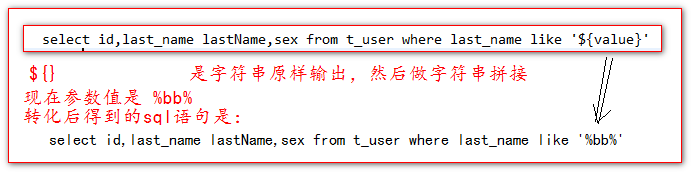
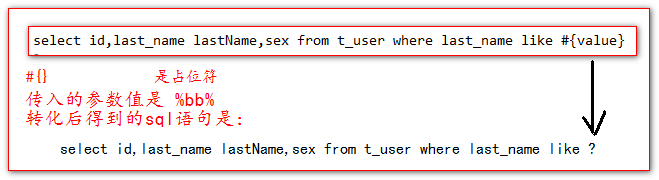
#{} 是占位符
${} 是做字符串原样输出,然后和配置的sql语句做字符串拼接。
8、MySQL的字符串拼接,concat函数实现。

<select id="queryUsersByNameLike" resultType="com.webcode.pojo.User">

	<!--

		#{}		是占位符

		${}		是字符串原样输出,然后做字符串拼接(有sql注入的风险)

		concat 是mysql提供的字符串拼接函数。

	 -->

		select id,last_name lastName,sex from t_user where last_name like concat('%',#{lastName},'%')

	</select>
二、自定义结果集<resultMap></resultMap>
1、<resultMap>的作用。
ResultMap标签可以给那些查询出来的结果要封装成为的Bean对象。是复杂bean对象的情况。
原来我们查询出来的结果,封装的对象里面的属性都是普通的属性。不包含子的javaBean对象。也不包含Bean对象的集合。那种叫普通的javabean。
那些Bean对象中又包含了子的Bean对象的情况,或者是Bean对象中又包含的bean对象集合的情况,叫复杂的Bean对象。
这种情况,只能使用ResultMap标签来将结果集转换成为复杂的Bean对象。而简单的不需要。简单的Bean对象,只需要使用ResultType属性即可。
2、创建一对一数据库表
## 一对一数据表

## 创建锁表

create table t_lock(

	`id` int primary key auto_increment,

	`name` varchar(50)

);

## 创建钥匙表

create table t_key(

	`id` int primary key auto_increment,

	`name` varchar(50),

	`lock_id` int ,

	foreign key(`lock_id`) references t_lock(`id`)

);

## 插入初始化数据

insert into t_lock(`name`) values('阿里巴巴');

insert into t_lock(`name`) values('华为');

insert into t_lock(`name`) values('联想');

insert into t_key(`name`,`lock_id`) values('马云',1);

insert into t_key(`name`,`lock_id`) values('任正非',2);

insert into t_key(`name`,`lock_id`) values('柳传志',3);
3、创建实体对象
public class Lock {

	private Integer id;

	private String name;

public class Key {

	private Integer id;

	private String name;

	private Lock lock;
4、一对一级联属性使用
Mapper接口的代码:
public interface KeyMapper {

	public Key queryKeyByIdForSample(Integer id);

}
KeyMapper配置文件的内容:
<!--

		resultMap可以自定义结果集

			type属性设置你要封装成为什么类型返回

			id属性给resultMap集合集起一个唯一的标识

	 -->

	<resultMap type="com.webcode.pojo.Key" id="queryKeyByIdForSample_resultMap">

		<!-- id标签负责把数据库的主键列。转到对象的id属性中

				column是列名

				property是属性名

				把列名的值,注入到property属性指向的属性中

		 -->

		<id column="id" property="id"/>

		<!-- 非主键列使用result标签 -->

		<result column="name" property="name"/>

		<!--

			级联映射

				一级一级的关联

		 -->

		<result column="lock_id" property="lock.id"/>

		<result column="lock_name" property="lock.name"/>

	</resultMap>

<!-- 	public Key queryKeyByIdForSample(Integer id); -->

	<select id="queryKeyByIdForSample" resultMap="queryKeyByIdForSample_resultMap">

		select

			t_key.* ,t_lock.name lock_name

		from

			t_key left join t_lock

		on

			t_key.lock_id = t_lock.id

		where

			t_key.id = #{id}

	</select>
4.2、<association /> 嵌套结果集映射配置
<resultMap type="com.webcode.pojo.Key" id="queryKeyByIdForSample_association_resultMap">

		<id column="id" property="id"/>

		<!-- 非主键列使用result标签 -->

		<result column="name" property="name"/>

		<!-- association标签可以把查询的结果映射成为一个子对象

				property="lock"	你要映射哪个子对象

				javaType 是说明你要映射出来的子对象是什么类型

		 -->

		<association property="lock" javaType="com.webcode.pojo.Lock">

			<!-- id给主键进行配置 -->

			<id column="lock_id" property="id"/>

			<!-- result给非主键列进行配置 -->

			<result column="lock_name" property="name"/>

		</association>

	</resultMap>

<!-- 	public Key queryKeyByIdForSample(Integer id); -->

	<select id="queryKeyByIdForSample" resultMap="queryKeyByIdForSample_association_resultMap">

		select

			t_key.* ,t_lock.name lock_name

		from

			t_key left join t_lock

		on

			t_key.lock_id = t_lock.id

		where

			t_key.id = #{id}

	</select>
4.3、<association /> 定义分步(立即)查询
KeyMapper接口:
public interface KeyMapper {

	// 分两次查,只查key

	public Key queryKeyByIdForTwoStep(Integer id);

}
LockMapper接口:
public interface LockMapper {

	// 只查锁

	public Lock queryLockById(Integer id);

}
LockMapper配置信息:
<mapper namespace="com.webcode.mapper.LockMapper">

<!-- 	public Lock queryLockById(Integer id);

			第二次查,只查锁的情况

 -->

	<select id="queryLockById" resultType="com.webcode.pojo.Lock">

		select id,name from t_lock where id = #{id}

	</select>

</mapper>
KeyMapper的配置信息:
	<resultMap type="com.webcode.pojo.Key" id="queryKeyByIdForTwoStep_resultMap">

		<id column="id" property="id"/>

		<result column="name" property="name"/>

		<!--

			association需要配置当前的这个子对象是使用一次查询得到

				property="lock"	表示当前要配置哪个子对象

				select表示你要使用哪个查询来得到这个子对象(需要一个参数)

				column表示你要将原查询结果的哪个列做为参数传递给下一个查询使用。

		 -->

		<association property="lock" column="lock_id"

			select="com.webcode.mapper.LockMapper.queryLockById"/>

	</resultMap>

	<!-- 	分两次查,只查key

	public Key queryKeyByIdForTwoStep(Integer id); -->

	<select id="queryKeyByIdForTwoStep" resultMap="queryKeyByIdForTwoStep_resultMap">

		select id,name,lock_id from t_key where id = #{id}

	</select>
5、延迟加载
延迟加载在一定程序上可以减少很多没有必要的查询。给数据库服务器提升性能上的优化。
要启用延迟加载,需要在mybatis-config.xml配置文件中,添加如下两个全局的settings配置。
<!-- 打开延迟加载的开关 -->

       <setting name="lazyLoadingEnabled" value="true" />

       <!-- 将积极加载改为消极加载  按需加载 -->

<setting name="aggressiveLazyLoading" value="false"/>
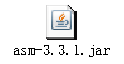
懒加载还需要同时引入两个jar包(注意: 3.2.8版本需要导以下两个包)

5.2、延迟加载的一对一使用示例
	<settings>

		<!-- 自动开启驼峰命名 -->

		<setting name="mapUnderscoreToCamelCase" value="true" />

		<!-- 打开延迟加载的开关 -->

		<setting name="lazyLoadingEnabled" value="true" />

		<!-- 将积极加载改为消极加载 按需加载 -->

		<setting name="aggressiveLazyLoading" value="false" />

	</settings>
三、多对一、一对多的使用示例
1、创建一对多数据库
## 一对多数据表

## 创建班级表

create table t_clazz(

	`id` int primary key auto_increment,

	`name` varchar(50)

);

## 插入班级信息

insert into t_clazz(`name`) values('javaEE20170228');

insert into t_clazz(`name`) values('javaEE20170325');

insert into t_clazz(`name`) values('javaEE20170420');

insert into t_clazz(`name`) values('javaEE20170515');

## 创建学生表

create table t_student(

	`id` int primary key auto_increment,

	`name` varchar(50),

	`clazz_id` int,

	foreign key(`clazz_id`) references t_clazz(`id`)

);

## 插入班级信息

insert into t_student(`name`,`clazz_id`) values('stu0228_1',1);

insert into t_student(`name`,`clazz_id`) values('stu0228_2',1);

insert into t_student(`name`,`clazz_id`) values('stu0228_3',1);

insert into t_student(`name`,`clazz_id`) values('stu0325_1',2);

insert into t_student(`name`,`clazz_id`) values('stu0325_2',2);

insert into t_student(`name`,`clazz_id`) values('stu0420_1',3);
2、<collection/> 一对多,立即加载
public class Student {

	private Integer id;

	private String name;
public class Clazz {

	private Integer id;

	private String name;

	private List<Student> stus;
ClazzMapper接口的代码:
public interface ClazzMapper {

	// 一次全部查询出来

	public Clazz queryClazzByIdForSimple(Integer id);

}
ClazzMapper配置信息:
<resultMap type="com.webcode.pojo.Clazz" id="queryClazzByIdForSimple_resultMap">

		<id column="id" property="id"/>

		<result column="name" property="name"/>

		<!--

			collection标签用来映射子集合=====>>>>private List<Student> stus;

				property属性你要映射哪个属性

				ofType属性配置集合中每个元素的具体类型

		 -->

		<collection property="stus" ofType="com.webcode.pojo.Student">

			<!-- id标签用来配置主键列,可以去重 -->

			<id column="stu_id" property="id"/>

			<result column="stu_name" property="name"/>

		</collection>

	</resultMap>

<!-- 	public Clazz queryClazzByIdForSimple(Integer id); -->

	<select id="queryClazzByIdForSimple" resultMap="queryClazzByIdForSimple_resultMap">

		select

			t_clazz.*,t_student.id stu_id,t_student.name stu_name,t_student.clazz_id

		from

			t_clazz left join t_student

		on

			t_clazz.id = t_student.clazz_id

		where

			t_clazz.id = #{id}

	</select>
3、一对多,分步查询赖加载
ClazzMapper接口方法:
public interface ClazzMapper {

	// 分两次查,这边只查班级

	public Clazz queryClazzByIdForTwoStep(Integer id);

}
StudentMapper接口方法:
public interface StudentMapper {

	// 只查学生,

	public List<Student> queryStudentByClazzId(Integer clazzId);

}
StudentMaper的配置内容:
<!-- 	public List<Student> queryStudentByClazzId(Integer clazzId); -->

	<select id="queryStudentByClazzId" resultType="com.webcode.pojo.Student">

		select id,name from t_student where clazz_id = #{clazzId}

	</select>
ClazzMapper的配置内容:
<resultMap type="com.webcode.pojo.Clazz" id="queryClazzByIdForTwoStep_resultMap">

		<id column="id" property="id"/>

		<result column="name" property="name"/>

		<!--

			collection映射子的集合属性

				property="stus"	设置当前要配置(封装)哪个集合

				select属性配置使用哪个查询得到这个集合

				column属性将某个列做为查询语句的参数使用

		 -->

		<collection property="stus" column="id"

			select="com.webcode.mapper.StudentMapper.queryStudentByClazzId"/>

	</resultMap>

<!-- 	public Clazz queryClazzByIdForTwoStep(Integer id); -->

	<select id="queryClazzByIdForTwoStep" resultMap="queryClazzByIdForTwoStep_resultMap">

		select id,name from t_clazz where id = #{id}

	</select>
4、双向关联
StudentMapper接口
public interface StudentMapper {

	// 按班级id查学生。还可以关联查班级

	public List<Student> queryStudentsByClazzIdForTwoStep(Integer clazzId);

}
StudentMapper的配置:
<resultMap type="com.webcode.pojo.Student" id="queryStudentsByClazzIdForTwoStep_resultMap">

		<id column="id" property="id"/>

		<result column="name" property="name"/>

		<!--

			association用来处理子对象

				property属性配置要处理哪个子对象

				select属性配置用哪个查询得到这个子对象

				column属性将哪个列做为查询的参数使用

		 -->

		<association property="clazz" column="clazz_id"

			select="com.webcode.mapper.ClazzMapper.queryClazzByIdForTwoStep"/>

	</resultMap>

<!-- 	public List<Student> queryStudentsByClazzIdForTwoStep(Integer clazzId); -->

	<select id="queryStudentsByClazzIdForTwoStep"

		resultMap="queryStudentsByClazzIdForTwoStep_resultMap">

		select id,name,clazz_id from t_student where clazz_id = #{clazzId}

	</select>
ClazzMapper的配置信息修改:
<resultMap type="com.webcode.pojo.Clazz" id="queryClazzByIdForTwoStep_resultMap">

		<id column="id" property="id"/>

		<result column="name" property="name"/>

		<!--

			collection映射子的集合属性

				property="stus"	设置当前要配置(封装)哪个集合

				select属性配置使用哪个查询得到这个集合

				column属性将某个列做为查询语句的参数使用

		 -->

		<collection property="stus" column="id"

			select="com.webcode.mapper.StudentMapper.queryStudentsByClazzIdForTwoStep"/>

	</resultMap>

<!-- 	public Clazz queryClazzByIdForTwoStep(Integer id); -->

	<select id="queryClazzByIdForTwoStep" resultMap="queryClazzByIdForTwoStep_resultMap">

		select id,name from t_clazz where id = #{id}

	</select>
测试:
        @Test

	public void testQueryClazzByIdForTwoStep() {

		SqlSession session = sqlSessionFactory.openSession();

		try {

			ClazzMapper mapper = session.getMapper(ClazzMapper.class);

			Clazz clazz = mapper.queryClazzByIdForTwoStep(1);

			session.clearCache();//清缓存,可以看到后面再次关联班级时的查询

			System.out.println(clazz.getName());

			List<Student> stus = clazz.getStus();

			for (Student student : stus) {

				session.clearCache();//清缓存,可以看到后面再次关联班级时的查询

				System.out.println( "学生姓名:" + student.getName() );

				System.out.println( "学生所在班级名称:" + student.getClazz().getName() );

			}

		} catch (Exception e) {

			e.printStackTrace();

		} finally {

			session.close();

		}

	}
注意:双向关联常见问题,就是死循环:
解决方法一:不要调用任何一方的toString方法
解决方法二:最后一次的查询使用resultType,而不是使用ResultMap
MyBatis(二)参数传递和自定义结果集的更多相关文章
- Struts学习之自定义结果集
转自:http://blog.csdn.net/hanxuemin12345/article/details/38763057 项目中我们经常遇到这样的需求——页面部分刷新,例如:添加用户,转到添加用 ...
- 从一到二:利用mnist训练集生成的caffemodel对mnist测试集与自己手写的数字进行测试
通过从零到一的教程,我们已经得到了通过mnist训练集生成的caffemodel,主要包含下面四个文件: 接下来就可以利用模型进行测试了.关于测试方法按照上篇教程还是选择bat文件,当然python. ...
- hadoop(二)搭建伪分布式集群
前言 前面只是大概介绍了一下Hadoop,现在就开始搭建集群了.我们下尝试一下搭建一个最简单的集群.之后为什么要这样搭建会慢慢的分享,先要看一下效果吧! 一.Hadoop的三种运行模式(启动模式) 1 ...
- 仿百度壁纸客户端(二)——主页自定义ViewPager广告定时轮播图
仿百度壁纸客户端(二)--主页自定义ViewPager广告定时轮播图 百度壁纸系列 仿百度壁纸客户端(一)--主框架搭建,自定义Tab + ViewPager + Fragment 仿百度壁纸客户端( ...
- 04-树7 二叉搜索树的操作集(30 point(s)) 【Tree】
04-树7 二叉搜索树的操作集(30 point(s)) 本题要求实现给定二叉搜索树的5种常用操作. 函数接口定义: BinTree Insert( BinTree BST, ElementType ...
- 使用Typescript重构axios(二十八)——自定义序列化请求参数
0. 系列文章 1.使用Typescript重构axios(一)--写在最前面 2.使用Typescript重构axios(二)--项目起手,跑通流程 3.使用Typescript重构axios(三) ...
- mybatis的参数传递
mybatis的参数传递分为两种:1.单参数传递 2.多参数传递 单参数 mybatis会直接取出参数值给Mapper文件赋值 例子如下: 1.Mapper文件内容如下: public void d ...
- PTA二叉搜索树的操作集 (30分)
PTA二叉搜索树的操作集 (30分) 本题要求实现给定二叉搜索树的5种常用操作. 函数接口定义: BinTree Insert( BinTree BST, ElementType X ); BinTr ...
- mybatis二(参数处理和map封装及自定义resultMap)
.单个参数 mybatis不会做特殊处理. #{参数名/任意名}:取出参数值. .多个参数 mybatis会做特殊处理. 多个参数会被封装成 一个map. key:param1...paramN,或者 ...
随机推荐
- mac下使用xampp中php显示1044/1045/1046(卸载xampp)
问题描述 在mac下使用xampp,访问http://192.168.64.3/phpmyadmin/可以正常显示php页面,当创建数据库时提示1044也就是普通用户没有权限 问题猜测 猜测在使用xa ...
- LeetCode--Sort Array By Parity && N-Repeated Element in Size 2N Array (Easy)
905. Sort Array By Parity (Easy)# Given an array A of non-negative integers, return an array consist ...
- 【HBase】HBase和Hue的整合
目录 一.修改hue.ini配置文件 二.启动HBase的thrift server服务 三.启动Hue 四.页面访问 一.修改hue.ini配置文件 cd /export/servers/hue-3 ...
- Jekyll 解决Jekyll server本地预览文章not found的问题
layout: post tags: [Jekyll] comments: true 执行Jekyll本地浏览器预览指令 bundle exec jekyll serve 进入浏览器输入127.0.0 ...
- HDU 2006 (水)
题目链接:http://acm.hdu.edu.cn/showproblem.php?pid=2006 题目大意:给你几个数,求奇数的乘积和 解题思路: 很水,不需要数组的,一个变量 x 就行 代码: ...
- mysql计算
select @csum := 0;select create_time,merchant_id,award as 奖励,total_count as 数量,(@csum := @csum + awa ...
- Python 图像处理 OpenCV (1):入门
引言 又开一个新的系列分享,对图像处理感兴趣的同学可以关注这个系列. 更新频率尽量保持一周两到三次推送. 新系列第一件事儿当然是资源推荐,下面是一些有关 OpenCV 的资源链接: 资源链接: 官方网 ...
- IOS真机测试(已拥有个人开发者证书)
创建真机调试证书并进行真机测试 步骤1 在启动台中点击其他,找到钥匙串访问. 步骤2 在打开的界面中点击右边的系统根证书,然后点击左上角的钥匙串访问,然后是证书助理,最后点击从证书颁发机构申请证书. ...
- c# 贪吃蛇小游戏
------------恢复内容开始------------ 新手学习c# 在博客园上看到后自己模仿打出来的第一个程序 开心,纪念一下 bean :食物类 block :蛇块类 snake :蛇类 ...
- SpringBoot注解分析
Spring boot 简介:是spring社区发布的一个开源项目,旨在帮助开发者更快更简单的构建项目,使用习惯优于配置,的理念让你的项目快速的跑起来,使用springboot可以不用,或者很少的配置 ...